
1. Увод
Thank you for choosing the Togo POWER A2000 Portable Power Station. This device is designed to provide reliable power for various applications, including emergency backup, outdoor activities, and home use. Please read this manual thoroughly before operating the unit to ensure safe and optimal performance. Keep this manual for future reference.
2. Безбедносна упутства
Придржавајте се следећих мера безбедности како бисте спречили повреде или оштећење уређаја:
- Немојте растављати, поправљати или модификовати јединицу.
- Не излажите уређај ватри или екстремним температурама.
- Избегавајте контакт са водом или другим течностима.
- Чувати ван домашаја деце и кућних љубимаца.
- Користите само одобрену додатну опрему и каблове за пуњење.
- Обезбедите одговарајућу вентилацију током употребе и пуњења.
- Не блокирајте отворе за вентилацију.
- If the unit emits smoke, odor, or unusual noise, discontinue use immediately and contact customer support.
3. Садржај пакета
Проверите да ли су сви предмети укључени у ваш пакет:
- 1x Togo POWER ADVANCE2000 Portable Power Station
- 1к АЦ кабл за пуњење
- 1x Anderson to Car Charger Cable
- 1к упутство за употребу
4. Производ је готовview
The Togo POWER A2000 features a robust design with multiple input and output options. It includes a clear LCD display for monitoring status and integrated safety features.

Слика 4.1: Фронт view of the Togo POWER A2000 Portable Power Station, showing the LCD display, AC outlets, USB ports, and control buttons.
4.1 Кључне карактеристике
- Велики капацитет: 1799Wh LiFePO4 battery (44.4V/40.5Ah).
- Снажан излаз: 2000W AC output (4000W surge).
- Више излазних портова: 3 AC outlets, 2 USB-C (Max 120W), 2 USB-A (Max 36W), 2 DC ports, 1 Cigarette Lighter Output.
- Бежично пуњење: Built-in 10W wireless charging pad.
- ЛЕД лампа: Integrated LED light with SOS mode.
- EPS Function: Uninterruptible Power Supply (EPS) mode with 10ms switchover time.
- ЕКО режим: Automatic power cut-off after 1 hour of no load to save energy.
- Напредни систем за управљање батеријама (BMS): Мониторс волtage, current, and temperature for protection.
- Паралелна веза: Supports connecting two units for increased capacity and output.

Слика 4.2: The Togo POWER A2000 powering various electronic devices simultaneously.

Слика 4.3: Детаљно view of the wireless charging pad, fast charging capability, SOS flashlight, and cooling vents.
5. Подешавање
5.1 Почетно пуњење
Before first use, fully charge the Togo POWER A2000. Connect the provided AC charging cable to the AC input port on the power station and then to a wall outlet. The LCD display will show the charging status. A full charge typically takes approximately 1.5 hours.
5.2 Разумевање ЛЦД екрана
The LCD screen provides real-time information:
- Индикатор нивоа батерије
- Процењено време пуњења
- Улаз/Излаз Ватtage
- Remaining Runtime
- Температура Алертс
- Low-Battery Warnings
6. Упутство за употребу
6.1 Укључивање/искључивање
Press and hold the main power button for a few seconds to turn the unit on or off. The LCD display will illuminate upon activation.
6.2 Коришћење утичница за наизменичну струју
Press the AC power button to activate the AC outlets. Plug your devices into the 120V/60Hz AC ports. Ensure the total wattagснага повезаних уређаја не прелази 2000W (снага од 4000W).
6.3 Using DC and USB Ports
Press the DC power button to activate the DC and USB ports. Connect your devices to the appropriate USB-A, USB-C, DC, or Cigarette Lighter ports. The wireless charging pad is also activated with the DC power button.
6.4 LED Flashlight and SOS Mode
Press the LED light button to turn on the flashlight. Press again to cycle through brightness levels. To activate SOS mode, press and hold the LED light button for more than 3 seconds.
6.5 EPS (Emergency Power Supply) Mode
When the power station is connected to a main power supply and has devices plugged into its AC outlets, it can function as an EPS. In the event of a power outage, the unit will automatically switch to battery power within 10 milliseconds, providing an uninterrupted power supply to connected devices.

Слика 6.1: The EPS feature provides seamless power backup for essential appliances.
6.6 ЕЦО режим
The ECO mode is designed to conserve energy. When activated, the unit will automatically shut down after 1 hour of no load (no devices drawing power). This prevents unnecessary battery drain. To disable ECO mode for continuous power to sensitive devices (e.g., CPAP machines, refrigerators), press the ECO button.

Слика 6.2: Explanation of ECO mode functionality.
6.7 Паралелна веза
The Togo POWER A2000 supports parallel connection, allowing two units to be linked together to double the capacity and output. Refer to the separate parallel connection cable manual for detailed instructions on how to set up this configuration.
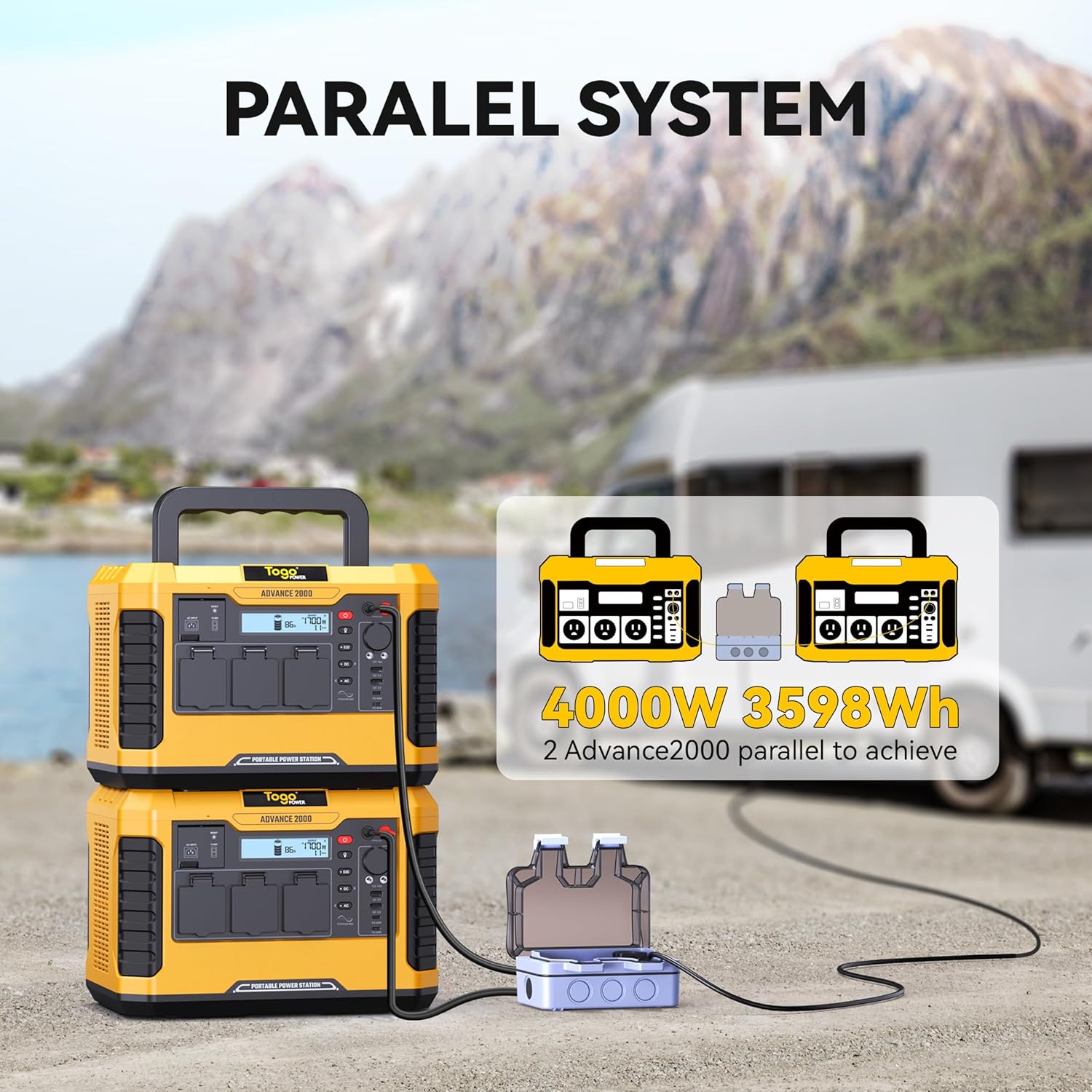
Слика 6.3: Two Togo POWER A2000 units connected in parallel.
7. Методе пуњења
The Togo POWER A2000 can be charged using three primary methods:
- Зидни пуњач за наизменичну струју: Connect the provided AC cable to a standard wall outlet. This method offers fast charging, reaching 100% in approximately 1.5 hours.
- Ауто пуњач: Use the Anderson to Car Charger Cable to charge the unit from your vehicle's 12V car port.
- Соларни панел: Connect compatible solar panels (12-60V, 800W max) to the solar input port. The built-in MPPT controller optimizes solar charging efficiency.

Слика 7.1: Illustration of the three available charging methods: Car Charger, AC Charger, and Solar Charger.
8. Одржавање
8.1 Складиштење
- Store the unit in a cool, dry place, away from direct sunlight and heat sources.
- За дуготрајно складиштење, пуните уређај на 50-80% свака 3-6 месеци како бисте продужили век трајања батерије.
8.2 Чишћење
- Користите суву, меку крпу за чишћење спољашњости уређаја.
- Немојте користити абразивна средства за чишћење или раствараче.
- Држите вентилационе отворе чистим од прашине и остатака.
8.3 Одржавање батерије
The Togo POWER A2000 uses a LiFePO4 battery, known for its long cycle life. To maximize battery longevity, avoid fully discharging the unit frequently. Recharge promptly after use.
КСНУМКС. Решавање проблема
If you encounter issues with your Togo POWER A2000, refer to the following common problems and solutions:
| Проблем | Могући узрок | Решење |
|---|---|---|
| Јединица се не укључује | Батерија је потпуно испражњена; Дугме за напајање није правилно притиснуто. | Напуните уређај; Притисните и држите дугме за напајање неколико секунди. |
| АЦ утичнице не раде | AC output not enabled; Overload protection activated; Device wattage exceeds limit. | Press the AC power button; Reduce the load; Check device wattage. |
| Јединица се не пуни | Charging cable not connected properly; Charger malfunction; Input source issue. | Ensure cables are securely connected; Try a different charging method/outlet; Contact support if charger is faulty. |
| LCD display shows error code/warning | Over-temperature, low battery, or other system alerts. | Refer to the specific error code in the full manual (if available) or contact customer support. Allow unit to cool down if temperature warning. |
If the problem persists after attempting these solutions, please contact Togo POWER customer support.
10. Спецификације
| Спецификација | Детаљ |
|---|---|
| Бранд | Того ПОВЕР |
| Модел | АДВАНЦЕ2000 |
| Тип батерије | ЛиФеПО4 |
| Капацитет | 1799Вх |
| АЦ Оутпут | 2000W (4000W Peak), 120V/60Hz |
| УСБ-Ц излаз | 2 ports, Max 120W total |
| УСБ-А излаз | 2 ports, Max 36W total |
| ДЦ излаз | 2 портова |
| Излаз упаљача | 1 порт |
| Бежично пуњење | 10В |
| АЦ Инпут | 100-240В |
| Соларни улаз | 12-60В, 800В Макс |
| Димензије (Д к Ш к В) | 13.78 cm x 10.43 cm x 9.45 cm |
| Тежина | 31.1 фунти (14.1 кг) |
| Посебне карактеристике | Digital Display, Lightweight, Overload Protection, Portable, Super Quiet, EPS, ECO Mode |
11. Гаранција и подршка
Togo POWER offers a 24-month worry-free assurance for the ADVANCE2000 Portable Power Station, along with friendly lifetime customer support.
11.1 Контакт информације
For technical assistance, warranty claims, or general inquiries, please contact Togo POWER customer support through the official website or your purchase platform. Please have your model number (ADVANCE2000) and purchase date available when contacting support.