
1. Увод
This manual provides comprehensive instructions for the CORBOBO SM809 Wired MMO Gaming Mouse. It covers product features, setup, operation, software customization, maintenance, and troubleshooting to ensure optimal performance and user experience.
2. Садржај пакета
- MMO wired mouse x1
- Right side plate x1
- Left side plate x1
- Упутство за производ к1
3. Производ је готовview
The CORBOBO SM809 is a wired MMO gaming mouse designed for precision and customization. It features a high-precision optical sensor, programmable buttons, interchangeable side plates, and customizable RGB lighting.
3.1 Кључне карактеристике
- Високопрецизни оптички сензор: Equipped with a PAW3311 optical sensor, offering DPI adjustable from 100 to 24,000.
- Програмабилна дугмад: 16 customizable buttons, including 9 side buttons, for macro functions and remapping.
- Interchangeable Side Plates: Modular magnetic design with 3-button and 9-button side plate options.
- Ергономски дизајн: Lightweight (85g) with a honeycomb pattern for breathability and grip, suitable for palm and claw grips.
- Прилагодљиво РГБ осветљење: Over 16.8 million color combinations with various dynamic effects.
- Stable Wired Connectivity: Durable 1.8-meter braided cable for reliable data transfer.
3.2 Дијаграм миша

Figure 3.2.1: CORBOBO SM809 Mouse with Labeled Buttons. This image illustrates the various buttons on the mouse, including the left and right click, scroll wheel/middle button, DPI+ and DPI- buttons, forward and backward keys, rapid fire key, and the 9 programmable side buttons.

Слика 3.2.2: Одозго надоле view of the CORBOBO SM809 Wired MMO Gaming Mouse. This image shows the overall design of the mouse, highlighting its honeycomb shell and the placement of the scroll wheel and DPI buttons.
4. Подешавање
The CORBOBO SM809 mouse is designed for plug-and-play functionality.
- Connect the USB cable of the SM809 mouse to an available USB port on your computer.
- Оперативни систем ће аутоматски открити и инсталирати потребне драјвере.
- For advanced customization, proceed to Section 6: Software Installation and Customization.
5. Упутство за употребу
5.1 ДПИ подешавање
The mouse features a high-precision optical sensor with adjustable DPI settings.
- Preset DPI Levels: The mouse has 8 preset DPI levels (1000/1600/2400/3200/4800/6400/12000/22800).
- On-the-fly Adjustment: Use the DPI+ and DPI- buttons (typically located behind the scroll wheel) to cycle through the preset DPI levels.
- Software Adjustment: For precise DPI settings from 100 to 24,000 in ±100 increments, use the dedicated software (refer to Section 6).

Figure 5.1.1: Adjustable DPI Levels. This image displays the 8 preset DPI levels and their visual indicators, demonstrating how the mouse's sensitivity can be changed.
5.2 Програмабилна дугмад
The SM809 mouse offers 16 programmable buttons for enhanced control.
- Each button can be remapped or assigned complex macro functions.
- Customization is performed through the mouse software. Refer to Section 6 for details.
5.3 Interchangeable Modular Side Plates
The mouse features magnetic side plates that can be swapped to suit different gaming or work preferences.
- The mouse comes with multiple side button layouts, including 3-button and 9-button options.
- To change a side plate, gently pull the current plate away from the mouse body. The magnetic attachment allows for easy removal and reattachment of the desired plate.

Figure 5.3.1: Interchangeable Side Plates. This image demonstrates the magnetic attachment of the side plates, showing how they can be easily removed and swapped.
5.4 Customizable RGB Lighting Effects
The SM809 features extensive RGB lighting customization.
- The LOGO and scroll/middle button offer 8 preset RGB breathing light effects.
- To access 11 customizable RGB lighting effects on the adjustable side keys, press the Тастер за назад у спрези са ДПИ- дугме.
- Further customization, including 16.8 million color combinations and various dynamic modes, is available through the mouse software.
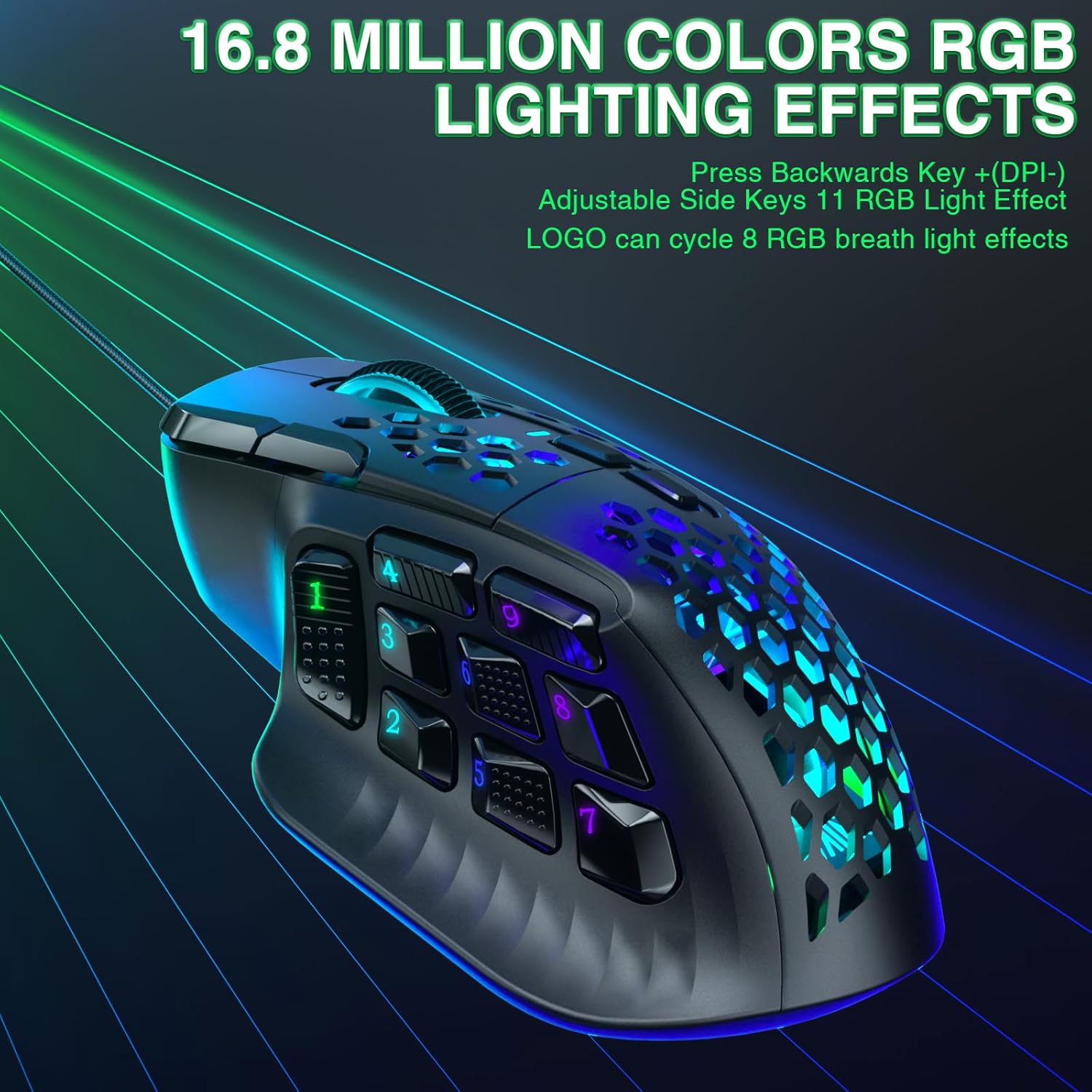
Figure 5.4.1: Customizable RGB Lighting Effects. This image showcases the vibrant RGB lighting options available on the mouse, highlighting the illuminated scroll wheel and side buttons.
6. Software Installation and Customization
To unlock the full potential of your CORBOBO SM809 mouse, install the dedicated software.
6.1 Преузимање софтвера
- Visit the official download page: solakakadriver.com
- Select "SM809 (Wired)" from the available options.
- Компатибилност: The software is only compatible with Windows operating systems. Ensure your operating system version meets the requirements.
- Напомена за инсталацију: Temporarily disable your antivirus software and firewall before downloading and installing the mouse driver software to avoid interruptions.
6.2 Опције прилагођавања
The software allows for extensive personalization:
- Поновно мапирање дугмета: Assign custom functions to any of the 16 buttons.
- Креирање макроа: Record and assign complex sequences of commands to a single button.
- ДПИ подешавања: Fine-tune DPI sensitivity in 100-DPI increments up to 24,000 DPI.
- Стопа гласања: Adjust the polling rate (125-1000Hz) for responsiveness.
- РГБ осветљење: Customize colors, effects, and brightness for various lighting zones.
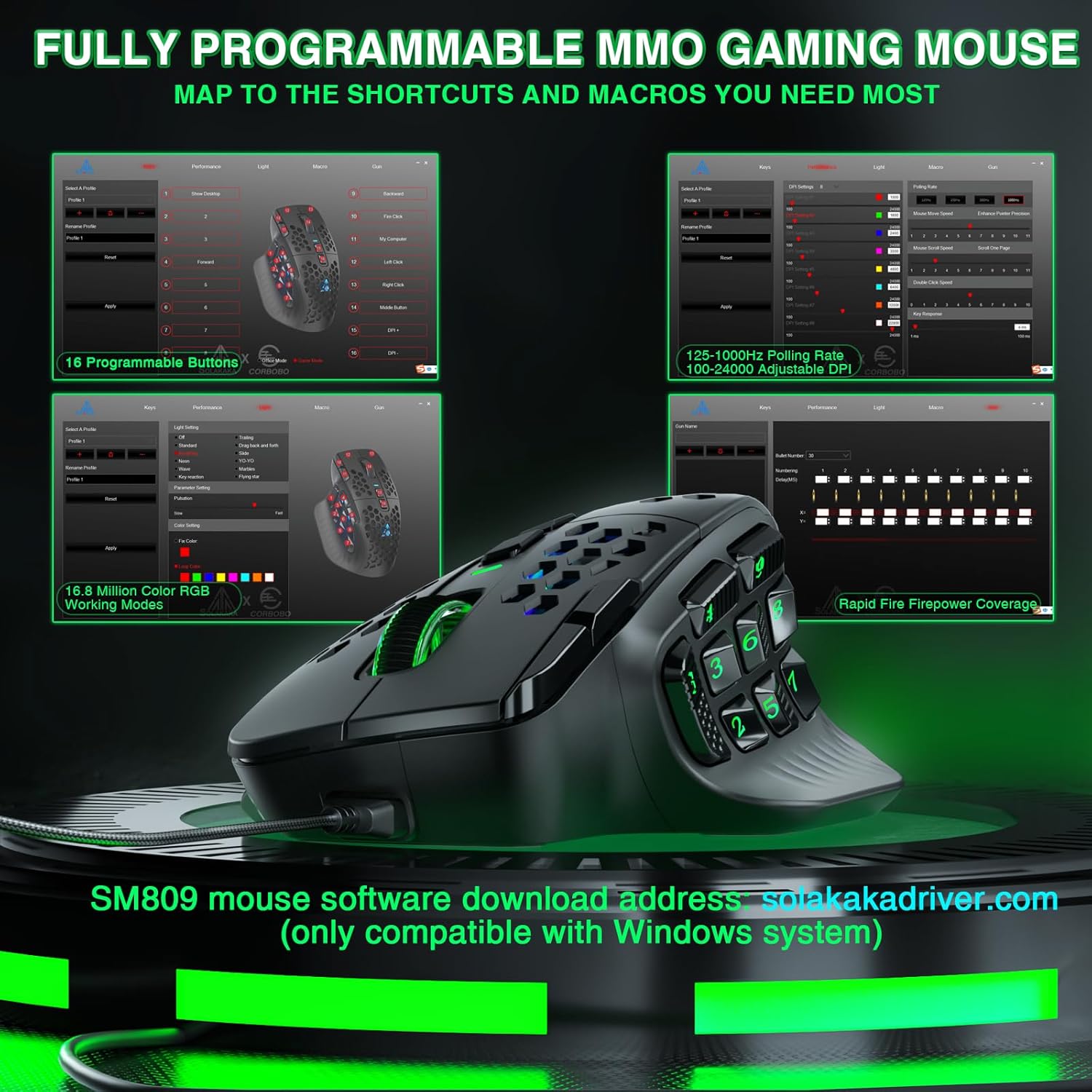
Figure 6.2.1: Mouse Software Interface. This image displays the graphical user interface of the SM809 customization software, showing options for button programming, DPI settings, and RGB lighting.

Figure 6.2.2: Custom Button Combination Key Settings. This image shows a detailed view of how to assign key combinations and macros within the mouse software.
7. Одржавање
Proper maintenance ensures the longevity and performance of your mouse.
- Чишћење: Користите меку, суву крпу да обришете површину миша. За тврдокорну прљавштину, благо дamp Може се користити тканина, водећи рачуна да влага не уђе у миш.
- Брига о сензорима: Keep the optical sensor area clean and free of dust or debris to maintain tracking accuracy.
- Управљање кабловима: Avoid sharp bends or excessive pulling on the braided cable to prevent damage.
КСНУМКС. Решавање проблема
If you encounter issues with your CORBOBO SM809 mouse, refer to the following common solutions.
- Миш не реагује:
- Уверите се да је УСБ кабл безбедно повезан са рачунаром.
- Покушајте да повежете миш са другим УСБ портом.
- Тестирајте миш на другом рачунару да бисте утврдили да ли је проблем са мишем или са рачунаром.
- Software Not Saving Settings/Macros:
- Ensure the mouse software is run with administrator privileges. Right-click the software icon and select "Run as administrator."
- Temporarily disable antivirus or firewall software during configuration, as they may interfere with saving settings.
- Verify that the software version is correct for your SM809 (Wired) model.
- Inconsistent Tracking/DPI Issues:
- Clean the optical sensor at the bottom of the mouse.
- Уверите се да користите миш на одговарајућој површини (нпр. подлога за миш).
- Adjust DPI settings via the mouse buttons or software.
- RGB Lighting Not Working Correctly:
- Check RGB settings within the mouse software.
- Ensure the correct lighting effect is selected using the Backward key + DPI- button combination.
If issues persist after attempting these solutions, please contact customer support.
9. Спецификације
| Феатуре | Детаљ |
|---|---|
| Број модела | СМ809 |
| Технологија повезивања | УСБ, жични |
| Тип сензора | High Precision Optical (PAW3311) |
| DPI опсег | 100 - 24,000 (adjustable in ±100 increments via software) |
| Поллинг Рате | До 1000Хз |
| Брзина праћења | КСНУМКС ИПС |
| Убрзање | 35Г |
| Програмабилна дугмад | 16 |
| Бочна дугмад | Interchangeable 3-button and 9-button plates |
| РГБ осветљење | 16.8 Million Colors, Customizable Effects |
| Цабле Ленгтх | 1.8 meters (braided) |
| Димензије производа | 4.72 к 3.07 к 0.1 инча |
| Тежина артикла | 3.04 унци (приближно 85 г) |
| Компатибилност оперативног система | Windows (for software customization) |
10. Гаранција и подршка
For any issues or questions regarding your CORBOBO SM809 Wired MMO Gaming Mouse, please contact customer support. The manufacturer is committed to providing assistance and will respond as soon as possible.
Молимо погледајте документацију о куповини за конкретне услове гаранције.