
1. Увод
This manual provides detailed instructions for the installation, operation, and maintenance of your ZSUS X79 VG2 Motherboard Bundle. This bundle includes the ZSUS X79 VG2 Motherboard, an Intel Xeon E5 2689 C2 processor, and 16GB of DDR3 1600MHz ECC RAM. Please read this manual thoroughly before proceeding with installation to ensure proper setup and optimal performance.
2. Производ је готовview
The ZSUS X79 VG2 Motherboard is designed to support LGA2011 V1/V2 series processors, offering a robust platform for demanding computing tasks. It features dual-channel DDR3 memory support, NVMe M.2 storage capabilities, and multiple expansion slots.
2.1. Главне компоненте
- ZSUS X79 VG2 Motherboard: Features an LGA2011 socket, H61 chipset, 4 DDR3 memory slots, 2 PCIe x16 slots, 1 PCIe x1 slot, 1 NVMe M.2 port, and 4 SATA2.0 ports.
- Intel Xeon E5 2689 C2 CPU: An 8-core, 16-thread processor with a base frequency of 2.6GHz (up to 3.6GHz turbo), 20MB L3 Cache, and LGA2011 socket compatibility.
- 16GB DDR3 1600MHz ECC RAM: High-performance Error-Correcting Code (ECC) memory, suitable for server and workstation environments, ensuring data integrity.
2.2. Распоред матичне плоче
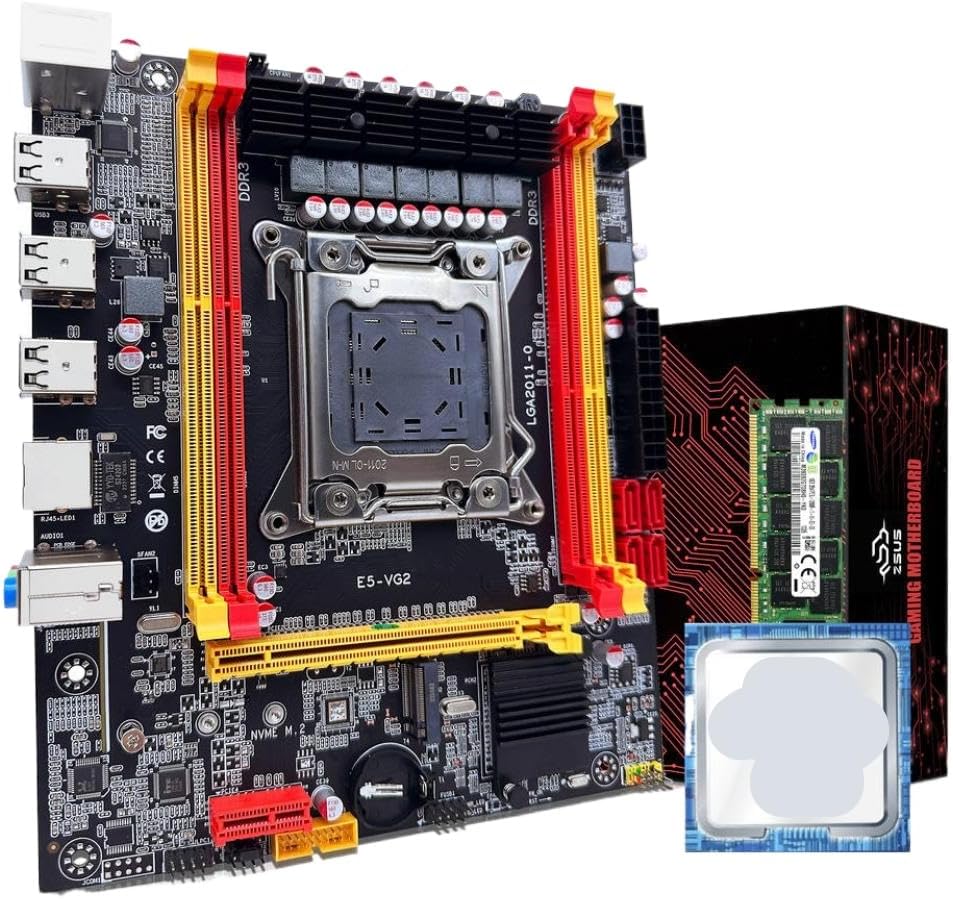
Слика 1: ZSUS X79 VG2 Motherboard Bundle. This image displays the motherboard with its LGA2011 CPU socket, four DDR3 RAM slots, PCIe slots, and various connectors. The included Xeon E5 2689 C2 CPU and 16GB DDR3 ECC RAM module are also visible alongside the product packaging.
Familiarize yourself with the various components and connectors on the motherboard before installation. Key areas include the CPU socket, RAM slots, PCIe expansion slots, SATA ports, M.2 slot, and I/O panel connectors.
3. Подешавање и инсталација
Before beginning installation, ensure your workspace is clean, well-lit, and free of static electricity. Use an anti-static wrist strap if available. Handle components by their edges to avoid touching sensitive contacts.
3.1. Инсталација процесора
- Припремите утичницу: Gently lift the CPU retention lever on the LGA2011 socket. Open the metal load plate.
- Уметните процесор: Carefully align the Intel Xeon E5 2689 C2 CPU with the LGA2011 socket. Ensure the triangular marker on the CPU matches the marker on the socket. Lower the CPU straight down without forcing it.
- Безбедан процесор: Close the metal load plate and push the retention lever back into its locked position until it clicks.
- Нанесите термалну пасту: Apply a small amount of thermal paste (not included) to the center of the CPU's integrated heat spreader (IHS).
- Инсталирање хладњака процесора: Mount a compatible LGA2011 CPU cooler (not included) according to its manufacturer's instructions. Ensure it makes firm contact with the CPU.
3.2. Инсталација РАМ-а
- Отворене браве: Open the retention clips at both ends of the DDR3 memory slots.
- Поравнајте РАМ меморију: Align the 16GB DDR3 1600MHz ECC RAM module with a memory slot, ensuring the notch on the module matches the key in the slot. For dual-channel operation, refer to the motherboard's silkscreen for recommended slot pairing (typically alternating slots).
- Убаците РАМ меморију: Press down firmly on both ends of the RAM module until the retention clips snap into place.
- Потврди: Ensure both clips are fully closed and the RAM module is securely seated.
3.3. NVMe M.2 SSD Installation (Optional)
- Пронађите M.2 слот: Identify the NVMe M.2 slot on the motherboard.
- Remove Standoff Screw: Unscrew the small standoff screw from the M.2 slot.
- Уметните M.2 SSD: Insert your NVMe M.2 SSD (not included) into the slot at a 30-degree angle, ensuring the gold contacts are fully seated.
- Безбедан SSD: Gently push the SSD down and secure it with the standoff screw.
3.4. SATA Device Installation (Optional)
- Connect Data Cable: Connect one end of a SATA data cable (not included) to a SATA2.0 port on the motherboard and the other end to your SATA hard drive or SSD (not included).
- Повежите кабл за напајање: Connect a SATA power cable from your power supply (not included) to the SATA device.
3.5. Прикључци за напајање
- 24-пински ATX напајање: Connect the main 24-pin ATX power connector from your power supply to the corresponding port on the motherboard.
- 8-pin EPS/CPU Power: Connect the 8-pin EPS (CPU) power connector from your power supply to the 1x8PIN port near the CPU socket.
3.6. Предња плоча и периферне везе
- Конектори предње плоче: Connect the power switch, reset switch, HDD LED, and power LED cables from your PC case to the front panel header on the motherboard. Refer to the motherboard's silkscreen for correct pin assignments.
- УСБ заглавља: Connect front panel USB 2.0 cables to the USB 2.0 headers on the motherboard.
- Audio Header: Connect the front panel audio cable to the audio header.
- Картице за проширење: Install any PCIe expansion cards (e.g., graphics card, network card) into the available PCIe x16 or PCIe x1 slots.
4. Упутство за употребу
After completing all hardware installations, you can proceed with powering on your system.
- Почетно укључивање: Ensure all cables are securely connected. Connect your monitor, keyboard, and mouse. Turn on the power supply switch, then press the power button on your PC case.
- Подешавање BIOS-а/UEFI-ја: During startup, repeatedly press the designated key (commonly ДЕЛ, F2, или Ф10) to enter the BIOS/UEFI setup utility. Here you can configure boot order, system time, and other hardware settings.
- Инсталација оперативног система: Insert your operating system installation media (USB drive or DVD) and follow the on-screen prompts to install your preferred operating system.
- Инсталација драјвера: After OS installation, install all necessary drivers for the motherboard chipset, network, audio, and any other installed components. Drivers are typically available on the manufacturer's webсајту.
5. Одржавање
Regular maintenance helps ensure the longevity and stable operation of your system.
- Уклањање прашине: Periodically clean dust from inside your PC case, especially from CPU coolers, case fans, and heatsinks, using compressed air. Ensure the system is powered off and unplugged before cleaning.
- Ажурирања BIOS-а/фирмвера: Проверите произвођача website for updated BIOS/firmware versions. Follow their instructions carefully when performing updates.
- Ажурирања драјвера: Keep your system drivers updated to ensure compatibility and optimal performance.
- Управљање кабловима: Уверите се да су унутрашњи каблови уредно постављени како би се побољшао проток ваздуха и спречиле сметње.
КСНУМКС. Решавање проблема
Ако наиђете на проблеме, погледајте следеће уобичајене кораке за решавање проблема:
- Нема напајања:
- Check if the power supply is switched on and properly connected to the motherboard (24-pin and 8-pin connectors).
- Уверите се да је кабл прекидача за напајање на предњој плочи правилно повезан са прикључком на матичну плочу.
- Без приказа:
- Verify that the monitor is connected to the graphics card (if installed) or the motherboard's integrated graphics port (if applicable and CPU supports it).
- Reseat the RAM modules. Incorrectly seated RAM is a common cause of no display.
- Ensure the graphics card is properly seated in its PCIe slot and has adequate power connections.
- Нестабилност/падови система:
- Проверите температуру процесора и графичке картице. Прегревање може изазвати нестабилност.
- Ensure RAM modules are compatible and correctly installed.
- Покрените алате за дијагностику меморије да бисте проверили да ли постоје грешке у РАМ меморији.
- Проверите да ли су сви прикључци за напајање безбедни.
- Оперативни систем се не покреће:
- Check BIOS/UEFI settings for correct boot order.
- Ensure the storage drive (SSD/HDD) containing the OS is properly connected and detected.
- If using an NVMe M.2 drive, ensure it is correctly installed and recognized in BIOS.
7. Спецификације
| Компонента | Спецификација |
|---|---|
| Модел матичне плоче | ZSUS X79-VG2 |
| ЦПУ Соцкет | LGA2011 V1/V2 series processor |
| Чипсет | Х61 серија |
| CPU Included | Intel Xeon E5 2689 C2 (8 Cores / 16 Threads) |
| CPU Base Frequency | 2.6GHz (up to 3.6GHz Turbo) |
| CPU L3 Cache | 20МБ |
| Тип меморије | DDR3 ECC REG (Server Memory) |
| Фреквенција меморије | 1600MHz (Supports 1066/1333/1600/1866MHz) |
| Капацитет меморије | 1 x 16GB (Max 128GB across 4 slots) |
| меморијска слота | 4 x DDR3 (Dual Channel) |
| Аудио Интерфаце | 1 (MIC-IN, LINE OUT, LINE IN) |
| Етхернет | Realtek Gigabit Ethernet |
| USB Interfaces (Rear) | 6 к УСБ 2.0 |
| USB Headers (Internal) | 1 (supports 2 x USB 2.0 ports) |
| ПЦИе Слотс | 2 к ПЦИе к16, 1 к ПЦИе к1 |
| САТА портови | 4 к САТА2.0 |
| M.2 Port | 1 x NVMe M.2 |
| Повер Интерфаце | 1 x 8-pin EPS, 1 x 24-pin ATX |
| Димензије | 217 мм к 187 мм |
8. Гаранција и подршка
For warranty information and technical support, please refer to the documentation provided with your purchase or contact the manufacturer, TJKTSLVA, directly. Keep your proof of purchase for warranty claims.
Manufacturer: TJKTSLVA