
1. Увод
Thank you for choosing the NIMO 17.3" IPS FHD Laptop. This manual provides essential information for setting up, operating, maintaining, and troubleshooting your device. Please read it carefully to ensure optimal performance and longevity of your laptop.
The NIMO N171 laptop features a 17.3-inch Full HD IPS display, powered by an Intel Core i3-1215U processor, 8GB of DDR4 RAM, and a 256GB PCIe SSD. It comes pre-installed with Windows 11 Home and includes a backlit keyboard with a fingerprint reader for enhanced security and convenience.

Image: NIMO 17.3 inch IPS FHD Laptop, showcasinњегов велики екран и елегантан дизајн.
2. Подешавање
2.1 Распакивање и почетни преглед
Пажљиво извадите све компоненте из паковања. Уверите се да су присутне следеће ставке:
- 1 x Nimo N171 Laptop
- 1 x Type-C 65W PD Fast Charger
- 1 x Упутство за употребу (овај документ)
- Windows 11 Home (pre-installed)
Прегледајте лаптоп да ли има физичких оштећења. Ако се пронађу било каква оштећења, одмах контактирајте корисничку подршку.
2.2 Пуњење лаптопа
Before first use, fully charge the laptop battery. Connect the provided 65W Type-C PD Fast Charger to the laptop's Type-C charging port and then to a power outlet. The charging indicator light will illuminate.

Image: The 65W Type-C PD Charger, illustrating its compact design and compatibility with various devices.
2.3 Почетно укључивање и подешавање Windows-а
Press the power button located on the laptop. The laptop will boot up and guide you through the Windows 11 Home setup process. Follow the on-screen instructions to configure language, region, network, and user accounts.
3. Упутство за употребу
3.1 Приказ и визуелни елементи
The NIMO N171 features a 17.3-inch Full HD (1920x1080) IPS anti-glare display, offering wide viewing angles and vibrant colors. Adjust brightness using the function keys (Fn + Fx keys, refer to keyboard layout for specific keys).

Image: The 17.3-inch FHD IPS display, highlighting its immersive viewing experience with narrow bezels.
3.2 Тастатура и унос
The laptop is equipped with a full-size backlit keyboard and a numeric keypad. The backlight can be toggled or adjusted using dedicated function keys. The touchpad supports multi-touch gestures for navigation.

Image: Close-up of the backlit keyboard and integrated fingerprint reader on the touchpad.
3.3 Читач отисака прстију
For secure and quick login, utilize the built-in fingerprint reader located on the touchpad. Configure your fingerprint in Windows Settings > Accounts > Sign-in options.
3.4 Webcam Privacy Shield
Интегрисани webcam features a physical privacy shield. Slide the cover to the left to open the camera and to the right to close it, ensuring your privacy when the camera is not in use.
3.5 Портови за повезивање
The laptop offers a variety of ports for connecting peripherals and external displays:
- USB 3.2 Генерација 1: Пренос података великом брзином.
- УСБ 2.0: Стандардна УСБ веза.
- УСБ типа Ц: For data transfer and charging (65W PD).
- Standard HDMI 1.4: Повежите се са екстерним мониторима или телевизорима.
- Утор за микро СД картицу: Проширите складиште или пребаците fileс са меморијских картица.
- Аудио прикључак: Повежите слушалице или спољне звучнике.
- Utor za Kensington Lock: За физичко обезбеђење.

Image: Diagram illustrating the various connectivity ports on the NIMO laptop.
3.6 Управљање батеријом
The laptop is equipped with a large capacity battery, providing up to 7 hours of usage. For optimal battery health, avoid frequently draining the battery completely and store the laptop in a cool, dry place.

Image: Visual representation of the laptop's battery capacity and typical usage scenarios.
4. Одржавање
4.1 Чишћење
Користите меку крпу која не оставља влакна за чишћење екрана и спољашњих површина. За тврдокорне мрље, дampen the cloth slightly with water or a screen-safe cleaner. Avoid harsh chemicals or abrasive materials.
4.2 Ажурирања софтвера
Regularly check for and install Windows updates to ensure your system has the latest security patches and performance improvements. You can find updates in Windows Settings > Windows Update.
4.3 Управљање складиштем
Периодично реview и управљајте својим SSD меморијским простором од 256 ГБ. Обришите непотребне fileс, деинсталирајте некоришћене апликације и размотрите складиштење у облаку за велике fileс да би се одржале оптималне перформансе система.
КСНУМКС. Решавање проблема
This section addresses common issues you might encounter with your NIMO laptop.
- Лаптоп се не укључује: Ensure the charger is properly connected and the battery has sufficient charge. Try holding the power button for 10-15 seconds to perform a hard reset.
- Екран је празан или трепери: Restart the laptop. If connected to an external display, try disconnecting and reconnecting the HDMI cable.
- Проблеми са Wi-Fi или Bluetooth повезивањем: Check if Wi-Fi/Bluetooth is enabled in Windows settings. Restart your router or the laptop. Update network drivers if necessary.
- Споре перформансе: Close unnecessary applications. Check for background processes consuming high resources (Task Manager). Ensure sufficient free storage space on the SSD.
- Тастатура или тачпед не реагују: Restart the laptop. Ensure no external devices are interfering.
Ако наиђете на сталне проблеме који нису овде обрађени, погледајте одељак Гаранција и подршка за помоћ.
6. Спецификације
Detailed technical specifications for the NIMO N171 Laptop:
| Феатуре | Спецификација |
|---|---|
| Бранд | NIMO |
| Назив модела | Nimo N171G |
| Величина екрана | 17.3 инча |
| Резолуција екрана | 1920 x 1080 пиксела (FHD) |
| Процесор | Intel Core i3-1215U (6 језгара, до 4.4 GHz) |
| РАМ | 8 GB DDR4 (3200 MHz) |
| Хард Дриве | 256 ГБ ПЦИе ССД |
| Грапхицс Цопроцессор | Integrated Graphics (Intel) |
| Оперативни систем | Виндовс 11 Хоме |
| Вирелесс Типе | 802.11a/b/g/n/ac (Wi-Fi 6) |
| Блуетоотх | Блуетоотх 5.2 |
| УСБ портови | 1x USB 2.0, 3x USB 3.0, 2x USB Type-C (1 for PD charging) |
| ХДМИ порт | ХДМИ 2.1 |
| Webцам | 2 МП задња Webcam Resolution (with privacy shield) |
| Посебне карактеристике | Fingerprint Reader, Backlit Keyboard, HD Audio, Memory Card Slot, Numeric Keypad |
| Просечно трајање батерије | 5-7 сати |
| Тежина артикла | 4.6 фунти |
| Димензије производа | 15.66 к 9.99 к 0.74 инча |
7. Гаранција и подршка
NIMO is committed to providing high-quality products and customer satisfaction.
7.1 Гаранција произвођача
Your NIMO laptop is covered by a comprehensive 2-годишња гаранција произвођача from Nimo Direct Inc. This warranty covers defects in materials and workmanship under normal use. Please retain your proof of purchase for warranty claims.

Image: Illustration of NIMO's 2-year support commitment.
7.2 90-Day Hassle-Free Returns
Nimo Direct Inc. offers a Политика враћања 90 дана. If you are not satisfied with your purchase, you may return the product within 90 days from the date of purchase. Please refer to the return policy details provided at the time of purchase or contact customer support.
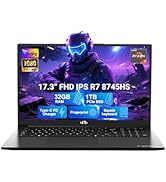
Image: Visual representation of the 90-day return policy.
7.3 Корисничка подршка
For any product-related questions, technical support, or warranty claims, please contact our professional customer service team:
- Емаил: сервице@нимопц.цом
- Телефон: Refer to your product packaging or NIMO's official website for current phone support numbers.
- Онлине: Visit the official NIMO website for FAQs and additional support resources.
Our dedicated support team is available to assist you and resolve any issues promptly.

Image: Depiction of NIMO's professional customer assistance team.