
Увод
Thank you for choosing the TCL QLED 55 Inch 55P7K 4K Google TV. This manual provides essential information for the safe and efficient use of your television. Please read these instructions thoroughly before operating the device and retain them for future reference.
Важне информације о безбедности
Always follow basic safety precautions when using this television to reduce the risk of fire, electric shock, and injury. Keep the television away from moisture and heat sources. Do not block ventilation openings. Refer to the full safety guidelines in the packaging for comprehensive details.
Шта је у кутији
Upon unpacking, ensure all items are present and undamaged:
- TCL QLED 55 Inch 55P7K 4K UHD Google TV
- Ремоте Цонтрол
- 1 AAAA Battery (for remote control)
- Повер Цорд
- ТВ сталак (2 комада)
- Вијци за ТВ сталке
- Кориснички приручник (овај документ)
Сетуп
1. Инсталација постоља
If you plan to place the TV on a table, attach the included stands. Place the TV face down on a soft, flat surface to prevent screen damage. Align each stand with the corresponding slots on the bottom of the TV and secure them with the provided screws.
2. Монтажа на зид
For wall mounting, remove the stands. This TV supports a VESA mount standard of 200 к 200 мм. Use a compatible wall mount bracket (sold separately) and follow its instructions carefully. Ensure the wall can support the weight of the TV (approximately 10.5 килограма) and the mount.
3. Повезивање периферних уређаја
The back of the TV features various ports for connecting external devices. Refer to the image below for port locations.
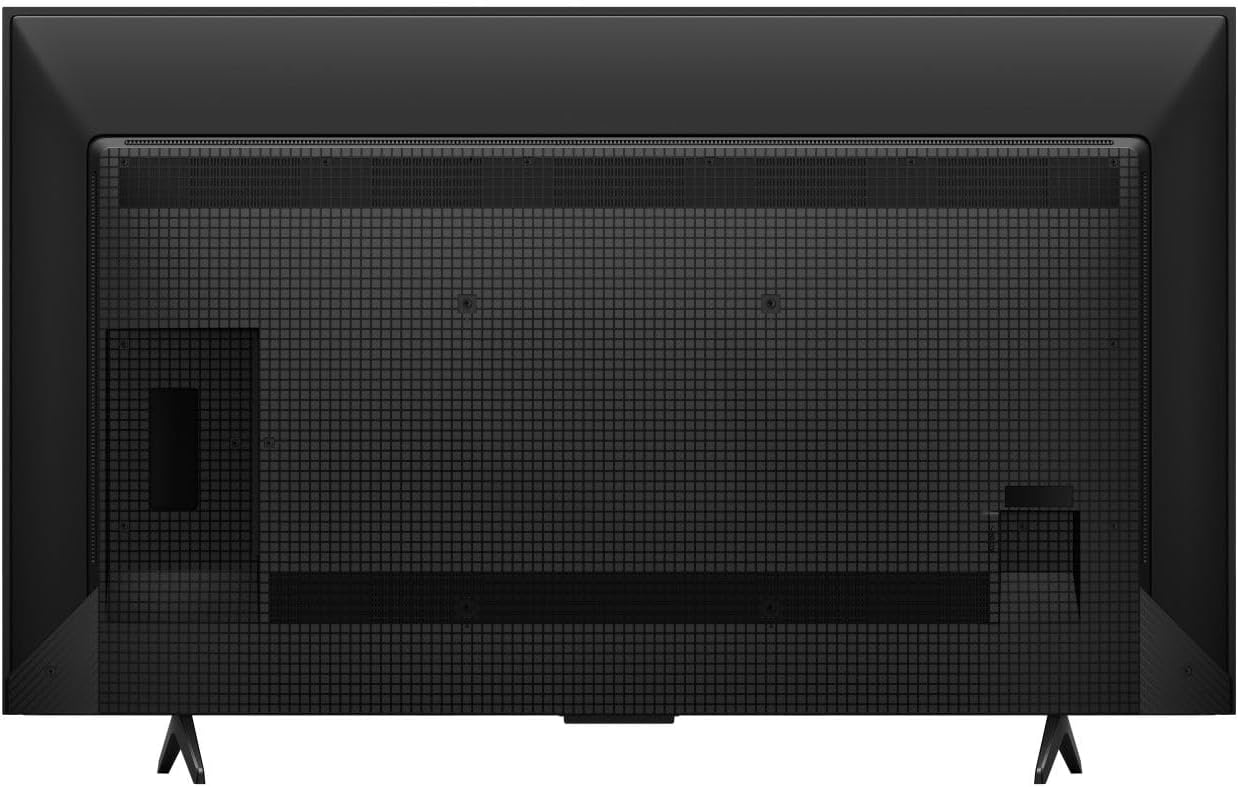
Слика: Позади view of the TCL 55P7K television, illustrating the layout of connectivity ports (HDMI, USB, Ethernet) and the VESA mounting screw holes. The stand attachment points are also visible at the bottom.
- ХДМИ портови: Connect Blu-ray players, game consoles, and other HDMI-enabled devices.
- УСБ портови: Повежите УСБ уређаје за складиштење података за репродукцију медија.
- Етхернет порт: За жичану интернет везу.
- Улаз за антену/кабл: За повезивање антене или кабловске телевизије.
4. Почетно укључивање и подешавање Google TV-а
After connecting all necessary cables, plug the power cord into an electrical outlet (100-240 ВАЦ, 50-60 Хз). Press the power button on the remote control or the TV. Follow the on-screen instructions to complete the initial setup, including network connection (Wi-Fi or Ethernet), Google account login, and channel scanning.
Управљање телевизором
1. Даљински управљач
The included remote control allows you to navigate the Google TV interface, adjust settings, and control playback. Insert the provided AAAA battery into the remote. The remote supports гласовна контрола за практичан рад.
2. Интерфејс Google TV-а
Your TCL 55P7K runs on Google TV, providing access to a wide range of streaming services and apps. Supported internet services include Netflix, Hulu, Amazon Prime Video, Disney+, YouTube, and many others available through the Google Play Store.
3. Подешавања слике
The QLED display technology delivers vibrant colors and excellent contrast. You can customize picture settings to your preference:
- Резолуција: Native 4K UHD (3840 x 2160 pixels).
- Брзина освежавања: 120 Hz for smooth motion.
- ХДР подршка: HDR10 for enhanced contrast and color.
- Осветљеност: Up to 500 Nit peak brightness.
- Adjust modes like Standard, Movie, Sport, or customize settings for brightness, contrast, color, and sharpness.
4. Аудио поставке
Experience immersive sound with Долби Атмос и 5.1 канал audio support. Access audio settings to adjust volume, sound modes (e.g., Standard, Music, Movie), and equalizer settings.
5. Повезивање
Телевизор нуди флексибилне опције повезивања:
- Ви-Фи: Бежично се повежите са кућном мрежом.
- Етхернет: За стабилну жичану интернет везу.
- ДВИ: Multiple ports for various devices.
- УСБ: For media playback from external drives.
6. Посебне карактеристике
The TV includes a Слееп Тимер feature, allowing you to set a time for the TV to automatically turn off.
Одржавање
1. Чишћење телевизора
Пре чишћења, искључите кабл за напајање. Користите меку, суву крпу да обришете екран и кућиште. За тврдокорне мрље, лагано дрхтајтеampen the cloth with water or a mild, non-abrasive screen cleaner. Never spray cleaner directly onto the screen or allow liquids to enter the TV's openings.
2. Ажурирања софтвера
Your TV may receive periodic software updates to improve performance and add new features. Ensure your TV is connected to the internet to receive these updates. You can usually check for updates in the TV's settings menu.
Решавање проблема
Ако наиђете на проблеме са телевизором, погледајте следећа уобичајена решења:
- Нема напајања: Уверите се да је кабл за напајање безбедно прикључен и на телевизор и на исправну електричну утичницу. Покушајте са другом утичницом.
- Нема слике/звука: Check that the correct input source is selected. Verify all cables (HDMI, antenna) are properly connected.
- Лош квалитет слике: Подесите подешавања слике (осветљеност, контраст, оштрина). Уверите се да улазни извор пружа висококвалитетни сигнал.
- Нема интернет везе: Check your Wi-Fi router or Ethernet cable. Reconnect to the network in the TV's settings.
- Даљински управљач не ради: Replace the AAAA battery. Ensure there are no obstructions between the remote and the TV.
For more complex issues, please contact TCL customer support.
Спецификације
| Феатуре | Детаљ |
|---|---|
| Назив модела | 55П7К |
| Бранд | ТЦЛ |
| Величина екрана | 55 инча |
| Дисплаи Тецхнологи | КЛЕД |
| Резолуција | 4К УХД (3840 к 2160) |
| Рефресх Рате | 120 Хз |
| Подржан ХДР формат | ХДР10 |
| Maximum Display Brightness | 500 Нит |
| Integrated Surround Sound Format | Dolby Atmos, 5.1 channel |
| Подржане Интернет услуге | Netflix, Hulu, Amazon Prime Video, Disney+, YouTube, Google TV |
| Технологија повезивања | Етернет, HDMI, USB, Wi-Fi |
| Хардверски интерфејс | Етхернет, ХДМИ, УСБ |
| Total USB 3.0 Ports | 1 |
| Контролни метод | Даљински, гласовни |
| Тип монтаже | Носач за сто, Носач за зид |
| VESA стандард за монтирање | 200 к 200 мм |
| Тежина артикла | 10.5 килограма |
| Лине Волtage | 100-240 ВАЦ 50-60 Хз |
| Укључене компоненте | TV, Remote, 1 AAAA battery |
| Посебна карактеристика | Слееп Тимер |
Информације о гаранцији
This TCL 55P7K television comes with a Ограничена гаранција. Please refer to the warranty card included in your product packaging or visit the official TCL webсајт за детаљне услове и одредбе, укључујући период покрића и процедуре сервисирања.
Корисничка подршка
For technical assistance, troubleshooting, or service inquiries, please contact TCL Customer Support. You can find contact information on the official TCL webсајту или у документацији вашег производа.
Произвођач: ТЦЛ