
Увод
This manual provides instructions for the E-YOOSO M10 (Z686-1) Wired Mechanical Keyboard. Please read this manual carefully before using the product to ensure proper operation and to maximize its lifespan. This keyboard features a 65% compact layout, mechanical blue switches, and customizable RGB backlighting, designed for office work and multimedia use.
Сетуп
Повезивање тастатуре
- Locate the detachable USB cable provided with your keyboard.
- Connect the USB-C end of the cable to the port on the back of the E-YOOSO M10 keyboard.
- Plug the USB-A end of the cable into an available USB 2.0 port on your computer.
- The keyboard is plug-and-play; no additional drivers or software are required for basic functionality.

Image: The E-YOOSO M10 keyboard connected via its detachable USB cable to a computer, illustrating the wired connection setup.
Компатибилност
The E-YOOSO M10 keyboard is compatible with various operating systems, including:
- Windows (2000, XP, ME, Vista, 7, 8)
- Линук
- Мац ОС
Упутство за употребу
Распоред и функције тастера
The E-YOOSO M10 features a 65% compact layout with 68 keys, including dedicated arrow keys and access to F1-F12 functions via the Fn key. This design optimizes desktop space while retaining essential keys for productivity.
Прилагођавање RGB позадинског осветљења
The keyboard supports 18 customizable RGB backlight modes. Use the following key combinations to adjust the lighting effects:
- Фн + Инс: Switch between 18 different backlight modes.
- Fn + ← / →: Adjust the backlight speed.
- Fn + ↑ / ↓: Подесите осветљеност позадинског осветљења.

Image: The E-YOOSO M10 keyboard showcasing its RGB backlighting and illustrating the function key combinations for adjusting light effects, speed, and brightness.
Функција против фантомског приказивања
The keyboard is equipped with full N-Key Rollover, meaning all 68 keys are anti-ghosting. This ensures that every key press is registered accurately, even when multiple keys are pressed simultaneously, which is beneficial for fast typing and gaming.

Image: The E-YOOSO M10 keyboard in use on a desk, visually representing the N-Key Rollover capability by highlighting several simultaneously pressed keys.
Ергономски дизајн
The keyboard features an ergonomic design with double kickstands, allowing for adjustable typing angles. The keycaps are designed with an ergonomic suspension profile and double-color injection for comfortable and durable use.

Слика: Споредни професионалацfile view of the E-YOOSO M10 keyboard, demonstrating its ergonomic design with varying keycap heights and the overall contoured shape for comfortable typing.
Одржавање
Чишћење тастатуре
To maintain the appearance and functionality of your E-YOOSO M10 keyboard, follow these cleaning guidelines:
- Use a soft, dry cloth to wipe down the keycaps and chassis regularly.
- For deeper cleaning, you may use a slightly damp cloth with a mild cleaning solution, ensuring no liquid enters the keyboard.
- The PBT injection keycaps are designed to be anti-sweat and fade-resistant, requiring minimal special care.
- Користите компримовани ваздух да уклоните прашину и остатке између тастера.

Слика: Детаљна view of the E-YOOSO M10 keyboard's PBT injection keycaps, emphasizing their construction for clear backlighting, anti-sweat properties, and resistance to fading.
Решавање проблема
Тастатура не реагује
- Уверите се да је USB кабл безбедно повезан и са тастатуром и са рачунаром.
- Покушајте да прикључите УСБ кабл у други УСБ порт на рачунару.
- Поново покрените рачунар.
- Ако користите УСБ чвориште, покушајте да повежете тастатуру директно са рачунаром.
Позадинско осветљење не ради или је неисправно
- Check if the backlight is turned off. Use Фн + ↑ за повећање осветљености.
- Cycle through backlight modes using Фн + Инс да видимо да ли то решава проблем.
- Уверите се да тастатура добија довољно напајања са УСБ порта.
Keys Not Registering or Double Typing
- Уверите се да је тастатура чиста и да нема прљавштине испод тастера.
- Test the keyboard on another computer to rule out a software or driver issue on your primary system.
Спецификације
| Бранд | Е-ИООСО |
| Број модела | З686-1 |
| Повезивање | Жично (USB 2.0) |
| Тип прекидача | Механички плави прекидач |
| Број кључева | 68 Кеис |
| Лаиоут | 65% Compact, QWERTY |
| Позадинско осветљење | RGB (18 режима) |
| Анти-Гхостинг | Потпуни Н-Кеи Ролловер |
| Кеицапс | PBT Injection, Double-shot |
| Материјал | Acrylonitrile Butadiene Styrene (ABS), Aluminum Plate |
| Цабле Ленгтх | 4.9 ft (1.5 m) Detachable USB Cable |
| Компатибилност | Виндовс, Линук, Мац ОС |
| Посебне карактеристике | Hot-swappable PCBA, North-facing LEDs, Pre-lubed Plate Mounted Stabilizer, Ergonomic Design |
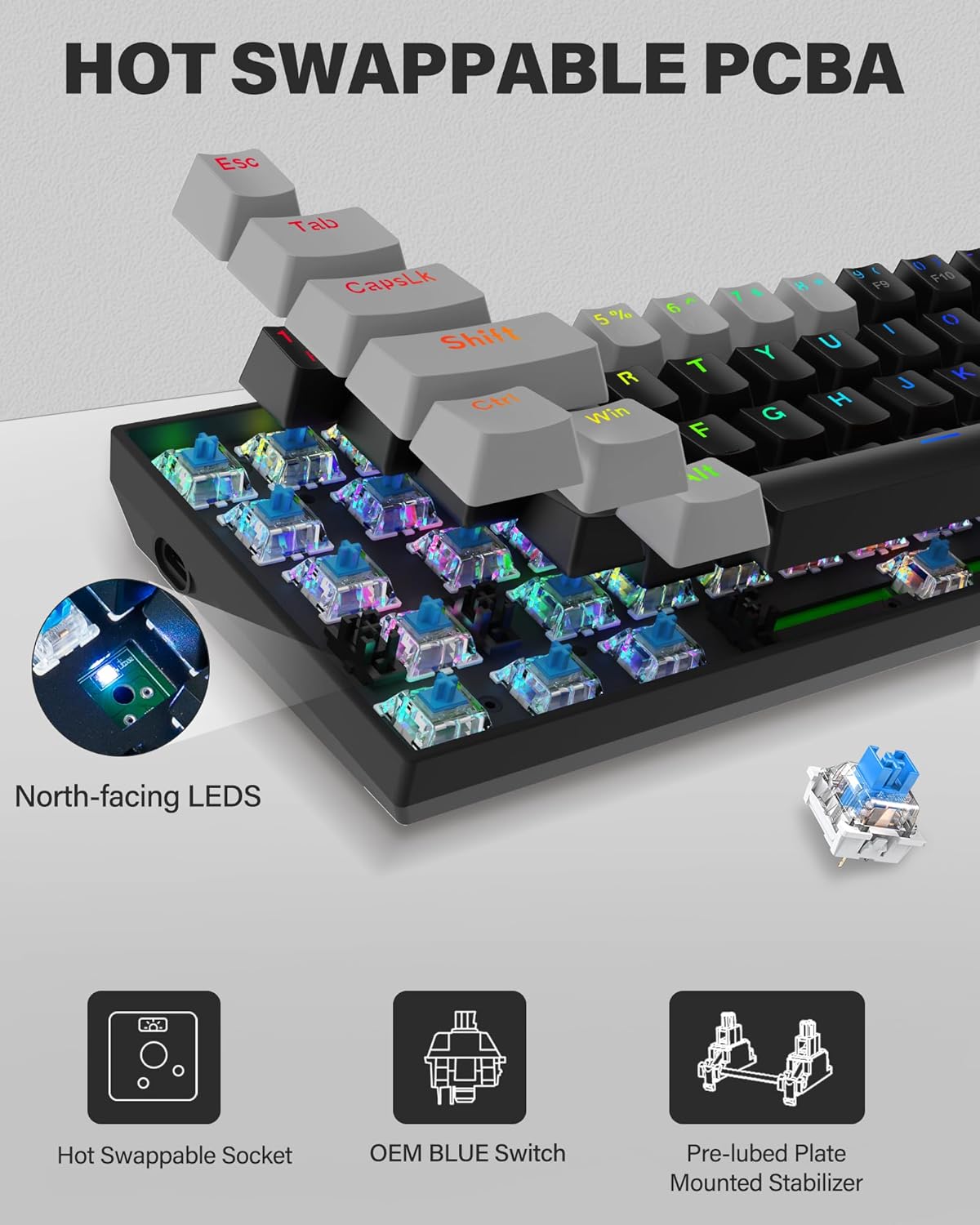
Image: A close-up of the E-YOOSO M10 keyboard's internal components, highlighting the hot-swappable PCBA, OEM Blue Switches, and pre-lubed plate-mounted stabilizers.

Image: An exploded diagram illustrating the layers of the E-YOOSO M10 keyboard, including PBT keycaps, Blue Switches, Positioning Plate, PCB Board, and Bottom Case.
Гаранција
The E-YOOSO M10 (Z686-1) Wired Mechanical Keyboard comes with a 1 година гаранције од датума куповине. Ова гаранција покрива производне недостатке и проблеме настале нормалном употребом. Молимо вас да сачувате доказ о куповини за потребе подношења захтева за гаранцију.
Подршка
For further assistance, technical support, or warranty inquiries, please refer to the contact information provided on the E-YOOSO official website or your retailer's support channels. When contacting support, please have your product model (Z686-1) and proof of purchase available.