
1. Увод и крајview
This user manual provides essential information for the safe and efficient operation of your Candy 21-Pint Portable Dehumidifier. Please read this manual thoroughly before using the appliance and retain it for future reference. This dehumidifier is designed to remove excess moisture from indoor air, helping to prevent mold, mildew, and other humidity-related issues in spaces up to 1,000 square feet.

Слика 1.1: Предња страна view of the Candy 21-Pint Portable Dehumidifier.
2. Безбедносне информације
Увек се придржавајте основних мера предострожности када користите електричне уређаје како бисте смањили ризик од пожара, струјног удара и повреда.
- Уверите се да напајање одговара запреминиtage specified on the dehumidifier's rating label.
- Не користите одвлаживач ваздуха са оштећеним каблом или утикачем.
- Keep the appliance away from water and other liquids. Do not immerse the unit in water.
- Не блокирајте улазе или излазе за ваздух. Одржавајте најмање 20 цм (8 инча) простора око уређаја.
- Искључите одвлаживач ваздуха из струје пре чишћења или било каквог одржавања.
- Овај уређај је намењен само за употребу у затвореном простору.
- Do not allow children to operate or play with the dehumidifier.
- If the unit emits unusual sounds, smells, or smoke, unplug it immediately and contact customer support.
3. Карактеристике производа
Your Candy Dehumidifier is equipped with several features designed for optimal performance and user convenience:
- Efficient Moisture Removal: Capable of removing up to 21 pints (12 liters) of moisture per day, suitable for areas up to 1,000 sq.ft.
- Подесиви опсег влажности: Set desired humidity levels between 30% and 90% Relative Humidity (RH).
- Опције двоструке дренаже:
- Ручна дренажа: Utilizes a 0.66-gallon (2.5-liter) water tank with an auto-shutoff feature to prevent overflow.
- Континуирано одводњавање: Includes a 3.33 ft (1 meter) drain hose for continuous water removal, ideal for long-term operation.
- Вишеструки режими рада:
- Континуирани режим: Runs constantly for maximum dehumidification.
- Аутоматски режим: Automatically adjusts operation to maintain comfortable humidity based on ambient temperature.
- User-Defined Mode: Allows setting a specific target humidity level. The unit will pause when the target is reached and restart if humidity rises.
- Две брзине вентилатора: Choose between LOW and HIGH fan speeds for customized performance and noise levels.
- Смарт Цонтрол: Control the dehumidifier remotely via a dedicated smartphone app, compatible with Google Home and Alexa for voice control.
- Дизајн прилагођен кориснику: Features ergonomically designed lift-up handles, 360° smooth wheels for easy mobility, a touch control panel with LED display, a 1-24 hour timer, and a detachable, washable filter for easy maintenance.
- Аутоматско одмрзавање: Automatically defrosts the coils in low-temperature environments to ensure efficient operation.

Figure 3.1: Dehumidification capacity and coverage area.
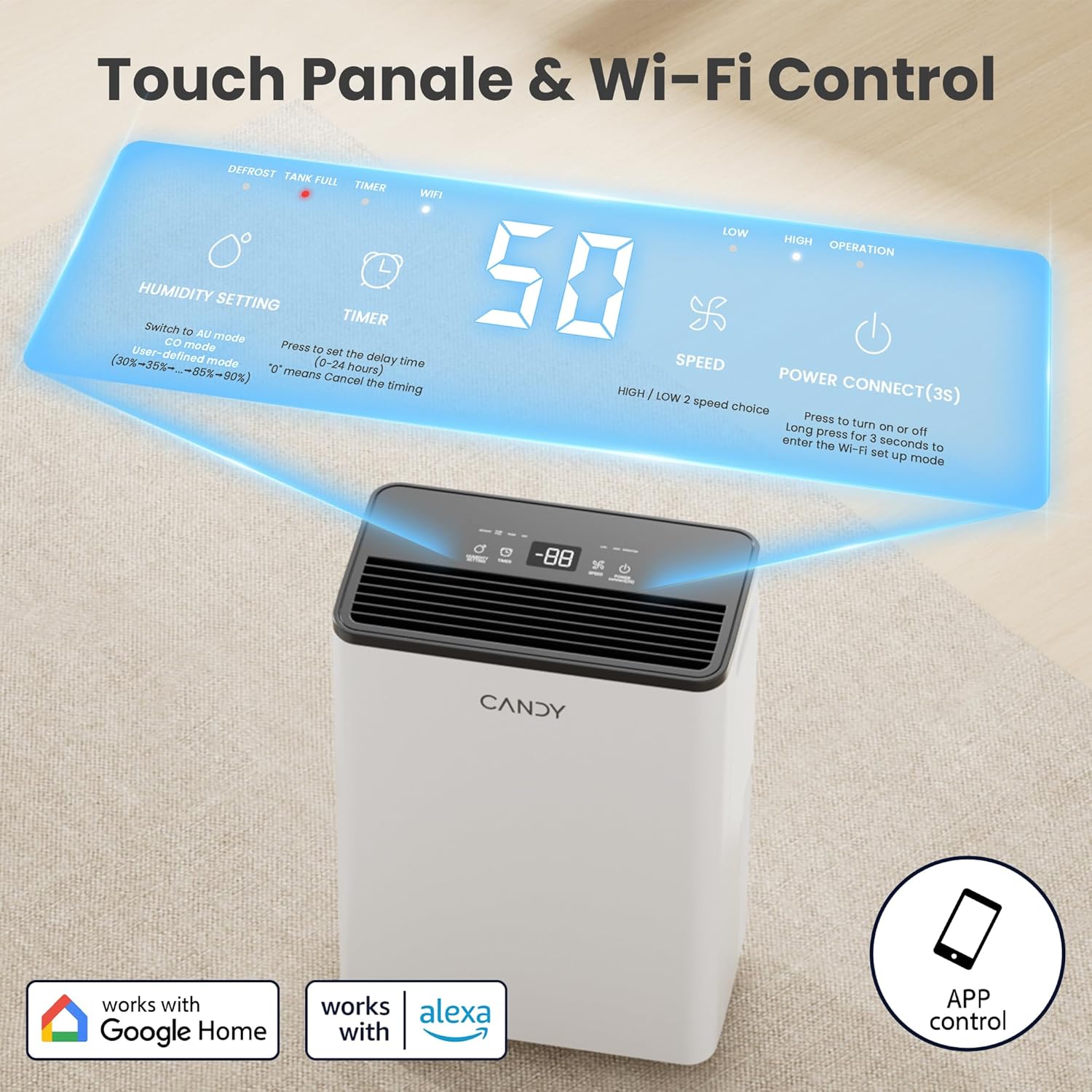
Figure 3.2: Touch control panel and Wi-Fi connectivity.

Слика 3.3: Илустрација ручних и континуираних метода одводњавања.
4. Подешавање и инсталација
4.1 Распакивање
Carefully remove the dehumidifier from its packaging. Inspect the unit for any shipping damage. Retain the packaging materials for future storage or transport.
4.2 Постављање
Place the dehumidifier on a flat, stable surface in the area where moisture removal is desired. Ensure there is at least 8 inches (20 cm) of clear space around all sides of the unit for proper airflow.
4.3 Прикључак за напајање
Укључите кабл за напајање у уземљену електричну утичницу. Уверите се да је утичницаtagе одговара захтевима јединице.
4.4 Drainage Setup (Choose One)
4.4.1 Ручно пражњење (резервоар за воду)
The unit comes with a built-in 0.66-gallon (2.5-liter) water tank. When the tank is full, the dehumidifier will automatically shut off and an indicator light will illuminate. Empty the tank by pulling it out, discarding the water, and reinserting it firmly until it clicks into place.

Figure 4.1: Steps for emptying the water tank.
4.4.2 Непрекидно одводњавање (одводно црево)
For continuous operation without needing to empty the tank, attach the included drain hose to the continuous drainage outlet on the back of the unit. Ensure the hose is sloped downwards to allow gravity drainage into a floor drain, large bucket, or sink. Do not allow the hose to be kinked or elevated, as this will prevent proper drainage.
5. Упутство за употребу
5.1 Контролна табла прекоview
The dehumidifier features a touch control panel with an LED display. Refer to Figure 5.1 for button functions.

Слика 5.1: Дигитална контролна табла.
- Дугме за напајање: Press to turn the unit ON/OFF. Press and hold for 3 seconds to enter Wi-Fi setup mode.
- Дугме за подешавање влажности: Press to cycle through humidity settings (30%-90% RH) or select operating modes (Continuous, Auto, User-Defined).
- Дугме тајмера: Press to set the auto ON/OFF timer (1-24 hours). '0' means no timer is set.
- Дугме за брзину: Press to switch between LOW and HIGH fan speeds.
- Приказ: Shows current humidity, target humidity, or timer settings.
- Индикаторска светла: DEFROST, TANK FULL, TIMER, WIFI, LOW (speed), HIGH (speed), OPERATION.
5.2 Подешавање режима рада
Притисните тастер Подешавање влажности дугме за кретање кроз следеће режиме:
- Continuous Mode (CO): The dehumidifier will operate continuously at HIGH fan speed, regardless of the indoor humidity. This mode is ideal for rapid dehumidification.

Figure 5.2: Continuous Mode operation.
- Auto Mode (AU): The dehumidifier will automatically adjust its operation to maintain the most comfortable humidity level based on the current indoor temperature. This setting cannot be manually adjusted.

Слика 5.3: Рад у аутоматском режиму.
- User-Defined Mode (30-90% RH): In this mode, you can set your desired humidity level. The unit will maintain the indoor humidity within a range of +3% to -2% of your set target. When the target humidity is reached, the unit will stop, and the operation light will flash. It will restart automatically when the humidity rises above the target.

Figure 5.4: User-Defined Mode operation.
5.3 Setting Fan Speed
Притисните тастер Брзина button to toggle between LOW and HIGH fan speeds. High speed provides faster dehumidification, while low speed offers quieter operation.

Figure 5.5: Fan speed settings.
5.4 Подешавање тајмера
Притисните тастер Тајмер button to set the desired operating duration (1-24 hours). The unit will automatically turn ON or OFF after the set time. If '0' is displayed, the timer function is inactive.

Figure 5.6: Timer and Auto Defrost features.
5.5 Smart Control (Wi-Fi & Voice)
Your dehumidifier can be controlled remotely via a smartphone app and voice assistants.
5.5.1 Повезивање апликације
- Download the dedicated smartphone app (e.g., "Smart Life" or similar, as indicated by product packaging/instructions) from your app store.
- Уверите се да је ваш телефон повезан на Ви-Фи мрежу од 2.4 ГХз.
- Press and hold the Power button on the dehumidifier for 3 seconds until the Wi-Fi indicator light flashes, indicating pairing mode.
- Follow the in-app instructions to add and connect your dehumidifier.

Figure 5.7: Smart control via Wi-Fi app.
5.5.2 Voice Control (Google Home/Alexa)
Once connected to the app, you can link your dehumidifier to Google Home or Amazon Alexa for voice commands. Follow the instructions within the app or your smart home assistant's application to enable this feature. Example commands include: "Alexa, set the bedroom humidity to 50."

Figure 5.8: Voice control integration.
6. Одржавање
Редовно одржавање обезбеђује оптималне перформансе и продужава век трајања вашег одвлаживача ваздуха. Увек искључите уређај из струје пре него што извршите било какво одржавање.
6.1 Чишћење ваздушног филтера
Ваздушни филтер треба чистити сваке две недеље или чешће, у зависности од употребе и квалитета ваздуха. Прљав филтер може смањити ефикасност и проузроковати да уређај ради интензивније.
- Уклоните резервоар за воду.
- Gently pull down to remove the air filter from its slot.
- Clean the filter with cool water. Do not use gasoline, alcohol, or hot water. A vacuum cleaner can also be used to remove dust.
- Allow the filter to air-dry completely before reinserting it. Do not operate the unit without the filter.

Figure 6.1: Steps for cleaning the air filter.
6.2 Чишћење резервоара за воду
Periodically clean the water tank to prevent mold and mildew growth. Use mild soap and warm water, then rinse thoroughly. Ensure the tank is completely dry before reinserting.
6.3 Спољно чишћење
Обришите спољашњост одвлаживача меком, дamp cloth. Do not use harsh chemicals or abrasive cleaners, as they may damage the surface.
КСНУМКС. Решавање проблема
Пре него што контактирате корисничку подршку, погледајте следећи водич за решавање уобичајених проблема:
| Проблем | Могући узрок | Решење |
|---|---|---|
| Одвлаживач се не укључује. | No power; Power cord not plugged in; Water tank full or not properly seated. | Проверите утичницу; Уверите се да је кабл за напајање добро прикључен; Испразните и поново поставите резервоар за воду правилно. |
| Уређај ради, али не сакупља воду. | Humidity setting too high; Room temperature too low; Air filter clogged; Air inlets/outlets blocked. | Lower the target humidity; Ensure room temperature is above 41°F (5°C); Clean the air filter; Clear any obstructions around the unit. |
| Јединица је бучна. | Unit not on a level surface; Air filter clogged; Fan speed set to HIGH. | Place unit on a flat, stable surface; Clean the air filter; Switch to LOW fan speed. |
| Вода цури из јединице. | Water tank not properly seated; Continuous drain hose is kinked or elevated. | Reinsert water tank firmly; Ensure drain hose is straight and sloped downwards. |
| Проблеми са Wi-Fi везом. | Incorrect Wi-Fi password; Not connected to 2.4 GHz network; Router too far. | Verify Wi-Fi password; Connect phone to 2.4 GHz network; Move unit closer to router or use a Wi-Fi extender. |
8. Спецификације
| Феатуре | Детаљ |
|---|---|
| Бранд | Цанди |
| Назив модела | CAS-CF12(W)-US |
| Капацитет одвлаживања | 21 Pints / 12 Liters per Day (at 86°F, 80% RH) |
| Област покривености | До 1000 квадратних стопа |
| Запремина резервоара | 0.66 галона (2.5 литара) |
| Опсег подешавања влажности | 30% - 90% релативне влажности |
| Број брзина | 2 (низак, висок) |
| Ватtage | 130 вати |
| Димензије производа (Д x Ш x В) | 6.69"Д к 11.42"Ш к 16.34"В |
| Тежина артикла | 18.7 фунти |
| Посебне карактеристике | Automatic Defrost, Automatic Shutoff, Continuous/Auto Mode, Digital Display, Smart APP WIFI Control, Ergonomic Handle, Washable Filter, Removable Tank, 360° Smooth Wheels. |
9. Гаранција и подршка
For warranty information, technical support, or service inquiries, please refer to the warranty card included with your product or visit the official Candy website. Please have your model number (CAS-CF12(W)-US) and purchase date ready when contacting support.
You can also visit the Candy Store on Amazon for more information: Продавница слаткиша