
Увод
The seenda COE200 Wireless Bluetooth Keyboard and Mouse Combo offers versatile connectivity and ergonomic design for enhanced productivity and comfort. This full-size keyboard features a numeric keypad and integrated wrist rest, while the symmetric mouse provides quiet clicks and adjustable DPI settings. Designed for multi-device integration, it supports both 2.4G USB and Bluetooth connections, making it compatible with a wide range of operating systems including Windows, macOS, iPadOS/iOS, and Android.
Шта је у кутији
- Wireless Keyboard (COE200)
- Wireless Mouse (COE200)
- USB Receiver (stored in mouse battery compartment)
- Упутство за употребу
Сетуп
1. Инсталација батерије
The keyboard requires 1 AAA battery and the mouse requires 1 AA battery (batteries not included). Open the battery compartments on the underside of both devices and insert the batteries according to the polarity indicators.

Слика 1: Инсталација батерија за тастатуру и миш.
2. 2.4G USB Wireless Connection (Plug & Play)
For devices without Bluetooth, or for a direct connection:
- Locate the USB receiver stored in the mouse's battery compartment.
- Plug the USB receiver into an available USB-A port on your computer or laptop.
- Укључите миш помоћу прекидача УКЉУЧЕНО/ИСКЉУЧЕНО на његовој доњој страни.
- На тастатури притисните Фн + К to switch to 2.4G mode. The 2.4G indicator light on the keyboard will illuminate.
- The keyboard and mouse should connect automatically. No drivers are needed.

Figure 2: 2.4G USB connection steps.
3. Блуетоотх веза
For devices with Bluetooth 4.0 or above:
- Turn on the mouse using the ON/OFF switch on its underside. Press the mode switch button on the mouse to select Bluetooth mode (BT indicator will blink).
- На тастатури притисните и држите Фн + В for 3 seconds to enter Bluetooth pairing mode. The BT indicator light on the keyboard will blink rapidly.
- On your device (computer, laptop, tablet, phone), go to Bluetooth settings and search for new devices.
- Select "SEENDA COE200 KB" for the keyboard and "SEENDA COE200 MS" for the mouse from the list of available devices to pair.
- Once paired, the indicator lights will stop blinking and remain solid.

Figure 3: Bluetooth connection steps.
4. Multi-Device Switching
The combo supports switching between two devices (one via 2.4G USB and one via Bluetooth). To switch between connected devices:
- For the keyboard: Press Фн + К for 2.4G mode or Фн + В for Bluetooth mode.
- For the mouse: Press the mode switch button on the underside of the mouse to toggle between 2.4G and Bluetooth modes.
Упутство за употребу
1. Карактеристике тастатуре
- Full-Size Layout with Numpad: Includes a numeric keypad for efficient data entry and calculations.
- Интегрисани ослонац за зглоб: Provides ergonomic support to reduce wrist strain during long typing sessions.
- Подесиве ноге са нагибом: Customize the keyboard angle for optimal comfort.
- Дизајн отпоран на проливање: Offers protection against accidental spills.
- Функцијски тастери за мултимедију: Access media controls (play/pause, volume, etc.) using the F-keys, often in combination with the Fn key.
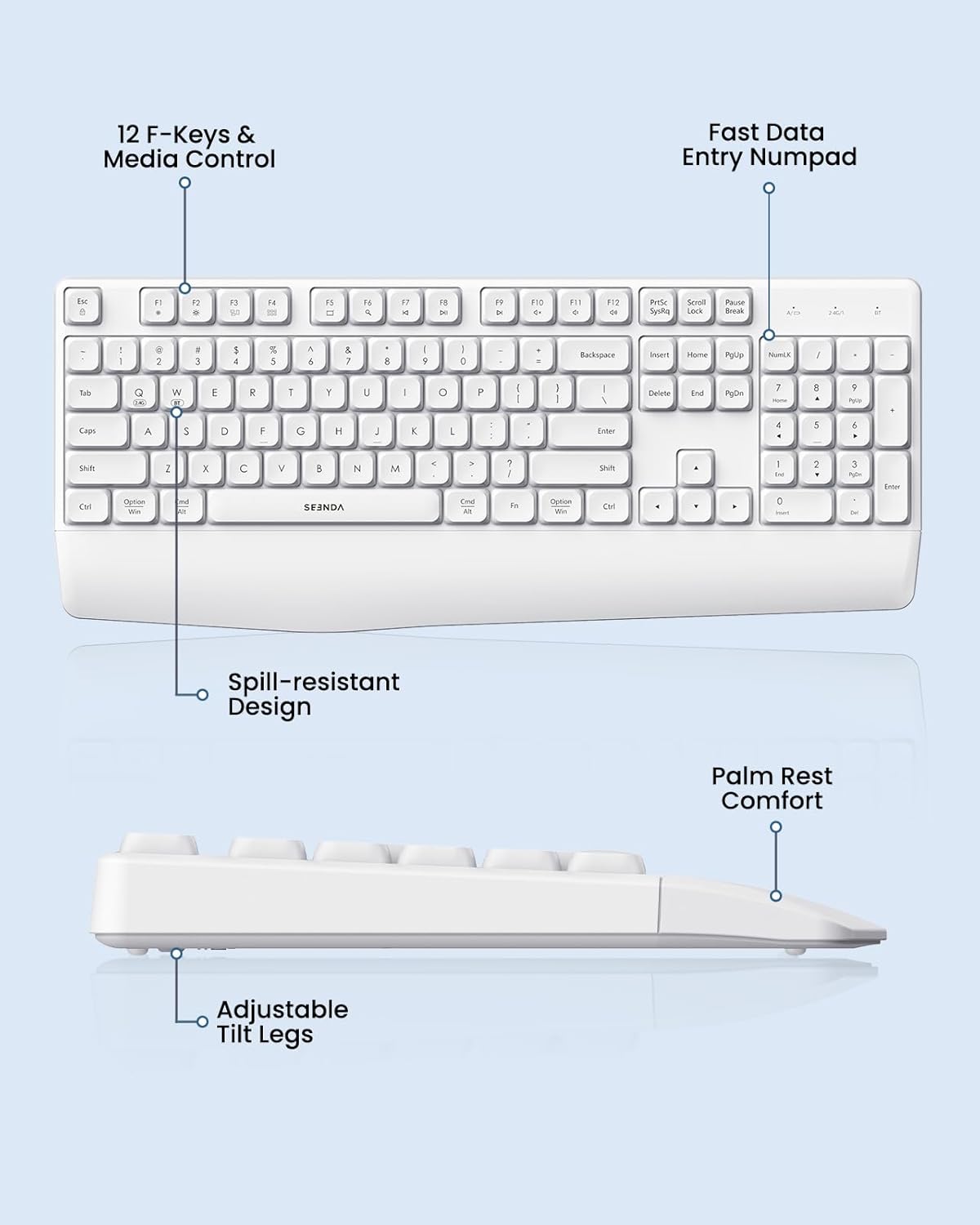
Figure 4: Keyboard features and layout.
2. Карактеристике миша
- Symmetric Design: Удобно и за леворуке и за десноруке кориснике.
- Тихо кликтање: Low-noise clicks create a peaceful working environment.
- Подесиви ДПИ: Cycle through 1000, 1600, and 2400 DPI settings to adjust cursor speed and precision.

Figure 5: Mouse features and DPI settings.
Управљање напајањем
The keyboard and mouse are designed for long-lasting use:
- Продужено трајање батерије: Offers up to 365 days of standby time.
- Функција аутоматског спавања: Devices automatically enter sleep mode after 30 minutes of inactivity to conserve battery power. Simply press any key or click the mouse to wake them up.
Компатибилност
The seenda COE200 combo is widely compatible with various operating systems and devices:
- 2.4G USB Mode: Compatible with Windows XP/7/8/10+.
- Блуетоотх режим: Fully compatible with Windows XP/7/8/10/11+, macOS 10.12+, iPadOS/iOS 13.0+, and Android 4.3 or above. (Requires Bluetooth 4.0 or above on your device).
- Компатибилни уређаји: Laptop, Desktop, Computer, PC, Notebook, Mac, MacBook Pro/Air, iPad, Tablet, iPhone.
Одржавање
Да бисте осигурали дуготрајност и оптималне перформансе ваше комбинације тастатуре и миша:
- Чишћење: Use a soft, dry cloth to clean the surfaces. For stubborn dirt, a slightly damp може се користити крпа, водећи рачуна да влага не уђе у уређај.
- Spill-Resistant: While the keyboard has a spill-resistant design, it is recommended to avoid direct exposure to liquids to prevent damage.
- Складиштење: Чувајте уређаје на хладном и сувом месту, даље од директне сунчеве светлости и екстремних температура.
Решавање проблема
If you encounter issues with your seenda COE200 combo, try the following steps:
- Нема везе/Кашњење:
- Ensure batteries are correctly inserted and have sufficient power. Replace if necessary.
- For 2.4G mode, ensure the USB receiver is securely plugged into your device.
- For Bluetooth mode, ensure Bluetooth is enabled on your device and the keyboard/mouse are in pairing mode (blinking indicator). Re-pair if connection is lost.
- Move the devices closer to your computer to rule out range issues (up to 33ft/10m).
- Try connecting to a different USB port or another device to check if the issue is device-specific.
- Keys/Mouse Buttons Not Working:
- Проверите нивое батерије.
- Ensure the correct connection mode (2.4G or Bluetooth) is selected on both the keyboard and mouse.
- Clean any debris around the keys or mouse buttons.
- Mouse Cursor Jumps/Inaccurate:
- Adjust the DPI setting on the mouse.
- Ensure the mouse is used on a clean, flat surface.
Спецификације
| Феатуре | Детаљ |
|---|---|
| Број модела | COE200 |
| Технологија повезивања | Блутут 5.0, 2.4G УСБ |
| Компатибилни уређаји | Laptop, Desktop, Computer, PC, Notebook, Mac, MacBook Pro/Air, iPad, Tablet, iPhone |
| Посебне карактеристике | Wrist Rest, Spill-Resistant, Adjustable DPI (1000/1600/2400), Quiet Clicking |
| Батерија за тастатуру | 1 ААА (није укључено) |
| Батерија за миш | 1 АА (није укључено) |
| Тежина артикла | 1.98 фунти |
| Димензије пакета | 17.36 к 9.69 к 1.85 инча |
Гаранција и подршка
Your seenda COE200 Wireless Bluetooth Keyboard and Mouse Combo comes with a 24-month warranty. For any questions or assistance, please contact customer support:
- Емаил: суппорт@сеенда.цом
- Радно време: Mon-Sun, 9 AM - 6 PM (GMT+8) (Closed during holidays)
Please refer to the Quick Start Guide included in the packaging for additional contact details and troubleshooting tips.