
Redmi Redmi Pad 2 Wi-Fi + Cellular
Redmi Pad 2 Wi-Fi + Cellular User Manual
Model: Redmi Pad 2 Wi-Fi + Cellular
1. Увод
Welcome to the Redmi Pad 2 Wi-Fi + Cellular user manual. This guide provides essential information to help you get started with your new tablet, understand its features, and ensure optimal performance. Please read this manual thoroughly before using your device.
The Redmi Pad 2 offers a vibrant 2.5K display, powerful MediaTek Helio G100-Ultra processor, long-lasting 9000mAh battery, and supports an Active Pen for enhanced productivity and creativity. With HyperOS 2 and AI-powered features, your tablet experience is designed to be intuitive and efficient.

Слика: Оверview of the Redmi Pad 2's key features, including its 2.5K display, cellular connectivity, immersive audio, 9000mAh battery, HyperOS 2, AI-Powered capabilities, and MediaTek Helio G100-Ultra processor.
2. Почетно подешавање
2.1 Распакивање и садржај пакета
Your Redmi Pad 2 package should contain the following items:
- Redmi Pad 2 Tablet Computer
- Повер Адаптер
- УСБ Типе-Ц кабл
- Алат за избацивање СИМ картице
2.2 Пуњење уређаја
Before first use, fully charge your Redmi Pad 2. Connect the USB Type-C cable to the tablet's charging port and the power adapter, then plug the adapter into a wall outlet. The tablet supports 18W fast charging.
2.3 Укључивање/искључивање
- За укључивање: Press and hold the Power button until the Redmi logo appears.
- За искључивање: Притисните и држите дугме за напајање, а затим изаберите „Искључи“ из опција на екрану.
2.4 Inserting a SIM Card (Cellular Models)
For cellular connectivity, insert a nano-SIM card using the provided SIM ejector tool.
- Пронађите лежиште за СИМ картицу са стране таблета.
- Уметните алат за избацивање СИМ картице у мали отвор поред лежишта и лагано притисните док лежиште не искочи.
- Ставите нано-СИМ картицу у лежиште са златним контактима окренутим надоле.
- Пажљиво гурните лежиште назад у таблет док не кликне на своје место.

Слика: Са стране view of the Redmi Pad 2, illustrating the location of the SIM card tray and physical buttons.
2.5 Повезивање на Ви-Фи
- Иди на Подешавања > Ви-Фи.
- Укључите Ви-Фи.
- Изаберите жељену мрежу са листе.
- Унесите лозинку ако се то од вас затражи и додирните Повежите се.
2.6 Подешавање Google налога
Follow the on-screen prompts to set up your Google account. This is necessary to access the Google Play Store, synchronize data, and use various Google services.
3. Operating Your Redmi Pad 2
3.1 Navigation and User Interface (HyperOS 2)
Your Redmi Pad 2 runs on HyperOS 2, based on Android, providing a smooth and intuitive user experience. Swipe gestures and on-screen buttons allow for easy navigation between apps and settings.
3.2 Карактеристике екрана
Experience crystal-clear visuals on the 11-inch 2.5K (2560x1600 pixels) display with a 90Hz refresh rate for smooth scrolling and animations. The display offers up to 600 nits of brightness for clear visibility in various lighting conditions.

Image: The Redmi Pad 2's 2.5K Crystal Clear Display, highlighting its sharp resolution and vibrant color reproduction.
3.3 Аудио искуство
The tablet features quad speakers with Dolby Atmos support, delivering an immersive audio experience for movies, music, and games.

Image: The Redmi Pad 2 demonstrating its immersive audio capabilities with quad speakers and Dolby Atmos technology.
3.4 Active Pen Support
The Redmi Pad 2 supports an Active Pen (sold separately) for precise input. Use it for note-taking, sketching, marking up documents, and navigating the interface with ultra-low latency and 4096 pressure sensitivity levels.

Image: The Redmi Pad 2 demonstrating Active Pen support for creative tasks, instant answers, effortless note-taking, and handwriting recognition.

Image: A close-up of the Redmi Smart Pen in use, detailing its features such as seamless writing, millisecond-level latency, 4096 pressure sensitivity, 10g activation force, and 12 hours of continuous writing.
3.5 AI-Powered Features
Leverage AI capabilities like Круг за претрагу for instant information retrieval and Gemini AI for personalized assistance, enhancing productivity and entertainment.

Image: The Redmi Pad 2 demonstrating AI-powered features, specifically 'Circle to Search' for instant answers.
3.6 Употреба камере
The tablet is equipped with an 8MP rear camera and a 5MP front camera, suitable for video calls and casual photography. Video capture resolutions include FHD 1080p and HD 720p.
3.7 Складиштење и перформансе
The Redmi Pad 2 comes with 8GB RAM and 256GB internal storage (UFS 2.2 for fast loads). Storage can be expanded up to 2TB using a microSD card (sold separately).

Image: The Redmi Pad 2 highlighting its storage and RAM capabilities, including up to 16GB RAM, 256GB UFS 2.2 storage, and 2TB expandable storage.
Powered by the MediaTek Helio G100-Ultra processor, the tablet delivers efficient performance for multitasking, gaming, and media consumption.
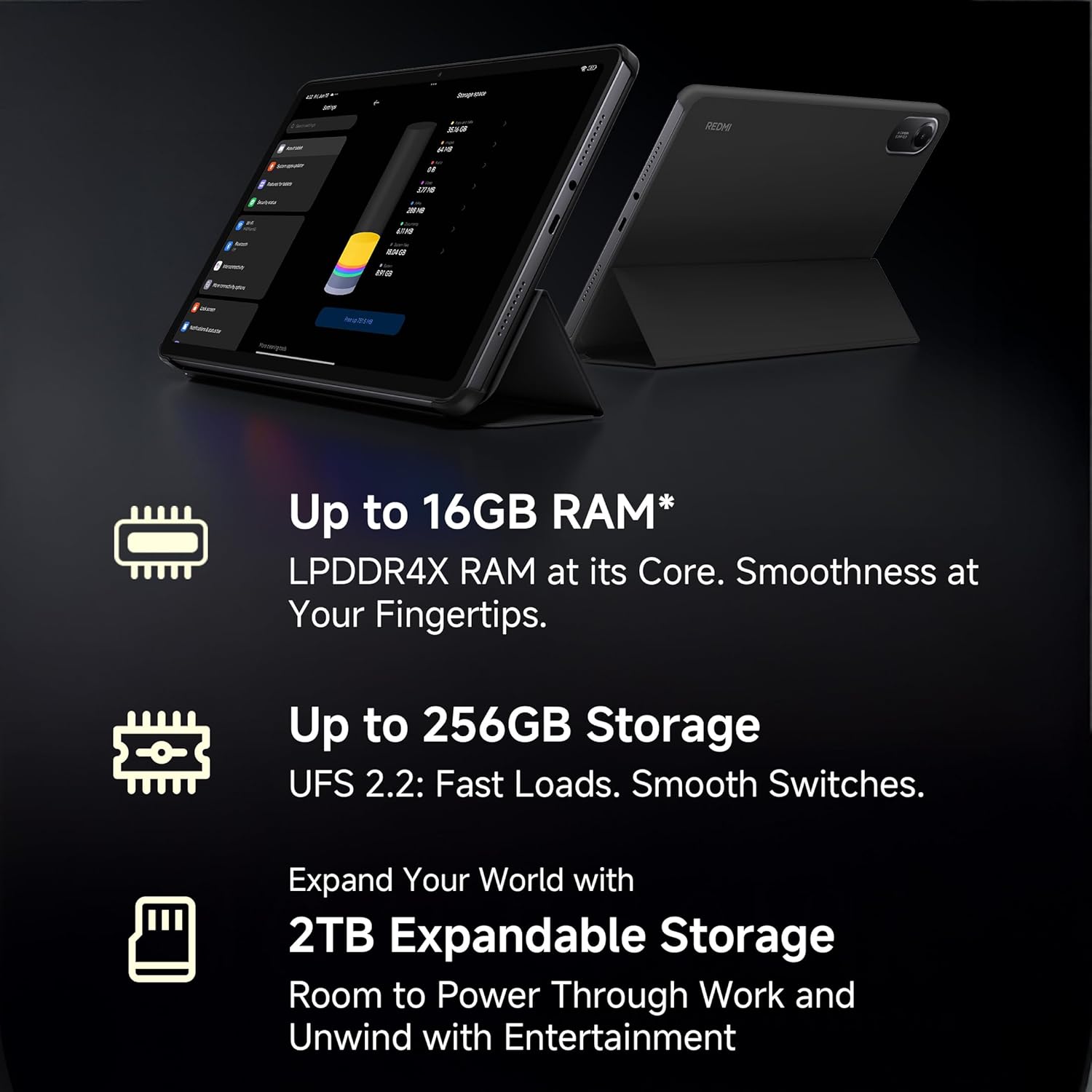
Image: A visual representation of the advanced MediaTek Helio G100-Ultra processor, emphasizing its performance capabilities.
3.8 Повезивање
Stay connected with Wi-Fi (802.11a/b/g/n/ac) and cellular connectivity. The tablet also features Bluetooth for connecting accessories and a USB 2.0 Type-C port for charging and data transfer.

Image: The Redmi Pad 2 demonstrating its cellular connectivity, allowing users to stay connected anytime, anywhere.
4. Одржавање и њега
4.1 Чишћење таблета
Use a soft, lint-free cloth to clean the screen and body of your Redmi Pad 2. Avoid using harsh chemicals or abrasive materials that could damage the display or finish.
4.2 Одржавање батерије
Батерија од 9000 mAh омогућава продужено коришћење. Да бисте продужили век трајања батерије:
- Избегавајте екстремне температуре.
- Не дозволите да се батерија потпуно испразни пре него што је често пуните.
- Користите оригинални пуњач и кабл за оптимално пуњење.

Image: The Redmi Pad 2 highlighting its XL 9000mAh battery, capable of providing up to 19 hours of binge-watching, 22 hours of discoveries, and 10 hours of gaming.
4.3 Ажурирања софтвера
Редовно проверавајте и инсталирајте ажурирања софтвера како бисте били сигурни да ваш таблет има најновије функције, безбедносне закрпе и побољшања перформанси. Идите на Подешавања > О таблету > Ажурирање система.
4.4 Оптимизација складиштења
Периодично реview и обришите непотребне files, apps, and media to maintain optimal performance. Utilize cloud storage or the expandable storage option for large files.
КСНУМКС. Решавање проблема
This section addresses common issues you might encounter with your Redmi Pad 2.
5.1 Уређај се не укључује
- Ensure the battery is charged. Connect the tablet to the charger for at least 30 minutes.
- Притисните и држите дугме за напајање 10-15 секунди да бисте извршили присилно поновно покретање.
5.2 Проблеми са повезивањем (Wi-Fi/мобилна мрежа)
- Ви-Фи: Check if Wi-Fi is enabled in settings. Restart your router. Forget the network and reconnect.
- мобилни: Ensure the SIM card is correctly inserted and activated. Check your mobile data settings. Restart the tablet.
5.3 Споре перформансе
- Затворите неискоришћене апликације које раде у позадини.
- Обришите кеш податке за апликације.
- Обезбедите довољно слободног простора за складиштење.
- Редовно поново покрећите таблет.
5.4 Active Pen Not Responding
- Ensure the Active Pen is charged (if applicable).
- Check Bluetooth connection for the pen in tablet settings.
- Поново покрените таблет.
6. Спецификације
| Феатуре | Детаљ |
|---|---|
| Бранд | Редми |
| Назив модела | Redmi Pad 2 Wi-Fi + Cellular |
| Оперативни систем | Android, HyperOS 2 |
| Процесор | MediaTek Helio G100-Ultra (2.2 GHz) |
| Грапхицс Цопроцессор | Мали-Г57 МЦ2 |
| РАМ | 8 ГБ |
| Интерна меморија | 256 ГБ |
| Екпандабле Стораге | Yes (up to 2TB) |
| Величина екрана | 11 инча (27.94 цм) |
| Резолуција екрана | 2560x1600 пиксела (2.5K) |
| Дисплаи Типе | ЛЦД |
| Рефресх Рате | 90 Хз |
| Макимум Бригхтнесс | 600 гњида |
| Задња камера | 8 МП |
| Предња камера | 5 МП |
| Капацитет батерије | 9000 мАх |
| Просечан век трајања батерије | 10 сата |
| Повезивање | Wi-Fi (802.11a/b/g/n/ac), Cellular |
| Хуман Интерфаце | Екран осетљив на додир са подршком за оловку |
| Аудио Јацк | 3.5 мм |
| Димензије (Д x Ш x В) | 25.5L x 16.6W x 0.7Th Centimeters |
| Тежина артикла | 519 грама |
| Боја | Ски Блуе |
7. Информације о гаранцији
The Redmi Pad 2 Wi-Fi + Cellular comes with a 1-годишња гаранција произвођача. Please retain your proof of purchase for warranty claims. For detailed terms and conditions, refer to the warranty card included in your product packaging or visit the official Redmi webсајту.
8. Корисничка подршка
For further assistance, technical support, or service inquiries, please contact Redmi customer support. You can find contact information on the official Redmi webсајту или путем одељка за подршку у подешавањима вашег уређаја.
Произвођач: BYD (India) Private Limited, Xiaomi
Контакт информације произвођача: BYD (India) Private Limited, Developed Plot No. OZ 7, Sipcot, Oragadam, Sriperambudur, Kancheepuram, Tamil Nadu 602105, India
For online support, visit the official Redmi India Support Page.
Ask a question about this manual
Ask about setup, troubleshooting, compatibility, parts, safety, or missing instructions. Manuals+ will review the question and use this page’s manual context to help answer it.