
1. Увод
Thank you for choosing the DEPSTECH DS650-DL Dual-Lens Articulating Industrial Endoscope. This device is designed for detailed visual inspection in hard-to-reach areas, featuring a dual-lens system with 210° bidirectional rotation, a 4.5-inch IPS monitor, and 1080P high-definition imaging. It is an essential tool for home maintenance, vehicle inspection, and machinery checks.
Please read this manual thoroughly before use to ensure proper operation and to maximize the product's lifespan.
2. Безбедносне информације
- Do not use the endoscope in environments with flammable or explosive gases.
- The probe is IP67 waterproof, but the main unit is not. Avoid exposing the main unit to water or excessive moisture.
- Не покушавајте да растављате или модификујете уређај. То ће поништити гаранцију и може проузроковати оштећење.
- Држите уређај ван домашаја деце.
- Избегавајте директно излагање очију ЛЕД светлима.
- The device features overheat protection. If the temperature exceeds 70°C, a warning will display. If it exceeds 80°C, the device will automatically shut down to prevent damage. Allow the device to cool down before resuming operation.
3. Садржај пакета
Проверите да ли су сви предмети присутни и у добром стању након отварања пакета.
- DEPSTECH DS650-DL Endoscope Unit
- Торбица за складиштење
- Упутство за употребу
- Кабл за пуњење типа Ц
- 32GB Memory Card (pre-installed or included separately)

Image: Contents of the DEPSTECH DS650-DL package.
4. Подешавање
4.1 Пуњење уређаја
Before first use, fully charge the endoscope unit. Connect the provided Type-C charging cable to the charging port on the device and to a suitable USB power adapter (not included).
4.2 Уметање меморијске картице
If the 32GB memory card is not pre-installed, locate the TF card slot on the side of the monitor unit. Insert the memory card with the contacts facing down until it clicks into place.
4.3 Укључивање/искључивање
Press and hold the power button (usually located near the monitor) for a few seconds to turn the device on or off. The IPS monitor will display the startup screen.
5. Операција
5.1 Understanding the Controls

Слика: Прекоview of the endoscope controls and ports.
- Дугме ОК/Потврди: Потврђује изборе у менијима.
- Up/Zoom In Button: Navigates up in menus or zooms in on the image.
- Down/Zoom Out Button: Navigates down in menus or zooms out on the image.
- Дугме за ротацију од 180°: Rotates the real-time image on the screen by 180 degrees.
- Lens Switch Button: Toggles between front camera, side camera, and dual-view режим.
- Фото/Видео дугме: Кратким притиском снимате фотографију, дугим притиском покрећете/заустављате снимање видеа.
- Power Button/LED Adjustment: Short press to adjust LED brightness (3 levels), long press to power on/off.
- Articulating Angle Dial: Controls the 210° bidirectional rotation of the probe tip.
- Слот за ТФ картицу: За уметање меморијске картице.
- Порт типа Ц: За пуњење и пренос података.
- Дугме за ресетовање: Resets the device (use a pin to press).
5.2 Using the Dual-Lens and Articulation
The DS650-DL features both a front camera and a side camera, allowing for a wider inspection range. The probe tip can be articulated up to 210° in two directions for comprehensive viewинг.
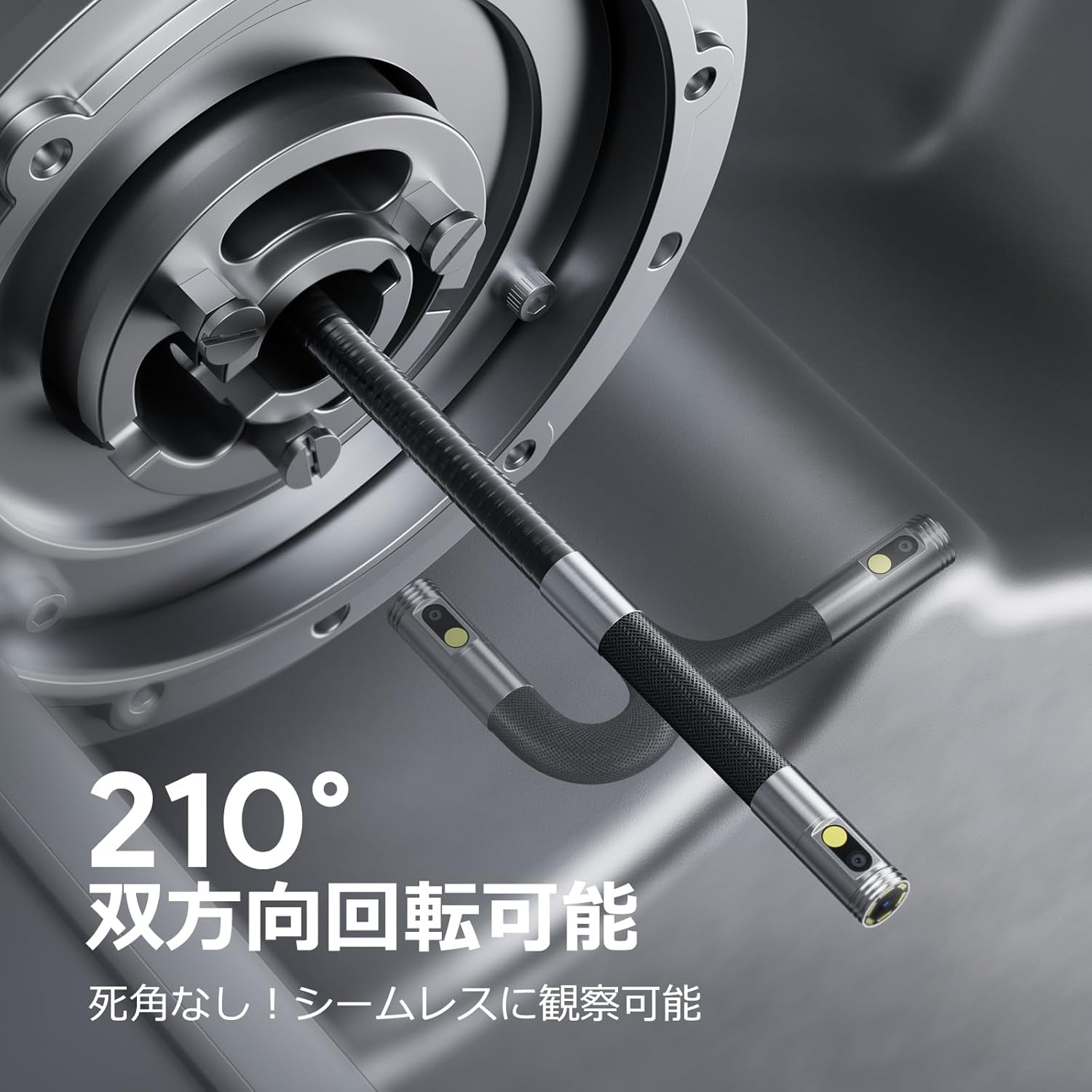
Image: Endoscope probe demonstrating 210° bidirectional articulation.
- Користите Дугме за пребацивање објектива to cycle between the front camera, side camera, or a split-screen dual-view режим.
- Ротирајте Articulating Angle Dial to precisely adjust the direction of the probe tip. This allows you to navigate around obstacles and view areas from multiple angles without repositioning the entire cable.
5.3 Снимање слика и видео записа
The device supports capturing both still images and video recordings directly to the inserted 32GB memory card.

Image: Monitor display showing photo and video capture features.
- Да снимите фотографију: Кратко притисните на Фото/Видео дугме.
- Да снимите видео: Дуго притисните Фото/Видео дугме to start recording. Long press again to stop recording.
- Цаптуред files are saved to the 32GB memory card. You can store approximately 10,000 images or 50 videos.
5.4 Подешавање осветљености ЛЕД диоде
The probe is equipped with high-brightness LED lights to illuminate dark inspection areas. Short press the Power Button/LED Adjustment button to cycle through 3 levels of LED brightness.

Image: IP67 waterproof probe with adjustable LED illumination.
5.5 Пренос података
You can transfer captured images and videos to a computer via the Type-C cable or by directly accessing the memory card.

Image: High-speed data transfer from endoscope to PC.
6. Одржавање
- Чишћење сонде: After use, especially in dirty or wet environments, gently wipe the probe with a soft, damp cloth. Ensure no debris remains on the camera lenses.
- Чишћење монитора: Use a soft, dry cloth to clean the IPS monitor. Avoid abrasive cleaners or solvents.
- Складиштење: Store the endoscope in its provided storage case in a cool, dry place, away from direct sunlight and extreme temperatures. This prevents damage from improper storage and moisture.
- Одржавање батерије: Да бисте продужили век трајања батерије, избегавајте често потпуно пражњење уређаја. Редовно га пуните, чак и ако се не користи дуже време.
КСНУМКС. Решавање проблема
| Проблем | Могући узрок | Решење |
|---|---|---|
| Уређај се не укључује. | Слаба батерија; квар уређаја. | Напуните уређај у потпуности. Ако проблем и даље постоји, контактирајте подршку. |
| Нема слике на екрану. | Cable not connected properly; camera lens obstructed. | Ensure the probe cable is securely connected. Check for obstructions on the lens. |
| Слика је мутна или нејасна. | Lens is dirty; focus distance incorrect. | Clean the camera lens. Ensure the object is within the optimal focal range (3-10cm). |
| Не могу да снимам фотографије/видео записе. | Memory card full or not inserted correctly. | Check if the 32GB memory card is inserted correctly. Delete old files or replace the card if full. |
| Device shuts down automatically. | Активирана заштита од прегревања. | Allow the device to cool down. Avoid using in excessively hot environments. |
8. Спецификације
| Феатуре | Детаљ |
|---|---|
| Бранд | ДЕПСТЕЦХ |
| Број модела | ДС650ДЈ |
| Дисплаи | 4.5-inch IPS LCD Monitor |
| Резолуција камере | 1080П |
| Пречник сонде | 8.5мм |
| Articulation Angle | 210° Bidirectional |
| Цабле Типе | 1.5M Semi-rigid |
| Водоотпорна оцена | IP67 (само сонда) |
| Осветљење | Подесива ЛЕД светла |
| Складиштење | Мицро СД картица од 32 ГБ (укључена) |
| Батерија укључена | Да |
| Димензије пакета | 43.1 к 21.4 к 7.4 цм |
| Тежина пакета | 1.33 кг |
9. Гаранција и подршка
9.1 Гаранција произвођача
This DEPSTECH product comes with a 24-месечна гаранција произвођача. Your order number serves as your proof of purchase for warranty claims. Please retain it.
9.2 Корисничка подршка
For any questions, technical assistance, or warranty inquiries, please contact our professional support team:
Емаил: суппорт.јп@депстецх.цом
We aim to respond to all inquiries within 24 hours (excluding weekends and public holidays, where responses will be provided on the next business day).

Image: DEPSTECH customer support and warranty information.