
Увод
This manual provides detailed instructions for the setup, operation, maintenance, and troubleshooting of your Azeyou 12 Inch Android 15 Tablet, model T12. Please read this manual thoroughly to ensure proper use and to maximize your device's performance and longevity.
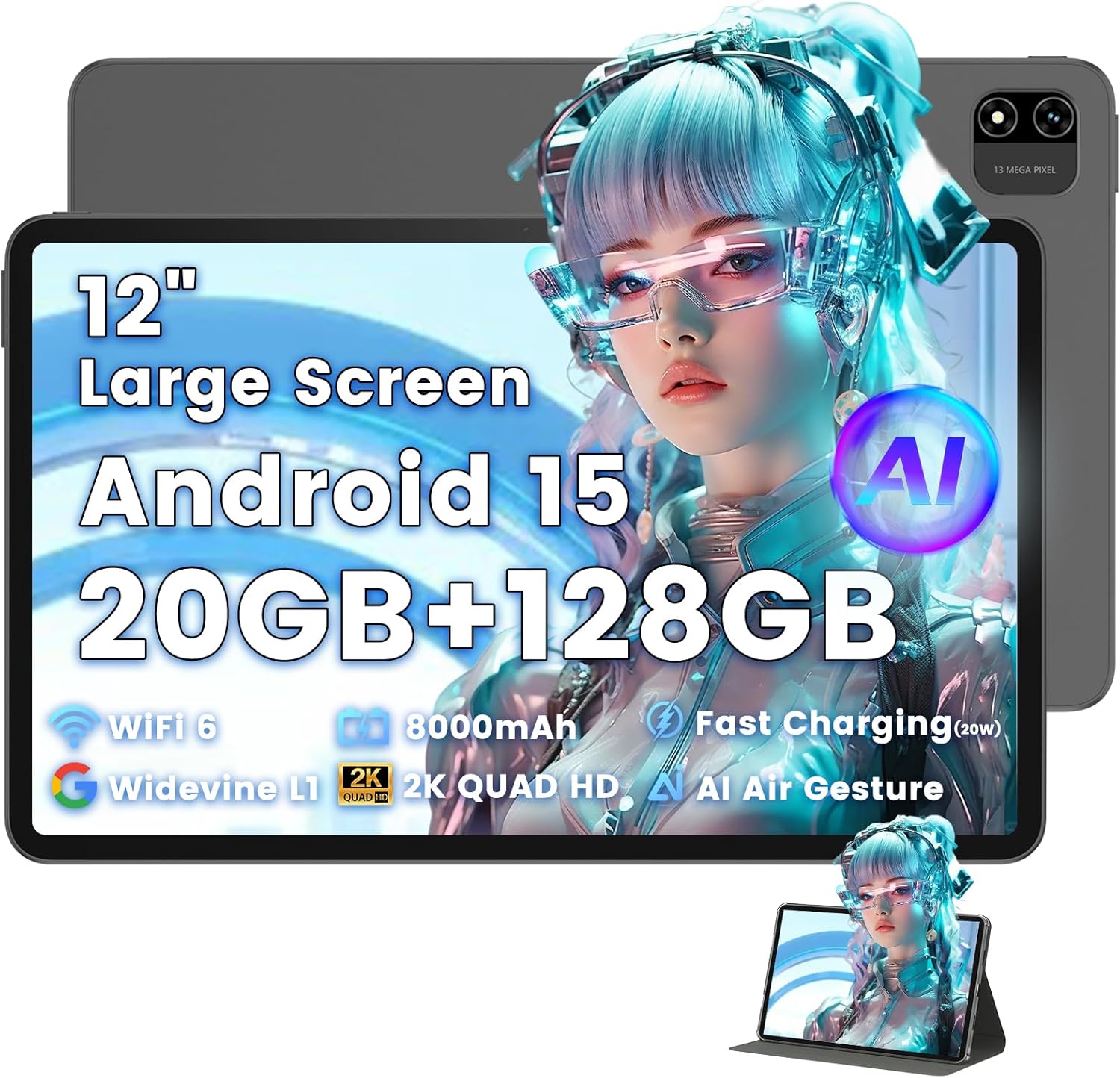
Image: The Azeyou T12 tablet, shown with its protective case, highlighting its large display and sleek design.
Шта је у кутији
Проверите да ли су све ставке присутне у пакету:
- 1x Azeyou Tablet (T12)
- 1x кабл за пуњење (тип C)
- 1к упутство за употребу
- 1к футрола за таблет
Сетуп
1. Почетно пуњење
Before first use, fully charge the tablet. Connect the provided Type-C charging cable to the tablet's charging port and the other end to a compatible 20W Power Delivery (PD) charger. The battery indicator on the screen will show charging status.

Image: An infographic detailing key features of the Azeyou T12 tablet, including its Android 15 operating system, AI octa-core processor, Wi-Fi 6, Bluetooth 5.0, dual cameras, storage capacity, Widevine L1 support, parental control, split-screen function, and 8000mAh battery.
2. Укључивање и искључивање
- За укључивање: Press and hold the Power button located on the side of the tablet until the Azeyou logo appears.
- За искључивање: Press and hold the Power button until the power options appear on the screen, then select "Power Off".
- Рестартовати: Притисните и држите дугме за напајање док се не појаве опције напајања, а затим изаберите „Рестарт“.
3. Чаробњак за почетно подешавање
При првом укључивању, таблет ће вас водити кроз процес почетног подешавања:
- Избор језика: Одаберите жељени језик.
- Ви-Фи веза: Изаберите своју Wi-Fi мрежу и унесите лозинку да бисте се повезали на интернет.
- Гоогле налог: Пријавите се помоћу свог Google налога или креирајте нови. Ово је неопходно за преузимање апликација из Google Play продавнице и синхронизацију података.
- Датум и време: Подесите тачан датум и време или дозволите мрежи да их аутоматски подеси.
- безбедност: Set up a screen lock (PIN, pattern, password, or face unlock).
4. Уметање TF картице (опционо)
The tablet supports storage expansion up to 1TB via a TF (microSD) card. Locate the TF card slot, gently insert the card until it clicks into place. Ensure the tablet is powered off before inserting or removing the TF card.

Image: A visual representation of the tablet's memory and storage, indicating 20GB RAM (6GB physical + 14GB virtual), 128GB internal storage, and support for up to 1TB TF card expansion, alongside popular application icons.
Упутство за употребу
1. Basic Navigation and Gestures
- Додирните: Изаберите ставку или отворите апликацију.
- Додирните и задржите: Приступите контекстуалним менијима или померите иконе.
- Превуците: Померајте се кроз екране или листе.
- Зумирање штипкањем прстију: Увећајте или умањите слике и web странице.
2. Карактеристике екрана
The Azeyou T12 features an 11.97-inch 2K FHD (2000x1200) display with a 90Hz refresh rate for smooth visuals.
- Подешавање осветљености: Swipe down from the top of the screen to access the Quick Settings panel and adjust the brightness slider.
- Филтер плавог светла: The tablet includes a built-in blue light filter that automatically adjusts brightness to reduce eye strain. This can be managed in Display Settings.
- Вајдвајн Л1: Enjoy high-definition content from streaming services like Netflix and Prime Video due to Widevine L1 certification.

Image: A visual representation of the tablet's display specifications, emphasizing its 12-inch screen, 16:10 aspect ratio, 2000x1200 resolution, and 90Hz refresh rate, with a child watching content on the screen.

Image: An illustration demonstrating the tablet's Widevine L1 certification for HD streaming and its quad-speaker system for rich, immersive audio, surrounded by logos of popular streaming services.
3. Перформансе и обављање више задатака истовремено
The tablet is equipped with an A733 octa-core processor and 20GB RAM (6GB physical + 14GB virtual) for smooth operation.
- Режим подељеног екрана: To use two apps simultaneously, open one app, then swipe up from the bottom of the screen and hold to access recent apps. Tap the app icon at the top of the window and select "Split screen". Choose a second app to open in the other half of the screen.
- Управљање апликацијом: Close background apps from the recent apps menu to optimize performance.
4. AI Smart Features
The A733 octa-core processor includes an AI chip that enables several intelligent functions:
- AI Posture Reminder: The tablet can monitor your sitting posture and provide gentle reminders to encourage better habits, especially useful for online learning or extended use.
- AI Gesture Control: Navigate the tablet without touching the screen. Use simple hand movements in front of the camera to flip pages, pause videos, or browse content.
- АИ побољшање слике: The AI engine can enhance low-resolution photos and videos in real-time, improving clarity, detail, and overall visual quality.

Image: A collage demonstrating the tablet's AI capabilities, including an AI Posture Reminder for healthy habits, AI Gesture Control for touch-free navigation, and AI Image Enhancement for improved photo and video quality.
5. камере
The tablet features a 5MP front camera and a 13MP rear camera with autofocus and flash.
- Предња камера: Ideal for video calls, online classes, and selfies.
- Задња камера: Suitable for capturing photos and videos. Features autofocus and flash for improved image quality.
- Откључавање лицем: Utilize the front camera for quick and secure access to your device.

Image: A graphic highlighting the tablet's 5MP front camera and 13MP AI rear camera, showcasing features like AI-enhanced photos and Face Unlock for secure access.
6. Повезивање
- Ви-Фи 6: Connect to high-speed Wi-Fi networks for stable streaming and low-latency online activities. Access Wi-Fi settings via the Quick Settings panel or the Settings app.
- Блуетоотх КСНУМКС: Pair with wireless keyboards, headphones, and other Bluetooth accessories. Enable Bluetooth in Quick Settings or the Settings app.
- Порт типа Ц: Used for charging, fast data transfer, and audio output with compatible Type-C headphones.

Image: A visual representation of the tablet's connectivity features, including Wi-Fi 6, Bluetooth 5.0, and support for Type-C headsets, illustrating seamless integration with various devices and networks.
7. Управљање батеријом
Батерија од 8000 mAh омогућава продужено коришћење. Да бисте оптимизовали век трајања батерије:
- Смањите осветљеност екрана.
- Онемогућите Wi-Fi и Bluetooth када их не користите.
- Затворите непотребне позадинске апликације.
- Use power-saving modes available in Battery Settings.
8. Родитељски надзор
The tablet includes a parental control mode to manage screen time, restrict content, and control app access for children. This feature can be configured in the tablet's settings under 'Digital Wellbeing & parental controls'.

Image: A screenshot of the Android 15 interface on the tablet, highlighting features such as HD streaming, parental control, and split-screen functionality, with various app icons visible.
Одржавање
1. Чишћење таблета
- Користите меку крпу која не оставља влакна да бисте очистили екран и кућиште таблета.
- За тврдокорне мрље, благо дampОперите крпу водом или средством за чишћење екрана намењеним за електронику.
- Избегавајте употребу јаких хемикалија, абразивних материјала или прекомерне влаге.
2. Ажурирања софтвера
Редовно проверавајте и инсталирајте ажурирања софтвера како бисте осигурали оптималне перформансе, безбедност и приступ новим функцијама. Идите на Подешавања > Систем > Ажурирање система.
3. Управљање складиштем
To maintain performance, periodically manage your tablet's storage:
- Обришите непотребне апликације и files.
- Обришите кеш податке за апликације у Подешавања > Апликације и обавештења > [Назив апликације] > Меморија и кеш.
- Utilize cloud storage or transfer large files to an external TF card or computer.
Решавање проблема
If you encounter issues with your Azeyou T12 tablet, refer to the following common solutions:
- Таблет се не укључује:
- Уверите се да је батерија напуњена. Прикључите пуњач и сачекајте неколико минута пре него што покушате да је укључите.
- Извршите присилно поновно покретање држећи дугме за напајање 10-15 секунди.
- Споро функционисање или замрзавање:
- Затворите непотребне позадинске апликације.
- Clear app cache and data.
- Поново покрените таблет.
- Check for available system updates.
- Проблеми са Ви-Фи везом:
- Ensure Wi-Fi is enabled on the tablet.
- Рестартујте свој Wi-Fi рутер.
- Заборавите мрежу у подешавањима Wi-Fi-ја и поново се повежите.
- Apps Crashing or Not Responding:
- Присилно затварање апликације (Settings > Apps & notifications > [App Name] > Force stop).
- Обришите кеш меморију и податке апликације.
- Деинсталирајте и поново инсталирајте апликацију.
- Уверите се да је апликација ажурирана на најновију верзију.
- Екран не реагује:
- Perform a forced restart.
- Уверите се да је екран чист и без прљавштине.
Спецификације
- Назив модела:
- ТКСНУМКС Таблет
- Оперативни систем:
- Андроид 15
- процесор:
- A733 Octa-Core Processor (Unisoc)
- РАМ:
- 20GB (6GB Physical + 14GB Virtual)
- Интерна меморија (ROM):
- 128ГБ
- Прошириво складиште:
- Up to 1TB via TF Card
- Величина екрана:
- 11.97 инча
- Резолуција екрана:
- 2000x1200 FHD
- Брзина освежавања:
- 90Хз
- Графички копроцесор:
- Imagination Technologies BXM-4-64 MC1
- Задња камера:
- 13МП са аутофокусом и блицем
- Предња камера:
- 5МП
- Капацитет батерије:
- 8000мАх
- Пуњење:
- 20W Power Delivery (PD) Fast Charging via Type-C
- Бежична повезаност:
- Wi-Fi 6 (802.11a/b/g/n/ac), Bluetooth 5.0
- аудио:
- Quad-Speakers, Type-C Audio Output
- Димензије (ДкШкВ):
- 11 к 7 к 0.3 инча
- Тежина артикла:
- 3.1 фунти
- Боја:
- Греи
- Посебне карактеристике:
- AI Posture Reminder, AI Gesture Control, AI Image Enhancement, Widevine L1, Parental Control, Split-Screen Mode, Face Unlock
Гаранција и подршка
Информације о гаранцији
Azeyou products typically come with a standard manufacturer's warranty. Please refer to the warranty card included in your product packaging or visit the official Azeyou website for specific warranty terms and conditions. The warranty generally covers manufacturing defects but does not cover damage caused by misuse, accidents, or unauthorized modifications.
Корисничка подршка
For technical assistance, troubleshooting beyond this manual, or warranty claims, please contact Azeyou customer support. Contact details can usually be found on the official Azeyou website or on the product packaging. When contacting support, please have your tablet's model number (T12) and purchase information ready.
Можете посетити Азеју продавница на Амазону за више информација о производу и ресурсе за подршку.