
1. Увод
This manual provides essential instructions for setting up, operating, maintaining, and troubleshooting your FUNYET 2-in-1 Laptop, Model FUN01-05. This device features a 14.1-inch Full HD touchscreen, an Intel Core i7-1265U processor, 16GB RAM, and a 512GB SSD, running Windows 11 Pro. Its 360-degree reversible screen allows for versatile usage modes.
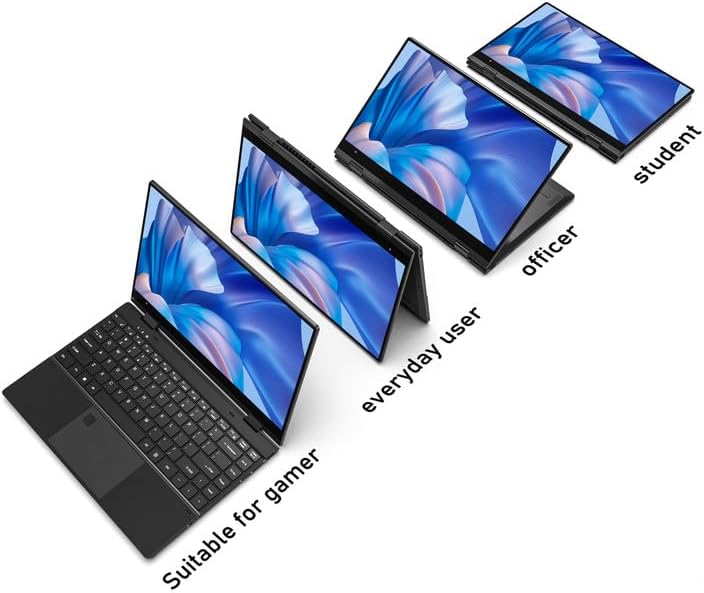
Figure 1: FUNYET 2-in-1 Laptop showcasing its versatile modes.
2. Садржај пакета
Проверите да ли су све ставке присутне у пакету:
- FUNYET 2-in-1 Touch Screen Laptop
- АЦ адаптер
- Гарантни лист
- Упутства (овај приручник)
3. Подешавање
3.1 Почетно пуњење и укључивање
- Connect the AC adapter to the DC-IN port on the laptop and plug it into a power outlet.
- Allow the laptop to charge for at least 30 minutes before initial use.
- Press and hold the Power Button (located on the side) until the screen illuminates.
3.2 Подешавање система Windows 11 Pro
Follow the on-screen prompts to complete the Windows 11 Pro initial setup. This includes selecting your region, language, connecting to a Wi-Fi network, and creating a user account.
3.3 Подешавање читача отиска прста
For enhanced security and quick access, set up the fingerprint reader:
- Идите на Подешавања система Windows > Налози > Опције пријављивања.
- Under "Windows Hello Fingerprint," click "Set up" and follow the instructions to register your fingerprint.

Figure 2: Backlit keyboard and integrated fingerprint reader.
4. Упутство за употребу
4.1 Управљање напајањем
- Укључено: Притисните дугме за напајање.
- Режим спавања: Briefly press the Power Button or close the lid.
- Искључи: Идите на мени Старт > Напајање > Искључи.
- Поново покрени: Идите на мени Старт > Напајање > Поново покрени.
4.2 2-у-1 режими
The laptop's 360-degree hinge allows for four primary modes:
- Notebook Mode: Стандардна конфигурација лаптопа за куцање и продуктивност.
- Режим стајања: Fold the keyboard back to prop up the screen for viewинг садржаја.
- Режим шатора: Position the laptop in an inverted 'V' shape, ideal for touch interaction or presentations in confined spaces.
- Режим таблета: Fold the screen completely back against the base for a tablet experience.

Figure 3: Different operational modes of the 2-in-1 laptop.
4.3 Touchscreen and Keyboard
- екран осетљив на додир: Use gestures similar to a smartphone or tablet for navigation and interaction.
- Тастатура са позадинским осветљењем: The keyboard features a backlight for use in low-light conditions. The backlight can typically be toggled or adjusted using function keys (e.g., Fn + F5).
4.4 Повезивање
Ваш лаптоп подржава различите опције повезивања:
- Ви-Фи 6: For high-speed wireless internet access. Connect via Windows Settings > Network & Internet > Wi-Fi.
- Блуетоотх КСНУМКС: For connecting wireless peripherals like headphones, mice, or keyboards. Pair devices via Windows Settings > Bluetooth & devices.
- Портови: The laptop includes various ports for external devices.

Figure 4: Laptop ports and their functions.
Доступни портови:
- ДЦ-ИН (улаз за напајање)
- USB 3.1 Type-C (Video Output, Data Transfer, Charging)
- Audio Port (Headphones/Microphone)
- Дугме за напајање
- TF Card Slot (for storage expansion up to 1TB)
- УСБ 3.1 Типе-А
5. Одржавање
5.1 Чишћење
- Користите меку крпу која не оставља влакна за чишћење екрана и спољашњости.
- За тврдокорне мрље, дampen the cloth slightly with water or a screen-safe cleaner.
- Avoid harsh chemicals, abrasives, or excessive moisture.
5.2 Одржавање батерије
- Да бисте максимално продужили век трајања батерије, избегавајте често потпуно пражњење батерије.
- Чувајте лаптоп на хладном и сувом месту када га не користите дуже време.
- The laptop features a 38 Watt-hour Lithium-Ion battery, providing up to 8 hours of usage.
5.3 Термално управљање
The laptop is designed with an improved thermal system to maintain optimal operating temperatures. Ensure proper airflow by not blocking the ventilation openings, especially during intensive tasks.

Figure 5: Laptop thermal design for efficient cooling.
КСНУМКС. Решавање проблема
Ако наиђете на проблеме, покушајте са следећим основним корацима за решавање проблема:
- Нема напајања: Уверите се да је АЦ адаптер безбедно повезан и са лаптопом и са исправном утичницом. Покушајте са другом утичницом.
- Screen Not Displaying: Повежите екстерни монитор да бисте проверили да ли је проблем са екраном лаптопа. Поново покрените лаптоп.
- Споре перформансе: Close unnecessary applications. Check for Windows updates. Ensure sufficient free storage space.
- Проблеми са Wi-Fi/Bluetooth мрежом: Toggle Wi-Fi/Bluetooth off and on in Windows Settings. Restart the laptop. Check router/device connections.
- Грешке на екрану: Ensure your Windows operating system and graphics drivers are up to date. This can often resolve display anomalies.
- Екран на додир који не реагује: Restart the laptop. Ensure the screen is clean and free of debris.
For persistent issues, refer to the support section or contact customer service.
7. Спецификације
| Феатуре | Детаљ |
|---|---|
| Бранд | ФУНИЕТ |
| Назив модела | Magbook |
| Број модела | FUN01-05 |
| Величина екрана | 14.1 инча |
| Резолуција екрана | 1920 x 1080 пиксела (FHD) |
| Дисплаи Типе | LCD, Touchscreen, Glossy Finish |
| Процесор | Intel Core i7-1265U (до 4.8 GHz, 8 језгара, 12 нити) |
| РАМ | 16 GB DDR4 (3733 MHz) |
| Складиштење | 512 GB SSD (PCIE x 4), expandable up to 1TB with TF card |
| Оперативни систем | Виндовс 11 Про |
| Графика | Интегрисана Интел Ирис Ксе графика |
| Бежично повезивање | Wi-Fi 6, Bluetooth 5.2 |
| Портс | USB 3.1 Type-A, USB 3.1 Type-C, DC-IN, Audio Jack, TF Card Slot |
| Камера | Front 2 MP |
| Безбедност | Препознавање отиска прста |
| Батерија | 38 Watt Hours Lithium Ion (up to 8 hours) |
| Тежина | 3 фунти |
| Димензије (Д x Ш x Дебљина) | 12.7 cm x 8.6 cm x 0.6 cm |
8. Гаранција и подршка
8.1 Информације о гаранцији
Your FUNYET 2-in-1 Laptop comes with a 2-годишња ограничена гаранцијаОва гаранција покрива производне недостатке и кварове хардвера при нормалној употреби. Молимо вас да сачувате доказ о куповини за потребе подношења захтева за гаранцију.
Поред тога, а 180-дневна политика бесплатног враћања нуди се од датума куповине.
8.2 Корисничка подршка
For technical assistance, warranty claims, or any product-related inquiries, please contact FUNYET customer support:
- Телефонска подршка: +1 800-986-9631 (English phone support available)
- Подршка на мрежи: 24/7 instant online support is available. Please visit the official FUNYET webсајт за контакт детаље.