
1. Производ је готовview
This manual provides instructions for the Gebildet 16mm Blue LED Metal Locking Push Button Switch. This durable switch features a latching mechanism, meaning one press turns it ON and a second press turns it OFF. It is designed for various applications requiring a reliable and waterproof switch with an integrated blue LED indicator.

Image 1.1: Five Gebildet 16mm Blue LED Metal Locking Push Button Switches. These switches feature a metallic housing and a blue LED ring.
2. Садржај пакета
- 5 x Gebildet 16mm Blue LED Metal Locking Push Button Switches
3. Спецификације
| Феатуре | Спецификација |
|---|---|
| Величина монтажне рупе | 16 мм (5/8") |
| Тип прекидача | 1 Normally Open (NO) 1 Normally Closed (NC) |
| Врста операције | Latching (Self-locking) |
| Називна струја/Волtage | 5А, 12-24В |
| ЛЕД Лифе | 40,000 сата |
| Елецтрицал Лифе | 100,000 циклуса |
| Мецханицал Лифе | 500,000 циклуса |
| Стопа заштите | IP65 (Waterproof & Dustproof), IK09 (Anti-vandal) |
| Материјал шкољке | Никловани месинг |
| Контакт материјал | Сребрна легура |
| Панел Тхицкнесс | 1-11мм |
| Обртни момент навртке | 5-14Нм |
| Контакт отпор | ≤50мΩ |
| Отпорност изолације | ≥1000МΩ |
| Температура околине | -20°Ц ~ +50°Ц |
| Број модела | Е1598 |

Image 3.1: Detailed specifications and dimensions of the Gebildet 16mm push button switch, including mounting hole size, switch type, and material.
4. Безбедносне информације
- електрична безбедност: Always disconnect power before installing or servicing the switch to prevent electrical shock.
- Отпорност на воду: The switch is rated IP65 for water and dust resistance, making it suitable for wet or dusty environments. However, do not immerse the switch in water.
- Anti-Vandal: The IK09 rating indicates resistance to external mechanical impact.
- Мали делови: Овај производ садржи ситне делове. Држати ван домашаја деце млађе од 3 године да би се спречила опасност од гушења.

Image 4.1: The switch is designed to be splashproof with an IP65 rating, suitable for use in challenging environments.

Image 4.2: Regulatory information and safety warnings, including a choking hazard notice for small parts.
5. Инсталација
- Ensure the power supply is disconnected before beginning installation.
- Drill a 16mm (5/8") diameter mounting hole in the desired panel. The panel thickness should be between 1mm and 11mm.
- Insert the switch into the mounting hole from the front of the panel.
- Secure the switch by tightening the nut on the back of the panel. Apply a torque of 5-14Nm.
- Proceed with wiring as described in Section 6.
6. Методе ожичења
The switch features 5 brass connections, allowing for flexible wiring configurations. It includes 1 Normally Open (NO) and 1 Normally Closed (NC) contact, and the LED can be wired to be always on or to illuminate only when the device is operating.
Refer to the diagram below for common wiring methods:
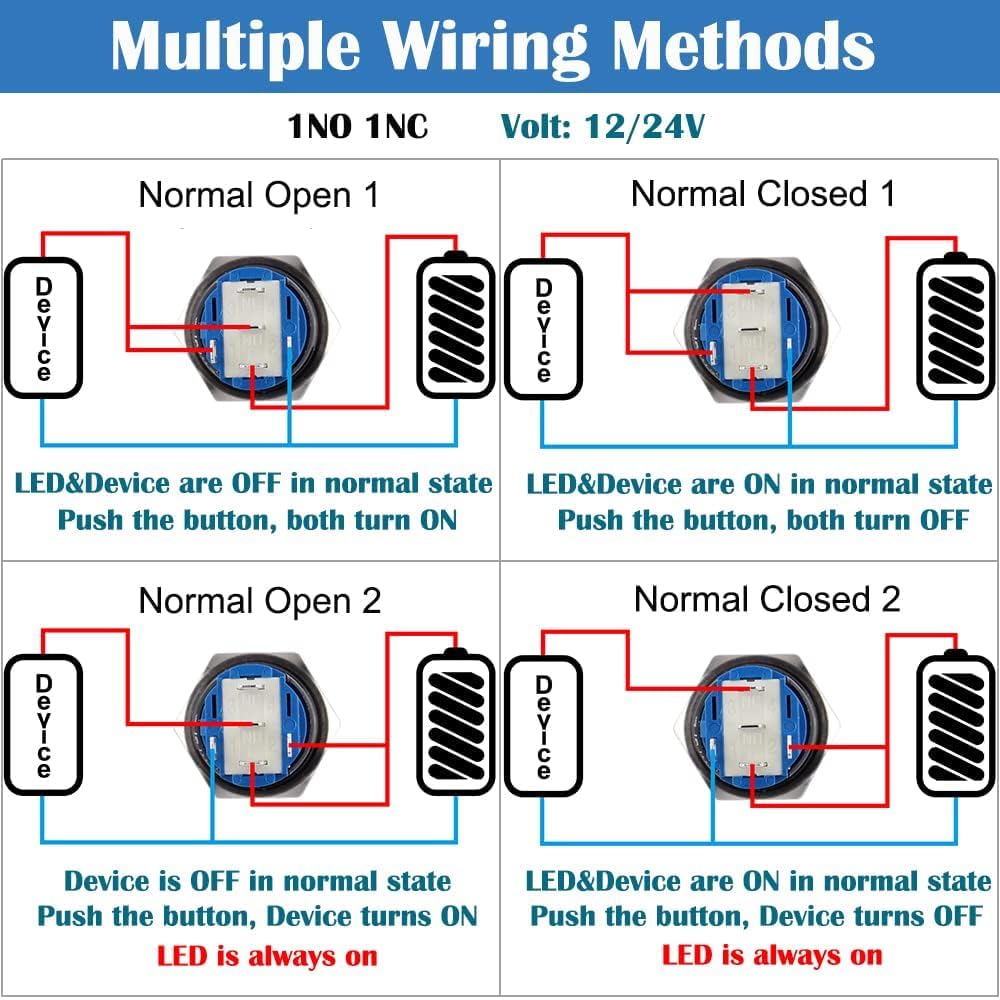
Image 6.1: This diagram illustrates four common wiring configurations for the switch, showing how to control both the device and the LED indicator in Normally Open and Normally Closed setups.
- Normally Open (NO) Configuration: The circuit is open (OFF) when the button is not pressed. Pressing the button closes the circuit (ON).
- Normally Closed (NC) Configuration: The circuit is closed (ON) when the button is not pressed. Pressing the button opens the circuit (OFF).
- The LED can be wired independently or in conjunction with the device operation.
7. Операција
This is a latching (self-locking) push button switch. Its operation is straightforward:
- Да бисте укључили: Press the button once. The switch will lock into the ON position, and the connected device will activate. The LED will illuminate if wired accordingly.
- Да искључите: Press the button again. The switch will release from the locked position, and the connected device will deactivate. The LED will turn off if wired accordingly.

Image 7.1: This diagram illustrates the latching operation: one press turns the switch ON, and a second press turns it OFF.
8. Одржавање
- Чишћење: Да бисте очистили прекидач, обришите га меком крпомamp крпа. Избегавајте употребу абразивних средстава за чишћење или растварача, јер могу оштетити завршну обраду или унутрашње компоненте.
- инспекција: Periodically inspect the switch for any signs of physical damage, loose connections, or wear. Ensure the mounting nut remains securely tightened.
- No internal user-serviceable parts. Do not attempt to disassemble the switch.
КСНУМКС. Решавање проблема
- Switch Not Activating Device:
- Check all wiring connections for proper contact and polarity.
- Verify the power supply to the switch and the connected device.
- Ensure the switch is fully pressed and latched.
- ЛЕД не светли:
- Check the LED's dedicated wiring for correct connections and polarity.
- Confirm the power supply to the LED is within the 12-24V range.
- Ensure the switch is in the ON position if the LED is wired to activate with the device.
10. Гаранција и подршка
For warranty information or technical support, please refer to the retailer where the product was purchased or visit the official Gebildet webсајт за контакт детаље.