
1. Увод
This manual provides essential information for setting up, operating, and maintaining your PELADN Mini PC HA-4 Ryzen 7 7840HS. Please read it thoroughly to ensure proper usage and to maximize the performance and longevity of your device.

Figure 1: The PELADN Mini PC HA-4 Ryzen 7 7840HS, showcasinњегов компактни дизајн и RGB осветљење.
2. Садржај пакета
Проверите да ли су све ставке наведене у наставку укључене у ваш пакет:
- PELADN HA-4 7840HS Mini PC
- ХДМИ кабл
- Повер Адаптер
- Кориснички приручник (овај документ)
- Носач
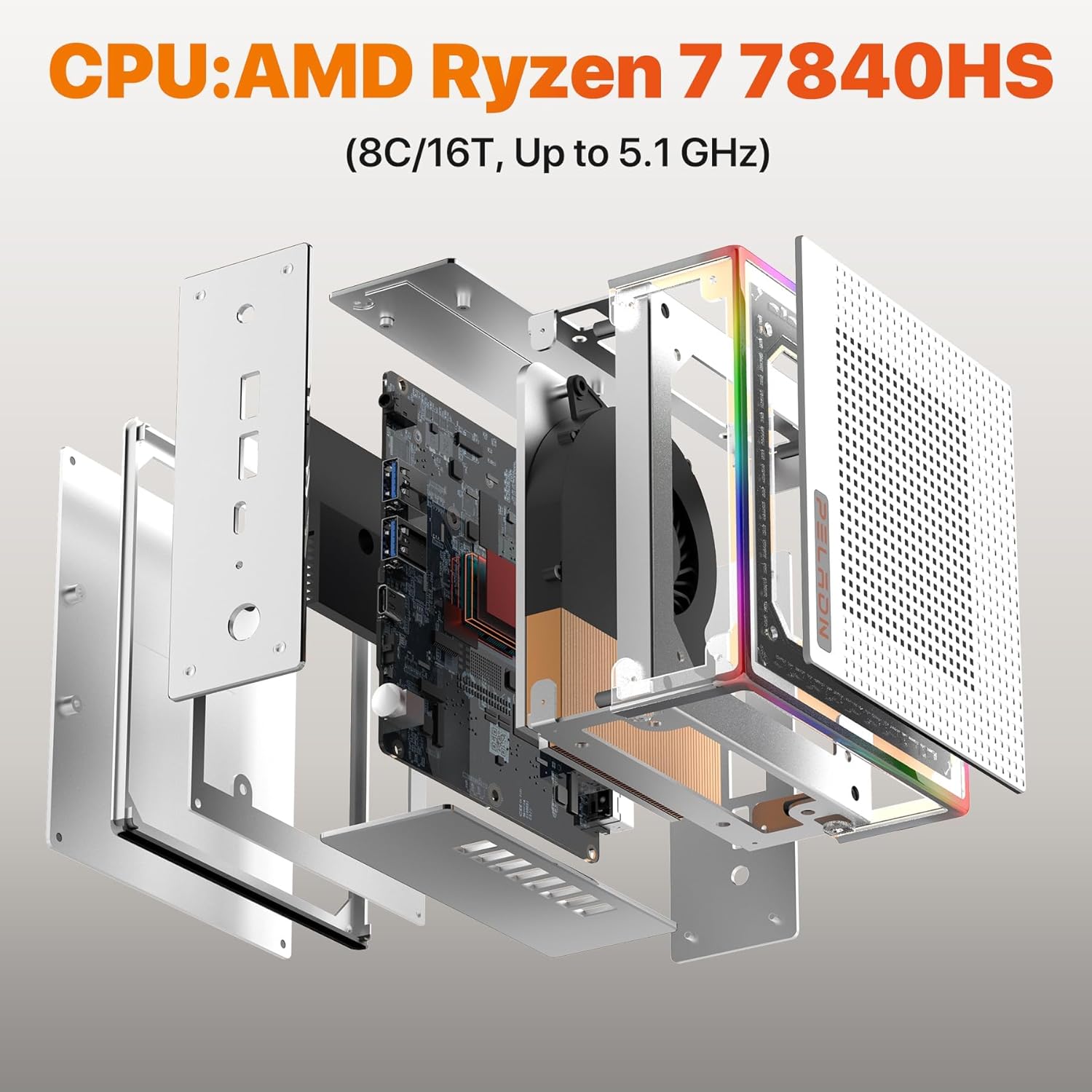
Слика 2: Експлодирао view of the PELADN Mini PC, illustrating its internal components and compact assembly.
3. Производ је готовview
3.1. External Features and Ports
The PELADN Mini PC HA-4 is designed for efficiency and connectivity. It features a compact form factor measuring approximately 5.3 x 5.0 x 2.0 inches.

Слика 3: Детаљно view of the PELADN Mini PC's front and rear ports, including USB, HDMI, and LAN connections.
- Предњи портови: USB 3.0 ports, USB 4 (Type-C) ports, 3.5mm Audio Jack, Power Button.
- Задњи портови: 2x HDMI 2.0, 1x USB 4 (Type-C), 1x USB 3.0, 1x USB 2.0, 1x RJ45 LAN (1000Mbps), DC-IN.
- Хлађење: Enhanced fan brackets improve heat dissipation by 19%.
- РГБ осветљење: The shell features a 64-color RGB light strip. A button at the rear allows toggling between breathing, single-color constant light, and off modes.
4. Водич за подешавање
4.1. Почетно подешавање
Follow these steps to prepare your Mini PC for first use:
- Повежите се са напајањем: Plug the power adapter into the DC-IN port on the Mini PC and then into a power outlet.
- Повежи се са екраном: Use the provided HDMI cable to connect your Mini PC to a monitor or TV. For multi-display setups, use additional HDMI or USB-C 4.0 cables.
- Повежите периферне уређаје: Повежите тастатуру и миш са доступним УСБ портовима.
- Укључено: Press the power button located on the front of the Mini PC.
The device comes pre-installed with Windows 11 Pro. Upon first boot, you will be guided through the Windows setup process. Follow the on-screen instructions to configure your language, region, and user account. Ensure you have an internet connection available during this process for updates.
Video 1: A general guide to initial setup and performance checks for a mini PC.
5. Упутство за употребу
5.1. Multi-Display Setup
The PELADN Mini PC supports up to three 4K displays simultaneously, enhancing productivity and visual experience. Connect your displays using the available 2x HDMI ports and 1x USB-C 4.0 port. Windows will automatically detect the displays, allowing you to configure their arrangement and resolution through Display Settings.

Figure 4: The PELADN Mini PC connected to a triple display setup, demonstrating its multi-tasking capabilities.
5.2. RGB контрола осветљења
Your Mini PC features an integrated 64-color RGB light strip. A dedicated button on the rear of the device allows you to cycle through three lighting modes:
- Режим дисања: Lights gently fade in and out.
- Single-Color Constant Light: Приказује статичну боју.
- Искључено: Искључује RGB осветљење.
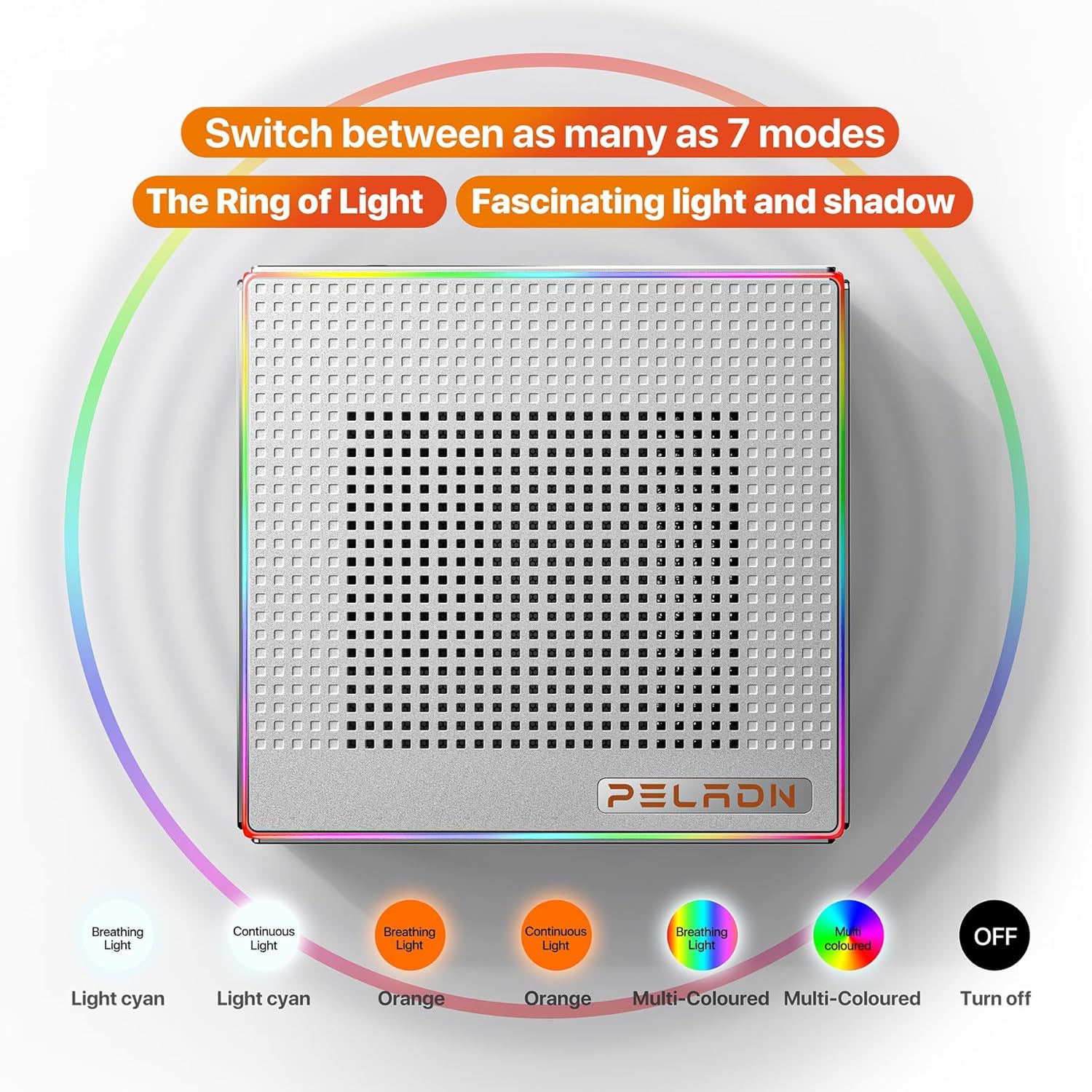
Figure 5: Visual representation of the PELADN Mini PC's RGB lighting options, including various colors and effects.
6. Перформансе прекоview
The PELADN Mini PC HA-4 is equipped with powerful components for a wide range of tasks:
- процесор: AMD Ryzen 7 7840HS (8 cores, 16 threads, up to 5.1GHz, 54W TDP) for high-performance computing.
- Графика: Integrated Radeon 780M (12-core GPU, 2200MHz) capable of 4K HD video playback and light 3D rendering/gaming.
- Меморија: 32GB DDR5 RAM at 5600MHz, expandable up to 64GB.
- Складиштење: 1TB M.2 2280 NVMe SSD with PCIe Gen 4.0 for fast boot times and application loading.
- Мрежа: WiFi 6 and Bluetooth 5.2 for strong wireless connectivity, alongside a 1000Mbps RJ45 LAN port for stable wired connections. Dual USB 4 ports offer up to 40 Gbps transfer speeds.
7. Одржавање
7.1. Cooling and Ventilation
The Mini PC features an optimized cooling system with new fan brackets, improving heat dissipation by 19%. To ensure optimal performance and longevity, keep the ventilation areas clear of obstructions. Avoid placing the device in enclosed spaces that restrict airflow.
7.2. Upgrading RAM and SSD
The device's RAM is upgradeable to a maximum of 64GB (2 x 32GB DDR5). The 1TB M.2 2280 NVMe SSD can also be replaced or upgraded. Refer to the detailed instructions in the full user manual for safe component replacement procedures.
КСНУМКС. Решавање проблема
8.1. Уобичајени проблеми
- Почетно подешавање језика: If the default language is not English, navigate through the Windows setup to select your preferred language. A full reformat may be required if the OS is already fully installed in an undesired language.
- Ви-Фи повезивање: If Wi-Fi issues occur (e.g., not working on certain websites), ensure drivers are updated and the operating system is current. Rebooting the device may resolve temporary issues. Consider using an external Wi-Fi adapter if problems persist.
- Кашњења у перформансама: For intensive tasks or gaming, ensure the device has adequate ventilation. Close unnecessary background applications. If using multiple USB devices, consider a powered USB hub to prevent performance degradation. Adjust display refresh rates in Windows settings and game settings for smoother performance.
- Бука вентилатора: While designed for quiet operation, the fan speed may increase under heavy load. This is normal. Ensure ventilation is not obstructed.
8.2. Техничка подршка
For any technical issues not covered in this manual, please contact PELADN customer support. The product includes a 1-year free warranty and 24/7 customer support for your peace of mind.
9. Спецификације
| Феатуре | Спецификација |
|---|---|
| Процесор | AMD Ryzen 7 7840HS (8C/16T, до 5.1 GHz) |
| Грапхицс Цопроцессор | Radeon 780M |
| РАМ | 32GB DDR5 (5600MHz), upgradeable to 64GB |
| Хард Дриве | 1TB M.2 2280 NVMe SSD (PCIe Gen 4.0) |
| Максимална резолуција екрана | 3840x2160 (4K) |
| Дисплаи Оутпут | 2x HDMI 2.0, 1x USB-C 4.0 (Triple Display Support) |
| Бежично повезивање | ВиФи 6, Блуетоотх 5.2 |
| Етхернет | 1000Mbps RJ45 LAN |
| УСБ портови | Dual USB 4 (Type-C, 40 Gbps), USB 3.0, USB 2.0 |
| Оперативни систем | OS (Pre-installed Windows 11 Pro) |
| Тежина артикла | 2.2 фунти |
| Димензије пакета | 7.48 к 7.48 к 3.54 инча |
10. Гаранција и подршка
The PELADN Mini PC HA-4 comes with a 1-year free warranty. For any inquiries, technical assistance, or warranty claims, please contact PELADN customer support. Our support team is available 24/7 to provide assistance.