
1. Увод
Thank you for choosing the ATKGEAR VXE MAD R Ultra-Lightweight Wireless Gaming Mouse. This manual provides detailed instructions for setting up, operating, maintaining, and troubleshooting your device. The VXE MAD R is engineered for high-performance gaming, featuring an ultra-lightweight design, advanced optical sensors, and flexible connectivity options to enhance your gaming experience.

Слика 1.1: Врх view of the ATKGEAR VXE MAD R Wireless Gaming Mouse. This image displays the mouse's ergonomic shape, scroll wheel, and primary buttons.
2. Садржај пакета
Молимо вас да проверите да ли су све ставке присутне у вашем пакету:
- ATKGEAR VXE MAD R Wireless Gaming Mouse
- УСБ-Ц на УСБ-А кабл за пуњење/дата
- 2.4 GHz Wireless Dongle (8K Polling Rate compatible)
- Упутство за употребу

Image 2.1: The 8K wireless dongle included with the VXE MAD R mouse. This dongle enables high-speed wireless connectivity.
3. Водич за подешавање
3.1 Пуњење миша
Before initial use, it is recommended to fully charge the mouse. Connect the supplied USB-C cable to the mouse's front port and the USB-A end to an available USB port on your computer or a USB wall adapter. The mouse's indicator light will show charging status.
3.2 Повезивање у жичаном режиму
To use the mouse in wired mode, simply connect the USB-C cable from the mouse to your computer's USB-A port. The mouse will automatically switch to wired mode and begin charging.
3.3 2.4 GHz Wireless Mode Connection
- Insert the 2.4 GHz wireless dongle into an available USB-A port on your computer.
- Укључите миш помоћу прекидача за напајање који се налази на дну уређаја.
- The mouse should automatically connect to the dongle. If connection is not established, refer to the troubleshooting section.
3.4 Software Installation (ATK V-Hub)
For full customization and advanced features, download and install the ATK V-Hub software. This software is available as a desktop application and a web-based interface. Visit the official ATKGEAR website for download links and instructions.

Image 3.1: Screenshot of the ATK V-Hub software interface, demonstrating options for customizing mouse settings.
4. Упутство за употребу
4.1 Основне функције
- Леви клик: Примарно дугме за акцију.
- Десни клик: Дугме за секундарну акцију, обично за контекстне меније.
- Точак за померање: For vertical scrolling. Can also be pressed for a middle-click function.
- Бочна дугмад: Programmable buttons, typically used for forward/back navigation by default.
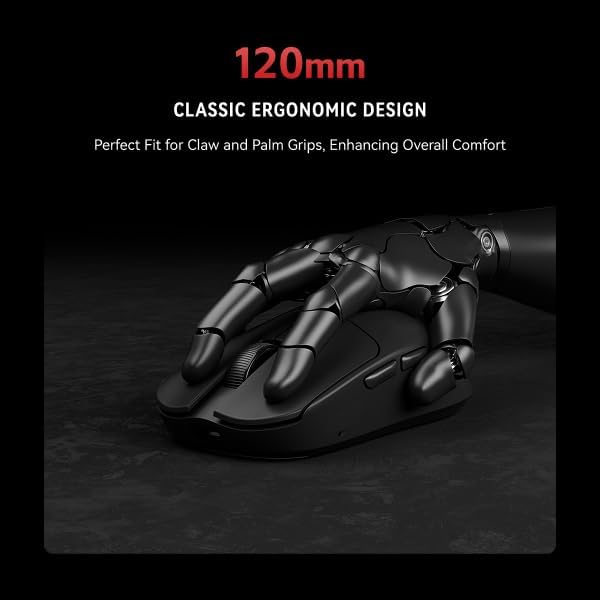
Image 4.1: The ATKGEAR VXE MAD R mouse held in a hand, illustrating its ergonomic design suitable for various grip styles.
4.2 ДПИ подешавање
The mouse features a high-precision optical sensor (PAW3395/PAW3950) with adjustable DPI settings up to 26,000. DPI settings can be customized and switched via the ATK V-Hub software. The mouse may have a dedicated DPI cycle button, which can also be configured in the software.

Слика 4.2: Крупни план view of the Pixart PAW3395/3950 optical sensor, highlighting its precision tracking capabilities.
4.3 Подешавање стопе анкетирања
The VXE MAD R supports a 1KHz polling rate in wired mode and up to an 8KHz polling rate in 2.4 GHz wireless mode. The polling rate can be adjusted through the ATK V-Hub software to suit your preferences and system capabilities.
4.4 Индикатор батерије
The mouse features an LED indicator that displays battery status. Refer to the ATK V-Hub software for detailed battery percentage and low battery warnings.
5. Customization with ATK V-Hub Software
The ATK V-Hub software provides comprehensive control over your VXE MAD R mouse. With this software, you can:
- Remap up to six buttons to custom functions or macros.
- Adjust DPI levels and create multiple DPI profiles.
- Configure polling rates for both wired and wireless modes.
- Customize RGB lighting effects (if applicable to your model).
- Adjust scroll wheel behavior.
- Креирајте и управљајте сложеним макроима.
The software is designed with a clean user interface, avoiding unnecessary bloat, and is available for both desktop and web приступ.
6. Одржавање
6.1 Чишћење
To maintain optimal performance and appearance, regularly clean your mouse. Use a soft, dry, lint-free cloth to wipe the surface. For stubborn dirt, slightly dampen the cloth with water. Avoid using harsh chemicals, abrasive cleaners, or solvents. Ensure no liquid enters the mouse's openings.
The mouse features an "ice-feel" matte coating, which is designed to be stain-resistant and easy to clean.
6.2 Одржавање батерије
To prolong battery life, avoid fully discharging the mouse frequently. Store the mouse at room temperature and avoid extreme heat or cold. If storing for an extended period, charge the battery to approximately 50%.
КСНУМКС. Решавање проблема
7.1 Миш не реагује
- Проверите снагу: Уверите се да је миш укључен и да има довољно напуњености батерије.
- Жична веза: If using wired mode, ensure the USB-C cable is securely connected to both the mouse and the computer. Try a different USB port.
- Бежична веза: If using wireless mode, ensure the 2.4 GHz dongle is securely inserted into a USB port. Try a different USB port. Ensure the dongle is within range (up to 10m).
- Поновно упаривање: If the wireless connection is lost, try re-pairing the mouse with the dongle. Refer to the ATKGEAR website for specific re-pairing instructions if automatic connection fails.
7.2 Sensor Tracking Issues
- Очистите сензор: Уверите се да је оптички сензор на дну миша чист и без прашине или прљавштине.
- Подлога за миш: Use the mouse on a clean, uniform surface or a high-quality mouse pad. Avoid highly reflective or transparent surfaces.
- ДПИ подешавања: Adjust DPI settings in the ATK V-Hub software to a level suitable for your usage.
7.3 Софтвер не детектује миш
- Поново покрени: Restart your computer and the ATK V-Hub software.
- Поново инсталирајте софтвер: Uninstall and reinstall the ATK V-Hub software.
- Ажурирање фирмвера: Check the ATKGEAR website for any available firmware updates for your mouse.
8. Спецификације
| Феатуре | Спецификација |
|---|---|
| Модел | МАД Р |
| Димензије | 120.1 × 63.2 × 38.1 мм |
| Тежина | 36g (±3g); '+' models 42g |
| Цоатинг | "Ice-feel" Matte |
| Сензор | PAW3395 / PAW3950 (up to 26,000 DPI, 650 IPS, 50G acceleration) |
| MCU & Chipset | Nordic nRF52840, Smart Speed X |
| Повезивање | USB-C Wired, 2.4 GHz Wireless |
| Поллинг Рате | 125–1 kHz Wired, 125–8 kHz Wireless |
| Прекидачи | ATK Optical Switches (70 million clicks) |
| Батерија | 200 mAh (standard), 500 mAh ('+' models); 60+ hours play |
| софтвер | ATK V-Hub (Web & Desktop) |

Image 8.1: A comprehensive table detailing the specifications of the ATKGEAR VXE MAD R and MAD R+ models.
8.1 Minimum Recommended PC Hardware Requirements for 8K Polling
- Intel System: CPU: Intel i7-9700K or higher; Graphics Card: NVIDIA RTX 2060 or higher; Memory: 16GB or more; Monitor: Screen refresh rate of 240Hz or higher.
- AMD System: CPU: AMD Ryzen 5 3600X or higher; Graphics Card: AMD RX 5700 XT or higher; Memory: 16GB or more; Monitor: Screen refresh rate of 240Hz or higher.
9. Гаранција и подршка
The ATKGEAR VXE MAD R Wireless Gaming Mouse comes with a standard manufacturer's warranty. For detailed warranty terms and conditions, please refer to the warranty card included in your product packaging or visit the official ATKGEAR webсајту.
For technical support, troubleshooting assistance, or to inquire about replacement parts, please contact ATKGEAR customer service through their official webсајт или контакт информације наведене у документацији вашег производа.