
Увод
The ATK VXE Dragonfly R1 Wireless Gaming Mouse is engineered for high-performance gaming, offering a lightweight design, advanced sensor technology, and versatile connectivity. This manual provides detailed instructions for setting up, operating, and maintaining your R1 gaming mouse to ensure optimal performance.

Слика: Врх view of the ATK VXE Dragonfly R1 Wireless Gaming Mouse in black, showcasing its ergonomic shape and button layout.
Садржај пакета
Молимо вас да проверите да ли су све ставке присутне у вашем пакету:
- ATK VXE Dragonfly R1 Wireless Gaming Mouse
- USB-C кабл за пуњење/пренос података
- 2.4 GHz бежични пријемник (USB адаптер)
- Кориснички приручник (овај документ)
- Nonstandard Battery (pre-installed)
Сетуп
1. Пуњење миша
Пре прве употребе, препоручује се да потпуно напуните миш. Повежите приложени USB-C кабл са портом за пуњење миша, а други крај са USB извором напајања (нпр. USB порт рачунара, USB адаптер за зид).
2. Опције повезивања
The ATK VXE Dragonfly R1 supports multiple connection modes:
- Бежична веза од 2.4 GHz: For optimal gaming performance. Insert the 2.4GHz USB receiver into an available USB port on your computer. The mouse should automatically connect.
- Блуетоотх: For general use and compatibility with various devices. Activate Bluetooth pairing mode on the mouse (refer to operating instructions for specific button combinations) and select "ATK VXE R1" from your device's Bluetooth settings.
- Жични (USB-C): Connect the mouse directly to your computer using the USB-C cable. This mode also charges the mouse.

Image: Diagram illustrating the Tri-Mode connectivity options: Bluetooth, 2.4GHz wireless, and wired USB-C connection for the ATK VXE Dragonfly R1 mouse.
Упутство за употребу
1. Укључивање/искључивање
Locate the power switch on the underside of the mouse. Slide it to the "ON" position to power on and "OFF" to power off.
2. Подешавање DPI-ја
The mouse features adjustable DPI settings. Press the DPI button (usually located on the underside or top of the mouse, depending on the model) to cycle through preset DPI levels. An indicator light may change color to show the current DPI setting.
3. Programmable Macro Keys
The ATK VXE Dragonfly R1 includes programmable macro keys. To customize these keys, download and install the official ATKGEAR software from the manufacturer's website. The software allows you to assign functions, macros, and adjust other mouse settings.
Кључне карактеристике
- Lightweight Design (48g): The R1 mouse is designed for agility and comfort during extended gaming sessions.
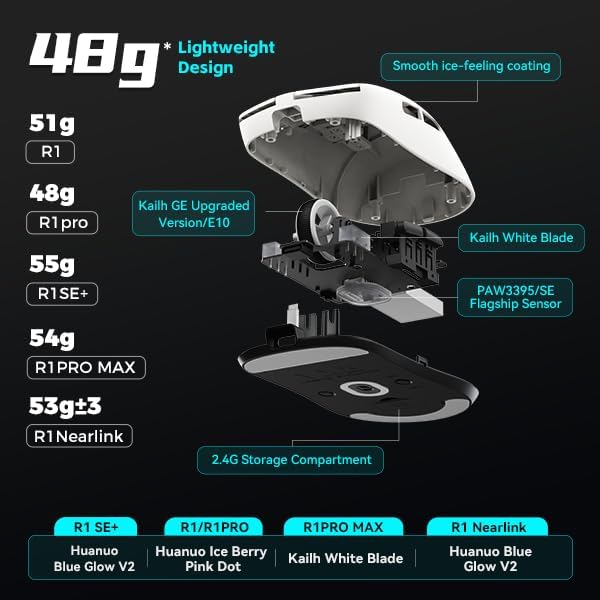
Слика: Експлодирана view of the ATK VXE Dragonfly R1 mouse highlighting its lightweight internal components and showing weight comparisons for different R1 series models.
- PAW3395/SE Flagship Sensor: Equipped with a high-end optical sensor for precise tracking and accuracy, essential for competitive gaming.
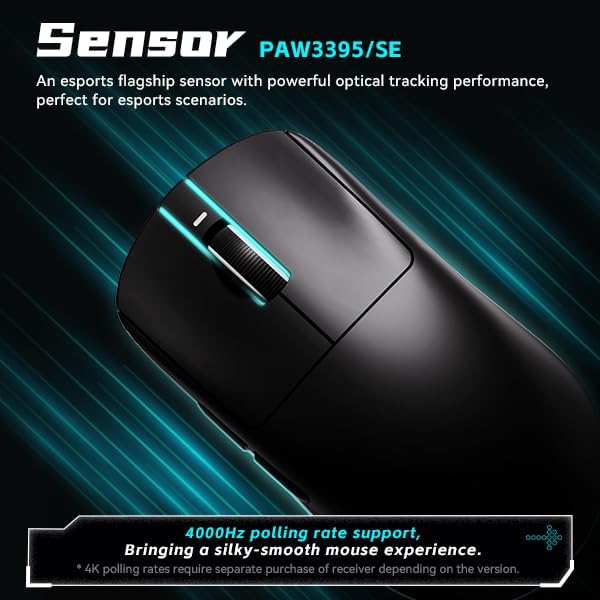
Image: Close-up of the ATK VXE Dragonfly R1 mouse, emphasizing the PAW3395/SE sensor and indicating 4000Hz polling rate support.
- Smart Speed X Transmission Technology: VXE's proprietary wireless technology ensures ultra-low latency and enhanced signal stability, even in environments with interference.

Image: Depiction of the ATK VXE Dragonfly R1 mouse with text highlighting "Smart Speed X" wireless transmission technology for low latency.
- Nordic/BEKEN(compx)/Hisilicon Nearlink MCU: Features a flagship-level chip for powerful performance, low power consumption, and improved interference resistance.

Image: Graphic showing the ATK VXE Dragonfly R1 mouse and its MCU, emphasizing 4K polling rate capability for both office and gaming.
- ATK Micro Switches (Kailh White Blade / Ice Berry Pink Dot): Designed for a consistent click feel and long lifespan.
- Kailh White Blade: 100 Million Click Lifespan, balanced feel.
- Ice Berry Pink Dot: 90 Million Click Lifespan, soft bounce feel.

Image: Detailed illustration comparing Kailh White Blade and Ice Berry Pink Dot micro switches, showing their click lifespan and feel characteristics.
- Smooth Ice-Feeling Coating: A dirt-resistant and easy-to-clean surface that provides a comfortable and grippy feel.

Image: Visual representation of the smooth ice-feeling coating on the ATK VXE Dragonfly R1 mouse, contrasting smooth and matte textures available on different R1 series models.
Одржавање
- Чишћење: Користите меку, суву крпу да обришете површину миша. За тврдокорну прљавштину, благо дamp cloth with mild soap can be used, ensuring no liquid enters the mouse. The "Ice-Feel" coating is designed to be dirt-resistant and easy to clean.
- Одржавање батерије: Да бисте продужили век трајања батерије, избегавајте често потпуно пражњење миша. Пуните миш када је индикатор батерије низак. Чувајте миш на хладном и сувом месту када га не користите дуже време.
- Одржавање сензора: Одржавајте оптички сензор на доњој страни миша чистим и без прашине или остатака ради прецизног праћења.
Решавање проблема
- Миш не реагује:
- Уверите се да је миш укључен.
- Проверите ниво батерије и по потреби је напуните.
- For 2.4GHz wireless, ensure the USB receiver is securely plugged in and within range.
- For Bluetooth, ensure Bluetooth is enabled on your device and the mouse is paired.
- Покушајте да се повежете преко USB-C кабла да бисте искључили проблеме са бежичном мрежом.
- Inconsistent tracking:
- Очистите оптички сензор на доњој страни миша.
- Уверите се да користите миш на одговарајућој површини (нпр. подлога за миш).
- Check for software updates for the mouse driver or ATKGEAR software.
- Проблеми са повезивањем:
- Move the mouse closer to the 2.4GHz receiver or Bluetooth device.
- Avoid sources of strong electromagnetic interference (e.g., Wi-Fi routers, other wireless devices).
- Re-pair the Bluetooth connection or re-insert the 2.4GHz receiver.
Спецификације
| Феатуре | Детаљ |
|---|---|
| Модел | R1 |
| Димензије | 6.3 x 4.72 x 2.36 инча (паковање) |
| Тежина артикла | 7 ounces (approx. 48g for mouse only) |
| Сензор | PAW3395/SE Optical |
| Повезивање | Блутут, бежични 2.4 GHz, жичани USB-C |
| Поллинг Рате | Up to 4000Hz (requires separate receiver for some versions) |
| Мицро Свитцхес | Kailh White Blade (100M clicks) / Ice Berry Pink Dot (90M clicks) |
| Цоатинг | Smooth Ice-Feeling |
| Батерија | Нестандардна батерија (укључена) |
| Произвођач | ATKGEAR |

Image: Detailed table outlining specifications for various models within the VXE Dragonfly R1 series, including dimensions, coating, sensor, chip, polling rate, battery life, weight, microswitches, scroll wheel, mouse feet, and connection methods.
Гаранција и подршка
For warranty information and technical support, please refer to the official ATKGEAR website or contact their customer service. Specific warranty terms may vary by region and retailer. Keep your proof of purchase for warranty claims.
Manufacturer: ATKGEAR