
Увод
This manual provides instructions for the proper setup, operation, and maintenance of your OMOTON GH03 Tablet Stand. Please read these instructions carefully before use to ensure optimal performance and longevity of the product.
Садржај пакета
Проверите да ли су све компоненте присутне у пакету:
- Aluminum tablet holder
- Plastic phone clamp
- Plastic tablet clamp
- Ц-цлamp base with adjustable arm
Упутства за подешавање
Follow these steps to set up your OMOTON GH03 Tablet Stand:
1. Attaching the C-Clamp База
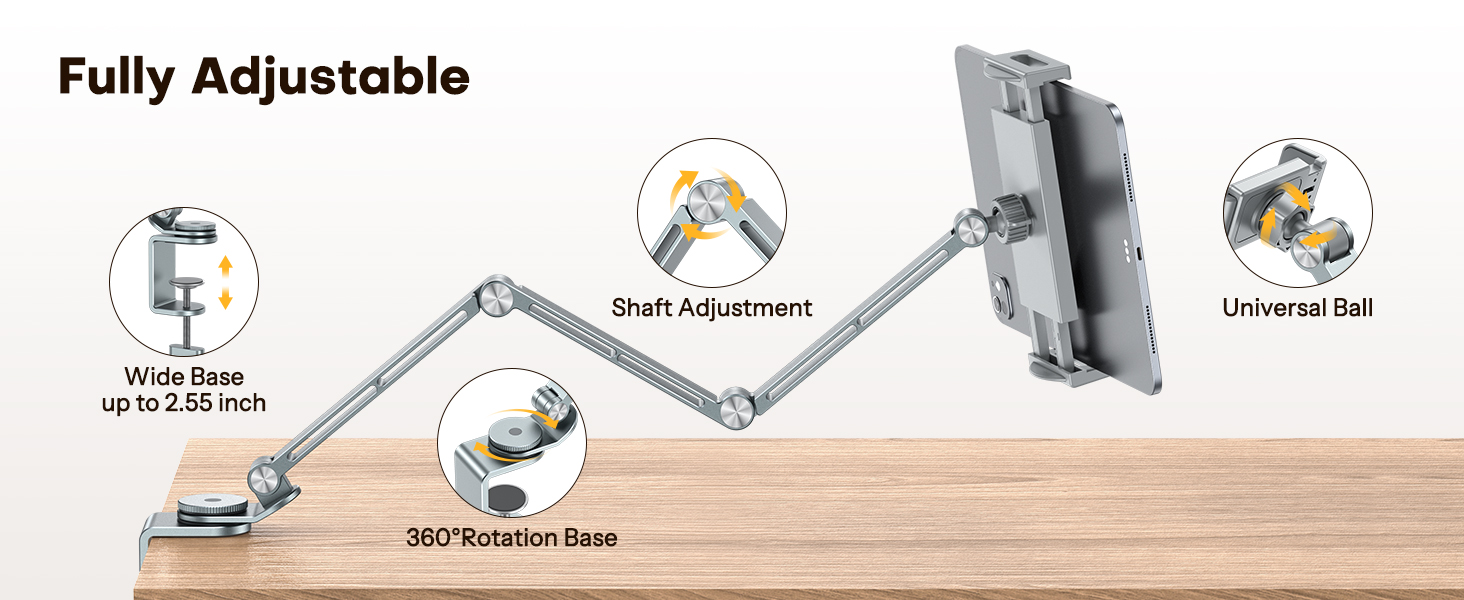
Тхе Ц-цлamp base is designed to securely attach to surfaces up to 2.55 inches thick. Locate a stable surface such as a desk, headboard, or side cabinet.
- Unscrew the knob on the C-clamp base to open the clamp.
- Поставите цлamp onto the edge of your desired surface.
- Затегните дугме док не дође до цлamp is firmly secured and does not wobble. Ensure the rubber padding on the base protects your surface from scratches.

2. Attaching the Device Clamp
The stand comes with two plastic clamps: one for phones and one for tablets. Choose the appropriate clamp за ваш уређај.
- Identify the ball joint at the end of the adjustable arm.
- Align the chosen plastic clamp (phone or tablet) with the ball joint.
- Притисните цлamp onto the ball joint until it snaps securely into place.
- Tighten the collar around the ball joint to secure the clamp's angle.

Упутство за употребу
The OMOTON GH03 stand offers flexible adjustment for optimal viewинг.
1. Inserting Your Device
- Gently pull apart the jaws of the plastic clamp.
- Insert your phone or tablet into the clamp, ensuring it is centered and held securely. The plastic clamps are designed to protect your device from scratches.
2. Adjusting Angle and Height
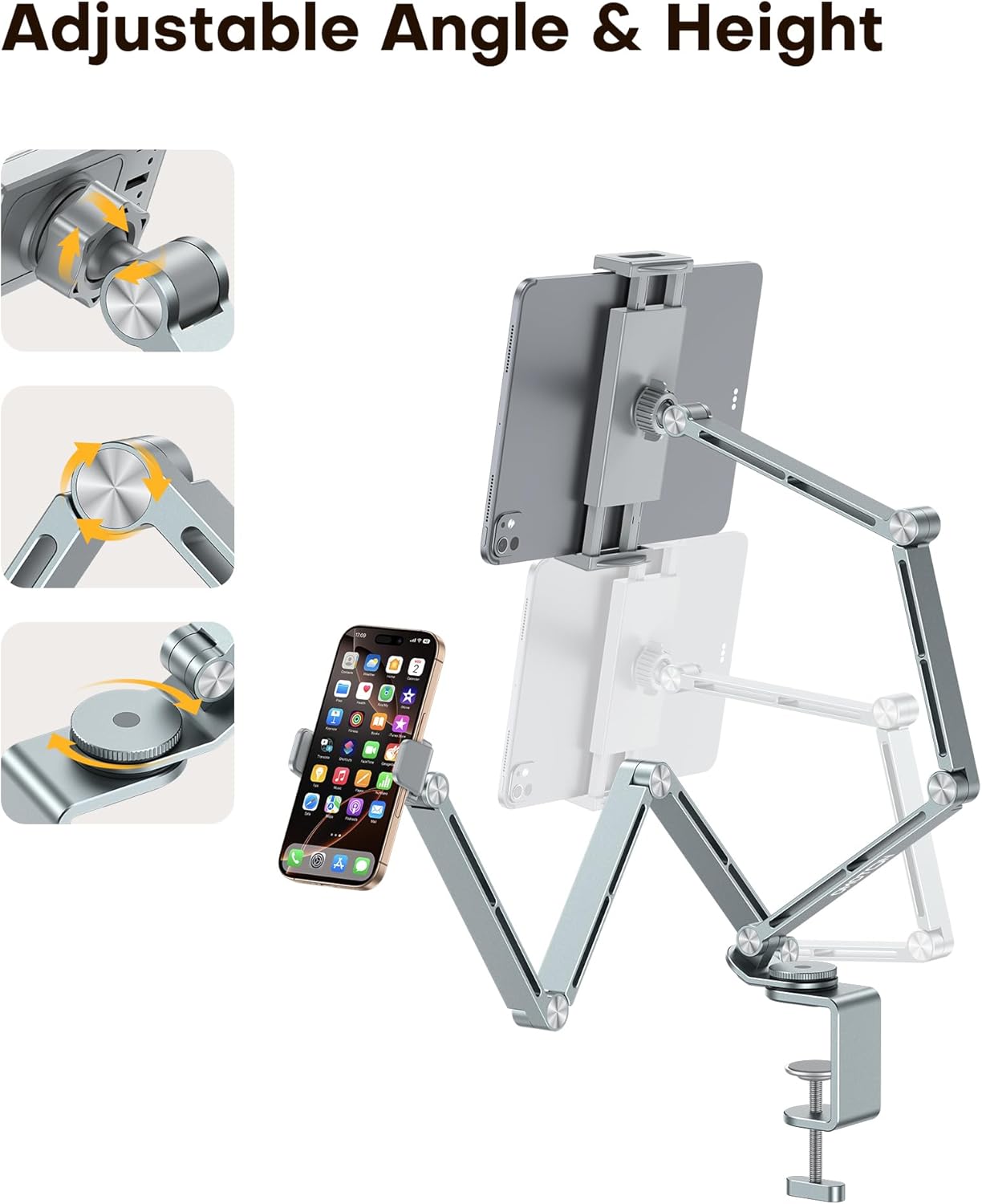
The stand features multiple rotating shafts and a 360° rotating base for comprehensive adjustment:
- Подешавање руке: The multi-joint aluminum alloy arm allows for various height and distance adjustments. Gently move the arm to your desired position. The joints are designed to hold their position once set.
- Ротација базе: The base can rotate 360°. Use the tension control knob on the base to adjust the tightness, preventing unwanted side shaking.
- Уређај Цлamp Угао: The ball joint connection allows for 360° rotation and tilt of your device. Loosen the collar, adjust the device to your preferred viewing angle (portrait or landscape), and then tighten the collar to secure it.
Одржавање
To ensure the longevity and proper function of your OMOTON GH03 Tablet Stand, follow these maintenance guidelines:
- Чишћење: Wipe the stand with a soft, dry cloth to remove dust. For stubborn marks, a slightly damp Може се користити крпа, а затим одмах осушити. Избегавајте абразивна средства за чишћење или раствараче.
- Joints and Clamps: Periodically check all screws and knobs to ensure they are tight. Do not overtighten. Ensure the rubber padding on the clamps and base remains intact to protect your devices and surfaces.
- Складиштење: When not in use for extended periods, store the stand in a clean, dry place.
Решавање проблема
If you encounter any issues with your OMOTON GH03 Tablet Stand, refer to the following common solutions:
- Сталак је климав:
- Уверите се да је C-clamp is securely tightened to the surface.
- Check the tension control knob on the rotating base and tighten it if necessary.
- Device slips from clamp:
- Verify that you are using the correct clamp size for your device (phone clamp for phones, tablet clamp for tablets).
- Ensure the device is properly seated and centered within the clamp чељуст.
- Arm does not hold position:
- The joints are designed to be firm. If they feel loose, gently check for any visible loose screws and tighten them if possible. Avoid excessive force.
Спецификације
| Бранд | ОМОТОН |
| Број модела | ГХ03 |
| Материјал | Алуминијумска легура |
| Боја | Греи |
| Тип монтаже | Стона површина (C-clamp) |
| Компатибилни уређаји | 4-13 inch tablets and phones (e.g., iPad Pro/Air/Mini, Samsung Galaxy Tabs, iPhone series, Kindle, Surface Pro, Switch) |
| Ц-Цлamp Дебљина | До 2.55 инча |
| Посебне карактеристике | 360 Degree Rotation, Adjustable, Ergonomic, Dual Plastic Clamps |


Информације о гаранцији
OMOTON provides a warranty for this product. For specific details regarding the warranty period and coverage, please refer to the documentation included with your purchase or contact OMOTON customer support.
Корисничка подршка
For any product-related issues, questions, or assistance, please contact the OMOTON support team. They are available to help ensure a satisfactory experience with your product.
Contact information can typically be found on the OMOTON official webсајту или путем ваше платформе за куповину.