
Увод
This manual provides detailed instructions for the setup, operation, and maintenance of your TANALAZ K71Pro Portable Karaoke Machine. Please read this manual thoroughly before using the product to ensure proper function and longevity. Keep this manual for future reference.
Производ је завршенview
Укључене компоненте:
- 1 x TANALAZ K71Pro Karaoke Speaker
- 2 к бежични микрофони
- 1 x Microphone Base/Holder
- КСНУМКС к УСБ-Ц кабл за пуњење
- 1 к Упутство за употребу
Кључне карактеристике:
- Компактан и преносив дизајн: Measures 3.7 x 3.14 x 3.42 inches, weighing 0.65 lbs, with a hand strap for easy transport.
- Двоструки бежични микрофони: Allows for duet singing with 5 voice-changing effects (original, female, male, monster, baby voice).
- Integrated Microphone Base: Provides organized storage and prevents microphones from falling. Compatible with TANALAZ K8, K21, K32, K79 microphones.
- Блуетоотх 5.3 повезивање: Ensures stable and long-distance wireless transmission for audio streaming from smartphones, tablets, and computers.
- Multi-functional Speaker: Can be used as a standalone Bluetooth speaker.
- Vibrant LED Party Lights: Dynamic color-changing lights integrated into the speaker to enhance the user experience.
- Више опција репродукције: Supports Bluetooth, AUX input, and TF Card (MicroSD card, not included) for versatile audio sources.
- Дуг век трајања батерије: Built-in 1200mAh battery provides 4-6 hours of continuous use.
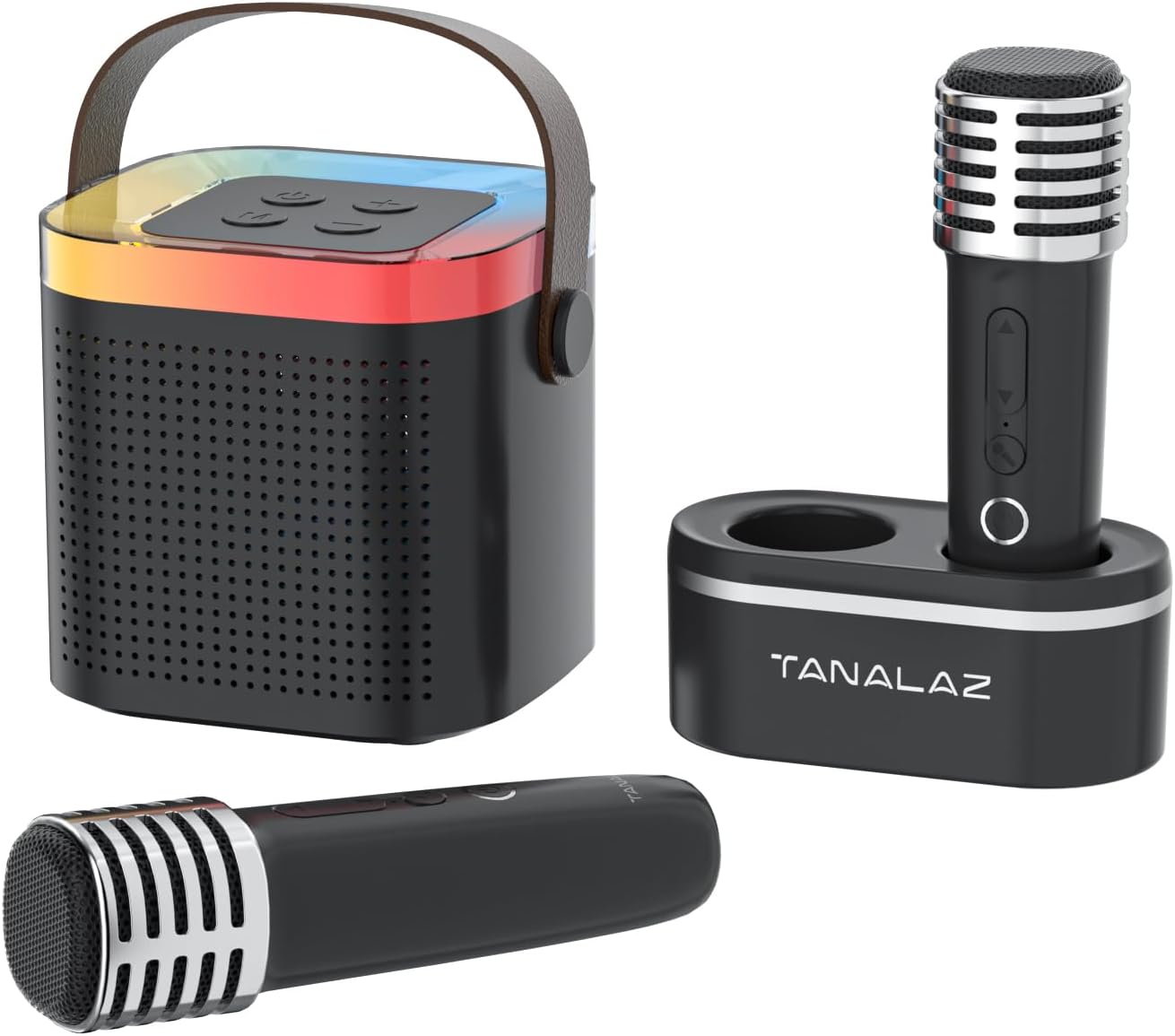
Image: The TANALAZ K71Pro karaoke machine, featuring the main speaker unit, two wireless microphones, and a dedicated microphone base for storage.

Слика: Експлодирана view illustrating the internal speaker components of the TANALAZ K71Pro, alongside the two wireless microphones and their base.
Сетуп
- Charging the Devices:
- Connect the provided USB-C charging cable to the charging port on the karaoke speaker and a suitable USB power adapter (not included).
- Connect the USB-C charging cable to the charging ports on each wireless microphone and a suitable USB power adapter.
- The charging indicator lights will illuminate during charging and turn off or change color when fully charged. Allow sufficient time for a full charge before first use.
- Укључивање:
- Press and hold the power button on the karaoke speaker until you hear a power-on prompt and the LED lights activate.
- Press and hold the power button on each wireless microphone until they power on.
- Блуетоотх упаривање:
- Ensure the karaoke speaker is powered on and in Bluetooth pairing mode (usually indicated by a flashing LED light).
- На паметном телефону, таблету или другом уређају који подржава Bluetooth, идите на подешавања Bluetooth-а.
- Тражи "K71Pro" (or similar name) in the list of available devices and select it to pair.
- Након упаривања, чућете звук потврде из звучника.

Image: The TANALAZ K71Pro speaker demonstrating its wide compatibility and Bluetooth 5.3 connection with a laptop, tablet, and smartphone.
Операција
Контроле звучника:
- Дугме за напајање: Press and hold to turn on/off. Short press to play/pause music.
- Дугмад за јачину звука (+/-): Short press to adjust speaker volume.
- Дугме за режим: Притисните да бисте пребацивали између режима Bluetooth, AUX и TF картице.
- ЛЕД светла: The speaker features integrated LED lights that change color automatically.
Контроле микрофона:
- Дугме за напајање: Притисните и држите да укључите/искључите.
- Volume/Echo Buttons: Use to adjust microphone volume and echo effect.
- Дугме за мењање гласа: Short press to cycle through 5 voice effects:
- Оригинал Воице
- Фемале Воице
- Мушки глас
- Монстер Воице
- Баби Воице

Image: The two wireless microphones highlighting the five available voice-changing effects for enhanced entertainment.
Connecting via AUX/TF Card:
- АУКС улаз: Connect an audio device using a 3.5mm AUX cable (not included) to the AUX port on the speaker. Switch the speaker to AUX mode.
- ТФ картица: Insert a TF (MicroSD) card (not included) with pre-loaded music into the TF card slot on the speaker. Switch the speaker to TF Card mode.
Одржавање
- Чишћење: Use a soft, dry cloth to clean the surface of the speaker and microphones. Do not use liquid cleaners or abrasive materials.
- Складиштење: Store the device in a cool, dry place away from direct sunlight and extreme temperatures. Use the microphone base to store microphones securely.
- Одржавање батерије: To prolong battery life, avoid fully discharging the device frequently. Charge the device regularly, even if not in use for extended periods.
- Изложеност води: Овај уређај није водоотпоран. Избегавајте излагање води или високој влажности.
Решавање проблема
| Проблем | Могући узрок | Решење |
|---|---|---|
| Нема напајања/Уређај се не укључује | Слаба батерија или је уређај искључен. | Charge the speaker and microphones fully. Press and hold the power button to turn on. |
| Не могу да упарим преко Bluetooth-а | Bluetooth not enabled, device too far, or already paired to another device. | Ensure Bluetooth is enabled on your device. Move closer to the speaker. Disconnect from other devices and try pairing again. |
| Нема звука из звучника | Volume too low, incorrect mode, or device not connected. | Increase speaker volume. Ensure correct mode (Bluetooth, AUX, TF Card) is selected. Verify successful Bluetooth pairing or cable connection. |
| Микрофон не ради | Microphone off, low battery, or volume too low. | Turn on the microphone. Charge the microphone. Increase microphone volume. |
| Мењач гласа не ради | Неправилно притискање дугмета. | Ensure you are short-pressing the voice changer button to cycle through effects. |
Спецификације
- Број модела: К71Про
- Бренд: ТАНАЛАЗ
- Димензије: 3.7 x 3.14 x 3.42 inches (Speaker)
- Тежина: 0.65 lbs (Speaker)
- Повезивање: Bluetooth 5.3, AUX, TF Card
- Број говорника: 1
- Капацитет батерије: 1200mAh (Speaker)
- Трајање батерије: 4-6 hours (Speaker)
- Порт за пуњење: УСБ тип Ц
- Компатибилни уређаји: Smartphones, Tablets, Laptops, Televisions
- Укључене компоненте: Speaker, 2 Wireless Microphones, Microphone Base, USB-C Cable, User Manual

Image: Detailed dimensions of the TANALAZ K71Pro karaoke speaker and wireless microphone.
Гаранција и подршка
For warranty information and customer support, please refer to the contact details provided with your purchase or visit the official TANALAZ webсајт. Сачувајте рачун као доказ о куповини за евентуалне рекламације по гаранцији.
For further assistance, please contact TANALAZ customer service.