
Увод
Thank you for choosing the HUANUO Electric Standing Desk with Drawers. This manual provides detailed instructions for the assembly, operation, and maintenance of your new height-adjustable desk. Please read this manual thoroughly before assembly and use to ensure safe and efficient operation.
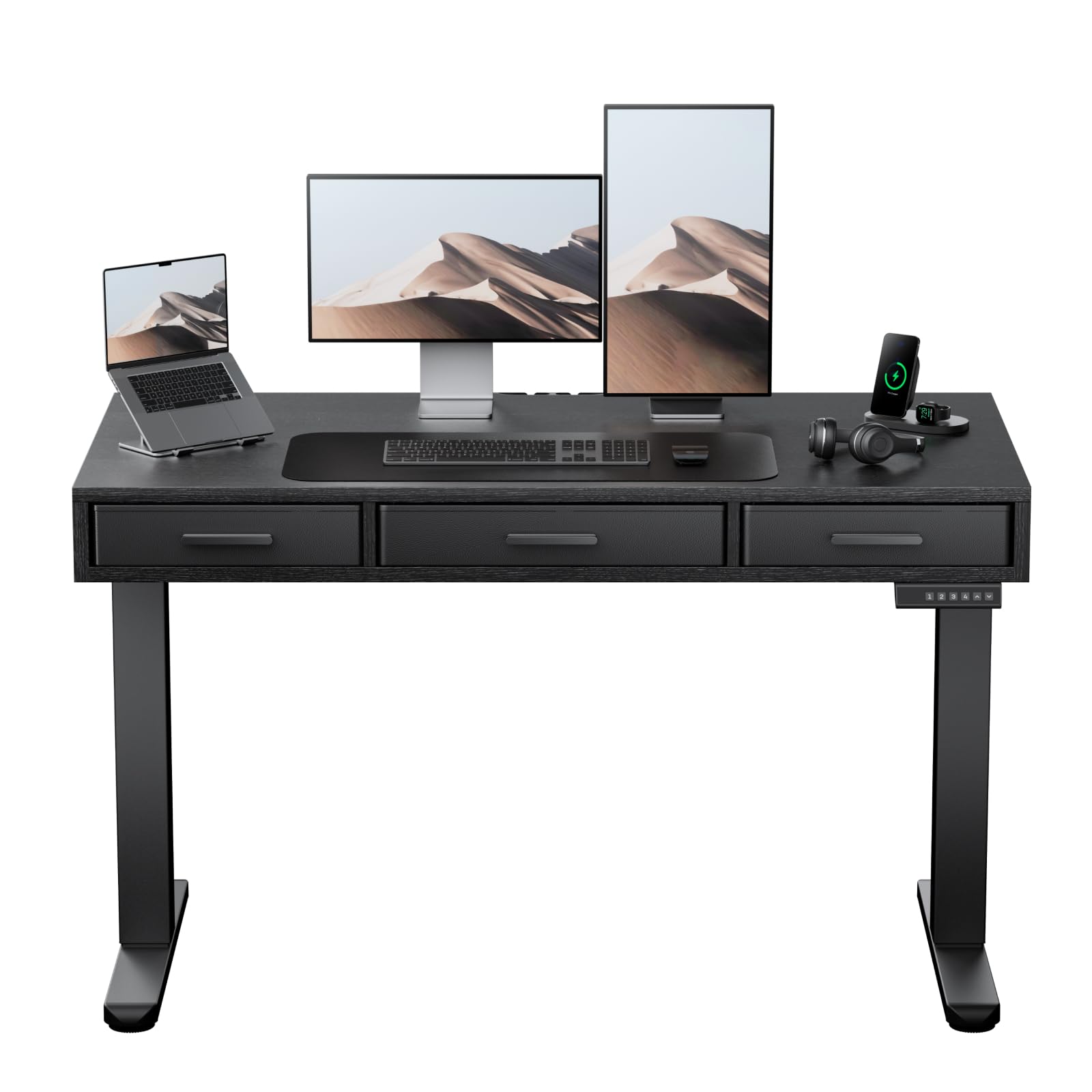
Image: The HUANUO Electric Standing Desk with Drawers, featuring a black desktop and frame, integrated drawers, and a control panel.
Безбедносне информације
Да бисте спречили повреде и оштећења производа, придржавајте се следећих безбедносних упутстава:
- Ограничење тежине: Не прекорачујте максималну носивост 176 фунте (80 кг)Преоптерећење може проузроковати нестабилност и оштећења.
- Скупштина: Assembly is recommended for 2 особе. Ensure all components are securely fastened according to the instructions.
- Пласман: Place the desk on a stable, level surface.
- Операција: Keep hands and objects clear of moving parts during height adjustment. Avoid sudden or excessive force when operating the desk.
- Деца и кућни љубимци: Држите децу и кућне љубимце даље од стола током рада како бисте спречили незгоде.
- Снага: Use only the provided power adapter. Disconnect power before cleaning or maintenance.
- инспекција: Regularly inspect the desk for any signs of wear, damage, or loose connections. Do not use if damaged.
Садржај пакета
Молимо вас да проверите да ли су сви делови присутни и неоштећени пре почетка монтаже. Ако неки делови недостају или су оштећени, контактирајте корисничку подршку.
- Desktop (48" x 24")
- Електрични подизни стубови (ноге)
- Crossbar/Frame Components
- Control Panel with Memory Settings
- Адаптер за напајање и каблови
- Фиоке за тканине (3 јединице)
- Assembly Hardware (screws, bolts, allen wrenches)
- Систем за управљање кабловима
Подешавање и монтажа
Follow these steps to assemble your HUANUO Electric Standing Desk. A detailed assembly video is provided below for visual guidance.
Видео водич за монтажу
Video: A step-by-step visual guide demonstrating the assembly process for the HUANUO Electric Standing Desk with Drawers.
Монтажа корак по корак
- Assemble the Desktop: Attach the desktop sections together using the provided dowels and screws. Ensure they are aligned correctly.
- Саставите оквир: Connect the crossbar to the lifting columns (legs) using the specified bolts. Ensure the frame is stable.
- Attach Desktop to Frame: Carefully place the assembled desktop onto the frame. Secure it using the designated screws. Ensure the desk frame remains balanced during this step to prevent tipping.
- Install Transmission Rod: Insert and secure the transmission rod between the two lifting columns. This rod synchronizes the movement of the legs.
- Attach Drawers: Assemble the fabric drawers and slide them into their designated slots under the desktop. Secure any necessary drawer components.
- Повежите каблове: Connect the power cable to the control panel and the power adapter. Ensure all motor cables are securely connected to the control box.
- Управљање кабловима: Utilize the included cable management system to organize and secure all wires, ensuring a tidy workspace.

Слика: Крупни план view of the desk's three spacious fabric drawers, designed for organized storage.
Упутство за употребу
Your HUANUO Electric Standing Desk features an intuitive control panel for easy height adjustment and memory settings.
Видео водич за рад
Video: Demonstrating the electric height adjustment and memory preset functions of the HUANUO Standing Desk.
Функције контролне табле

Image: The convenient control panel with LED display, buttons for custom height settings (1-4), and up/down arrows for precise adjustment.
- Дугмад за горе/доле: Користите Горе (▲) и Доле (▼) arrows to manually adjust the desk height. The current height is displayed on the LED screen.
- Пресет меморије (1, 2, 3, 4): Your desk features four programmable height settings. To save a height:
- Подесите сто на жељену висину помоћу дугмади горе/доле.
- Press and hold one of the memory buttons (1, 2, 3, or 4) until the display flashes or beeps, indicating the height is saved.
- Систем против судара: The desk is equipped with an anti-collision system that automatically stops and slightly reverses movement if it encounters an obstacle during adjustment. This feature helps prevent damage and injury.

Image: A user standing comfortably at the HUANUO electric standing desk, illustrating the benefits of height adjustment for improved posture and reduced strain.
Феатурес Оверview
The HUANUO Electric Standing Desk is designed with user comfort and functionality in mind.
- Three Spacious Fabric Drawers: Integrated into the desktop, these drawers provide convenient storage for office essentials, helping to keep your workspace organized and clutter-free. The large central drawer measures 17.1" L x 9.5" D x 3" H, and two smaller side drawers are 13.1" L x 9.5" D x 3" H.
- Ц-Цлamp Компатибилност монтирања: The desk features an extended rear edge, making it compatible with C-clamp monitor mounts. This allows for easy attachment of monitor arms to optimize your screen setup.
- Робусна конструкција: Built with a solid carbon steel frame and thicker legs, the desk ensures stability and durability, supporting up to 176 lbs. It has undergone rigorous 50,000-cycle lift testing for long-lasting performance.
- Тих рад: The electric motor operates quietly, ensuring minimal disruption in your work environment.
- Систем за управљање кабловима: Slots are integrated onto the back edge of the desk to help manage and organize cables, contributing to a clean and efficient workspace.

Image: The desk's design allows for easy attachment of C-clamp monitor mounts, enhancing workspace ergonomics.

Image: Detail of the desk's thick carbon steel frame, highlighting its robust construction for enhanced stability and durability.
Одржавање
Proper maintenance will extend the life and performance of your standing desk.
- Чишћење: Обришите радну површину и оквир меком крпомamp крпом. Избегавајте јаке хемикалије или абразивна средства за чишћење која би могла оштетити завршну обраду.
- Брига о фиокама: Фиоке од тканине могу се очистити на лицу места благим детерџентом и водом. Оставите да се потпуно осуше на ваздуху.
- Управљање кабловима: Periodically check that all cables are securely routed and not pinched or tangled.
- Причвршћивачи: Повремено проверите све завртње и вијке да бисте били сигурни да су затегнути. По потреби поново затегните.
- Motor & Mechanism: Keep the lifting mechanism free from dust and debris. Do not lubricate the motor or lifting columns unless specifically instructed by the manufacturer.
Решавање проблема
Ако наиђете на проблеме са својим столом, погледајте следеће уобичајене проблеме и решења:
| Проблем | Могући узрок | Решење |
|---|---|---|
| Сто се не помера нити реагује на команде. | Power cable disconnected, motor cables loose, control panel malfunction. | Check all power and motor connections. Ensure the power outlet is functional. Try resetting the desk (refer to specific reset procedure if available, or unplug for 30 seconds and replug). |
| Сто се помера неравномерно или производи необичне звуке. | Uneven load, loose fasteners, obstruction in lifting mechanism. | Distribute weight evenly on the desktop. Check and tighten all assembly fasteners. Inspect for any obstructions under the desk. |
| Height memory settings are not saving or recalling correctly. | Incorrect saving procedure, temporary glitch. | Ensure you hold the memory button until the display confirms saving. Try resetting the desk. |
| Anti-collision system frequently activates. | Obstruction, sensitivity setting (if adjustable). | Ensure there are no objects in the path of the desk's movement. |
If the problem persists after attempting these solutions, please contact HUANUO customer support for further assistance.
Спецификације
| Феатуре | Детаљ |
|---|---|
| Бранд | ХУАНУО |
| Број модела | HNESD167B-US |
| Димензије радне површине | 48" W x 24" D (121.9 cm x 60.9 cm) |
| Опсег подешавања висине | 28.3" до 46.5" (71.9 цм до 118.1 цм) |
| Максимални капацитет тежине | 176 фунти (80 кг) |
| Материјал | Carbon Steel Frame, Engineered Wood Desktop |
| Број фиока | 3 (Тканина) |
| Посебне карактеристике | Electric Adjustable Height, 4 Memory Height Settings, One-Touch Lifting, Anti-Collision System, C-Clamp Mount Compatible, Cable Management System |
| Боја | Црно |
| Обавезна монтажа | Да (препоручују се 2 особе) |
| УЛ Листед | Да |
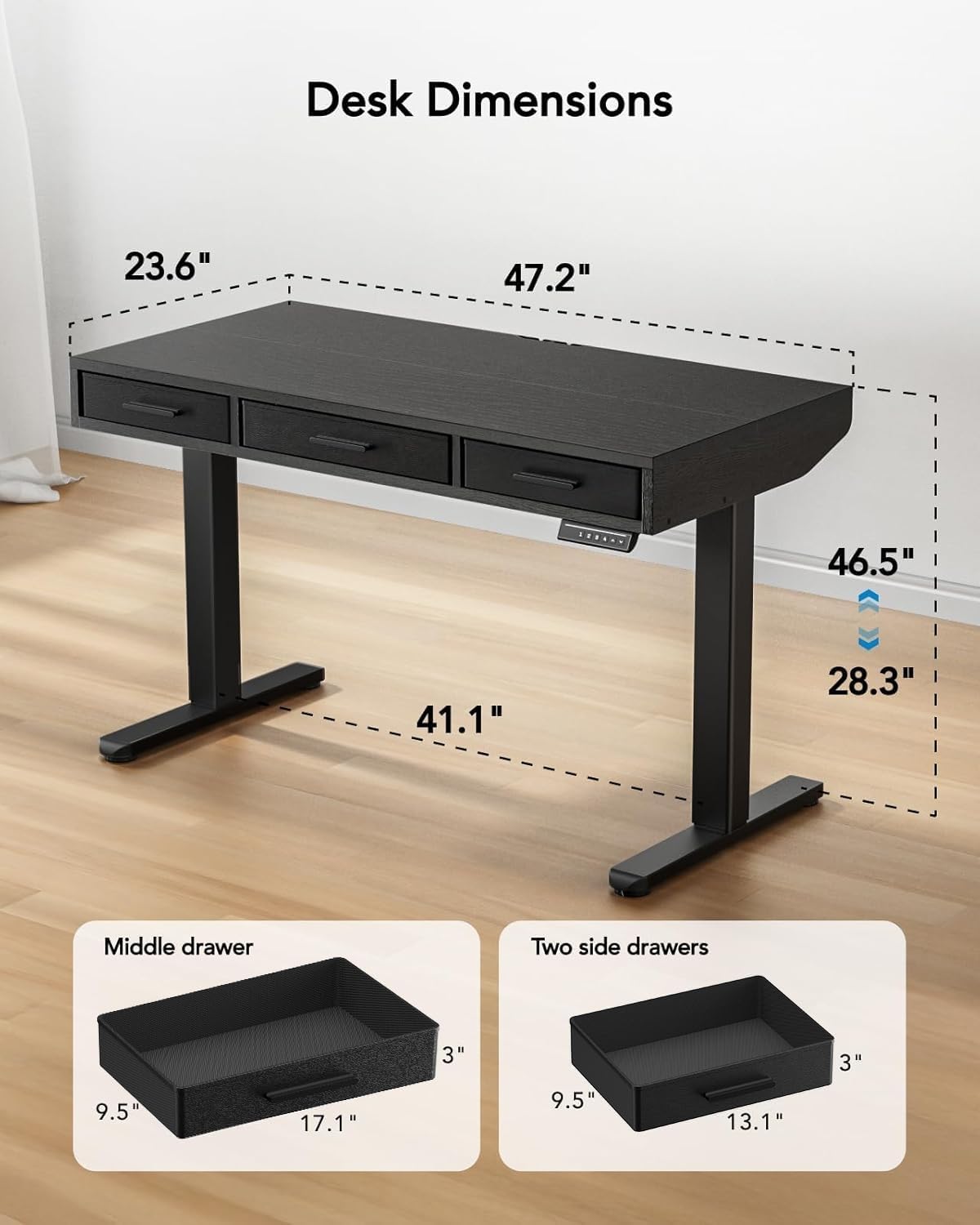
Image: Detailed diagram illustrating the dimensions of the desk, including height range (28.3"-46.5") and desktop size (47.2"x23.6").
Гаранција и подршка
For warranty information, technical support, or to report missing/damaged parts, please contact HUANUO customer service. Refer to your purchase documentation for specific contact details or visit the official HUANUO webсајту.
Подршка на мрежи: Visit the HUANUO Store on Amazon