
1. Увод и крајview
Thank you for choosing the Mcezdy M5C-2(BLE)-6-Pin Ebike LCD Display. This advanced cycling computer is designed to provide essential riding data, smart connectivity, and convenient features for your electric bicycle. Please read this manual thoroughly before installation and use to ensure proper function and safety.

Figure 1: Mcezdy M5C-2 Ebike LCD Display showing current speed, pedal assist level, and battery voltage.
2. Кључне карактеристике
- Vibrant Color Screen: Provides clear and easy-to-read riding data.
- Personalized Control: Features walk-assist mode, cruise control, real-time trip and total mileage tracking, voltage display, and adjustable bike parameters (wheel diameter, speed limits).
- Паметно повезивање: Syncs with cycling applications via Bluetooth for route recording and statistics.
- Пуњење у покрету: Integrated Type-C charging port (5V/500mA output) for mobile devices.
- Издржљива конструкција: IPX65 waterproof rating, rugged ABS and PC housing, tempered glass screen, and nylon bracket for all-weather use.
- Виде Волtagе Компатибилност: Supports 24V, 36V, 48V, and 60V battery systems.

Слика 2: Завршеноview of M5C-2 display functions.
3. Важна напомена о компатибилности
This Ebike LCD display operates exclusively with controllers using the UART No. 2 protocol. It is not compatible with other UART protocols. Ensure your Ebike controller supports UART No. 2 to avoid compatibility issues.
How to Determine Your Ebike's Communication Protocol:
- Consult your Ebike's user manual or technical documentation.
- Check your existing Ebike display for protocol information.
- Contact your Ebike manufacturer for specific details.

Figure 3: Compatibility warning and connector types (5-Pin and 6-Pin).
4. Спецификације производа
| Спецификација | Детаљ |
|---|---|
| Бранд | Мцезди |
| Назив модела | M5C-2(BLE)-6-Pin |
| Дисплаи Типе | ЛЦД |
| Технологија повезивања | Блуетоотх |
| Протокол | UART No. 2 |
| Волtagе Компатибилност | 24В, 36В, 48В, 60В |
| Водоотпорна оцена | ИПКС65 |
| Материјал | ABS, PC, Tempered Glass, Nylon |
| Тип монтаже | Handlebar Mount (22.2mm, 25.4mm, 28.6mm, 31.8mm) |
| Укључене компоненте | LCD Display, User's Manual, Fault Code Description |
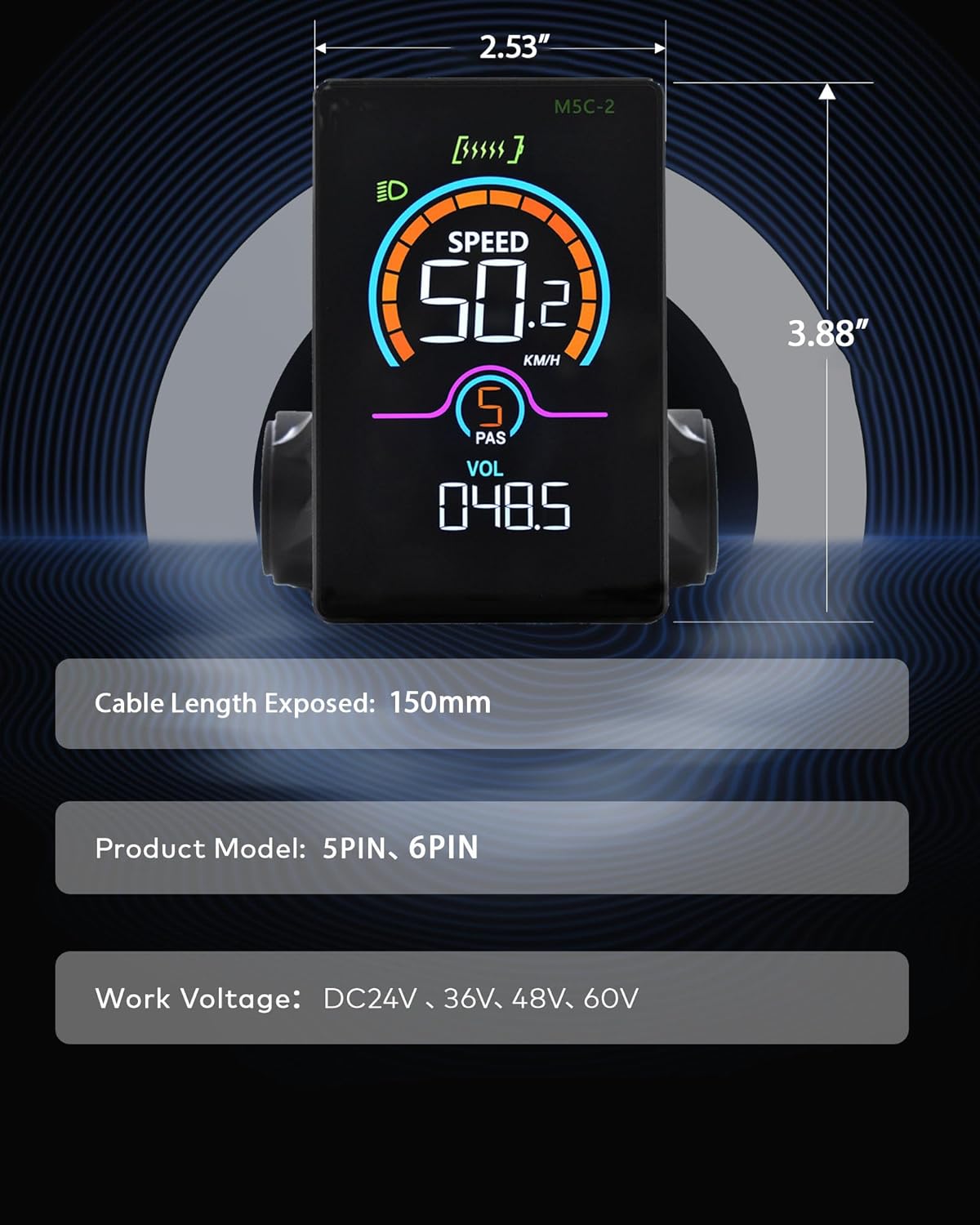
Figure 4: M5C-2 display dimensions and cable length.
5. Подешавање и инсталација
Follow these steps to properly install your Mcezdy LCD Display on your Ebike.
5.1 Монтирање дисплеја
- Loosen the screws on the display's handlebar mount.
- Position the display on your Ebike's handlebar. The adjustable mount accommodates handlebar diameters of 22.2mm, 25.4mm, 28.6mm, and 31.8mm.
- Tighten the screws securely to prevent movement during riding.

Figure 5: Display mounted on a handlebar, demonstrating adjustable fit.
5.2 Повезивање каблова
- Identify the display's cable connector (either 5-Pin or 6-Pin).
- Locate the corresponding connector on your Ebike's controller or wiring harness.
- Carefully align and connect the display cable to the Ebike's system. Ensure a firm connection.
Video 1: This video demonstrates the physical installation and initial power-on sequence of the Mcezdy Ebike Display, including mounting and cable connections.
6. Упутство за употребу
Familiarize yourself with the display's controls and functions.
6.1 Укључивање/искључивање
- За укључивање: Press and hold the power button (usually marked with a power symbol) on the control pad for a few seconds until the display illuminates.
- За искључивање: Поново притисните и држите дугме за напајање док се екран не искључи.
6.2 Switching Assistance Modes (PAS Levels)
Use the '+' and '-' buttons on the control pad to adjust the pedal assist (PAS) level. Higher numbers indicate more motor assistance.
6.3 Промена параметара приказа
Briefly press the power button to cycle through different display parameters such as Trip Distance, Odometer (ODO), Max Speed, Average Speed, Range, Calorie Consumption, and Cadence.
6.4 App Connection (Bluetooth)
The M5C-2 display supports Bluetooth connectivity for integration with cycling applications. This allows you to record routes, track stats, and potentially adjust settings via your smartphone.
- Download the recommended cycling app (e.g., 'LINGHUI' as indicated in product images) from your smartphone's app store.
- Уверите се да је Блуетоотх омогућен на вашем паметном телефону.
- Power on the Ebike display.
- Open the cycling app and follow the in-app instructions to connect to your M5C-2 display.
Video 2: This video demonstrates the Bluetooth connection process between the Mcezdy Ebike Display and a smartphone application.

Figure 6: Smartphone app interface for M5C-2 display.
7. Напредна подешавања
The display allows for customization of various parameters to suit your riding preferences.
7.1 Accessing the Main Menu
To enter the main menu, press and hold the '+' and '-' buttons simultaneously for a few seconds. Navigate through the menu using the '+' and '-' buttons, and confirm selections with the power button.
7.2 Customizable Parameters (Exampлес)
- Пречник точка: Adjust for accurate speed and distance readings.
- Ограничење брзине: Set the maximum assisted speed according to local regulations or personal preference.
- Осветљеност: Adjust display backlight intensity.
- Време аутоматског искључивања: Configure the time before the display automatically shuts off due to inactivity.
- Избор јединице: Switch between metric (km/h) and imperial (mph) units.
- Ресетовање путовања: Reset trip distance data.
8. Одржавање
Правилно одржавање осигурава дуготрајност и оптималне перформансе вашег дисплеја.
- Чишћење: Wipe the display screen with a soft, damp крпу. Избегавајте абразивна средства за чишћење или раствараче.
- Изложеност води: While IPX65 rated for water resistance, avoid prolonged submersion or high-pressure water jets. Ensure the Type-C charging port cover is securely closed when not in use.
- Складиштење: Store the Ebike and display in a dry, cool place away from direct sunlight when not in use.
- Инспекција каблова: Periodically check all cables and connectors for any signs of wear, damage, or loose connections.
КСНУМКС. Решавање проблема
Погледајте овај одељак за уобичајене проблеме и њихова решења.
9.1 Display Not Powering On
- Ensure the Ebike battery is charged and properly connected.
- Check all cable connections between the display and the controller for looseness or damage.
- Verify that the power button is being pressed and held for the required duration.
9.2 Incorrect Speed/Distance Readings
- Access the advanced settings menu and verify that the wheel diameter is correctly set for your Ebike.
- Ensure the speed sensor on your Ebike is properly installed and functioning.
9.3 Displaying Error Codes
If the display shows an error code, refer to the 'Fault Code Description' document included with your product for specific meanings and troubleshooting steps. Common issues may include motor, controller, or sensor malfunctions.
9.4 Проблеми са повезивањем путем Bluetooth-а
- Ensure the display is powered on and within range of your smartphone.
- Поново покрените и екран и паметни телефон.
- Check the app's settings to ensure it has permission to use Bluetooth.
10. Гаранција и подршка
The Mcezdy M5C-2(BLE)-6-Pin Ebike LCD Display comes with a 1-годишња гаранција произвођача.
For technical support, warranty claims, or further assistance, please contact Mcezdy customer service through the retailer where you purchased the product or visit the official Mcezdy webсајту.