
1. Увод
Хвала вам на куповиниasing the Netzu T338B 3-in-1 Digital Alarm Clock. This device is designed to provide clear time, date, and indoor temperature displays, along with an alarm function. Its compact design and adjustable features make it suitable for various indoor environments such as bedrooms, living rooms, and offices. Please read this manual carefully to ensure proper setup and operation.

Image 1.1: The Netzu T338B Digital Alarm Clock, showing its main display with time, temperature, and date.
2. Безбедносне информације
- Не излажите уређај екстремним температурама, директној сунчевој светлости или високој влажности.
- Избегавајте испуштање или излагање уређаја јаким ударима.
- Користите само приложени адаптер за напајање или компатибилан са одговарајућом јачином звукаtage.
- Чувати ван домашаја деце.
- Do not attempt to disassemble or repair the device yourself. Contact customer support if service is required.
- Батерије одложите на одговарајући начин у складу са локалним прописима.
3. Садржај пакета
Молимо вас да проверите пакет за следеће ставке:
- Netzu T338B Digital Alarm Clock
- AC Power Cable (USB cable and wall adapter)
- Упутство за употребу
4. Карактеристике производа
- 3-in-1 Display: Shows time, date, and indoor temperature simultaneously.
- Подесива осветљеност: 4 levels of display brightness plus an OFF option.
- Подесива јачина звука: 3 alarm volume levels.
- Одгода функција: Provides a 9-minute snooze duration.
- Формат времена: Supports 12-hour and 24-hour time display.
- Јединица температуре: Приказује температуру у степену Целзијуса (°C) или Фаренхајта (°F).
- Извор напајања: Corded electric (AC power) with battery backup for settings (2x AAA batteries, not included).
- Компактан дизајн: Dimensions of 5.94"L x 1.3''W x 2.17"H, suitable for various spaces.
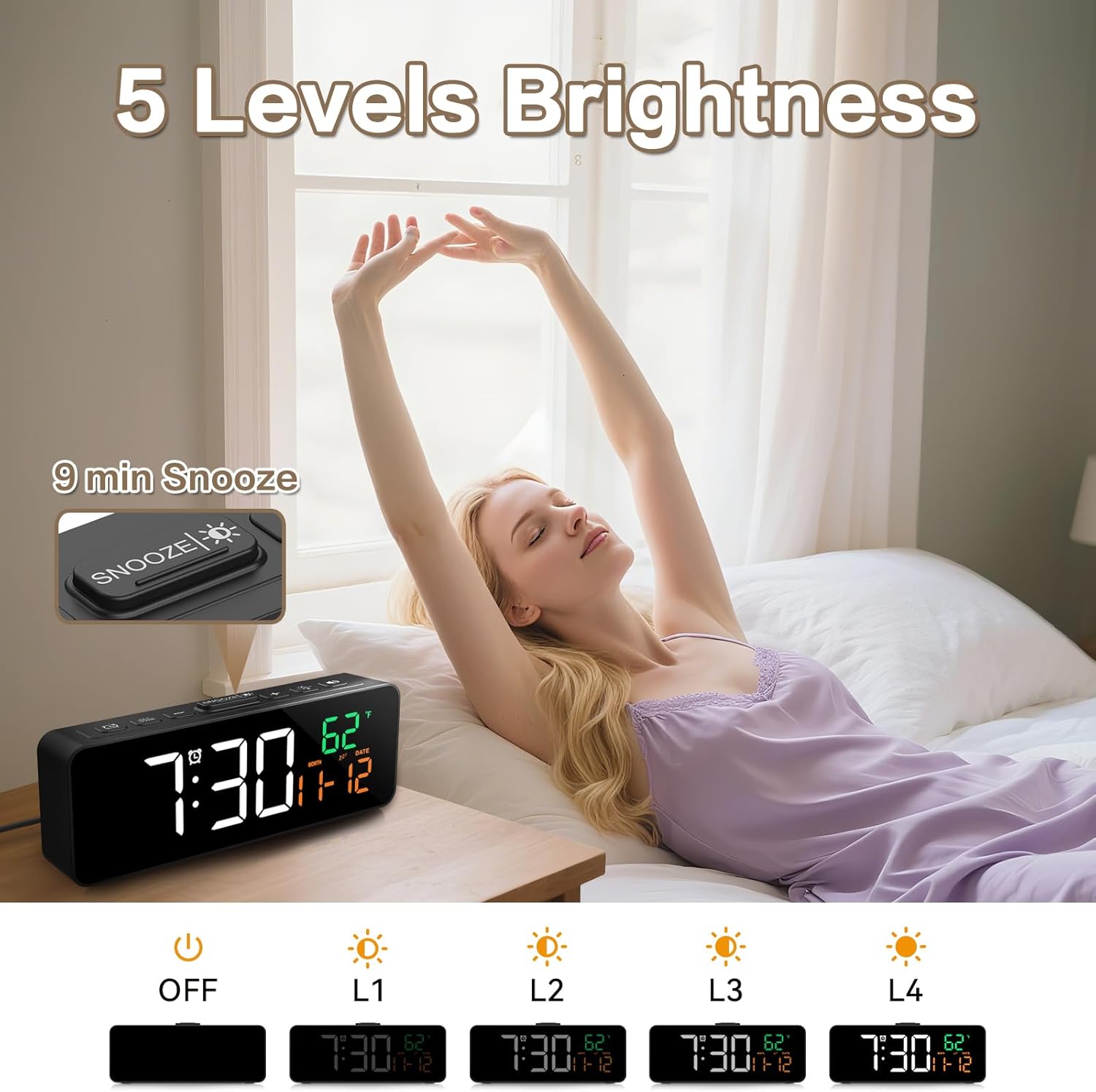
Image 4.1: The compact dimensions of the Netzu T338B Digital Alarm Clock, measuring 5.9 inches in length, 1.3 inches in width, and 2.17 inches in height.
5. Подешавање
5.1 Прикључак за напајање
- Connect the provided AC power cable to the DC 5V input port on the back of the clock.
- Plug the other end of the power cable into a standard wall outlet. The display will light up.
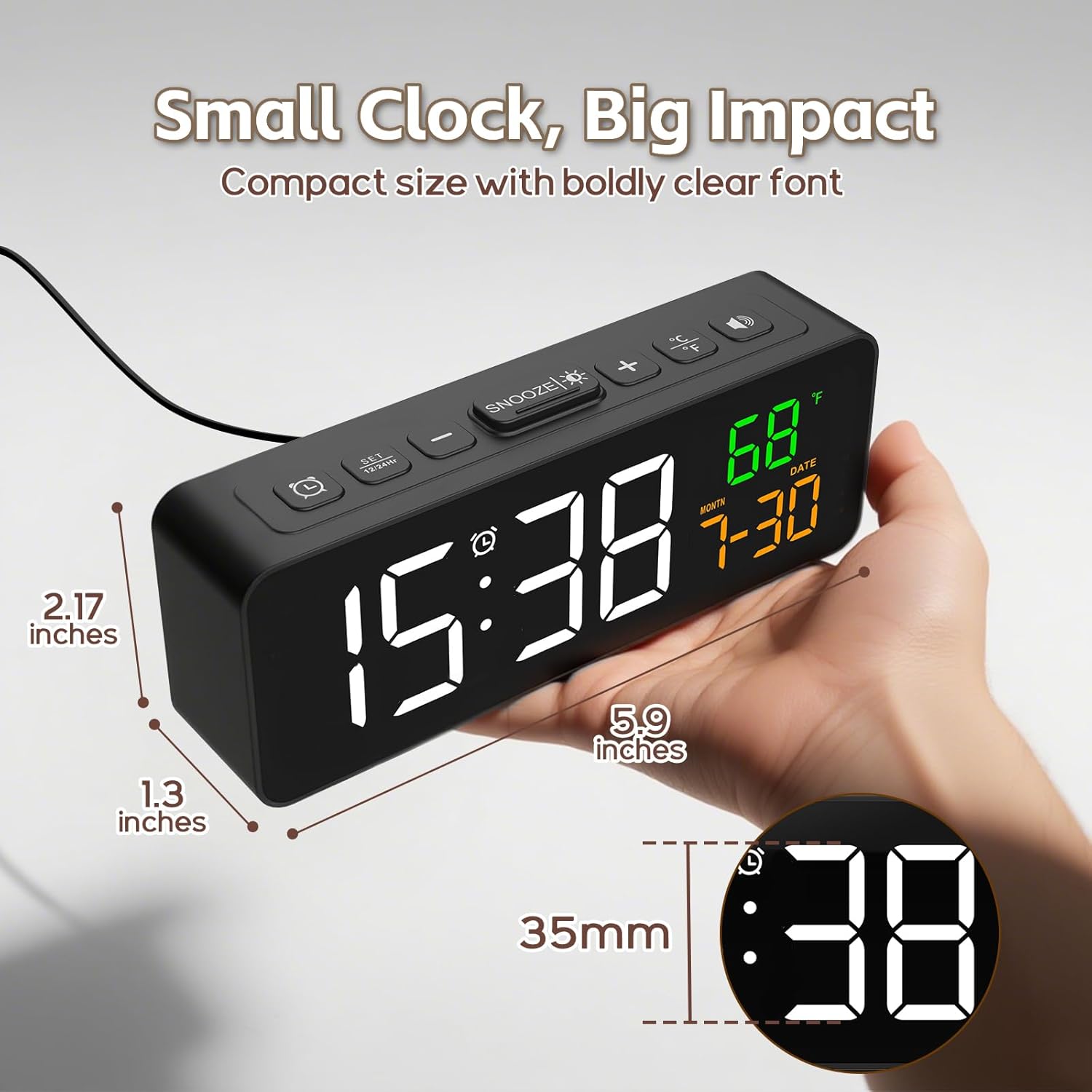
Image 5.1: The Netzu T338B Digital Alarm Clock connected to a power outlet via its plug-in cable.
5.2 Инсталација батерије (резервне)
For backup purposes, in case of a power outage, install 2 AAA batteries (not included) into the battery compartment on the back of the clock. These batteries will preserve your time and alarm settings but will not power the display or sound the alarm during a power interruption.
- Отворите поклопац одељка за батерије на задњој страни сата.
- Уметните 2 ААА батерије, водећи рачуна о исправном поларитету (+ и -).
- Добро затворите поклопац одељка за батерије.
6. Упутство за употребу
6.1 Подешавање времена и датума
The clock displays time, month, and date. You can switch between 12-hour and 24-hour formats.

Image 6.1: The clock displaying time in both 12-hour (PM) and 24-hour formats.
- Притисните и држите ВРЕМЕНСКИ СКЛОП button (usually marked with a clock icon) on the back or top of the clock until the hour digits flash.
- Користите + or - дугмад за подешавање сата.
- Притисните ВРЕМЕНСКИ СКЛОП again to move to minute adjustment. Use + or - за подешавање минута.
- Наставите да притискате ВРЕМЕНСКИ СКЛОП to cycle through year, month, and date settings, adjusting each with + or -.
- Притисните ВРЕМЕНСКИ СКЛОП one last time or wait a few seconds for the settings to save and exit.
- Да бисте пребацивали између 12/24-часовног формата, кратко притисните ВРЕМЕНСКИ СКЛОП button when the time is displayed (not in setting mode).
6.2 Setting Temperature Unit
The clock can display temperature in Celsius or Fahrenheit.

Image 6.2: The clock displaying indoor temperature and the current month and date.
- Кратко притисните ° Ц/° Ф button (usually on the top or back) to toggle between Celsius and Fahrenheit.
6.3 Подешавање аларма
- Притисните и држите АЛАРМ СЕТ button (usually marked with an alarm clock icon) until the alarm hour digits flash.
- Користите + or - дугмад за подешавање сата аларма.
- Притисните АЛАРМ СЕТ again to move to minute adjustment. Use + or - to adjust alarm minutes.
- Притисните АЛАРМ СЕТ one last time or wait a few seconds to save the alarm time.
- Да бисте активирали или деактивирали аларм, кратко притисните АЛАРМ УКЉУЧЕН / ИСКЉУЧЕН button (often the same as ALARM SET or a dedicated button). An alarm icon will appear on the display when activated.
6.4 Подешавање осветљености
The display has 4 brightness levels and an OFF mode.

Image 6.3: Visual representation of the clock's five brightness settings: OFF, L1 (lowest), L2, L3, and L4 (highest).
- Кратко притисните БРИГХТНЕСС button (often the SNOOZE button or a dedicated sun icon) to cycle through the brightness levels: L4 > L3 > L2 > L1 > OFF > L4.
6.5 Подешавање јачине звука аларма
There are 3 adjustable alarm volume levels.

Image 6.4: The clock displaying an alarm time with an illustration of three distinct volume levels (L01, L02, L03) for the alarm sound.
- While the alarm is sounding, or during alarm setup, press the ВОЛУМЕ button (often the + or - button when in alarm mode) to cycle through the 3 volume levels.
6.6 Коришћење функције одлагања
- Када се огласи аларм, притисните СНООЗЕ button (usually a large button on top) to temporarily silence the alarm for 9 minutes.
- Аларм ће се поново огласити након 9 минута.
- To turn off the alarm completely, press any other button on the clock (e.g., ALARM SET, TIME SET).
7. Одржавање
- Очистите површину сата меком, сувом крпом. Не користите абразивна средства за чишћење или раствараче.
- Ensure the ventilation openings (if any) are free from dust and debris.
- If storing the clock for an extended period, remove the AAA backup batteries to prevent leakage.
КСНУМКС. Решавање проблема
| Проблем | Могући узрок | Решење |
|---|---|---|
| Екран је празан. | Нема прикључка за напајање. | Ensure the AC power cable is securely plugged into the clock and a working wall outlet. |
| Alarm does not sound during power outage. | Backup batteries only save settings, not power the alarm. | This is normal operation. The clock requires AC power for the display and alarm function. |
| Време/датум је нетачан. | Incorrectly set or power interruption without backup batteries. | Re-set the time and date following Section 6.1. Install fresh AAA batteries for backup. |
| Display is too dim/bright. | Потребно је подесити ниво осветљености. | Press the BRIGHTNESS button to cycle through levels (Section 6.4). |
| Јачина звука аларма је прениска/превисока. | Volume level needs adjustment. | Adjust the alarm volume during alarm setup or when it's sounding (Section 6.5). |
9. Спецификације
- Бренд: Нетзу
- Број модела: Т338Б
- Тип приказа: Дигитал
- Извор напајања: Кабл електрични (AC)
- Резервно напајање: 2 x AAA Batteries (not included, for settings only)
- Димензије производа: 5.94" Д к 1.3" Ш к 2.17" В
- Тежина артикла: 7.4 унци
- Материјал: Пластика
- Посебне карактеристике: Adjustable Brightness, Adjustable Volume, Snooze, Temperature Display, Date Display
- Унутрашња/спољна употреба: Индоор
10. Гаранција и подршка
Netzu products are designed for reliability and performance. For warranty information or technical support, please refer to the contact details provided on the product packaging or visit the official Netzu website. Please have your model number (T338B) and purchase information ready when contacting support.