
OMOTON B0FCMD15TF
OMOTON Foldable Bluetooth Keyboard with Touchpad (QWERTZ Layout)
Model: B0FCMD15TF
Марка: ОМОТОН
1. Увод
Thank you for choosing the OMOTON Foldable Bluetooth Keyboard with Touchpad. This portable QWERTZ keyboard is designed for convenience and efficiency, offering multi-device connectivity and an integrated touchpad. This manual provides detailed instructions for setup, operation, and maintenance to ensure optimal performance.
2. Садржај пакета
Молимо вас да проверите пакет за следеће ставке:
- OMOTON Foldable Bluetooth Keyboard
- Сталак за мобител
- Кабл за пуњење типа Ц
- Торбица за ношење
- Упутство за употребу
3. Производ је готовview
The OMOTON Foldable Bluetooth Keyboard features a compact QWERTZ layout with 78 full-size keys and a multi-touch touchpad. It supports connection to up to three devices simultaneously across iOS, Android, and Windows operating systems. Its magnetic folding design makes it highly portable.
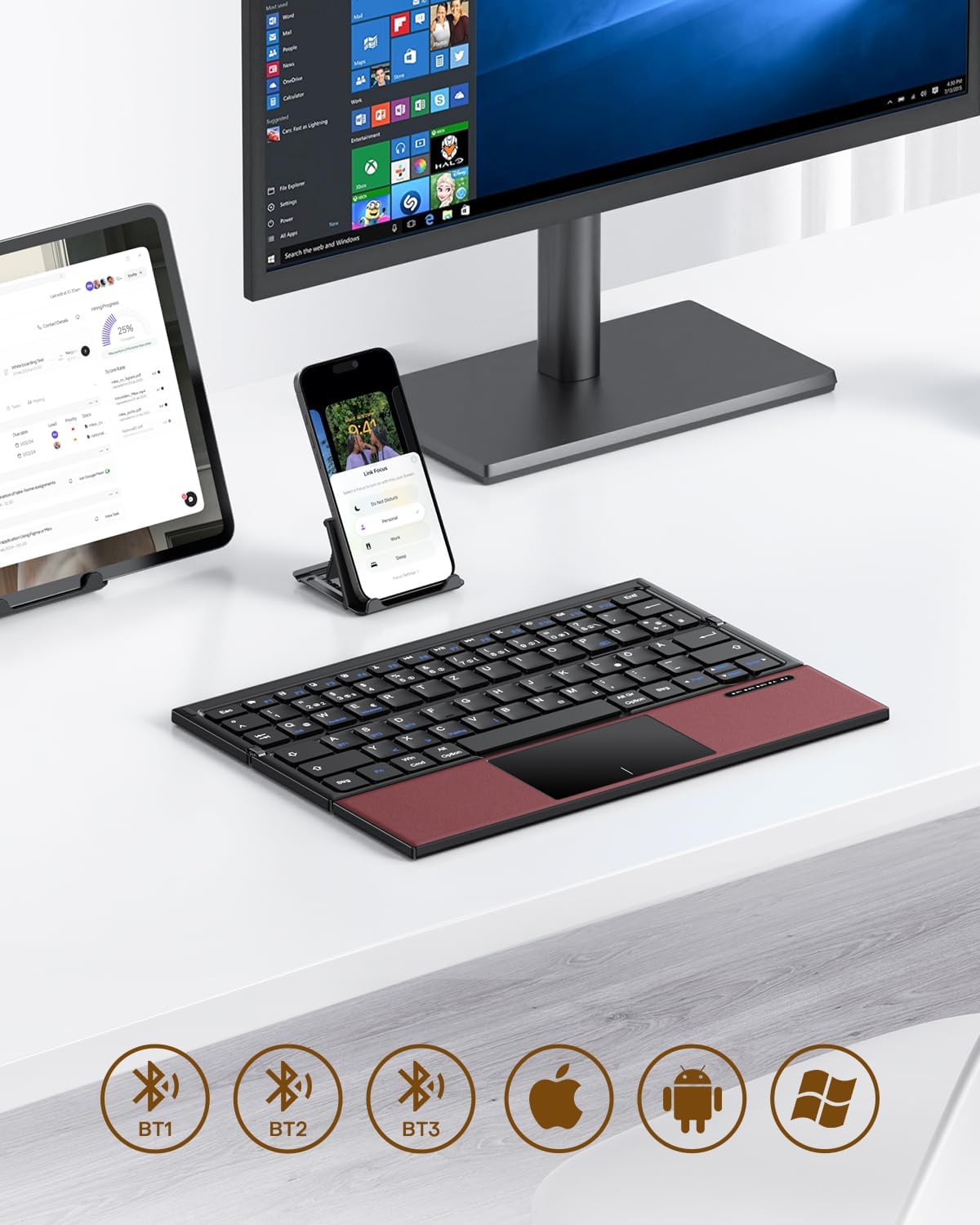
Image 3.1: The OMOTON Foldable Bluetooth Keyboard in use with a tablet, smartphone, and monitor, demonstrating multi-device connectivity via BT1, BT2, and BT3 channels.
Кључне карактеристике:
- Троструки дизајн: Compact and portable for travel.
- Интегрисана тачпед: Multi-touch functionality for navigation without an external mouse.
- Повезивање са више уређаја: Connects to up to three Bluetooth-enabled devices (BT1, BT2, BT3).
- QWERTZ распоред: Standard German keyboard layout with 78 full-size keys.
- Пуњива батерија: Built-in 180mAh battery with Type-C charging.

Image 3.2: Close-up details of the keyboard, highlighting its magnetic closure, indicator lights, silent scissor keys, elegant PU leather finish, and durable metal hinge.
Преносивост:
The keyboard's compact, tri-fold design makes it ideal for travel and on-the-go use. It easily fits into bags and pockets, making it a convenient companion for various environments.

Image 3.3: The keyboard in use in a cafe, on an airplane, and in a meeting room, demonstrating its versatility for different work and travel scenarios.

Image 3.4: The folded keyboard being placed into a carrying case inside a bag and slipped into a jacket pocket, illustrating its compact size and ease of transport.
4. Подешавање
4.1 Пуњење тастатуре
Before first use, fully charge the keyboard. Use the included Type-C charging cable to connect the keyboard to a power source (e.g., computer USB port, USB wall adapter).
- The power indicator light will show charging status.
- Пуно пуњење обично траје 2-3 сата.
- The keyboard offers up to 60 hours of operating time and 90 days of standby time on a full charge.

Image 4.1: The keyboard connected via its Type-C port for charging, with icons indicating charging time, working time, and standby time.
4.2 Упаривање са уређајем
The keyboard supports up to three Bluetooth connections (BT1, BT2, BT3). Follow these steps to pair your keyboard with a device:
- Укључено: Unfold the keyboard to automatically power it on. The indicator light will flash.
- Изаберите канал: Притисните тастер Fn + BT1, Fn + BT2, или Fn + BT3 keys simultaneously to select a Bluetooth channel. The corresponding indicator light will flash slowly.
- Уђите у режим упаривања: Притисните Фн + Ц (or the Bluetooth icon key) to enter pairing mode. The selected channel indicator light will flash rapidly.
- Омогућите Блутут на уређају: On your device (smartphone, tablet, laptop), go to Bluetooth settings and turn on Bluetooth.
- Изаберите тастатуру: Тражи "OMOTON Keyboard" (or similar) in the list of available devices and select it to connect.
- Потврдите везу: Once connected, the indicator light on the keyboard will stop flashing and remain solid for a few seconds before turning off.
Note: The Type-C cable is for charging only and does not support wired connectivity.
4.3 Пребацивање између уређаја
Да бисте прелазили између упарених уређаја, једноставно притисните Fn + BT1, Fn + BT2, или Fn + BT3 to select the desired channel. The keyboard will automatically connect to the last paired device on that channel.
5. Упутство за употребу
5.1 Keyboard Layout and Special Keys
The keyboard features a QWERTZ layout with 78 standard keys and 12 multimedia shortcuts. Familiarize yourself with the layout for efficient typing.

Image 5.1: The keyboard displaying its full-size keys and integrated multi-touch touchpad, designed for a laptop-like typing experience.
5.2 Коришћење тачпеда
The multi-touch touchpad supports various gestures for navigation. This eliminates the need for an external mouse.
- Додир једним прстом: Леви клик.
- Додир са два прста: Кликните десним тастером миша (контекстни мени).
- Померање са два прста: Померајте се горе/доле или лево/десно.
- Увећавање прстима: Zoom in/out (supported on some devices/apps).
- Покрети превлачења: Specific gestures may vary by operating system (Windows, Android, iOS).
Note for iPad users: You may need to enable "AssistiveTouch" in your iPad settings for full touchpad functionality. Some gestures may vary between applications. Scrolling direction can be adjusted in your device settings.
5.3 Режим уштеде енергије
To conserve battery, the keyboard will automatically enter sleep mode after 30 minutes of inactivity. To wake it up, press any key.
5.4 Ergonomic Usage
For comfortable and ergonomic typing, ensure your screen is positioned correctly to maintain a healthy posture.

Image 5.2: A visual guide showing the recommended ergonomic posture for using the keyboard with a screen, emphasizing proper neck and back alignment.
6. Одржавање
- Чишћење: Користите меку, суву крпу за чишћење површине тастатуре. За тврдокорну прљавштину, благо обришитеampОбришите крпу водом или благим средством за чишћење. Избегавајте прекомерну влагу.
- Складиштење: When not in use, fold the keyboard and store it in the provided carrying case to protect it from dust and scratches.
- Одржавање батерије: Avoid fully discharging the battery frequently. Charge the keyboard regularly, especially if it will be stored for an extended period.
- Избегавајте екстремне услове: Do not expose the keyboard to extreme temperatures, direct sunlight, or high humidity.
КСНУМКС. Решавање проблема
7.1 Тастатура се не повезује
- Уверите се да је тастатура укључена (расклопљена).
- Уверите се да је Блуетоотх омогућен на вашем уређају.
- Check if the keyboard is in pairing mode (indicator light flashing rapidly after pressing Fn+C).
- Ensure you have selected the correct Bluetooth channel (BT1, BT2, or BT3).
- Покушајте да раскинете упаривање и поново упарите тастатуру из подешавања Блутут везе на уређају.
- Уверите се да је батерија тастатуре напуњена.
7.2 Touchpad Not Responding
- Уверите се да је тастатура правилно повезана путем Блутут-а.
- For iPad users, verify that "AssistiveTouch" is enabled in your iPad settings.
- Поново покрените тастатуру и уређај.
- Clean the touchpad surface to remove any dirt or debris.
7.3 Incorrect Key Output (QWERTZ vs. QWERTY)
- This keyboard has a QWERTZ layout. Ensure your device's software keyboard setting is also set to QWERTZ (German layout) for correct character output.
- If your device is set to QWERTY, some keys (e.g., Y/Z, special characters) will not match the physical keyboard. Adjust your device's input language/keyboard layout settings.
7.4 Кратак век трајања батерије
- Ensure the keyboard is fully charged before use.
- The keyboard automatically enters sleep mode after 30 minutes of inactivity to save power.
- Avoid leaving the keyboard unfolded and powered on when not in use for extended periods.
8. Спецификације
| Бранд | ОМОТОН |
| Модел | B0FCMD15TF |
| Технологија повезивања | Блуетоотх |
| Компатибилни уређаји | iPadOS, iOS, Android, Windows (Laptops, PCs, Tablets, Smartphones) |
| Распоред тастатуре | QWERTZ (немачки распоред) |
| Број кључева | 78 |
| Посебне карактеристике | Foldable, Portable, Rechargeable, Integrated Multi-touch Touchpad |
| Материјал | Plastic, Polyurethane (PU) |
| Капацитет батерије | 180 мАх Ли-ион |
| Порт за пуњење | Типе-Ц |
| Време пуњења | Прибл. 2-3 сати |
| Оперативно време | До 60 сати |
| Време приправности | До 90 дана |
| Преклопљене димензије | 25.3 к 6 к 2.1 цм |

Image 8.1: Visual representation of the keyboard's dimensions when unfolded and folded, alongside a tablet and smartphone for scale.
9. Гаранција и подршка
OMOTON products come with a standard warranty. For detailed warranty information, please refer to the warranty card included in your package or visit the official OMOTON webсајту.
If you encounter any issues or have questions regarding your OMOTON Foldable Bluetooth Keyboard, please contact OMOTON Customer Support:
- Webсајт: OMOTON Official Store on Amazon
Please have your model number (B0FCMD15TF) and purchase details ready when contacting support.
Ask a question about this manual
Ask about setup, troubleshooting, compatibility, parts, safety, or missing instructions. Manuals+ will review the question and use this page’s manual context to help answer it.