
SatelliteSale SS-RC-NOTUS-M2
SatelliteSale Notus M2 Remote Control User Manual
Model: SS-RC-NOTUS-M2 | Brand: SatelliteSale
1. Увод
This manual provides detailed instructions for the SatelliteSale Notus M2 Remote Control, a voice-activated Bluetooth replacement designed for Optimum Stream Devices. It covers setup, operation, maintenance, and troubleshooting to ensure optimal performance and user experience.

Слика: Фронт view of the SatelliteSale Notus M2 Remote Control.
2. Садржај пакета
Проверите да ли су све ставке присутне у пакету:
- 1 x SatelliteSale Notus M2 Remote Control
- 2 x AAA батерије (унапред инсталиране или укључене засебно)
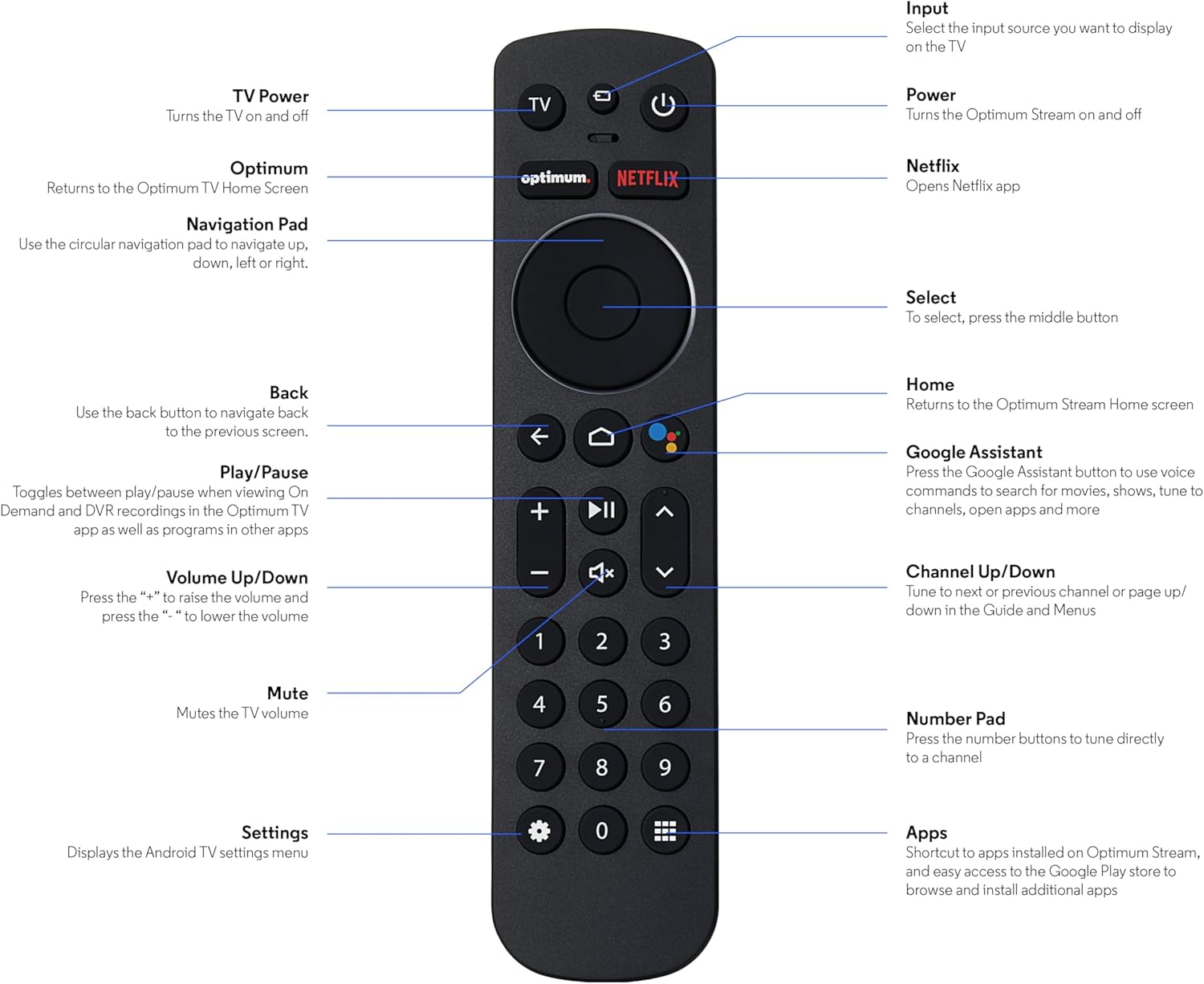
Image: The SatelliteSale Notus M2 Remote Control shown alongside two AAA batteries.
3. Распоред и функције даљинског управљача
Familiarize yourself with the buttons and their functions on your SatelliteSale Notus M2 Remote Control.

Image: Detailed diagram of the SatelliteSale Notus M2 Remote Control with labels for each button and its corresponding function.
- ТВ напајање: Укључује и искључује телевизор.
- Улаз: Selects the input source to display on the TV.
- Снага: Turns the Optimum Stream device on and off.
- Оптимум: Returns to the Optimum TV Home Screen.
- Нетфлик: Opens the Netflix application directly.
- Навигациона тастатура (кружна): Use to navigate up, down, left, or right within menus.
- Select (Middle Button of Nav Pad): Потврђује избор.
- назад: Враћа се на претходни екран.
- Почетна: Returns to the Optimum Stream Home screen.
- Google Assistant (Microphone Icon): Activates voice commands for search, playback control, and hands-free assistance.
- Пусти/паузирај: Toggles between play and pause for content.
- Појачавање/утишавање (+/-): Подешава јачину звука ТВ-а.
- Искључи звук: Mutes the TV volume.
- Channel Up/Down (Arrows): Tunes to the next or previous channel, or navigates pages in guides and menus.
- Нумеричка тастатура (0-9): Directly tunes to a channel or enters numerical input.
- Подешавања (икона зупчаника): Displays the Android TV settings menu.
- Apps (Grid Icon): Provides shortcuts to installed apps on Optimum Stream and access to the Google Play Store.
4. Подешавање
4.1 Инсталација батерије
The remote requires two AAA batteries. Ensure correct polarity when inserting.
- Пронађите одељак за батерије на полеђини даљинског управљача.
- Померите поклопац батерије надоле да бисте га отворили.
- Уметните две ААА батерије, поклапајући ознаке (+) и (-) пола батерије унутар одељка.
- Replace the battery cover by sliding it back into place until it clicks.

слика: View of the remote control with the battery compartment open, showing the correct orientation for AAA battery insertion.
4.2 Pairing Your Remote with Optimum Stream Device
Your remote is designed to be paired with your Optimum Stream device for full functionality, including Bluetooth connectivity and voice control. If your remote becomes unpaired or if you are setting up a new remote, follow these steps:

Image: An illustration explaining the importance of direct line of sight for initial pairing and the flexibility of remote placement after pairing.
Важна напомена: For initial pairing, the Optimum Stream box needs to be in direct line of sight of the remote. If your box is behind a TV or in a cabinet, you may need to temporarily relocate it so the remote can be directly pointed at the Stream box. Once pairing is complete, the Stream box can be moved out of sight as the remote uses Bluetooth.
- Ensure batteries are correctly installed in your remote.
- Turn on your TV and your Optimum Stream cable box.
- Press any button on the Stream remote to ensure you are on the Home Screen.
- Са почетног екрана изаберите Подешавања (gear icon).
- Изаберите Device and Remote Settings > Даљински управљачи и додаци.
- Изаберите Add Stream Remote.
- Пратите упутства на екрану да бисте довршили процес упаривања.
- You will see an on-screen confirmation once the remote is successfully paired.

Image: Visual representation of pairing steps 1 through 5, showing the remote and on-screen prompts.

Image: Visual representation of pairing steps 6 through 9, detailing the final stages of the pairing process.
5. Упутство за употребу
5.1 Управљање гласом
The SatelliteSale Notus M2 remote features voice control for convenient operation. Press the microphone button (Google Assistant icon) and speak your command clearly. You can use voice commands to:
- Тражи content (movies, TV shows, actors).
- Control playback (play, pause, fast forward, rewind).
- Отворите апликације.
- Tune to specific channels.
- Get information (weather, sports scores).

Image: A person using the voice control feature of the remote, with sound waves emanating from the remote towards the TV screen.

Слика: Бивши/аample of a voice command, "Hey Google, turn on the Spider-Man movie," displayed on screen with the remote.
5.2 Bluetooth Wireless Connectivity
Once paired, the remote utilizes Bluetooth for communication with your Optimum Stream device. This means you do not need a direct line of sight to operate the device, allowing for greater flexibility in remote usage and device placement.
5.3 Dedicated Streaming App Buttons
The remote includes dedicated buttons for popular streaming applications, such as Netflix. Pressing these buttons provides one-touch access to your favorite entertainment platforms.
6. Одржавање
- Чишћење: Use a soft, dry cloth to clean the remote. Do not use liquid cleaners or aerosols.
- Замена батерије: Replace batteries when the remote's response becomes sluggish or it stops functioning. Always replace both batteries at the same time with new AAA batteries.
- Складиштење: Даљински управљач чувајте на хладном и сувом месту, даље од директне сунчеве светлости и екстремних температура.
КСНУМКС. Решавање проблема
| Проблем | Могући узрок | Решење |
|---|---|---|
| Даљински управљач не реагује. | Празне или празне батерије. | Замените обе ААА батерије новим. |
| Remote not controlling Optimum Stream device. | Remote is unpaired or pairing failed. | Follow the pairing instructions in Section 4.2. Ensure direct line of sight during initial pairing. |
| Гласовна контрола не ради. | Remote not paired via Bluetooth, or microphone issue. | Ensure the remote is properly paired via Bluetooth (Section 4.2). Speak clearly and close to the microphone. |
| Дугмад су лепљива или не реагују. | Прљавштина или остаци испод дугмади. | Очистите даљински управљач меком, сувом крпом. Избегавајте просипање. |
8. Спецификације
| Феатуре | Детаљ |
|---|---|
| Број модела | SS-RC-NOTUS-M2 |
| Повезивање | Блуетоотх бежични |
| Посебне карактеристике | Voice Activated (Google Assistant), Dedicated App Buttons, Ergonomic Design |
| Компатибилни уређаји | Optimum Stream Box (powered by Android TV) |
| Извор напајања | 2 к ААА батерије (укључене) |
| Боја | Мат црна |
| Тежина артикла | 3.66 унци |
| Димензије пакета | 7.28 к 1.89 к 1.22 инча |
9. Гаранција и подршка
For warranty information or technical support, please refer to the official SatelliteSale webсајт или директно контактирајте њихову корисничку службу. Сачувајте рачун за куповину за потребе гаранције.
Произвођач: Сателитска продаја
Ask a question about this manual
Ask about setup, troubleshooting, compatibility, parts, safety, or missing instructions. Manuals+ will review the question and use this page’s manual context to help answer it.