
Увод
The Cooler Master Elite 681 White is a computer case designed for high-performance PC builds, featuring a dual-chamber architecture and extensive cooling support. It offers a 270-degree full-view tempered glass design for an unobstructed view of internal components and lighting. This manual provides essential information for setting up, operating, maintaining, and troubleshooting your Elite 681 computer case.
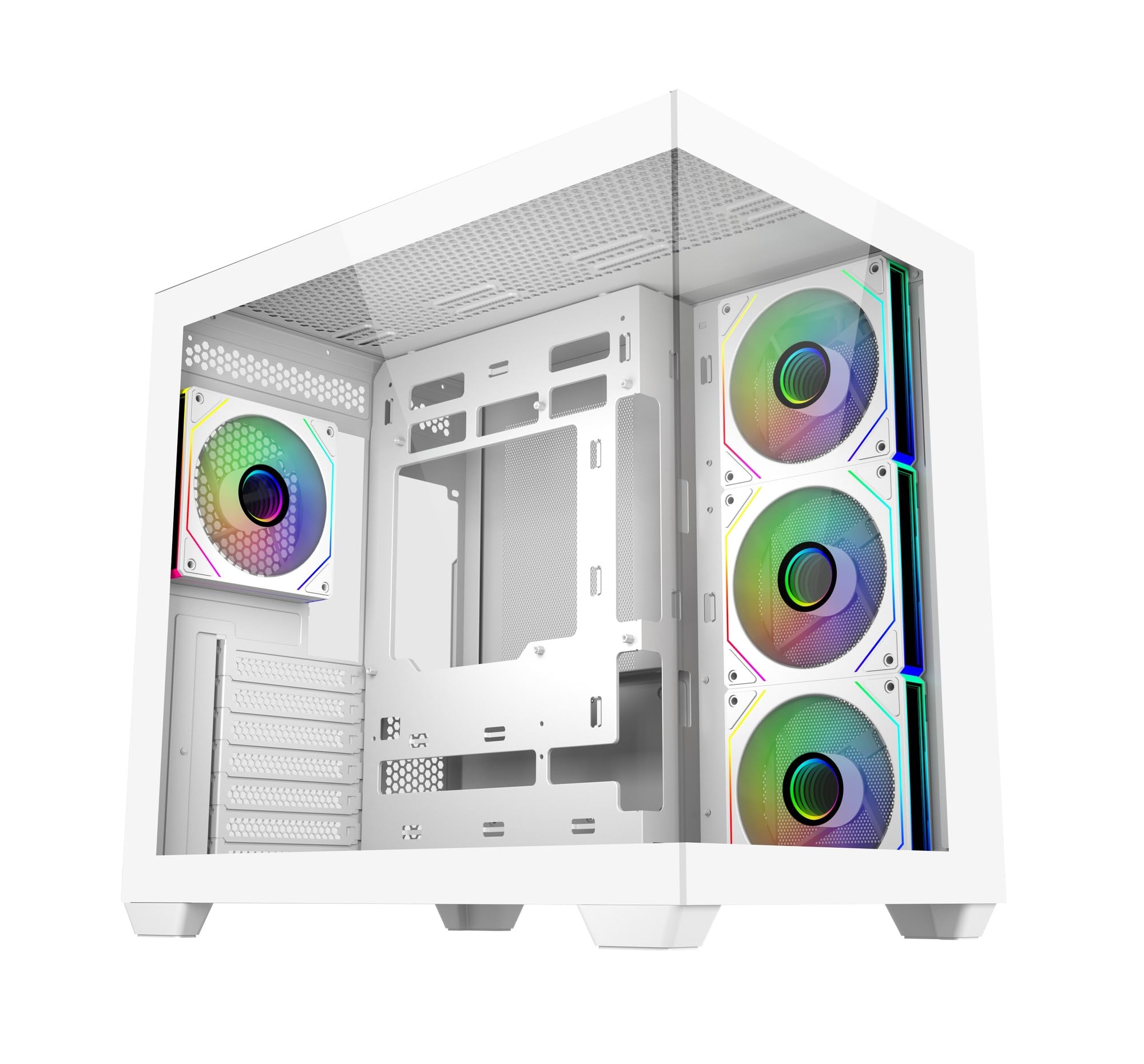
Слика: Предња страна view of the Cooler Master Elite 681 White computer case, showcasing its tempered glass panels and internal layout.
Подешавање и инсталација
Follow these guidelines for proper installation of your components into the Elite 681 case.
Компатибилност компоненти
- Подршка за матичну плочу: The Elite 681 supports ATX, Micro-ATX, and ITX motherboards.
- Graphics Card Length: Accommodates graphics cards up to 410mm in length, suitable for RTX 50 Series and other high-end GPUs.
- Подршка радијатора: Supports dual 360mm radiators (top and bottom) and a 280mm side-mounted radiator for advanced liquid cooling solutions.
Fan Installation and Airflow
The case includes four pre-installed ARGB fans: three reverse-blade side intake fans and one rear exhaust fan. These fans feature daisy-chain connectors for simplified cable management and are compatible with major motherboard ARGB software for synchronized lighting.

Слика: Интерна view of the Cooler Master Elite 681 White case, showing pre-installed ARGB fans and component mounting areas.
The Elite 681 features a vertical cooling configuration, supporting up to 10 fans in a bottom-to-top airflow layout to enhance thermal performance. Full-size mesh openings on the top and bottom panels ensure superior airflow.
Цабле Манагемент
The true dual-chamber architecture separates the motherboard from the PSU and cabling, providing 95mm of cable management depth in the right chamber. This design simplifies installation and improves airflow.
Управљање вашим системом
Once your system is assembled, utilize the front I/O panel and ARGB fan controls.
Предња И/О плоча
The upgraded high-speed I/O panel provides convenient connectivity:
- Dual USB 3.0 Type-A ports
- One USB 3.2 Gen 2x2 Type-C port (up to 20Gbps transfer speed)
- 3.5mm Audio + Mic jack

Image: Close-up of the Elite 681's top I/O panel, showing USB Type-C, USB Type-A, and audio ports.
ARGB контрола вентилатора
The pre-installed ARGB fans can be synchronized with your motherboard's ARGB software for customizable lighting effects. Refer to your motherboard's manual for specific instructions on ARGB control software.
Одржавање
Regular maintenance ensures optimal performance and longevity of your computer case.
Филтери за прашину
The Elite 681 features full-size mesh openings on the top and bottom panels, which act as dust filters. Periodically remove and clean these filters to prevent dust buildup and maintain efficient airflow. Use compressed air or a soft brush to remove accumulated dust.
Панели од каљеног стакла
Очистите каљене стаклене плоче меком крпом која не оставља влакна и благим средством за чишћење стакла. Избегавајте абразивне материјале или јаке хемикалије које би могле огребати или оштетити стакло.
Решавање проблема
If you encounter issues during or after installation, consider the following common troubleshooting steps:
- Нема напајања: Ensure all power supply cables are securely connected to the motherboard, graphics card, and other components. Check the power switch on the PSU and the case's power button connection to the motherboard.
- Fans Not Spinning/ARGB Not Working: Verify that all fan power cables and ARGB cables are correctly connected to the motherboard or a dedicated ARGB controller. Ensure motherboard ARGB software is installed and configured.
- Проблеми са уклапањем компоненти: Double-check component dimensions against the case specifications. Ensure all standoffs are correctly installed for the motherboard size.
- Оштећење приликом испоруке: Inspect the case for any physical damage that may have occurred during shipping, such as bent panels or broken support pieces, which could affect stability or component installation.
Спецификације
| Феатуре | Детаљ |
|---|---|
| Бранд | Цоолер Мастер |
| Број модела | E681-WHNN-S00 |
| Тип случаја | Торањ |
| Компатибилност матичне плоче | АТКС, Мицро-АТКС, ИТКС |
| Боја | Бела |
| Материјал | Aluminium (Frame), Tempered Glass |
| Димензије производа (ДкШкВ) | 42.5 к 28.5 к 40 цм |
| Тежина артикла | 7.13 кг |
| УСБ 3.0 портови | 2 |
| USB 3.2 Gen 2x2 Type-C Port | 1 |
| Унапред инсталирани вентилатори | 4 x ARGB (3 side intake, 1 rear exhaust) |
| Максимална дужина ГПУ-а | 410мм |
| Подршка радијатора | Dual 360mm (top/bottom), 280mm (side) |
Информације о гаранцији
For detailed warranty terms and conditions, please refer to the official Cooler Master website or the warranty card included with your product. Warranty coverage typically includes manufacturing defects and material faults for a specified period from the date of purchase.
Подршка
If you require further assistance or have questions not covered in this manual, please visit the official Cooler Master support webсајт:
You can also find additional resources, FAQs, and contact information on their webсајту.


