
Увод
Welcome to your new NIMO 15.6" FHD Laptop N151. This manual provides essential information to help you get started, operate, maintain, and troubleshoot your device. Please read through these instructions carefully to ensure optimal performance and longevity of your laptop.
Сетуп
1. Распакивање и први преглед
Пажљиво извадите све предмете из паковања. Уверите се да су присутне следеће компоненте:
- 1 x Nimo N151 Laptop
- 1 x Type-C 65W PD Fast Charger
- 1 x Упутство за употребу (овај документ)
- Windows 11 Home (pre-installed)
Inspect the laptop for any physical damage. If any components are missing or damaged, contact customer support immediately.
2. Charging the Laptop
Before first use, fully charge your laptop. Connect the provided Type-C 65W PD Fast Charger to the Type-C charging port on your laptop and then to a power outlet. The charge LED indicator will illuminate.

Image: The NIMO laptop connected to its Type-C PD fast charger, illustrating the charging process.
3. Укључивање и почетно подешавање
Press the power button located on the keyboard. The laptop will boot up and guide you through the initial Windows 11 Home setup process. Follow the on-screen instructions to configure your language, region, network, and user account.
Управљање лаптопом
Дисплаи
Your NIMO laptop features a 15.6-inch Full HD (1920x1080) Anti-Glare IPS display. This display offers clear visuals and reduced eye strain, suitable for various tasks from work to entertainment.

Image: The NIMO laptop's 15.6-inch FHD IPS display, highlighting its narrow bezels and vibrant visual capabilities.
Keyboard and Fingerprint Sensor
The laptop is equipped with a backlit keyboard for comfortable typing in various lighting conditions and a numeric keypad for efficient data entry. A fingerprint sensor is integrated for secure and quick login.

Image: Close-up of the NIMO laptop's backlit keyboard, showcasing the fingerprint sensor and numeric keypad.
Webцам
2MP webcam is integrated for video calls and online meetings.
Портови и повезивање
The NIMO N151 offers a variety of ports for versatile connectivity:
- УСБ 3.0 портови: За пренос података великом брзином.
- УСБ 2.0 порт: За повезивање периферних уређаја.
- ХДМИ порт: За повезивање са екстерним екранима.
- Type-C Ports: One for charging (PD Fast Charger) and one for multifunction use.
- Утор за микро СД картицу: За проширење складишног простора или пренос files.
- Headphone Combo Jack: За аудио улаз/излаз.
- Utor za Kensington Lock: За физичко обезбеђење.
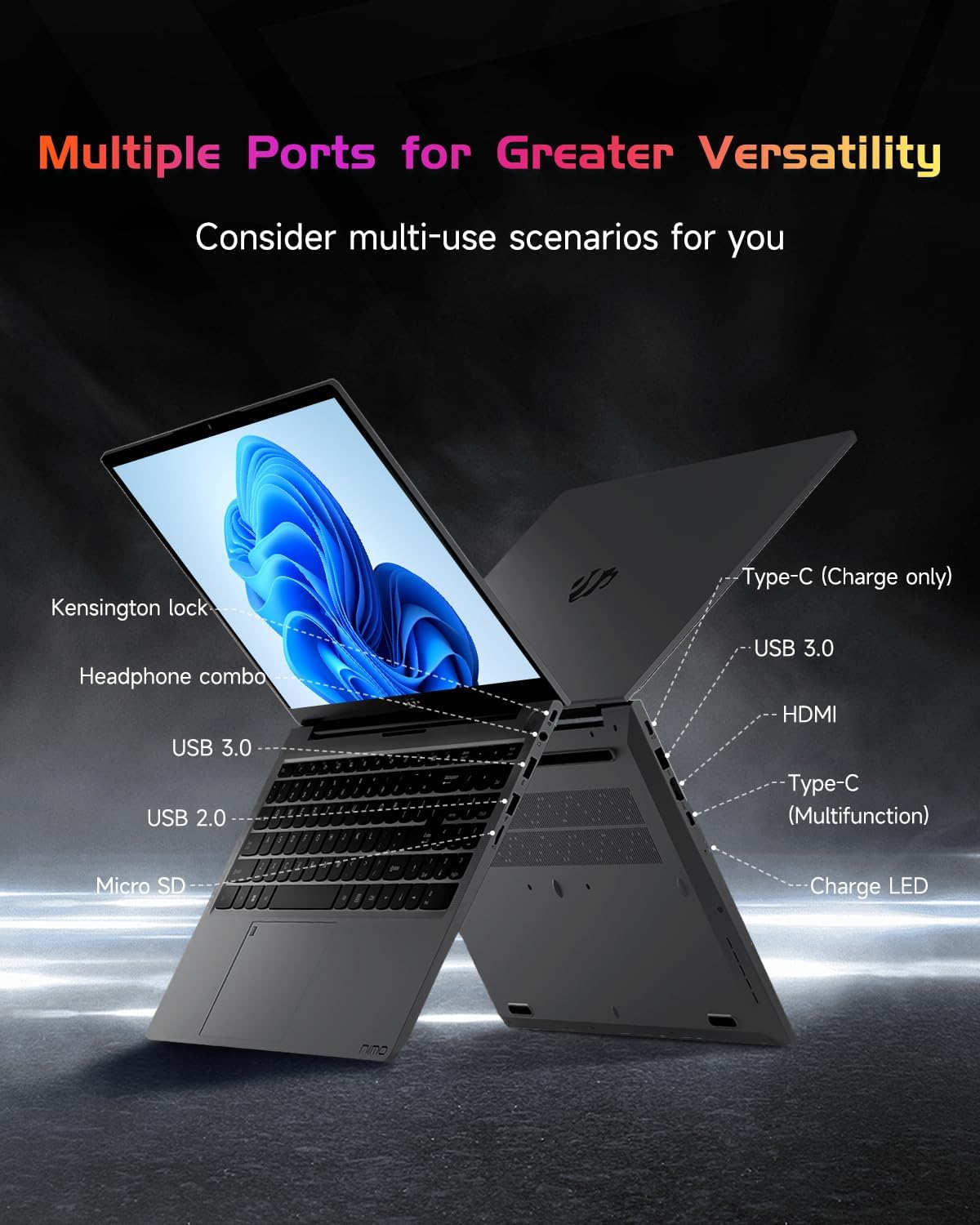
Слика: Бочни професионалацfile of the NIMO laptop, displaying its array of ports for diverse connectivity needs.
Stay connected with integrated Wi-Fi 6 for fast wireless internet and Bluetooth 5.2 for connecting wireless accessories.
Процесор и перформансе
Powered by the Intel Alder Lake-N100 12th Gen processor, the NIMO N151 delivers reliable performance for multitasking, streaming, and everyday computing tasks. It comes with 16GB DDR4 RAM and a 256GB PCIe SSD for fast startups and seamless operation.

Image: A visual representation of the Intel Alder Lake-N100 12th Gen processor, highlighting its role in the laptop's performance.
Оперативни систем
The laptop comes pre-installed with Windows 11 Home, offering a modern and intuitive user experience.
Одржавање
Општа нега
- Држите лаптоп на чистом и сувом месту, даље од екстремних температура.
- Avoid spilling liquids on the keyboard or screen.
- Use a soft, lint-free cloth to clean the screen and exterior. Do not use harsh chemicals.
- Обезбедите одговарајућу вентилацију тако што не блокирате отворе за ваздух.
Баттери Царе
To prolong battery life, avoid fully discharging the battery frequently. It is recommended to keep the battery charge between 20% and 80% when possible.
Решавање проблема
Уобичајени проблеми и решења
- Лаптоп се не укључује: Ensure the charger is properly connected and the battery has sufficient charge. Try holding the power button for 10-15 seconds to perform a hard reset.
- Екран је празан: Connect an external monitor to check if the display is the issue. Restart the laptop.
- Проблеми са Ви-Фи везом: Проверите да ли је Wi-Fi омогућен у подешавањима система Windows. Поново покрените рутер и лаптоп.
- Споре перформансе: Close unnecessary applications, check for malware, and ensure Windows is up to date.
For persistent issues, refer to the online support resources or contact NIMO customer service.
Спецификације
| Феатуре | Детаљ |
|---|---|
| Бранд | NIMO |
| Назив модела | Nimo N151 |
| Величина екрана | 15.6 инча |
| Резолуција екрана | 1920 x 1080 пиксела (FHD) |
| Процесор | Intel Pentium Quad Core N100 (up to 3.4 GHz) |
| РАМ | 16 ГБ ДДР4 |
| Брзина меморије | 3200 МХз |
| Хард Дриве | 256 GB SSD (PCIe) |
| Грапхицс Цопроцессор | Интегрисана графика |
| Оперативни систем | Виндовс 11 Хоме |
| Вирелесс Типе | 802.11a/b/g/n/ac (Wi-Fi 6) |
| Блуетоотх | Блуетоотх 5.2 |
| УСБ 2.0 портови | 1 |
| УСБ 3.0 портови | 3 |
| Просечно трајање батерије | 5 сата |
| Тежина артикла | 3.8 фунти |
| Димензије производа | 14.07 к 8.98 к 0.76 инча |
| Посебне карактеристике | Backlit Keyboard, Fingerprint Reader, HD Audio, Memory Card Slot, Numeric Keypad |
Гаранција и подршка
Your NIMO laptop is covered by a 2-годишња гаранција произвођача, ensuring peace of mind for your purchase. Additionally, NIMO offers a 90-Day Hassle-Free Return Policy.
For technical assistance, warranty claims, or returns, please contact NIMO customer support through their official channels. Refer to the contact information provided with your product or on the NIMO webсајту.
Видео снимци производа
Watch these official videos for a comprehensive overview and demonstration of your NIMO laptop's features.
NIMO 15.6 Laptop Comprehensive Introduction
Video: A detailed introduction to the NIMO 15.6" FHD Laptop, showcasinњегов дизајн и кључне функционалности.
NIMO Laptop: Perfect for Work and Study, Anytime, Anywhere
Video: This video highlights the NIMO laptop's versatility for both work and study environments, emphasizing its portability.
NIMO 15.6 FHD Laptop for Students Home Work
Video: A demonstration of the NIMO 15.6" FHD Laptop's suitability for students and home-based work tasks.
Efficiency Meets Convenience: Nimo Laptop
Video: This video showcases the NIMO laptop's efficiency and convenient features for daily use.
NIMO Laptop UGC
Video: User-generated content featuring the NIMO laptop, demonstrating real-world usage scenarios.
NIMO 15.6 FHD Laptop Promotion Video
Video: A promotional video for the NIMO 15.6" FHD Laptop, showcasinг његове карактеристике и предности.