
Увод
This manual provides essential information for setting up, operating, maintaining, and troubleshooting your NIMO 15.6-inch FHD Gaming Laptop, model Nimo N153. Please read this manual thoroughly before using your device to ensure proper function and longevity.

Image: The NIMO 15.6-inch FHD Gaming Laptop, showcasinг његов елегантан дизајн.
Шта је у кутији
Након распакивања, проверите да ли су присутне све ставке наведене у наставку:
- 1 x Nimo N153 Laptop
- 1 x Type-C 100W PD Fast Charger
- 1 x Упутство за употребу (овај документ)
- Windows 11 Home (pre-installed)
- Информације о гаранцији и поврату
Сетуп
1. Прво укључивање и пуњење
Before first use, connect the laptop to the power adapter and a wall outlet. The Type-C 100W PD Fast Charger is designed for efficient charging. Allow the battery to charge sufficiently before disconnecting.

Image: The compact Type-C 100W PD Fast Charger included with the laptop.
2. Operating System Setup (Windows 11)
Upon first boot, follow the on-screen instructions to complete the Windows 11 Home setup. This includes selecting your region, language, connecting to a Wi-Fi network, and creating a user account.
3. Подешавање читача отиска прста
For enhanced security, set up the integrated fingerprint reader. Navigate to Windows Settings > Accounts > Sign-in options and follow the prompts to register your fingerprint.

Image: Close-up of the laptop's keyboard, highlighting the fingerprint reader and backlit keys.
4. Повезивање периферних уређаја
Лаптоп има разне портове за повезивање екстерних уређаја:
- УСБ портови: Connect USB devices such as mice, keyboards, and external storage.
- ХДМИ порт: Повежите се са екстерним монитором или телевизором за проширени приказ.
- Type-C Ports: For data transfer, charging, and connecting compatible Type-C accessories.
- Утор за микро СД картицу: Insert Micro SD cards for additional storage or data transfer.
- Слушалице: Повежите слушалице или спољне звучнике.
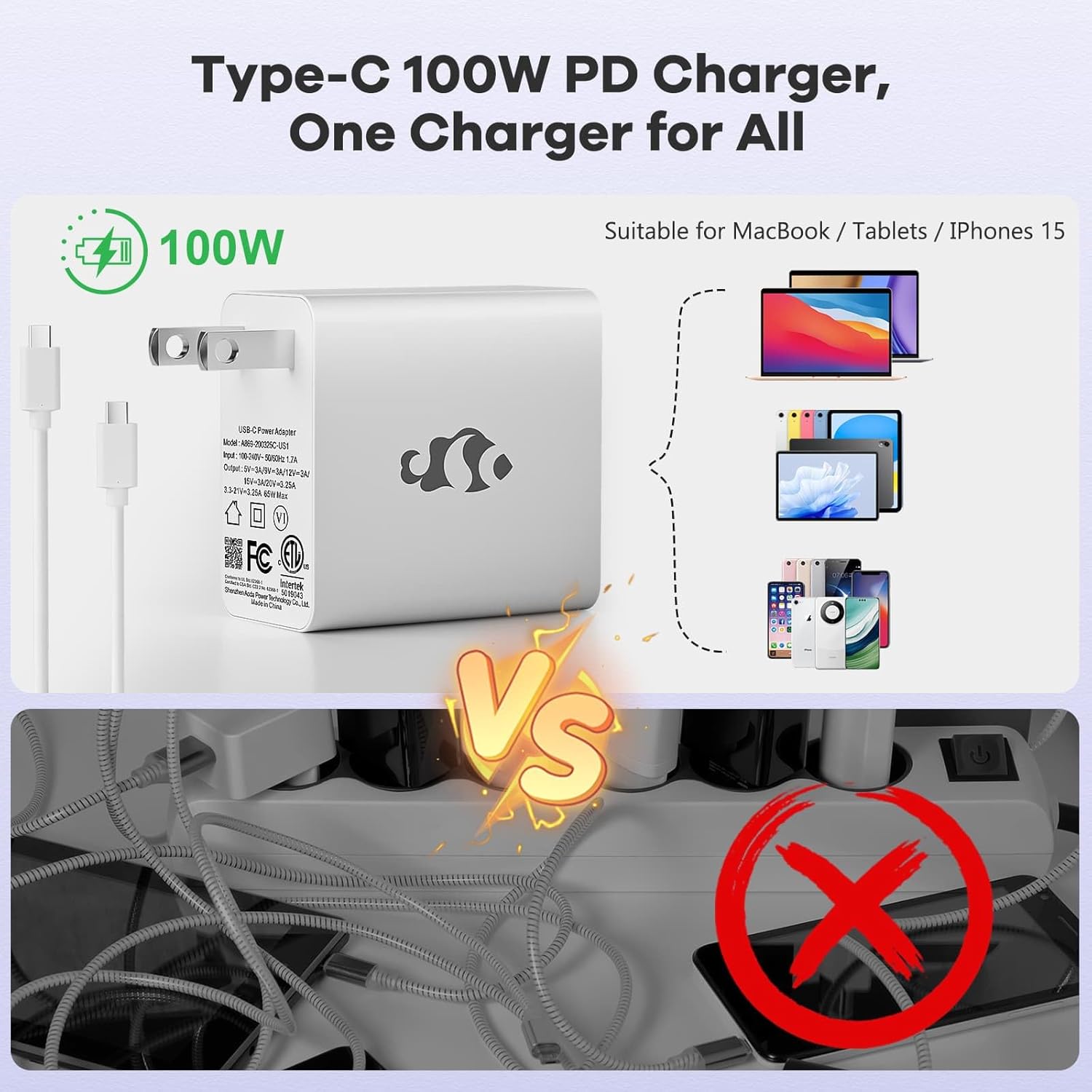
Image: Diagram illustrating the various ports available on the NIMO laptop, including USB, HDMI, Type-C, Micro SD, and headphone jack.
Упутство за употребу
1. Укључивање/искључивање и режим спавања
- Укључено: Притисните дугме за напајање које се налази на тастатури.
- Искључивање: Кликните на дугме Старт у оперативном систему Windows, а затим изаберите Напајање > Искључи.
- Режим спавања: Затворите поклопац лаптопа или кликните на дугме Старт, а затим изаберите Напајање > Спавање.
2. Keyboard and Touchpad Functions
- Тастатура са позадинским осветљењем: The keyboard features backlighting for use in low-light conditions. Use the dedicated function key (Fn + F key combination, typically) to adjust brightness or toggle it on/off.
- Нумеричка тастатура: The full-size keyboard includes a numeric keypad for convenient data entry.
- Вишеструки додирни тачпед: Supports various gestures for navigation and control within Windows. Refer to Windows settings for touchpad gesture customization.
3. Бежично повезивање
- Ви-Фи: Да бисте се повезали на бежичну мрежу, кликните на икону Wi-Fi на траци задатака, изаберите жељену мрежу и унесите лозинку ако је потребно.
- Блуетоотх: Да бисте упарили Bluetooth уређаје, идите на Windows подешавања > Bluetooth и уређаји и пратите упутства за додавање новог уређаја.
4. Webcam Shield
The laptop is equipped with a physical webcam shield for privacy. Slide the shield to cover or uncover the webцам по потреби.
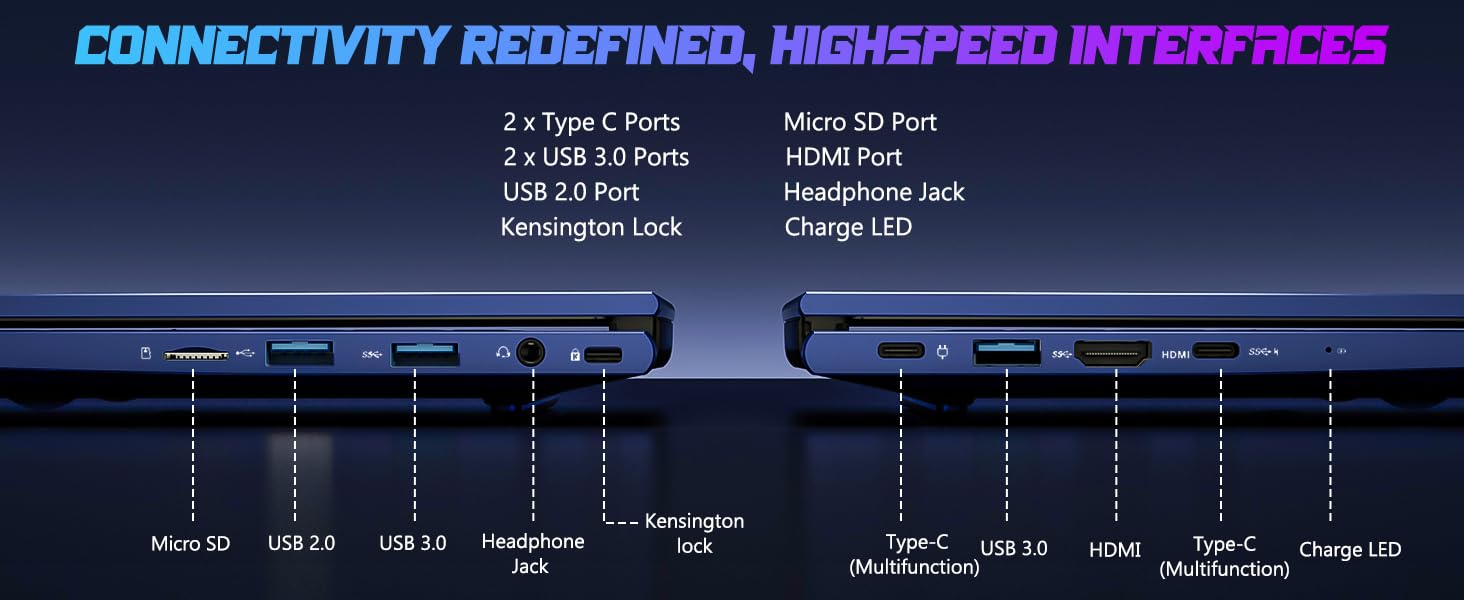
Image: Illustration of the laptop's webcam with a privacy shield feature.
5. Карактеристике екрана
The 15.6-inch FHD IPS anti-glare display (1920x1080 resolution) provides clear visuals. Adjust display settings such as brightness and resolution through Windows Display Settings.

Image: The NIMO laptop displaying a vibrant image on its 15.6-inch FHD IPS screen.
Одржавање
1. Чишћење лаптопа
- Екран: Лагано користите меку крпу која не оставља длачице дampводом или средством за чишћење екрана. Не прскајте течност директно на екран.
- Тастатура и кућиште: Користите меку, суву крпу. За тврдокорну прљавштину, благоamp Може се користити крпа, водећи рачуна да течност не уђе у отворе.
- Портови: Држите отворе чистим од прашине и остатака. Користите компримовани ваздух ако је потребно, држећи бочицу усправно.
2. Ажурирања софтвера
Regularly check for and install Windows updates to ensure system stability, security, and optimal performance. Go to Windows Settings > Windows Update.
3. Могућност надоградње
The Nimo N153 laptop supports upgradable dual-channel memory and detachable RAM/SSD. If you plan to upgrade components, it is recommended to consult a qualified technician or refer to NIMO's official support resources to avoid voiding your warranty or damaging the device.
Решавање проблема
If you encounter issues with your NIMO laptop, try the following basic troubleshooting steps:
- Нема напајања: Ensure the charger is securely connected to both the laptop and a working power outlet. Check the charge LED indicator.
- Проблеми са приказом: If the screen is blank, try connecting an external monitor via HDMI to check if the issue is with the laptop's internal display. Ensure display drivers are up to date.
- Проблеми са повезивањем (Wi-Fi/Bluetooth): Restart the laptop and your router/Bluetooth device. Check Windows network settings to ensure Wi-Fi and Bluetooth are enabled.
- Споре перформансе: Close unnecessary applications, check for malware, and ensure sufficient free storage space on the SSD.
- Систем се замрзава: Притисните и држите дугме за напајање 10-15 секунди да бисте присилно искључили лаптоп, а затим га поново покрените.
For more complex issues or if the problem persists, please contact NIMO customer support.
Спецификације
| Феатуре | Детаљ |
|---|---|
| Бранд | NIMO |
| Назив модела | Nimo N153 |
| Величина екрана | 15.6 инча |
| Резолуција | 1920x1080 Pixels (FHD IPS Anti-glare) |
| ЦПУ модел | AMD Ryzen 5 6600H (6 Cores, 12 Threads, up to 4.5 GHz) |
| Грапхицс Цопроцессор | AMD Radeon 660M (Integrated GPU) |
| Величина инсталиране РАМ меморије | 16 GB DDR5 (4800 MHz) |
| Величина чврстог диска | 1 TB SSD (PCIe 4.0) |
| Оперативни систем | Виндовс 11 Хоме |
| Посебне карактеристике | Backlit Keyboard, Fingerprint Reader, HD Audio, Numeric Keypad, Webcam Shield |
| Технологија повезивања | Wi-Fi (802.11a/b/g/n/ac), Bluetooth |
| Портс | 2x Type-C, 2x USB 3.0, 1x USB 2.0, 1x HDMI, 1x Micro SD, 1x Headphone Jack, Kensington Lock |
| Трајање батерије | Up to 5 Hours (Usage), Up to 7 Hours (Standby) |
| Капацитет батерије | 53.58 ватних сати |
| пуњач | 100W GaN Type-C PD Fast Charger |
| Тежина артикла | 3.8 фунти |
| Димензије (Д x Ш x Дебљина) | 14.07 cm x 8.98 cm x 0.76 cm |
Напомена: Спецификације су подложне променама без претходне најаве.
Гаранција и подршка
1. Гаранција произвођача
Your NIMO N153 laptop is covered by a Двогодишња гаранција произвођача from Nimo Direct Inc. This warranty covers defects in materials and workmanship under normal use. Please retain your proof of purchase for warranty claims.
2. Политика поврата
NIMO offers a 90-day hassle-free return policy. If you are not satisfied with your purchase, you may return the product within 90 days of purchase. Refer to your purchase documentation for specific return procedures.
3. Корисничка подршка
For technical assistance, warranty claims, or any product-related inquiries, please contact NIMO customer support:
- Емаил: сервице@нимопц.цом
- Онлине: Visit the official NIMO webсајт за ресурсе подршке и опције контакта.
Our dedicated support team is available to assist you.

Image: NIMO customer service representatives ready to assist.