
1. Увод
Thank you for choosing the NIMO 15.6" IPS FHD-Gaming-Laptop. This manual provides essential information for setting up, operating, maintaining, and troubleshooting your new laptop. Designed for versatile performance, this laptop is equipped with an AMD Ryzen 5 6600H processor, 32GB DDR5 RAM, and a 1TB SSD, making it suitable for work, gaming, and everyday use. Please read this manual thoroughly before using your device to ensure optimal performance and longevity.

Figure 1.1: NIMO 15.6" IPS FHD-Gaming-Laptop
The NIMO 15.6" IPS FHD-Gaming-Laptop features a sleek design with a vibrant Full HD IPS display, ideal for both productivity and entertainment.
2. Шта је у кутији
Молимо вас да проверите да ли су све ставке присутне у пакету:
- 1 x Nimo N153 Laptop
- 1 x Type-C 100W PD Fast Charger
- 1 к Упутство за употребу
- Windows 11 Home (Pre-installed)
- 2 Years Warranty, 90 Days Return Information
3. Водич за подешавање
3.1 Initial Power-On and Charging
Before first use, ensure your laptop is fully charged. Connect the provided Type-C 100W PD Fast Charger to the laptop's Type-C port and a power outlet. The charge LED indicator will illuminate.
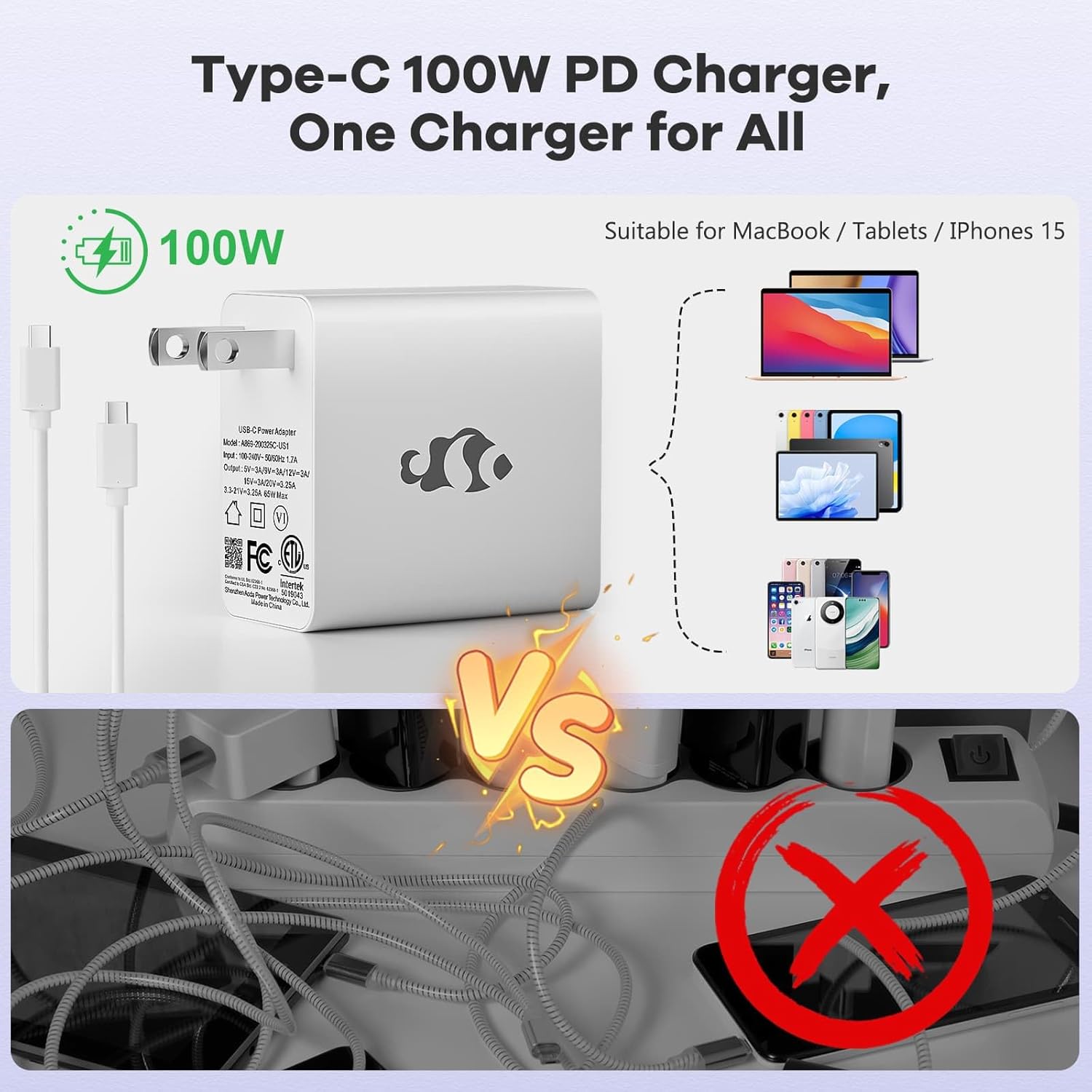
Figure 3.1: Type-C 100W PD Fast Charger
The compact 100W USB-C PD fast charger and 6.56ft cable provide efficient power delivery, compatible with various devices.
3.2 Повезивање периферних уређаја
Your NIMO laptop offers multiple ports for enhanced versatility. Refer to the diagram below for port locations and types:
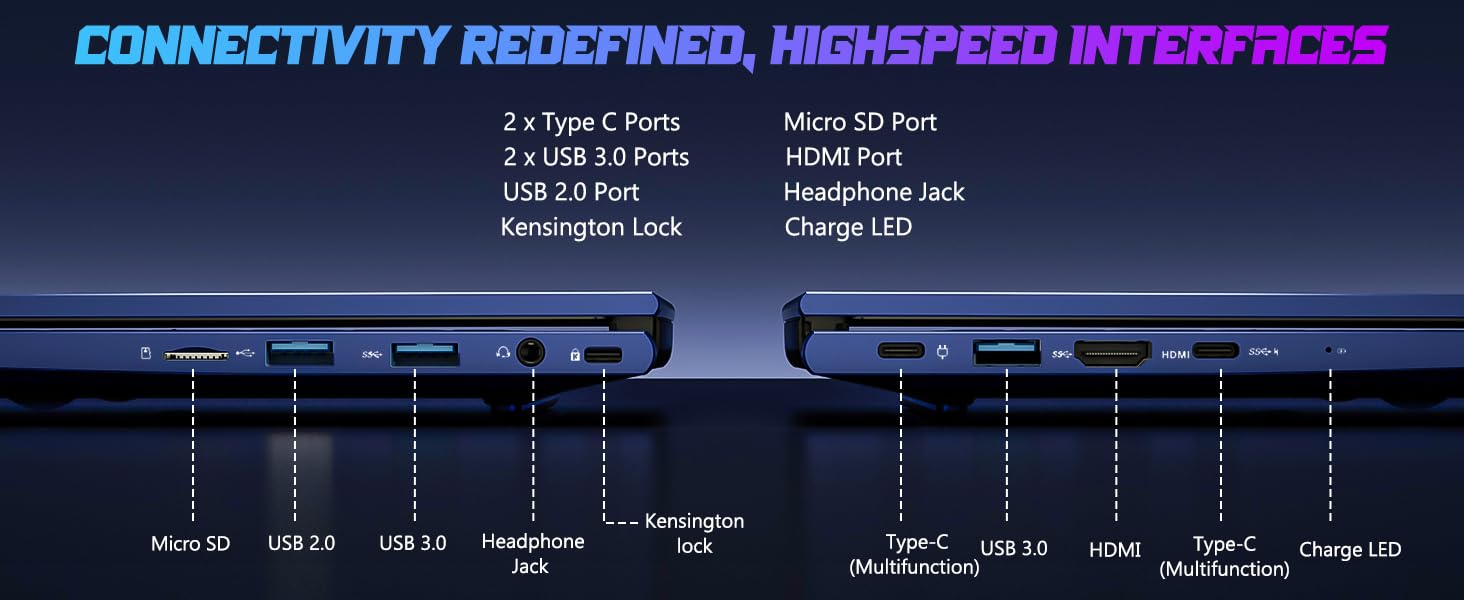
Слика 3.2: Портови за повезивање
The laptop includes 2x Type-C ports, 2x USB 3.0 ports, 1x USB 2.0 port, Micro SD port, HDMI port, Headphone Jack, and Kensington Lock for comprehensive connectivity.
- УСБ портови: Connect external devices such as mice, keyboards, or external storage drives.
- ХДМИ порт: Повежите се са екстерним монитором или телевизором за већи приказ.
- Слушалице: За аудио излаз на слушалице или екстерне звучнике.
- Мицро СД слот: Insert a Micro SD card for additional storage or data transfer.
4. Управљање лаптопом
4.1 Карактеристике екрана
The NIMO laptop features a 15.6" FHD IPS (1920x1080) anti-glare display with an 85% screen-to-body ratio, providing clear and vibrant visuals for all your tasks.
4.2 Тастатура и читач отиска прста
The laptop is equipped with a backlit keyboard for comfortable typing in various lighting conditions and a multi-touch touchpad for precise navigation. The built-in fingerprint reader allows for secure, one-touch login.

Figure 4.1: Backlit Keyboard and Fingerprint Reader
The backlit keyboard enhances visibility, while the integrated fingerprint reader provides quick and secure access to your system.
4.3 Webcam Privacy
For enhanced privacy, the laptop includes a built-in privacy camera switch, allowing you to easily disable the 2.0M webкамера када се не користи.
Слика 4.2: Webcam Shield
The physical webcam shield provides an extra layer of privacy, ensuring your camera is off when you need it to be.
4.4 Перформансе прекоview
The NIMO laptop is powered by an AMD Ryzen 5 6600H CPU (6 cores, 12 threads, up to 4.5 GHz) and an integrated AMD Radeon 660M GPU (6nm process, 6 GPU cores, 1900 MHz). This configuration provides balanced performance for productivity and light gaming.

Figure 4.3: Outstanding Performance
The AMD Ryzen 5 6600H processor and Radeon 660M iGPU deliver robust performance for various computing tasks.
With 32GB of DDR5 RAM and a 1TB PCIe 4.0 SSD, the laptop ensures seamless multitasking, faster load times, and ampле складиште за ваше files and applications. The memory is upgradable to 64GB and the SSD is detachable for future expansion.

Figure 4.4: Seamless Multitasking and Ampле Стораге
The combination of 32GB DDR5 RAM and a 1TB PCIe 4.0 SSD provides lightning-fast performance and significant storage capacity.
4.5 Трајање батерије
The laptop is equipped with a 54Wh smart battery, providing up to 5 hours of active use and up to 10 hours of standby time. A 15-minute charge can provide up to 2 hours of standby time with the 100W PD fast charger.

Figure 4.5: 54Wh Smart Battery
The efficient 54Wh smart battery offers extended usage and quick charging capabilities.
5. Одржавање
To ensure the longevity and optimal performance of your NIMO laptop, follow these maintenance guidelines:
- Нека буде чисто: Regularly clean the screen with a microfiber cloth and the keyboard with compressed air to remove dust and debris.
- Ажурирања софтвера: Keep your Windows 11 operating system and drivers updated to ensure security and performance improvements.
- Одржавање батерије: Avoid completely draining the battery frequently. For long-term storage, charge the battery to about 50-60%.
- Правилна вентилација: Ensure the laptop's vents are not obstructed to prevent overheating. Use it on a hard, flat surface.
- Безбедно руковање: Avoid dropping or subjecting the laptop to strong impacts.
КСНУМКС. Решавање проблема
This section addresses common issues you might encounter with your NIMO laptop.
| Проблем | Могући узрок | Решење |
|---|---|---|
| Лаптоп се не укључује | Слаба батерија; Проблем са адаптером за напајање | Connect the charger and wait a few minutes. Ensure the power adapter is securely connected to both the laptop and the outlet. |
| Споро перформансе | Too many applications running; Low disk space; Outdated drivers | Затворите непотребне апликације. Ослободите простор на диску. Ажурирајте Windows и управљачке програме уређаја. |
| Проблеми са Wi-Fi повезивањем | Wi-Fi adapter off; Router issue; Driver issue | Уверите се да је Wi-Fi омогућен у подешавањима система Windows. Поново покрените рутер. Ажурирајте драјвере за Wi-Fi. |
| Позадинско осветљење тастатуре не ради | Backlight disabled; Driver issue | Press the dedicated backlight key (usually Fn + F key). Check keyboard drivers in Device Manager. |
If you encounter issues not listed here or require further assistance, please contact NIMO customer support.
7. Спецификације
Detailed technical specifications for the NIMO 15.6" IPS FHD-Gaming-Laptop:
| Феатуре | Детаљ |
|---|---|
| Величина екрана на стојећем екрану | 15.6 инча |
| Максимална резолуција екрана | 1920 x 1080 пиксела (FHD IPS) |
| Процесор | AMD Ryzen 5 6600H (6 Cores, up to 4.5 GHz) |
| РАМ | 32 GB DDR5 (4800 MHz) |
| Хард Дриве | 1 TB SSD (PCIe 4.0) |
| Грапхицс Цопроцессор | AMD Radeon 660M (интегрисана) |
| Оперативни систем | Виндовс 11 |
| Вирелесс Типе | 802.11а/б/г/н/ац |
| УСБ портови | 1x USB 2.0, 3x USB 3.0, 2x Type-C |
| Просечно трајање батерије | 5 Hours (active use) |
| Тежина артикла | 3.8 фунти |
| Димензије производа | 14.07 к 8.98 к 0.76 инча |
| Боја | Плава |
| Посебне карактеристике | Позадинско осветљење тастатуре, читач отиска прста, HD аудио, нумеричка тастатура |
8. Гаранција и подршка
NIMO is committed to providing high-quality products and excellent customer service.
8.1 Информације о гаранцији
Your NIMO laptop comes with a comprehensive 2-годишња гаранција произвођача. This warranty covers defects in materials and workmanship under normal use. Additionally, we offer a 90-Day Hassle-Free Return Policy од дана куповине.
8.2 Корисничка подршка
Our dedicated support team is ready to assist you with any questions or issues. For technical support, warranty claims, or general inquiries, please contact us via:
- Емаил: сервице@нимопц.цом
- Онлине: Visit the official NIMO webсајт за често постављана питања и ресурсе за подршку.
We strive to resolve any issues swiftly and ensure your satisfaction.
8.3 Производ завршенview Видео
Watch this official video for a quick overview of the NIMO laptop's features and benefits:
Video: NIMO Laptop Overview
This video provides a brief look at the NIMO 15.6" laptop, highlighting its key features and user experience, including its display, camera, and overall performance.