
1. Увод
This manual provides essential information for setting up, operating, maintaining, and troubleshooting your VIBOX IX-556 PC Gamer. Please read these instructions carefully before using your new computer to ensure optimal performance and longevity.

Image 1.1: The VIBOX IX-556 PC Gamer, showcasing its white chassis and illuminated internal components.
2. Подешавање
2.1 Распакивање
Carefully remove the PC from its packaging. Inspect for any visible damage. Retain all packaging materials for future transport or warranty claims.
2.2 Повезивање периферних уређаја
Connect your monitor, keyboard, mouse, and other peripherals to the appropriate ports on the rear and front of the PC. Ensure all connections are secure.
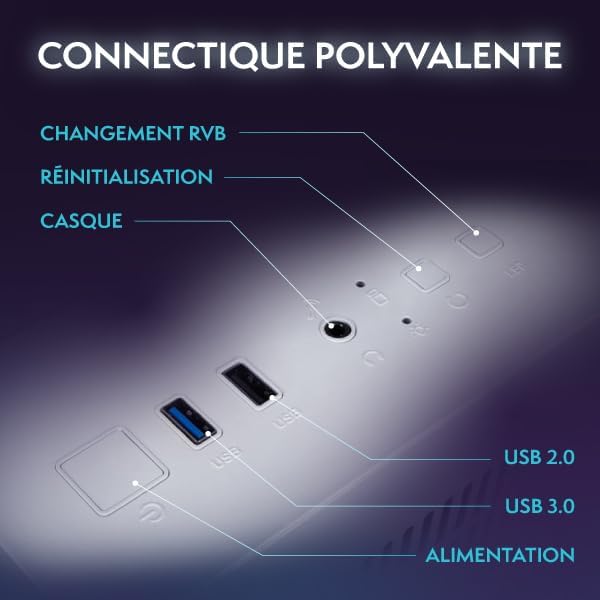
Image 2.1: Front panel connectivity, including USB 2.0, USB 3.0, headphone jack, reset button, and RGB change button.
- Монитор: Use an HDMI or DisplayPort cable to connect your monitor to the graphics card ports (usually located lower on the rear panel).
- тастатура и миш: Повежите се са било којим доступним УСБ портовима.
- Снага: Connect the power cable to the PC's power supply unit (PSU) and then to a wall outlet.
- Мрежа: For wired internet, connect an Ethernet cable to the LAN port. For wireless, the included Wi-Fi adapter provides connectivity.
2.3 Почетно укључивање
Press the power button on the front of the PC. The system will boot up, and you will be guided through the Windows 11 Home initial setup process.
3. Упутство за употребу
3.1 Укључивање/искључивање
- За укључивање: Притисните дугме за напајање једном.
- Затворити: Кликните на дугме Старт у оперативном систему Windows, а затим изаберите Напајање > Искључи.
- Рестартовати: Кликните на дугме Старт у оперативном систему Windows, а затим изаберите Напајање > Поново покрени.
3.2 Windows 11 Home Features
Your VIBOX IX-556 comes pre-installed with Windows 11 Home, optimized for gaming. Key features include:
- DirectStorage: For faster game loading times.
- Аутоматски HDR: Enhances visuals for supported games.
- Xbox Game Pass Integration: Seamless access to a library of games.
- Optimized CPU Performance: Enhanced processing for demanding applications.
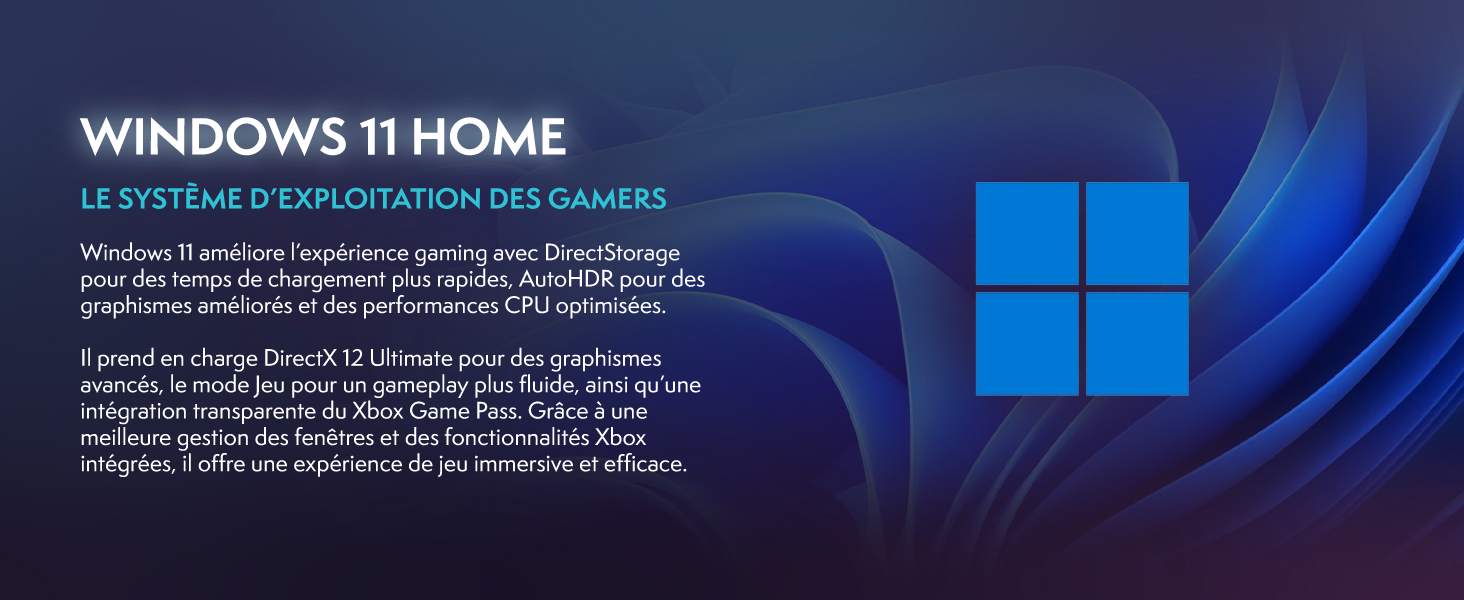
Image 3.1: Windows 11 Home, highlighting features like DirectStorage and Auto HDR for an enhanced gaming experience.
3.3 Перформансе у играма
The VIBOX IX-556 is equipped with high-performance components for a fluid gaming experience:
- AMD Ryzen 7 9800X3D Processor: Provides exceptional gaming performance and low latency.
- AMD Radeon RX 9070 XT Graphics Card: Delivers stunning visuals and supports advanced features like Raytracing.
- 32 ГБ ДДР5 РАМ меморије: Ensures smooth multitasking and efficient system performance.

Image 3.2: Performance comparison chart demonstrating FPS improvements with AMD HYPR-RX and Fluid Motion Frames 2.1 in various games.

Image 3.3: Visual comparison illustrating the enhanced lighting and reflections when Raytracing is enabled.
4. Одржавање
4.1 Чишћење
Regular cleaning helps maintain performance and extends the lifespan of your PC.
- Екстеријер: Користите меку, дamp cloth to clean the exterior surfaces. Avoid harsh chemicals.
- прашина: Periodically use compressed air to clear dust from fan vents and internal components. Ensure the PC is powered off and unplugged before cleaning.
4.2 Ажурирања софтвера
Keep your operating system and drivers updated to ensure stability and optimal performance.
- Ажурирања за Windows: Windows 11 will automatically check for and install updates. You can manually check via Settings > Windows Update.
- Ажурирања драјвера: Regularly check the AMD website for the latest graphics card drivers. Motherboard and other component drivers can be found on the respective manufacturer's webсајтовима.
4.3 Систем хлађења
The VIBOX IX-556 features water cooling and multiple RGB fans for efficient thermal management.

Image 4.1: The VIBOX AIO 120mm liquid cooler, designed for compact and efficient CPU temperature management.

Image 4.2: Inverse airflow diagram, showing how the system optimizes air circulation to reduce heat accumulation.

Image 4.3: VIBOX Hex RGB Infinity 120mm fans, offering multiple colors and RGB modes for customization.
Ensure proper airflow by keeping the PC in a well-ventilated area. Avoid blocking air vents. The water cooling system is maintenance-free for typical use, but monitor temperatures using system monitoring software if you notice performance degradation.
КСНУМКС. Решавање проблема
5.1 Уобичајена питања
- Без приказа: Ensure the monitor is connected to the graphics card (not the motherboard) and is powered on. Try a different cable or monitor if possible.
- Рачунар се не укључује: Check all power connections, including the wall outlet and the PSU cable. Ensure the PSU switch is in the 'On' position.
- Замрзавање/падови система: Ensure all drivers are up to date. Check system temperatures. If issues persist, consider a clean installation of Windows or contact support.
- Споре перформансе: Проверите да ли постоје апликације у позадини које троше ресурсе. Обезбедите довољно слободног простора на SSD-у. Покрените скенирање за злонамерни софтвер.
5.2 Контактирање подршке
If you encounter issues that cannot be resolved using the troubleshooting steps above, please contact VIBOX Gaming customer support. Provide your product model (IX-556) and a detailed description of the problem.
6. Спецификације

Image 6.1: Dimensions of the VIBOX IX-556 PC case: 42cm (height) x 28cm (width) x 43.5cm (depth).
| Компонента | Детаљ |
|---|---|
| Назив модела | VIBOX IX-556 (VTX-7 White) |
| Процесор | AMD Ryzen 7 9800X3D (8 Cores, up to 5.2 GHz Max Boost) |
| графичка картица | AMD Radeon RX 9070 XT (16GB GDDR6) |
| РАМ | 32GB DDR5 5600MHz (Dual Channel) |
| Складиштење | 1ТБ ССД |
| Оперативни систем | Виндовс 11 Хоме |
| Повезивање | Wi-Fi (300 Mbps adapter included), Ethernet, USB, HDMI, DisplayPort |
| Хлађење | Water Cooling, RGB Lighting |
| Тип случаја | Tower (Tempered Glass 3-Panel Design) |
| Димензије (Д к Ш к В) | 42 к 28 к 43.5 цм |
| Видео Оутпут | HDMI, DisplayPort (Max Resolution: 3840x2160) |
| УСБ портови | Multiple (USB 2.0, USB 3.0) |
| Тип прикључка за напајање | Type C/EF (2-pin European/Hybrid FR-DE) |
| Компатибилни уређаји | Headset, Keyboard, Printer, Monitor, Mouse |
| Специфичне употребе | Gaming, Photo Editing, Video Editing |
7. Гаранција и подршка
7.1 Информације о гаранцији
Your VIBOX IX-556 PC Gamer comes with a comprehensive warranty:
- делови: 2 године
- рад: Животни вијек
Сачувајте доказ о куповини за гаранцијске захтеве.
7.2 Корисничка подршка
For technical assistance, warranty service, or any questions regarding your VIBOX IX-556 PC Gamer, please contact VIBOX Gaming customer support. Refer to the contact information provided with your purchase or visit the official VIBOX Gaming webсајту.