
1. Увод
This manual provides essential instructions for setting up, operating, maintaining, and troubleshooting your HONOR 400 5G smartphone. Please read this guide thoroughly to ensure proper use and to maximize the performance of your device.
The HONOR 400 is a powerful 5G smartphone featuring a 6.55-inch AMOLED display, a Qualcomm Snapdragon 7 Gen 3 processor, 12GB of RAM, and 512GB of internal storage. It operates on Android 15 and is equipped with a 5300mAh battery, a 200MP main camera, and dual-SIM capabilities.
2. Шта је у кутији
Upon unboxing your HONOR 400 smartphone, verify that all items are present:
- ХОНОР 400 5Г паметни телефон
- УСБ кабл
- (Other accessories such as a charger, SIM ejector tool, or protective case may vary by region and package contents.)
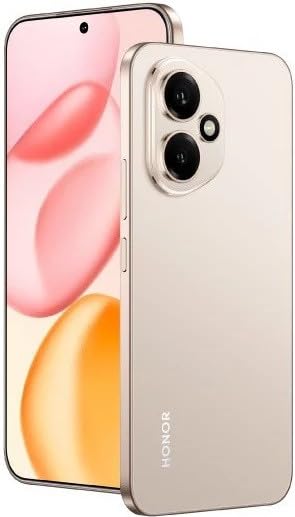
Слика 2.1: The HONOR 400 5G Smartphone. This image displays the device's sleek design and the main screen.
3. Девице Оверview
Упознајте се са физичким компонентама вашег HONOR 400 паметног телефона.
3.1 Фронт View
- Приказ: 6.55-inch AMOLED screen with 1264 x 2736 pixels resolution.
- Предња камера: 50 MP, f/2.0 (широкоугаони) за селфије и видео позиве.
- Слушалица: Located at the top edge of the display.
An illustration of the front view would typically show the display, front camera, and earpiece.
3.2 Реар View
- Main Camera System:
- 200 MP, f/1.9 (wide), 1/1.4", PDAF, OIS
- 12 MP, f/2.2, 112° (ultrawide), AF
- Фласх: LED flash for low-light photography.
- HONOR Logo: Идентификација бренда.
An illustration of the rear view would typically highlight the camera module and brand logo.
3.3 Сиде Viewс и луке
- Дугме за напајање: Typically on the right side, used to power on/off and wake/sleep the device.
- Дугмад за јачину звука: Typically on the right side, above the power button, for adjusting volume.
- УСБ Типе-Ц порт: Налази се на дну, користи се за пуњење и пренос података.
- Лежиште за СИМ картицу: Location varies, typically on the side or bottom, for inserting Nano-SIM cards.
- Microphones & Speakers: Strategically placed for calls and audio output.
Illustrations of the device's sides would show the placement of buttons, ports, and the SIM tray.
4. Подешавање
4.1 Уметање SIM картица
- Пронађите лежиште за СИМ картицу на свом уређају.
- Уметните алатку за избацивање СИМ картице (ако је доступна) у мали отвор поред лежишта и лагано гурајте док лежиште не искочи.
- Place your Nano-SIM card(s) into the designated slots on the tray. The HONOR 400 supports Dual-SIM (Nano-SIM + ESIM OR Nano-SIM + Nano-SIM). Ensure the gold contacts face downwards.
- Пажљиво вратите лежиште у телефон.
An image demonstrating SIM card insertion would be helpful here.
Важно: Пре куповинеasing, verify network compatibility with your service provider. This device supports GSM networks (2G, 3G, 4G LTE, and 5G SA/NSA) but does not support CDMA networks.
4.2 Почетно укључивање и чаробњак за подешавање
- Притисните и држите дугме за напајање док се не појави HONOR лого.
- Follow the on-screen instructions to complete the initial setup, which includes selecting your language, connecting to Wi-Fi, setting up your Google account, and configuring security features.
5. Управљање вашим уређајем
5.1 Андроид 15 оперативни систем
Your HONOR 400 runs on Android 15, offering a user-friendly interface and access to a vast ecosystem of applications via the Google Play Store. Navigate using gestures or on-screen buttons, customize your home screen, and manage notifications.
5.2 Основне функције
- Упућивање позива: Додирните икону телефона, унесите број и додирните дугме за позивање.
- Слање порука: Use the Messaging app to send SMS/MMS.
- Прегледање Интернета: Отвори а web browser (e.g., Chrome) to access the internet via Wi-Fi or mobile data.
- Управљање апликацијом: Download, install, and uninstall apps from the Google Play Store.
5.3 Употреба камере
The HONOR 400 features a versatile camera system:
- Задња камера: Utilize the 200 MP main sensor for high-resolution photos and the 12 MP ultrawide lens for expansive shots. Features include PDAF and Optical Image Stabilization (OIS).
- Предња камера: The 50 MP wide-angle front camera is ideal for selfies and video conferencing.
- Видео снимак: Capture videos in up to 4K resolution at various frame rates (30, 60, 120 fps).
A diagram of the camera interface or tips for photography modes could be included here.
5.4 Повезивање
Your device supports multiple connectivity options:
- 5G/4G ЛТЕ: High-speed mobile data connectivity.
- Ви-Фи: Повежите се на бежичне мреже за приступ интернету.
- Блуетоотх: Упарите се са бежичним слушалицама, звучницима и другим уређајима.
- УСБ типа Ц: За пуњење и повезивање са рачунаром ради преноса података.
6. Одржавање
6.1 Одржавање батерије
- The HONOR 400 is equipped with a 5300mAh non-removable battery.
- Да бисте продужили век трајања батерије, избегавајте екстремне температуре и често потпуно пражњење батерије.
- Use the provided USB cable and a compatible charger for optimal charging.
6.2 Ажурирања софтвера
Regularly check for and install software updates to ensure your device has the latest features, security patches, and performance improvements. You can usually find this option in your phone's Settings menu under "System & updates" or "About phone."
6.3 Чишћење уређаја
Користите меку крпу која не оставља влакна да бисте очистили екран и кућиште телефона. Избегавајте употребу јаких хемикалија или абразивних материјала.
КСНУМКС. Решавање проблема
This section addresses common issues you might encounter with your HONOR 400 smartphone.
7.1 Уређај се не укључује
- Ensure the battery is charged. Connect the phone to a charger for at least 15 minutes before attempting to power it on again.
- Try a forced restart by holding the Power button for an extended period (e.g., 10-15 seconds).
7.2 Проблеми са мрежном повезивањем
- Проверите да ли је ваша СИМ картица правилно уметнута.
- Verify that mobile data is enabled in your phone's settings.
- Поново покрените уређај.
- Confirm with your service provider that your plan is active and there are no network outagес у вашој области.
- Ensure your device is compatible with your network's frequencies (GSM only, no CDMA).
7.3 Рушење или замрзавање апликација
- Затворите и поново отворите апликацију.
- Обришите кеш меморију и податке апликације у Подешавања > Апликације.
- Уверите се да је апликација ажурирана на најновију верзију.
- Поново покрените телефон.
7.4 Споре перформансе
- Затворите непотребне апликације у позадини.
- Обришите кеш и привремено files.
- Ensure you have sufficient free storage space (512GB internal storage).
- Редовно поново покрећите уређај.
8. Спецификације
| Феатуре | Детаљ |
|---|---|
| Назив модела | Част 400 |
| Оперативни систем | Андроид 15.0 |
| Процесор | Qualcomm SM7550-AB Snapdragon 7 Gen 3 (4 nm), осам језгара (1x2.63 GHz Cortex-A715 и 3x2.4 GHz Cortex-A715 и 4x1.8 GHz Cortex-A510) |
| РАМ | 12 ГБ |
| Интерна меморија | 512 GB (непрошириво) |
| Дисплаи | 6.55 Inches AMOLED, 1B colors, 1264 x 2736 pixels |
| Задња камера | 200 MP (wide, OIS) + 12 MP (ultrawide) |
| Предња камера | 50 MP (широкоугаони) |
| Резолуција снимања видео записа | 4K (30, 60, 120 fps) |
| Капацитет батерије | 5300 Милиamp Hours (non-removable) |
| СИМ картица | Дуал-СИМ (Нано-СИМ + ЕСИМ ИЛИ Нано-СИМ + Нано-СИМ) |
| Повезивање | 5G, GSM, LTE, Wi-Fi, Bluetooth, USB Type-C |
| Димензије | 156.5 к 74.6 к 7.3 мм (6.16 к 2.94 к 0.29 инча) |
| Тежина | 202 грама (6.49 оз) |
| Боја | Desert Gold (as per product listing, actual color may vary by variant) |
9. Гаранција и подршка
9.1 Гаранција произвођача
The HONOR 400 smartphone comes with a 1 године гаранције произвођачаОва гаранција покрива недостатке у материјалу и изради при нормалној употреби. Молимо вас да сачувате доказ о куповини за потребе подношења захтева за гаранцију.
For specific terms and conditions of the warranty, please refer to the warranty card included with your product or visit the official HONOR support webсајту.
9.2 Корисничка подршка
За додатну помоћ, техничку подршку или упите о услугама, обратите се корисничкој подршци HONOR-а путем њиховог званичног webсајт или контакт информације које су наведене у паковању вашег производа.
You can typically find support resources, FAQs, and contact details on the official HONOR webсајт: ввв.хихонор.цом