
1. Увод
Thank you for choosing the UBOTIE Wireless Keyboard and Mouse Combo. This manual provides essential information for setting up, operating, and maintaining your new peripheral devices. This combo offers a full-size QWERTY layout keyboard with round colorful keys, an integrated phone holder, and a comfortable wrist rest, paired with a quiet wireless mouse, all connected via a single 2.4GHz USB receiver.
2. Безбедносне информације
- Држите уређаје даље од воде и других течности како бисте спречили оштећења.
- Избегавајте излагање уређаја екстремним температурама или директној сунчевој светлости.
- Не покушавајте сами да растављате или поправљате уређаје. За помоћ контактирајте корисничку подршку.
- Батерије одложите у складу са локалним прописима.
3. Садржај пакета
- 1 x UBOTIE Wireless Keyboard
- 1 x UBOTIE Wireless Mouse
- 1 x 2.4GHz USB Receiver (stored inside the mouse)
- 1 x Integrated Wrist Rest
- 1 x Keycap Cleaning Brush
Note: Batteries (2x AAA for keyboard, 1x AA for mouse) are not included and must be purchased separately.

Image: UBOTIE Wireless Keyboard and Mouse Combo with wrist rest and USB receiver.
4. Подешавање
4.1 Инсталација батерије
- За миша: Open the battery compartment cover on the underside of the mouse. Insert one AA battery, ensuring correct polarity (+/-). Close the cover.
- За тастатуру: Open the battery compartment cover on the underside of the keyboard. Insert two AAA batteries, ensuring correct polarity (+/-). Close the cover.
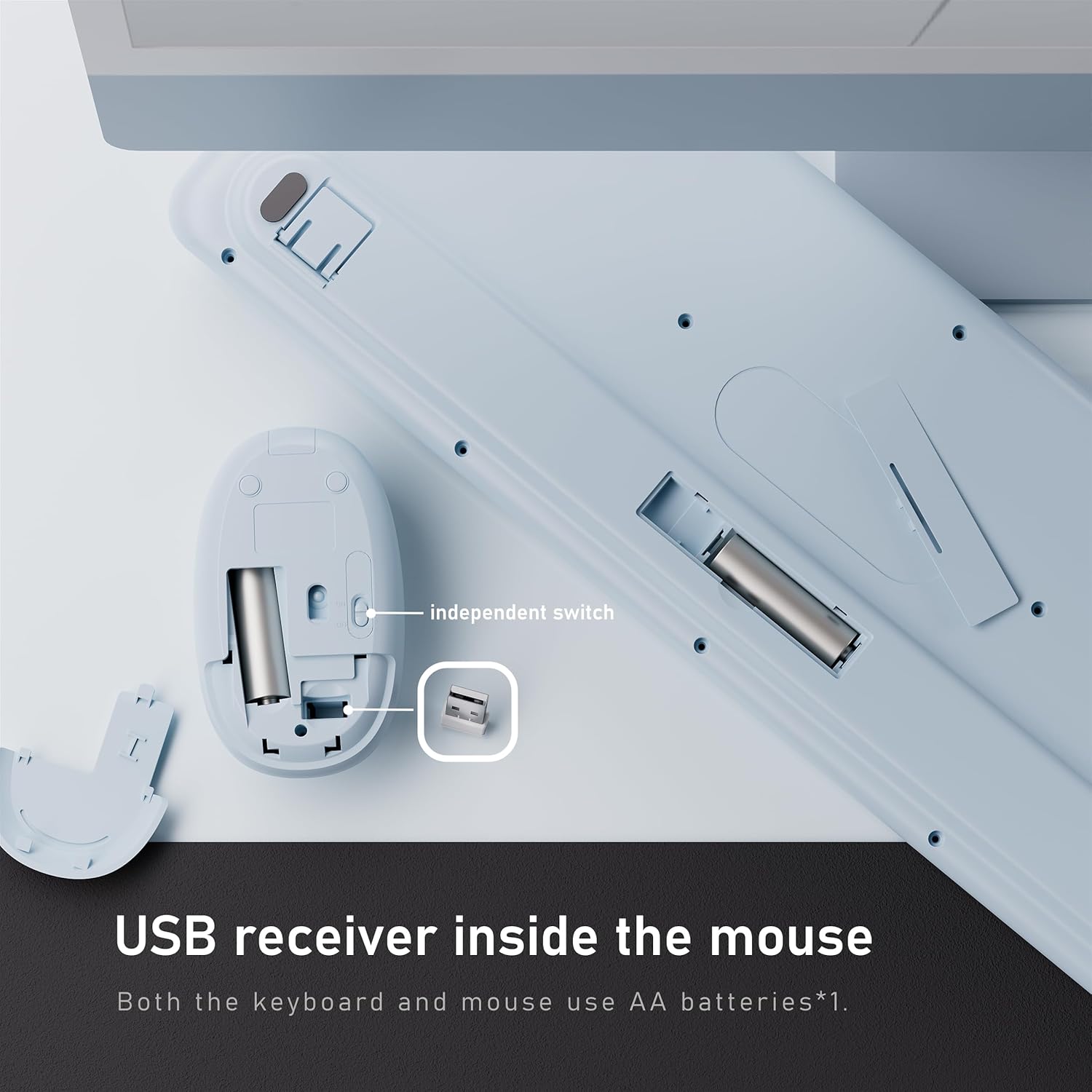
Image: Underside of the mouse showing the USB receiver storage and battery compartment. Underside of the keyboard showing its battery compartment.
4.2 Повезивање USB пријемника
- Locate the 2.4GHz USB receiver stored in the battery compartment of the mouse.
- Уклоните УСБ пријемник.
- Plug the USB receiver into an available USB-A port on your computer or laptop. If your computer only has USB-C ports, use the provided USB-C adapter.
- Turn on the power switches for both the keyboard and the mouse. The devices are plug-and-play and should connect automatically.
Video: Demonstrates the plug-and-play setup of the wireless keyboard and mouse combo, highlighting the USB receiver and connection process.
5. Упутство за употребу
5.1 Карактеристике тастатуре
- QWERTY распоред пуне величине: Standard keyboard layout with function keys and a numeric keypad for efficient typing.
- Round Colorful Keycaps: Unique design for enhanced visual appeal and comfortable typing.
- Интегрисани држач телефона: A slot at the top of the keyboard allows you to place your smartphone or tablet for easy viewинг и мултитаскинг.
- Ослонац за зглоб: The detachable wrist rest provides ergonomic support to reduce strain during extended typing sessions. It attaches magnetically to the keyboard.
- Прекидач: An independent power switch is located on the keyboard to conserve battery life when not in use.

Image: The UBOTIE keyboard showcasing the integrated phone holder with a smartphone placed in it.
5.2 Карактеристике миша
- Тихи кликови: The mouse features low-noise buttons, ideal for quiet environments.
- Подесиви ДПИ: A DPI button allows you to adjust the mouse sensitivity for precise control.
- Ергономски дизајн: Contoured shape for comfortable grip.
- Прекидач: An independent power switch is located on the mouse to conserve battery life.
Video: A seller-provided video demonstrating the features of the wireless keyboard and mouse, including the ergonomic design and quiet operation.
6. Одржавање
6.1 Cleaning the Keycaps
The floating keycap design allows for easy cleaning. Use the included brush or a soft, dry cloth to remove dust and debris from between the keys. For deeper cleaning, individual keycaps can be carefully removed and reattached.
6.2 Генерално чишћење
Wipe the surface of the keyboard and mouse with a soft, damp тканина. Избегавајте употребу јаких хемикалија или абразивних материјала који могу оштетити завршни слој.
КСНУМКС. Решавање проблема
- Без конекције: Ensure both the keyboard and mouse are powered on and have fresh batteries. Verify the USB receiver is securely plugged into your computer. Try plugging the receiver into a different USB port.
- Кашњење или повремена веза: Move the devices closer to the USB receiver. Avoid placing the receiver near other wireless devices that may cause interference.
- Mouse Cursor Jumps/Sticks: Check the mouse's DPI setting and adjust if necessary. Ensure the mouse sensor is clean and used on a suitable surface.
- Тастери не реагују: Check battery levels. If individual keys are stuck, gently clean around them.
- Device Not Waking from Sleep: The devices enter sleep mode after 30 minutes of inactivity to save power. Simply press any key or click the mouse to wake them up.
8. Спецификације
| Феатуре | Детаљ |
|---|---|
| Бранд | УБОТИЕ |
| Модел | B0FCXTYWDF |
| Повезивање | 2.4 GHz бежични (USB пријемник) |
| Распоред тастатуре | Full-Size QWERTY |
| Батерија за тастатуру | 2 к ААА батерије (нису укључене) |
| Батерија за миш | 1 к АА батерија (није укључена) |
| Компатибилност | Виндовс 11, 10, 8, 7 |
| Оперативни опсег | До 10 метара (33 стопе) |
| Опис тастатуре | Membrane Computer Keyboard and Mouse With Phone Holder Wrist Rest |
| Тежина артикла | 2.48 фунте (1.13 килограма) |
| Димензије пакета | 17.52 к 8.9 к 2.01 инча |
9. Гаранција и подршка
UBOTIE products come with a standard manufacturer's warranty. For specific warranty details, please refer to the product packaging or contact UBOTIE customer support directly. If you encounter any issues or have questions about your product, please visit the official UBOTIE webсајт или контактирајте њихов тим за корисничку подршку за помоћ.
За више информација посетите UBOTIE Store on Amazon.