
Netzu 6208D
Netzu Digital Alarm Clock User Manual
Модел: 6208Д
Brand: Netzu
Увод
Thank you for choosing the Netzu Digital Alarm Clock. This clock features a vibrant RGB display, dual alarms, adjustable brightness, and a loud alarm option, designed to provide a reliable and customizable timekeeping experience. This manual will guide you through the setup, operation, and maintenance of your new alarm clock.

Слика: Фронт view of the Netzu Digital Alarm Clock displaying the time in vibrant RGB colors.
Безбедносне информације
- Не излажите уређај екстремним температурама, директној сунчевој светлости или високој влажности.
- Држите уређај даље од воде или других течности.
- Не покушавајте сами да растављате или поправљате уређај. Све сервисирање препустите квалификованом особљу.
- Користите само приложени адаптер за напајање и кабл.
- Обезбедите одговарајућу вентилацију 24 сата дневно.
Садржај пакета
Молимо вас да проверите пакет за следеће ставке:
- Netzu Digital Alarm Clock x 1
- Адаптер за напајање к 1
- Кабл за напајање к 1
- Упутство за употребу к 1

Image: Illustration showing the alarm clock, power cable, adapter, and manual, indicating items included in the package.
Производ је завршенview
Familiarize yourself with the main components and controls of your Netzu Digital Alarm Clock.

Image: Visual representation highlighting key features such as loud sound, 4-level brightness, dual alarm clocks, 12/24h time format, snooze function, and battery memory.
Контроле и дугмад:
- Дугме СНООЗЕ: Located on top, used to activate snooze or turn off display.
- Дугме за ПОДЕСИВАЊЕ ВРЕМЕНА: On the side, used to enter time setting mode.
- ALARM 1/2 Buttons: On the side, used to set Alarm 1 and Alarm 2.
- +/- Дугмад: On the side, used to adjust values (time, brightness, volume).
- РГБ дугме: On the side, used to cycle through RGB color modes.
Сетуп
1. Прикључак за напајање:
Connect the provided power adapter to the DC input port on the back of the alarm clock, then plug the adapter into a standard wall outlet. The display will light up.

Image: The alarm clock connected to a wall outlet via its power adapter and cable, illustrating the plug-in functionality.
2. Battery Backup Installation (Optional but Recommended):
For memory function during power outages, install 2 x AAA batteries (not included) into the battery compartment on the bottom of the clock. This ensures that time and alarm settings are retained even if the main power is disconnected. The display will not be lit during battery backup mode, but the internal clock and alarm settings will remain active.

Image: Depiction of the alarm clock with two AAA batteries, explaining how battery backup maintains time and alarm settings during power failures.
Упутство за употребу
1. Подешавање времена:
- Притисните и држите ВРЕМЕНСКИ СКЛОП дугме док цифре сати не почну да трепћу.
- Користите +/- дугмад за подешавање сата.
- Притисните ВРЕМЕНСКИ СКЛОП поново да бисте потврдили сат и прешли на подешавање минута. Цифре за минуте ће трептати.
- Користите +/- дугмад за подешавање минута.
- Притисните ВРЕМЕНСКИ СКЛОП again to save the time and exit time setting mode.
12H/24H Time Format:
While in time setting mode (hour or minute flashing), press the ВРЕМЕНСКИ СКЛОП button repeatedly to toggle between 12-hour (with AM/PM indicator) and 24-hour formats.
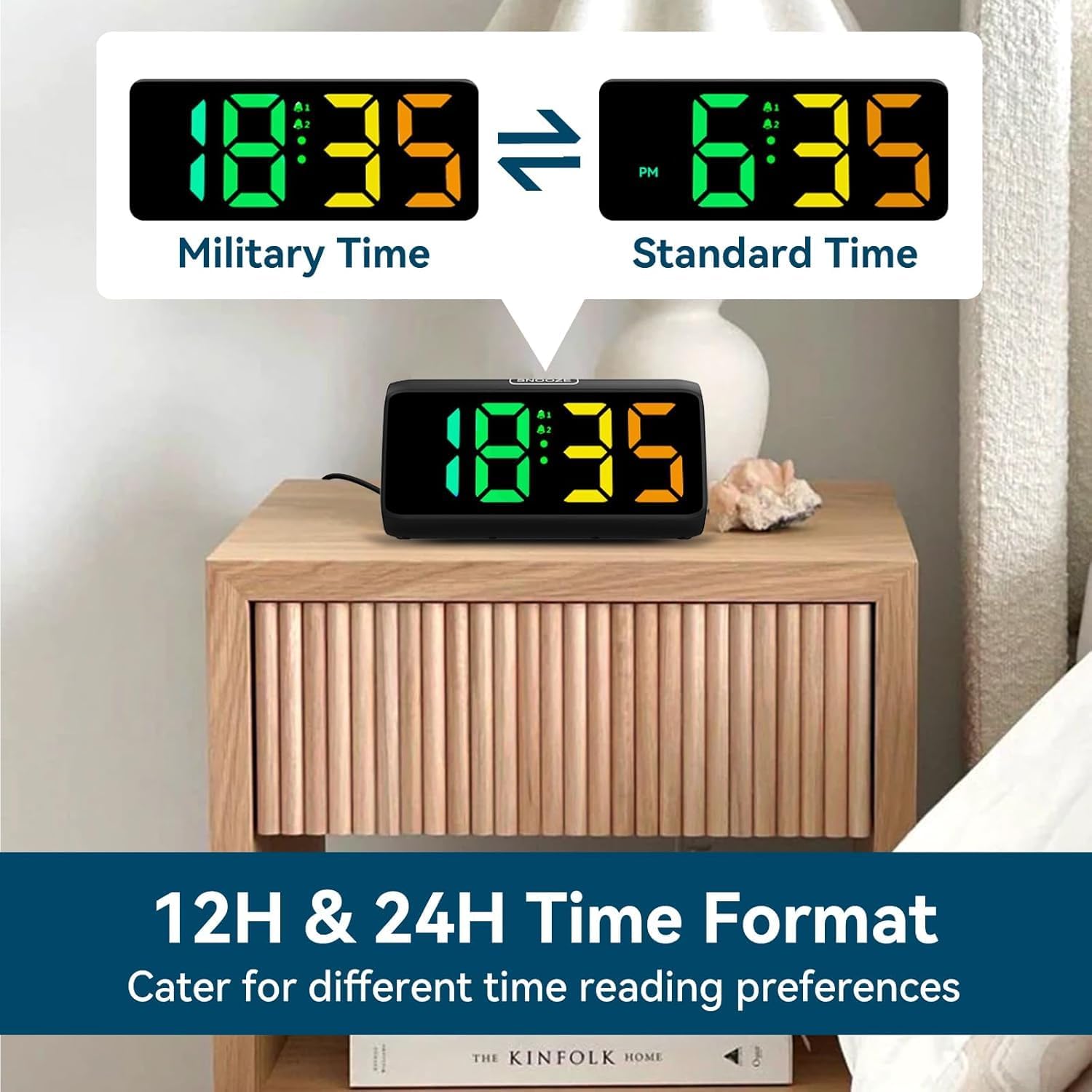
Image: Comparison of the alarm clock display showing time in 12-hour format (with AM/PM) and 24-hour (military) format.
2. Setting Alarms (Alarm 1 & Alarm 2):
The clock supports two independent alarms.
- Притисните и држите АЛАРМ 1 дугме (или АЛАРМ 2 button) until the alarm hour digits flash.
- Користите +/- дугмад за подешавање сата аларма.
- Притисните тастер АЛАРМ 1 (или АЛАРМ 2) button again to confirm the hour and move to minute setting. The minute digits will flash.
- Користите +/- дугмад за подешавање минута аларма.
- Притисните тастер АЛАРМ 1 (или АЛАРМ 2) button again to save the alarm time.
- After setting the time, the alarm icon (bell 1 or bell 2) will appear on the display, indicating the alarm is active.
- To turn an alarm ON/OFF, short press the corresponding АЛАРМ 1 or АЛАРМ 2 button. The bell icon will appear/disappear.
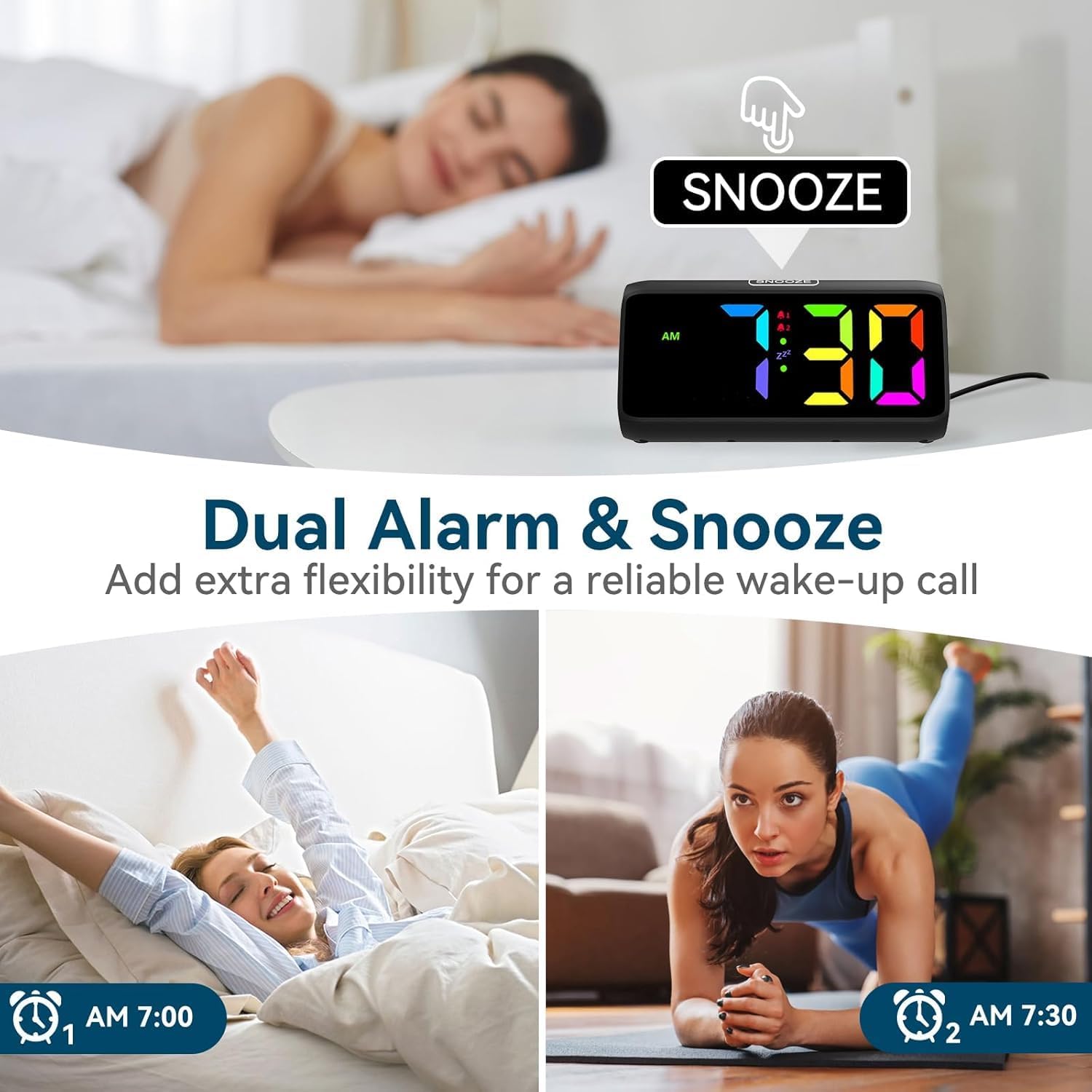
Image: Visual demonstrating the dual alarm functionality, showing two different alarm times and the snooze button.
3. Adjusting Alarm Volume:
Када се огласи аларм, притисните дугме +/- buttons to cycle through the 4 available volume levels. The clock can reach up to 115 decibels.

Image: Graphic illustrating the alarm clock's sound output, showing volume levels from 85dB to 115dB.
4. Функција одлагања:
When the alarm sounds, tap the large СНООЗЕ button on top of the clock to activate the snooze function. The alarm will pause for 9 minutes and then sound again. The 'Zz' icon will appear on the display.
To turn off the alarm completely, press any other button (e.g., ALARM 1/2, TIME SET) or let the alarm sound for its full duration (typically 60 minutes) without snoozing.

Image: A person reaching for the snooze button on the alarm clock, demonstrating the ease of activating the 9-minute snooze.
5. Подешавање осветљености екрана:
Кратко притисните на СНООЗЕ button to cycle through 5 brightness levels (Lv.4, Lv.3, Lv.2, Lv.1, OFF). Choose the level that suits your preference, including turning the display completely off.

Image: Visual comparison of the alarm clock display at different brightness levels (Lv.4 to OFF), showing how the screen can be adjusted from bright to completely dark.
6. Changing RGB Colors/Modes:
Притисните тастер РГБ button to cycle through the 8 available RGB color modes. These include various solid colors and a dynamic color-changing mode, allowing for personalized visual effects.

Image: A grid displaying 8 different RGB color options for the alarm clock's screen, showcasing the customizable visual experience.
Одржавање
- Чишћење: Use a soft, dry cloth to wipe the surface of the clock. Do not use abrasive cleaners or solvents.
- Складиштење: If storing the clock for an extended period, remove the AAA batteries to prevent leakage.
- Окружење: Keep the clock in a clean, dry environment, away from dust and moisture.
Решавање проблема
| Проблем | Могући узрок | Решење |
|---|---|---|
| Приказ сата је искључен. | No power connection or display is set to OFF. | Ensure the power adapter is securely plugged in. Press the SNOOZE button to cycle through brightness levels and turn the display ON. |
| Аларм се не оглашава. | Аларм није подешен или је искључен. Јачина звука је прениска. | Check if the alarm icon is displayed. If not, set the alarm. Increase the alarm volume when it is sounding. |
| Време/подешавања се ресетују након нестанка струјеtage. | No AAA batteries installed for backup. | Install 2 x AAA batteries (not included) for memory retention during power interruptions. |
| Дугмад не реагују. | Привремени софтверски квар. | Unplug the power adapter, remove backup batteries (if installed), wait 30 seconds, then reconnect power. |
Спецификације
- Бренд: Нетзу
- Број модела: 6208Д
- Боја: Црно
- Димензије производа: 15.8 к 3.81 к 7.2 цм
- Тежина артикла: 280 г
- Материјал: Пластика
- Тип приказа: Дигитал
- Посебне карактеристике: Adjustable Brightness, Adjustable Volume, Alarm, Loud Alarm, Snooze, RGB Display
- Извор напајања: Plug-in (AC adapter included)
- Резервно напајање: 2 x AAA Batteries (not included) for memory function
Гаранција и подршка
For warranty information or technical support, please refer to the contact details provided on the product packaging or visit the official Netzu webсајту. Сачувајте рачун о куповини за гаранције.
За додатну помоћ, можете се директно обратити продавцу преко платформе на којој је производ купљен.
Ask a question about this manual
Ask about setup, troubleshooting, compatibility, parts, safety, or missing instructions. Manuals+ will review the question and use this page’s manual context to help answer it.