
LEDIARY 22 Inch Ceiling Fan
LEDIARY плафонски вентилатор од 22 инча са светлима и даљинским управљачем, упутство за употребу
Model: 22 Inch Ceiling Fan
1. Увод
This manual provides detailed instructions for the safe installation, operation, and maintenance of your LEDIARY 22 Inch Ceiling Fan with Lights and Remote. Please read this manual thoroughly before installation and retain it for future reference. This ceiling fan features a low-profile design, integrated LED lighting with adjustable color temperature and dimming, a reversible DC motor, and dual control options via remote and Bluetooth app.

Image 1.1: The LEDIARY 22 Inch Ceiling Fan with its remote control and smartphone app interface.
2. Важне информације о безбедности
Увек се придржавајте основних мера предострожности приликом инсталирања и рада електричних уређаја како бисте смањили ризик од пожара, струјног удара и повреда.
- електрична безбедност: Ensure power is disconnected at the circuit breaker before installation or servicing. All wiring must comply with national and local electrical codes.
- Квалификовани електричар: Ако нисте упознати са електричним инсталацијама, консултујте квалификованог електричара.
- Монтажа: Монтажна конструкција мора бити способна да издржи тежину вентилатора (приближно 9.23 фунти).
- Размак сечива: Одржавајте минимални размак од 7 метра од пода до лопатица вентилатора.
- Do Not Bend Blades: Avoid bending the fan blades during installation or cleaning.
- Без страних предмета: Не стављајте прсте или било какве предмете у лопатице вентилатора док вентилатор ради.
- Волtage: This fan operates on 120 Volts. Verify your power supply matches this requirement.
3. Садржај пакета
Before beginning installation, ensure all components are present and undamaged. If any parts are missing or damaged, contact customer support.
- Ceiling Fan Unit (with integrated LED light)
- Ремоте Цонтрол
- Носач
- Пакет хардвера (шрафови, навртке, подлошке)
- Упутство за употребу
4. Водич за инсталацију
Installation should be performed by a qualified individual. Ensure power is OFF at the circuit breaker before starting.
- Припремите место за инсталацију:
- Искључите напајање на главном прекидачу.
- Remove any existing light fixture or ceiling fan.
- Ensure the junction box is securely mounted and capable of supporting the fan's weight.
- Причврстите носач за монтажу:
- Secure the mounting bracket to the ceiling junction box using the provided screws and washers.
- Уверите се да је носач чврсто причвршћен и раван.
- Perform Electrical Wiring:
- Connect the fan's electrical wires to the household wiring according to local codes. Typically, this involves connecting:
- Црно (уживо) до црног (уживо)
- Бела (неутрална) до беле (неутралне)
- Зелени или голи бакар (уземљење) до зеленог или голог бакра (уземљења)
- Користите жичане матице да причврстите све везе.
- Пажљиво увуците све жице у разводну кутију.
- Connect the fan's electrical wires to the household wiring according to local codes. Typically, this involves connecting:
- Монтирајте вентилаторску јединицу:
- Lift the fan unit and align it with the mounting bracket.
- Secure the fan unit to the mounting bracket using the designated screws.
- Завршне провере:
- Ensure all connections are secure and the fan is properly mounted.
- Вратите напајање на прекидач.

Image 4.1: Product dimensions (22"D x 22"W x 5.3"H) and recommended room sizes (Height 7FT-10FT, Length & Width UP TO 8.5ft x 8.5ft).
5. Операција
Your LEDIARY ceiling fan can be controlled via the included remote control or a Bluetooth-enabled smartphone app.
5.1 Рад на даљинском управљачу
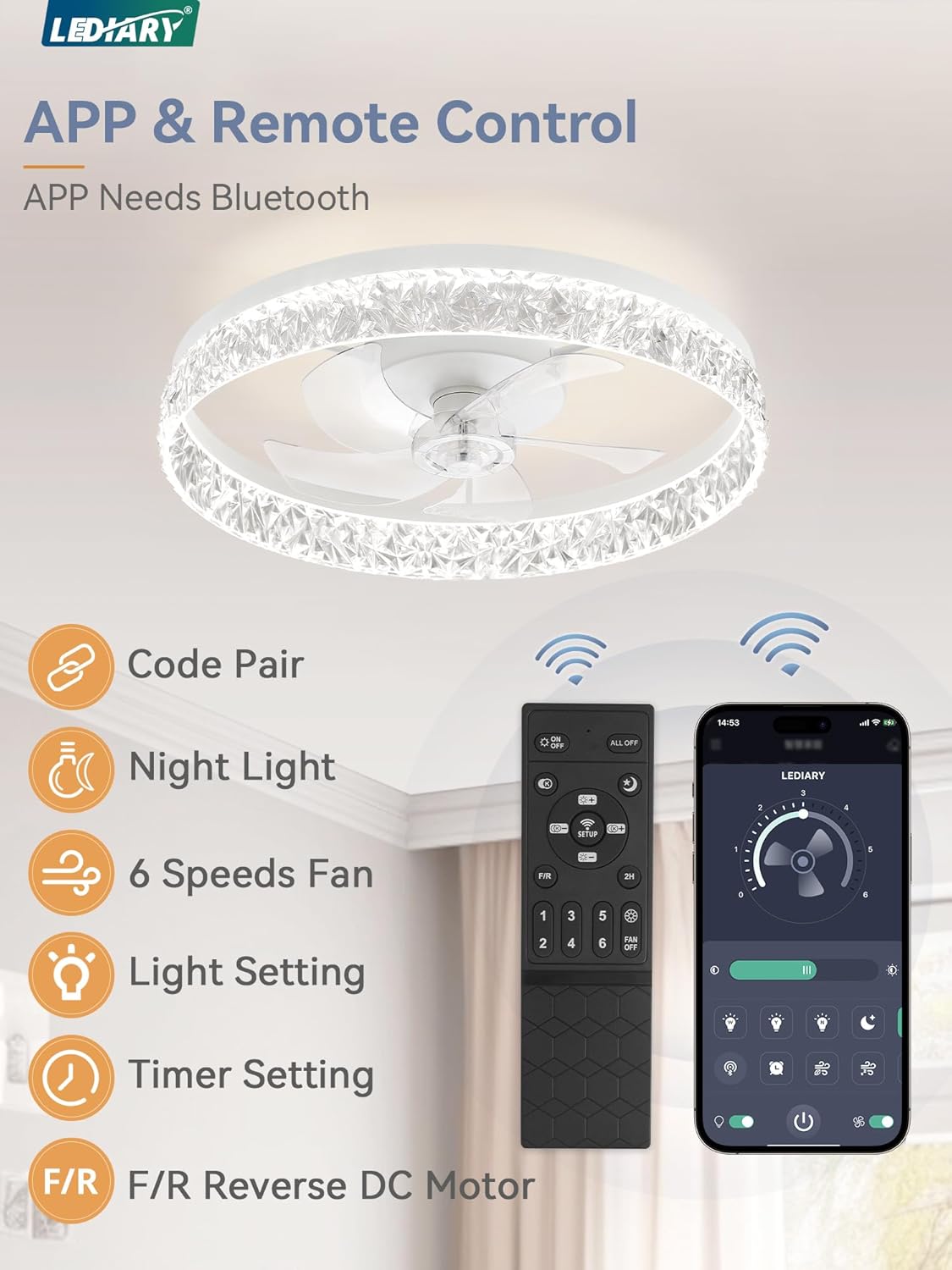
Image 5.1: The remote control and smartphone app interface for controlling the fan and light functions.
- Укључивање/искључивање: Притисните тастер ОН/ОФФ дугме за укључивање или искључивање вентилатора и светла.
- Брзина вентилатора: Користите 1-6 buttons to select one of six fan speeds.
- Speeds 1-2: Soft Wind
- Speeds 3-4: Natural Wind
- Speeds 5-6: Cool Wind
- Укључено/искључено светло: Притисните тастер Светло укључено/искључено button to control the light independently.
- Подешавање температуре боје: Користите ЦЦТ button to cycle through color temperatures (3000K Warm White, 4500K Natural, 6000K Daylight).
- Затамњење: Користите Диммер Уп/Довн buttons to adjust light brightness from 10% to 100%. The fan remembers your last light settings.
- Подешавање тајмера: Притисните тастер Тајмер button to activate the 2-hour sleep timer. The fan will automatically turn off after 2 hours.
- Reverse DC Motor: Притисните тастер Ф/Р button to change the fan's direction.
- Летњи режим (напред): Creates a downdraft, providing a cooling effect.
- Зимски режим (обрнуто): Creates an updraft, circulating warm air trapped near the ceiling.
- Ноћно светло: Притисните тастер Нигхт Лигхт button for a low-intensity light setting.

Image 5.2: Illustration of adjustable color temperatures (3000K, 4500K, 6000K) and smooth dimming from 10% to 100% brightness.

Image 5.3: Visual representation of the reversible DC motor, showing forward airflow for summer cooling and reverse airflow for winter warmth circulation.
5.2 Контрола путем Bluetooth апликације
The fan can also be controlled via a dedicated Bluetooth app. Refer to the app's instructions for pairing and advanced features. The app provides similar controls to the remote, including fan speed, light settings, and timer functions.
6. Одржавање
Редовно одржавање обезбеђује оптималне перформансе и продужава век трајања вашег плафонског вентилатора.
- Чишћење:
- Before cleaning, ensure the power is turned off at the circuit breaker.
- Обришите вентилатор и светиљку меком крпомamp тканина.
- Не користите абразивна средства за чишћење или раствараче, јер могу оштетити завршну обраду.
- Затегните причвршћиваче: Periodically check all screws and fasteners to ensure they are tight. Loose connections can cause noise or wobble.
- Није потребно подмазивање: ДЦ мотор је трајно подмазан и не захтева додатно подмазивање.
КСНУМКС. Решавање проблема
Ако имате проблема са плафонским вентилатором, погледајте следеће уобичајене проблеме и решења:
| Проблем | Могући узрок | Решење |
|---|---|---|
| Вентилатор се не покреће | Нема напајања вентилатора; Лабаве жице; Батерија даљинског управљача је празна. | Проверите осигурач; Проверите да ли су сви прикључци жица безбедни; Замените батерију даљинског управљача. |
| Светло не ради | Нема напајања светла; лабаве жице; проблем са драјвером за ЛЕД диоду. | Check power supply; Verify light wiring; Contact customer support if LED driver is suspected. |
| Вентилатор се љуља | Loose mounting screws; Unbalanced blades. | Ensure mounting bracket and fan unit are securely fastened; Check for any bent blades. |
| Даљински управљач не ради | Low battery; Not paired with fan; Obstruction between remote and receiver. | Replace battery; Refer to pairing instructions (if applicable); Ensure clear line of sight. |
| Вентилатор је бучан | Лабави завртњи; Проблем са мотором; Опструкција. | Tighten all screws; Ensure no wires are rubbing; Contact customer support if motor noise persists. |

Image 7.1: Noise level comparison, highlighting the fan's quiet operation at approximately 30dB, suitable for bedrooms.
8. Спецификације
| Бранд | ЛЕДИАРИ |
| Модел | 22-инчни стропни вентилатор |
| Димензије производа | 22"Д к 22"Ш к 5.3"В |
| Тежина артикла | 9.23 фунти |
| Волtage | 120 Волтс |
| Лигхт Оутпут | 3130 лумена |
| Температура боје | 3000K-6000K (Dimmable) |
| Брзине вентилатора | 6 |
| Тип мотора | DC Motor (Reversible) |
| Контролни метод | Remote, Bluetooth App |
| Врста инсталације | Монтира се на плафон |
| Recommended Room Use | Bedroom, Kids Room, Kitchen, Living Room, Study Room |
9. Гаранција и подршка
This LEDIARY ceiling fan is backed by a 2-year support guarantee од дана куповине. Ова гаранција покрива недостатке у материјалу и изради при нормалној употреби.
Шта је покривено:
- Manufacturing defects.
- Malfunctions under normal operating conditions.
Шта није покривено:
- Damage caused by improper installation or misuse.
- Damage from accidents, alterations, or unauthorized repairs.
- Нормално хабање.
Корисничка подршка:
For warranty claims, technical assistance, or any questions regarding your product, please contact LEDIARY customer service. Provide your purchase details and model number for efficient service.
LEDIARY is committed to providing 24-hour online technical support.

Image 9.1: Icon indicating availability of customer service and technical support.