
1. Увод
This manual provides comprehensive instructions for the safe and effective use of the AMPBANK H128 Handheld Thermal Camera. The H128 is designed for precise temperature measurement and thermal imaging, suitable for various applications including electrical inspections, HVAC diagnostics, building energy audits, and automotive maintenance. Please read this manual thoroughly before operating the device and retain it for future reference.

Слика 1.1: AMPBANK H128 Handheld Thermal Camera, showcasing its ergonomic design and integrated display.
2. Безбедносне информације
Увек се придржавајте следећих мера безбедности како бисте спречили повреде и оштећење уређаја.
- Do not point the camera directly at extremely high-intensity energy sources, such as the sun or lasers, as this may damage the infrared detector.
- Avoid dropping the device or subjecting it to severe impact, despite its robust design.
- Do not immerse the device in water or other liquids. While it has an IP65 rating for dust and water jet protection, it is not designed for submersion.
- Use only the specified charging cable (USB-C) and power adapter to charge the device.
- Не покушавајте да растављате или модификујете камеру. Поправке треба да обављају само овлашћени сервисери.
- Keep the lens clean and free from dust and debris. Use a soft, lint-free cloth for cleaning.
- Operate the device within the specified environmental conditions (temperature and humidity).
3. Производ је готовview
3.1. Компоненте
Тхе AMPBANK H128 thermal camera includes the following main components:
- Инфрацрвена сочива: Captures thermal radiation.
- Екран: Shows thermal images, temperature readings, and menu options.
- Контролна дугмад: For navigation and selection (OK, Up, Down, Return/Power).
- Дугме за окидање: To capture images.
- УСБ-Ц порт: За пуњење и пренос података.
- Монтажа за статив: Standard 1/4-inch thread for stable positioning.
3.2. Кључне карактеристике
The H128 thermal camera offers a range of advanced features for efficient and accurate thermal inspections:
- Enhanced Clarity with TISR Resolution: The camera utilizes TISR (Thermal Image Super Resolution) technology to achieve an effective display resolution of 240x240 pixels from a 128x128 infrared sensor, providing clearer thermal images.
- Продужено трајање батерије од 24 сата: Equipped with a built-in 2900mAh rechargeable battery, the H128 provides up to 24 hours of continuous operation, minimizing downtime during extended inspections.
- Precise Temperature Measurement: The device offers high accuracy with a temperature resolution of 0.1°C and readings within ±3%, covering a wide temperature range from -4°F to 842°F (-20°C to 450°C). Users can adjust emissivity for various materials to improve accuracy.
- Temperature Alarm for Anomaly Detection: A built-in alarm system quickly identifies abnormal heat sources, automatically tracking and displaying maximum, minimum, and center temperatures on the screen.
- Durable and Robust Design: The H128 is built to withstand demanding environments, featuring a 6.56-foot (2-meter) drop protection and an IP65 ingress protection rating against dust and water jets.
- Висока брзина кадрова: A 25Hz frame rate ensures smooth, real-time thermal imagery, crucial for dynamic inspections.
- Multiple Thermal Palettes: Choose from 5 different color palettes (Iron Red, Black Hot, Rainbow, White Hot, Red Hot) to best visualize temperature differences for specific applications.

Figure 3.1: Comparison of thermal image clarity with and without TISR technology, demonstrating the enhanced 240x240 resolution.

Figure 3.2: Illustration of the H128's long-lasting 24-hour battery life and Type-C charging port.

Figure 3.3: The H128 in use, demonstrating its capability for accurate temperature measurement in an electrical panel.

Figure 3.4: The H128 display highlighting hot, center, and cold spots with an integrated high/low temperature alarm.
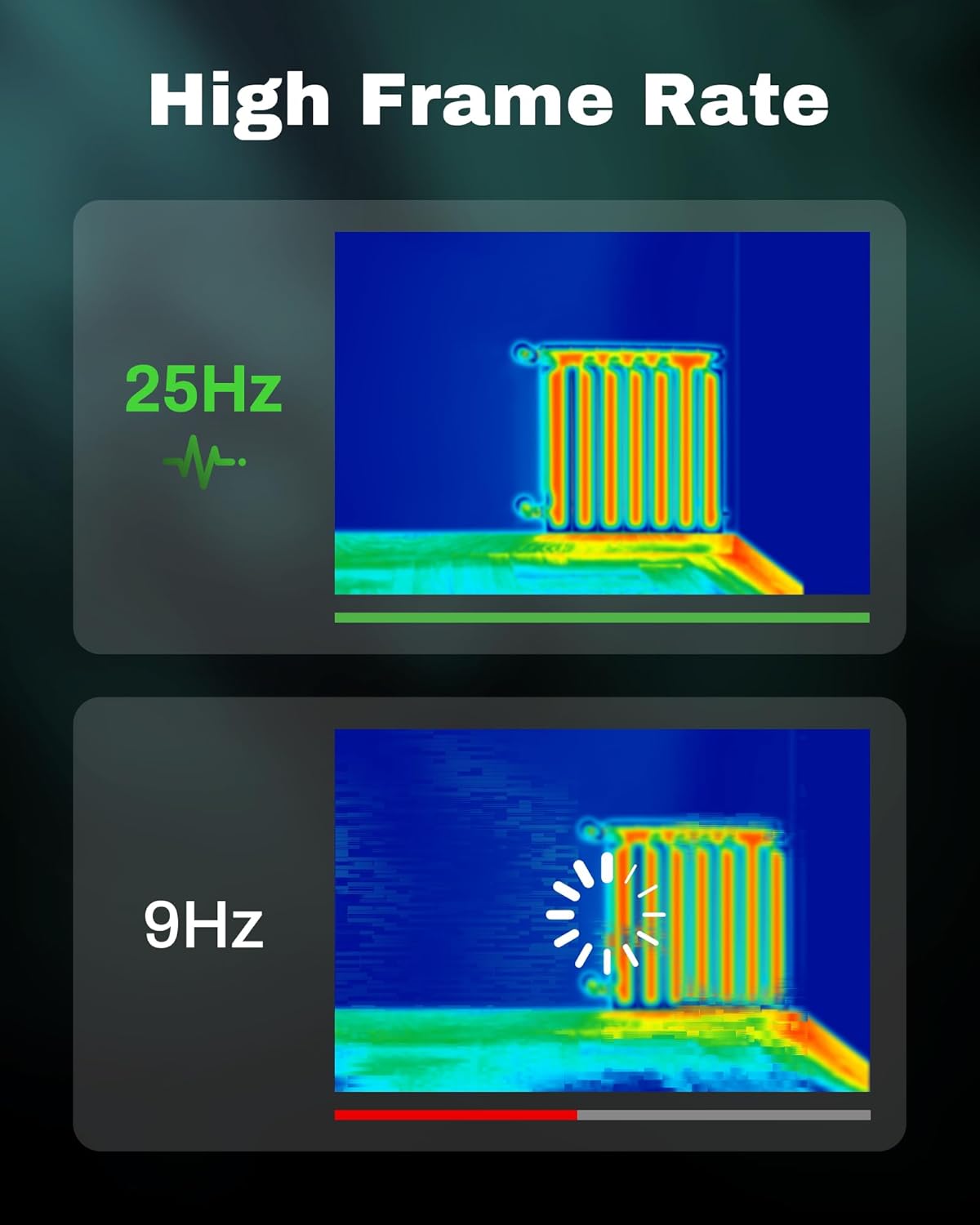
Figure 3.5: Visual comparison of thermal image fluidity at 25Hz versus 9Hz frame rates.

Figure 3.6: Display of the five available thermal color palettes for varied visualization of heat signatures.
4. Подешавање
4.1. Распакивање
Пажљиво извадите све предмете из паковања. Кутија треба да садржи:
- AMPBANK H128 Thermal Imaging Camera
- УСБ-Ц кабл
Inspect the camera for any signs of damage. If any components are missing or damaged, contact customer support immediately.
4.2. Пуњење батерије
Пре прве употребе, потпуно напуните уграђену батерију камере.
- Connect the supplied USB-C cable to the USB-C port on the top of the camera.
- Повежите други крај USB-C кабла са компатибилним USB адаптером за напајање (није укључен) или USB портом рачунара.
- The charging indicator on the screen will show the charging status. A full charge typically takes several hours.
- Када се потпуно напуни, искључите кабл.
4.3. Почетно укључивање и основна подешавања
- Укључено: Press and hold the power button (often integrated with the Return button) for approximately 8 seconds until the screen illuminates.
- Избор језика: Upon first power-on, you may be prompted to select your preferred language. Use the Up/Down buttons to navigate and the OK button to confirm.
- Датум и време: Подесите тачан датум и време за тачно времеamping of captured images. Navigate to the settings menu using the OK button, then find the Date/Time option.
5. Операција
5.1. Основна операција
- Укључивање/искључивање: Press and hold the power button for 8 seconds to turn on. Press and release the power button to turn off or enter sleep mode.
- Навигација по менијима: Користите OK button to enter the menu. Use the Up и Доле arrow buttons to scroll through options. Press OK to select an option. Press the Повратак button to exit a menu or go back.
- Снимање слика: Aim the camera at the target. Press the trigger button (located on the handle) to capture a thermal image. Images are saved internally.
5.2. Measurement Modes and Settings
- Temperature Spot Measurement: The H128 automatically displays the maximum, minimum, and center temperatures on the screen.
- Подешавање емисивности: For accurate temperature readings, adjust the emissivity setting based on the material being inspected. Access this setting through the menu. Common emissivity values can be found in reference tables.
- Подешавање удаљености: Inputting the approximate distance to the target can further refine temperature accuracy.
- Thermal Palettes: Change the color scheme of the thermal image to highlight temperature differences more effectively. Navigate to the palette settings in the menu and choose from Iron Red, Black Hot, Rainbow, White Hot, or Red Hot.
5.3. Управљање подацима
The H128 can store over 8000 images internally. To transfer images to a computer:
- Connect the camera to your computer using the supplied USB-C cable.
- The camera will appear as a removable storage device.
- Browse to the image folder and copy the desired fileс на ваш рачунар.

Figure 5.1: Connecting the H128 thermal camera to a laptop via USB-C for image transfer.
6. Одржавање
6.1. Чишћење
- Тело камере: Обришите кућиште фотоапарата меком крпомamp тканина. Немојте користити абразивна средства за чишћење или раствараче.
- Инфрацрвена сочива: The infrared lens is a delicate optical component. Use a lens cleaning cloth or a soft, lint-free cloth specifically designed for optics. Gently wipe the lens to remove dust or smudges. Do not apply excessive pressure or use harsh chemicals.
6.2. Складиштење
When not in use, store the H128 in a cool, dry place, away from direct sunlight and extreme temperatures. Ensure the battery is partially charged (around 50%) before long-term storage to preserve battery health.
6.3. Брига о батерији
Да бисте максимално повећали век трајања батерије:
- Избегавајте често потпуно пражњење батерије.
- Избегавајте да батерију остављате потпуно напуњену на дужи период.
- Напуните батерију на собној температури.
КСНУМКС. Решавање проблема
| Проблем | Могући узрок | Решење |
|---|---|---|
| Камера се не укључује. | Батерија је празна. | Напуните батерију помоћу USB-C кабла. |
| Слика је мутна или нејасна. | Lens is dirty. / Incorrect focus (if applicable). | Clean the infrared lens with a soft, lint-free cloth. The H128 has fixed focus, ensure you are within the optimal measurement distance. |
| Очитавања температуре изгледају нетачна. | Incorrect emissivity setting. / Distance to target is too far. | Adjust the emissivity setting in the menu to match the material being measured. Ensure you are within the recommended measurement distance. |
| Није могуће пренети слике на рачунар. | Loose USB-C connection. / Driver issue. | Ensure the USB-C cable is securely connected to both the camera and the computer. Try a different USB port or cable. Restart both devices. |
| Трајање батерије је краће од очекиваног. | Frequent use of high-brightness settings. / Battery degradation over time. | Reduce screen brightness if possible. Ensure proper charging and storage practices. If battery life significantly degrades, contact support. |
Ако проблем и даље постоји након покушаја ових решења, обратите се AMPBANK customer support.
8. Спецификације
| Параметар | Валуе |
|---|---|
| Модел | Х128 |
| Инфрацрвена резолуција | 128x128 пиксела |
| TISR Display Resolution | 240x240 пиксела |
| Температурни опсег | -4°Ф до 842°Ф (-20°Ц до 450°Ц) |
| Прецизност | ±3% or ±3°C (whichever is greater) |
| Термичка осетљивост (НЕТД) | 40мк |
| Фраме Рате | 25Хз |
| Тип батерије | Built-in Rechargeable Lithium Ion (2900mAh) |
| Трајање батерије | До 24 сати непрекидне употребе |
| Порт за пуњење | УСБ-Ц |
| Заштита од пада | 6.56 стопа (2 метра) |
| ИП Ратинг | ИП65 |
| Капацитет складиштења | 8000+ images |
| Димензије | 9.33 к 4.76 к 3.86 инча (приближно) |
| Тежина | 1.06 фунте (приближно) |
9. Гаранција и подршка
За детаљне информације о гаранцији, погледајте гарантни лист који је приложен уз ваш производ или посетите званичну веб страницу AMPБАНКА webсајт. Услови гаранције могу се разликовати у зависности од региона и производа.
Ако вам је потребна техничка помоћ, имате питања о производу или треба да покренете рекламацију у оквиру гаранције, обратите се AMPBANK customer support through their official channels:
- Произвођач: AMPБАНКА
- Онлине продавница: Посетите AMPBANK Store on Amazon
- Молимо обратите се званичнику AMPБАНКА website or product packaging for the most current contact information (email, phone, service centers).