
1. Увод
Хвала вам на куповиниasing the Nillkin Foldable Bluetooth Keyboard. This compact and versatile keyboard is designed to enhance your productivity across multiple devices, offering a comfortable typing experience with an integrated touchpad and numeric keypad. Please read this manual carefully to ensure proper use and maintenance of your device.
2. Производ је готовview
Кључне карактеристике:
- Склопиви и преносиви дизајн: Weighing approximately 238g, this keyboard folds to a compact size (18.2 x 10.8 x 1.6cm when folded) for easy portability.
- Integrated Touchpad & Numeric Keypad: Features a large, responsive touchpad (59mm x 64mm) for smooth cursor control and multi-gesture operations. The touchpad can be switched to a numeric keypad using Fn + Right Command key.
- Удобно искуство куцања: Utilizes a pantograph key structure with a 19mm key pitch and 1.2mm key travel for quiet and efficient typing, similar to a laptop keyboard.
- Long Battery Life & Energy Saving: Built-in large capacity battery provides over 1 week of continuous use and 150 days of standby time on a single charge. Features automatic sleep mode after 10 minutes of inactivity and auto power on/off upon folding/unfolding.
- Повезивање са више уређаја: Supports simultaneous connection to up to 3 devices via Bluetooth 5.0, compatible with Android, Windows, iPad OS, macOS, and iOS. Easily switch between devices with a single touch.
- Durable Silicone Material: Made with organic silicone material that is skin-friendly, durable, and resistant to extreme temperatures (-40℃ to 200℃).
- Погодни индикатори: Five LED lamps on the top indicate battery level and connection status.
Садржај пакета:
- Nillkin Foldable Bluetooth Keyboard x 1
- УСБ-Ц кабл за пуњење к 1
- Упутство за употребу к 1
- Торбица за складиштење к 1
Димензије производа:
- Unfolded Size: 34.2 cm (L) x 10.8 cm (W) x 0.95 cm (H)
- Folded Size: 18.2 cm (L) x 10.8 cm (W) x 1.6 cm (H)
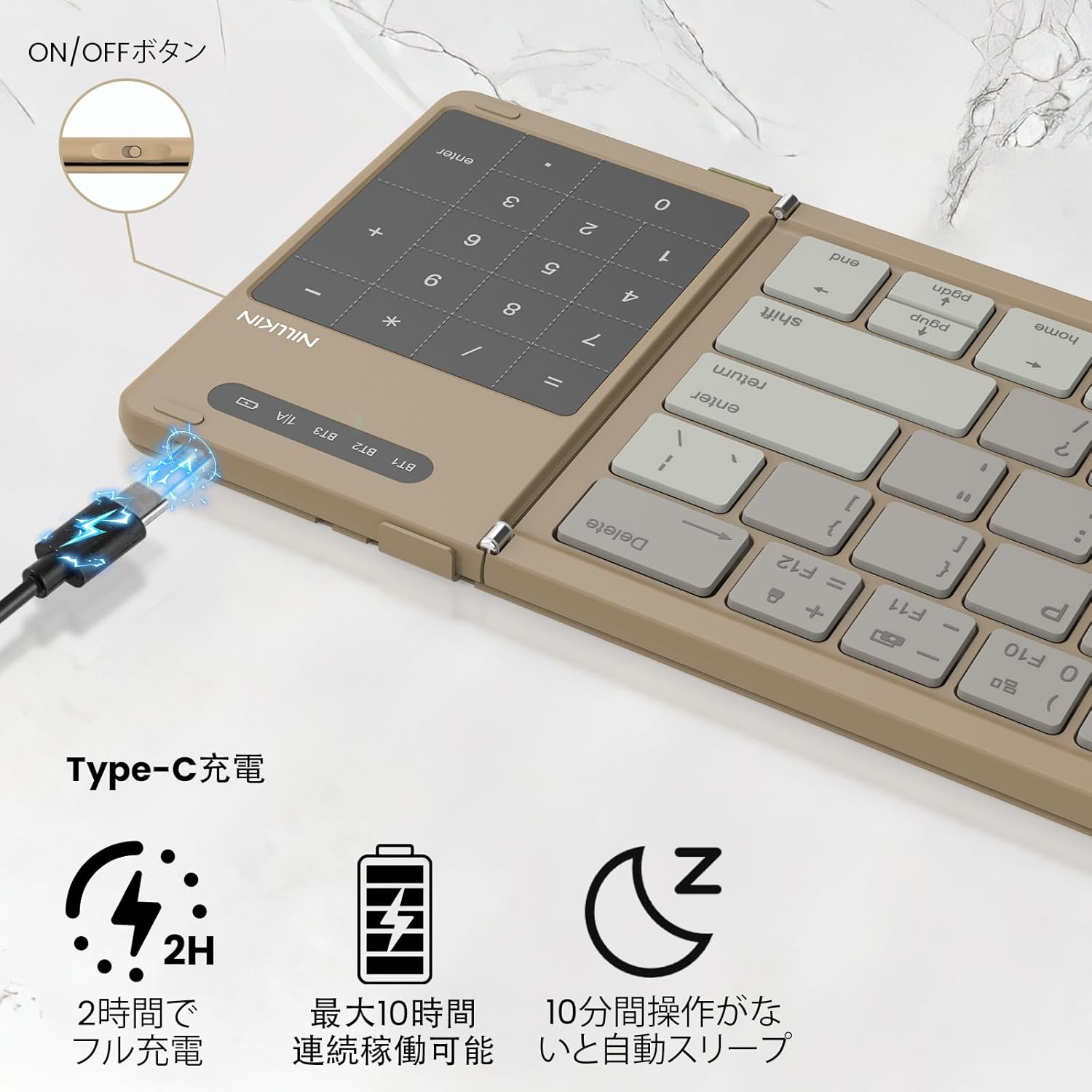
Image: Nillkin Foldable Bluetooth Keyboard showing its unfolded and folded dimensions.

Image: The Nillkin keyboard in its compact, folded state.
3. Подешавање
3.1. Пуњење тастатуре
- Connect the provided USB-C charging cable to the keyboard's charging port and a power source.
- The red indicator light will stay on during charging.
- The indicator light will turn off when charging is complete. A full charge takes approximately 2 hours.

Image: The keyboard connected via USB-C for charging, showing the charging indicator.
3.2. Блуетоотх упаривање
- Расклопите тастатуру да бисте је аутоматски укључили.
- Turn on Bluetooth on your device (e.g., iPad, smartphone, computer).
- Притисните Фн + К (за БТ1), Фн + В (за БТ2), или Фн + Е (for BT3) to select a Bluetooth channel.
- Притисните Фн + Ц to enter pairing mode. The blue indicator light will flash.
- On your device, search for "Cube Pocket Keyboard" in the Bluetooth settings and tap to connect.
- Once connected, the blue indicator light on the keyboard will turn off.
Video: This video demonstrates the Bluetooth pairing process for the Nillkin Foldable Bluetooth Keyboard, including how to select a channel and enter pairing mode.
4. Упутство за употребу
4.1. Multi-Device Switching
After successfully pairing with up to three devices (BT1, BT2, BT3), you can quickly switch between them by pressing Фн + К, Фн + В, или Фн + Е односно.

Image: The keyboard demonstrating multi-device connectivity and switching between a smartphone, laptop, and tablet.
4.2. Numeric Keypad / Touchpad Toggle
The integrated touchpad can function as a numeric keypad. To switch between touchpad mode and numeric keypad mode, press Fn + Right Command key. This allows for convenient numerical input without needing a separate mouse.

Image: Illustration of the touchpad and numeric keypad functionality, highlighting the toggle feature.
4.3. Мултимедијални тастери и пречице
The keyboard features various multimedia and shortcut keys for enhanced productivity:
- Pressing a multifunction key alone will activate numeric input mode.
- Пресинг Shift + Multifunction Key allows for symbol input.
- Пресинг Fn + Multifunction Key activates multimedia functions (e.g., brightness, volume, media control).
- For Windows users, Fn + Shift + Multifunction Key can be used for specific shortcut functions.

Image: A visual guide to the Fn key shortcuts for various functions like brightness, volume, and media control.
4.4. Промена језика
- iOS / Mac: Притисните Ctrl + Spacebar.
- Андроид: Притисните Ctrl + Spacebar or Shift + Spacebar.
- Виндовс: Притисните Алт + Схифт.
4.5. Провера нивоа батерије
To check the battery level, press Fn + Command:
- Green light flashes 3 times: 70% - 100% battery.
- Blue light flashes 3 times: 30% - 70% battery.
- Red light flashes 3 times: 0% - 30% battery.
5. Одржавање
- Одржавајте тастатуру чистом брисањем меком, сувом крпом.
- Избегавајте излагање тастатуре екстремним температурама, директној сунчевој светлости или течностима.
- Store the keyboard in its provided pouch when not in use to protect it from dust and scratches.
КСНУМКС. Решавање проблема
- Тастатура се не повезује: Ensure Bluetooth is enabled on your device and the keyboard is in pairing mode. Try restarting both the keyboard and your device.
- Тастери не реагују: Check the battery level and charge the keyboard if necessary. Ensure the keyboard is properly connected via Bluetooth.
- Проблеми са додирном таблом: For iPad users, ensure "Settings → General → Trackpad" is turned on. Some gestures may not be supported depending on the OS or application.
- Unexpected input: Ensure the keyboard is placed on a stable surface. If keys are registering multiple presses or not at all, try cleaning around the keys.
7. Спецификације
| Феатуре | Опис |
|---|---|
| Бранд | Nillkin |
| Модел | B0FDKPY2P2 |
| Технологија повезивања | Блуетоотх 5.0 |
| Компатибилни уређаји | iPad OS, Windows 10+, Mac OS X 10.10+, Android 4.3+, Smartphones, Tablets, Laptops, PCs |
| Распоред тастатуре | КВЕРТИ |
| Тип прекидача | Mechanical (Pantograph) |
| Извор напајања | Баттери Поверед |
| Материјал | ABS, силикон, поликарбонат |
| Боја | Каки |
8. Гаранција и подршка
Nillkin products come with a 2-year manufacturer's warranty from the date of purchase. In case of any issues, please contact customer service. We offer a 30-day quality guarantee (return/exchange for defective products) and 2-year after-sales service.
To contact support, navigate to "Account Service" → "Order History" → "Contact Seller". We aim to respond within 24 hours.