
NIMO Nimo N157L
NIMO 15.6" FHD IPS Student Laptop Computer User Manual
Model: Nimo N157L
Увод
Thank you for choosing the NIMO 15.6" FHD IPS Student Laptop Computer. This manual provides essential information for setting up, operating, maintaining, and troubleshooting your new device. Please read this manual thoroughly to ensure optimal performance and longevity of your laptop.
Шта је у кутији
Молимо вас да проверите да ли су све ставке наведене у наставку укључене у ваш пакет:
- 1 x Nimo N157 Laptop
- 1 x Type-C 65W PD Fast Charger
- 1 x Упутство за употребу (овај документ)
- Windows 11 Home Operating System (pre-installed)
- Warranty Information (2 Years Warranty, 90 Days Return)
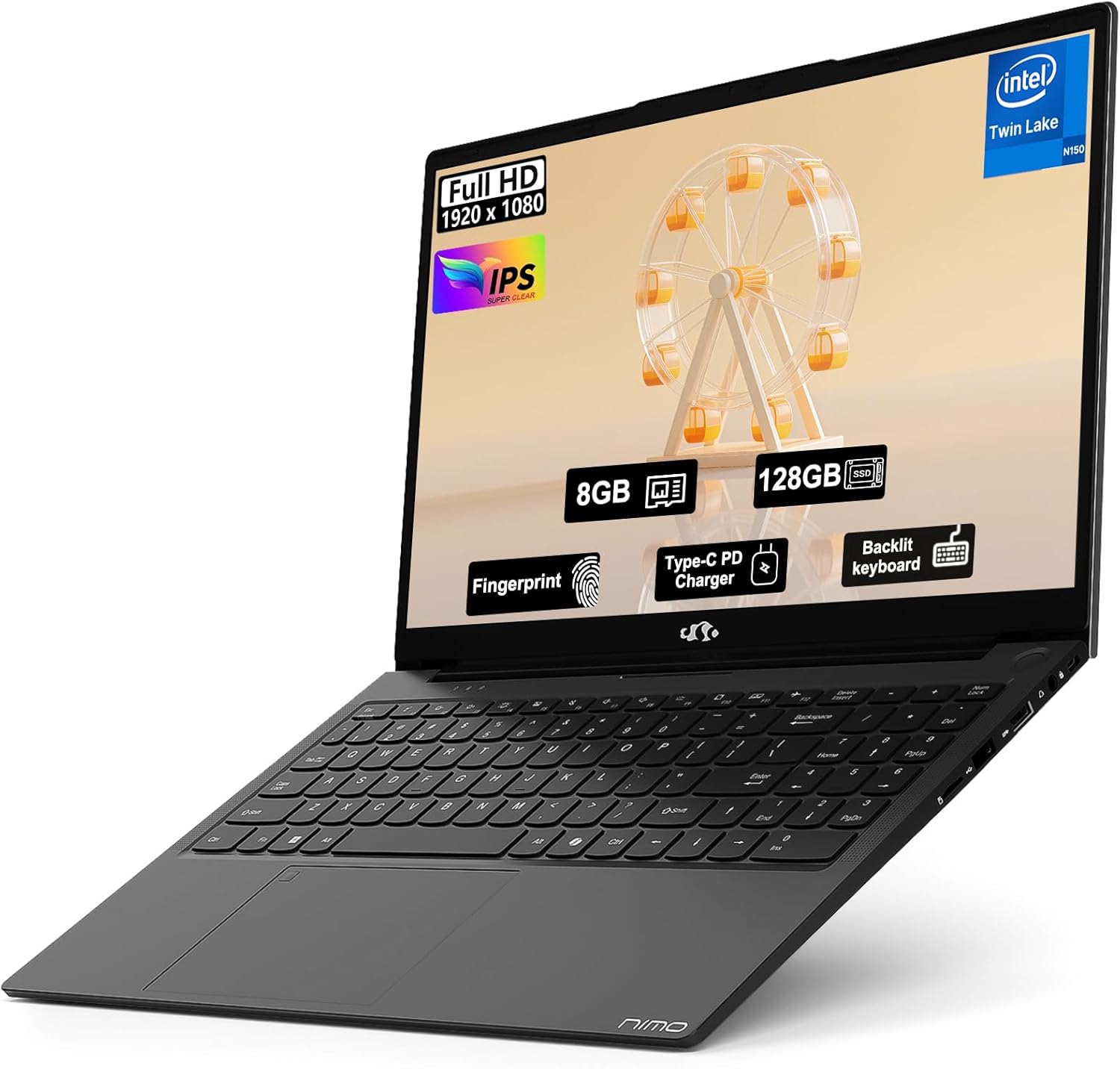
Image: The NIMO 15.6" FHD IPS Student Laptop Computer. The screen highlights key features such as Full HD 1920x1080 resolution, IPS display, 8GB RAM, 128GB SSD, Fingerprint reader, Type-C PD Charger, and Backlit keyboard. The laptop is shown in a sleek black finish.
Водич за подешавање
1. Прво укључивање и пуњење
Before first use, it is recommended to fully charge your NIMO laptop. Connect the included Type-C 65W PD Fast Charger to the laptop's Type-C port and a power outlet. The charging indicator light will illuminate. A 15-minute charge can provide approximately 2 hours of standby time.
2. Подешавање оперативног система
Your NIMO laptop comes with Windows 11 Home pre-installed. Upon first boot, follow the on-screen instructions to complete the initial Windows setup, including language selection, network connection, and user account creation.
3. Подешавање читача отиска прста
For enhanced security and convenient login, set up the fingerprint reader. Navigate to Подешавања > Налози > Опције пријављивања > Препознавање отиска прста (Windows Hello) and follow the prompts to register your fingerprints. The fingerprint sensor is integrated into the touchpad.
4. Backlit Keyboard Adjustment
The backlit keyboard allows for comfortable typing in low-light environments. Use the dedicated function keys (usually Fn + a specific F-key, refer to keyboard legends) to turn the backlight on/off and adjust its brightness levels.
Упутство за употребу
1. Карактеристике екрана
Your laptop features a 15.6-inch Full HD (1920x1080) IPS Anti-Glare Display. This provides wide viewing angles, accurate colors, and reduces reflections for a comfortable viewing experience. The 85% screen-to-body ratio and 16:9 aspect ratio optimize screen real estate.
2. Употреба тачпеда
The integrated touchpad supports multi-touch gestures for intuitive navigation. Common gestures include:
- Додир једним прстом: Леви клик
- Додир са два прста: Кликните десним тастером миша
- Померање са два прста: Померање горе/доле или лево/десно
- Зумирање штипкањем прстију: Увећајте/умањите
3. Повезивање
The NIMO laptop supports various connectivity options:
- Ви-Фи 6: За брзу бежичну интернет везу.
- Блуетоотх КСНУМКС: За повезивање бежичних периферних уређаја као што су слушалице, мишеви и тастатуре.
- УСБ портови: Includes 1 x USB 2.0 port and 3 x USB 3.0 ports for connecting external devices.
- Порт типа Ц: Користи се за пуњење и пренос података.
4. Управљање батеријом
The laptop is equipped with a Lithium Polymer battery providing an average battery life of approximately 5 hours. To maximize battery life, adjust screen brightness, close unused applications, and utilize power-saving modes in Windows settings.
Одржавање
1. RAM and SSD Upgrade
The NIMO laptop supports user-detachable RAM and SSD, allowing for future upgrades. If you plan to upgrade, ensure you use compatible components (DDR4 RAM, PCIe SSD) and follow proper electrostatic discharge (ESD) precautions. Consult a professional if you are unsure.
2. Чишћење лаптопа
Да бисте одржали изглед и функционалност вашег лаптопа:
- Користите меку крпу која не оставља влакна за чишћење екрана и спољашњости.
- За тврдокорне мрље, благо дampобришите крпу водом или средством за чишћење екрана.
- Avoid using harsh chemicals, abrasive cleaners, or direct spraying of liquids onto the laptop.
- Редовно чистите тастатуру и тачпад да бисте уклонили прашину и прљавштину.
Решавање проблема
Овај одељак пружа решења за уобичајене проблеме на које можете наићи.
| Проблем | Могуће решење |
|---|---|
| Лаптоп се не укључује. | Ensure the charger is properly connected and the power outlet is functional. Allow the battery to charge for at least 30 minutes before attempting to power on again. |
| Екран је празан или трепери. | Check display cable connections (if external monitor is used). Restart the laptop. Update graphics drivers. |
| Проблеми са Wi-Fi везом. | Ensure Wi-Fi is enabled in Windows settings. Restart your router/modem. Update Wi-Fi drivers. |
| Тастатура или тачпед не реагују. | Restart the laptop. Check for driver updates. Ensure no external devices are interfering. |
If you encounter issues not covered here or require further assistance, please contact NIMO customer support.
Спецификације
Detailed technical specifications for your NIMO N157L laptop:
| Феатуре | Детаљ |
|---|---|
| Назив модела | Nimo N157L |
| Величина екрана | 15.6 инча |
| Резолуција екрана | 1920 x 1080 pixels (FHD IPS Anti-Glare) |
| Процесор | Intel 4 Core N150 (up to 3.6 GHz) |
| РАМ | 8 GB DDR4 (3200 MHz, detachable) |
| Хард Дриве | 128 GB PCIe SSD (detachable) |
| Грапхицс Цопроцессор | Интегрисана графика |
| Оперативни систем | Виндовс 11 Хоме |
| Вирелесс Типе | 802.11a/b/g/n/ac (Wi-Fi 6), Bluetooth 5.2 |
| УСБ портови | 1 к УСБ 2.0, 3 к УСБ 3.0 |
| Друге луке | Type-C (65W PD Fast Charging), Memory Card Slot |
| Посебне карактеристике | Позадинско осветљење тастатуре, читач отиска прста, HD аудио, нумеричка тастатура |
| Трајање батерије | Approx. 5 Hours (Lithium Polymer) |
| Тежина артикла | 3.8 фунти |
| Димензије производа | 14.07 к 8.98 к 0.76 инча |
| Боја | Црно |
| Позади Webцам Ресолутион | 2 МП |
Гаранција и подршка
NIMO Direct Inc. offers a comprehensive 2-годишња гаранција произвођача for your laptop. This warranty covers defects in materials and workmanship under normal use. Additionally, a 90-Day Hassle-Free Return and Exchange Service is provided from the date of purchase.
For warranty claims, technical support, or any concerns regarding your NIMO laptop, please contact the manufacturer's dedicated support team. Refer to the contact information provided on the product packaging or the official NIMO webсајту.
Напомена: The laptop is partially assembled in the USA. Please retain your proof of purchase for warranty purposes.
Ask a question about this manual
Ask about setup, troubleshooting, compatibility, parts, safety, or missing instructions. Manuals+ will review the question and use this page’s manual context to help answer it.