
1. Увод
This manual provides comprehensive instructions for the installation, operation, and maintenance of your B2 Audio SixTen 10-Channel Digital Signal Processor (DSP). Please read this manual thoroughly before using the device to ensure proper functionality and to maximize its performance.
2. Производ је готовview
The B2 Audio SixTen DSP is an advanced digital signal processor designed for precise audio customization in car audio systems. It features 6 inputs and 10 outputs, offering extensive control over your sound environment.
Кључне карактеристике:
- Advanced Digital Signal Processing: 6-input, 10-output DSP with 96 kHz, 32-bit resolution for clear audio and precise tuning.
- Бежична контрола: Adjust settings via Bluetooth using the dedicated iOS & Android application for real-time customization.
- Хигх-Волtagе Излаз: Each of the 10 output channels delivers a 4-volt signal for optimal performance.
- Компактан дизајн: Engineered for seamless integration with a space-saving form factor of 4.5” x 5.75” x 1.5”.
- Звук професионалног нивоа: Designed for precise frequency control, low distortion, and superior sound stagинг.

Слика: Под углом view of the B2 Audio SixTen DSP, highlighting its compact design and various connection points.
Шта је у кутији:
- (1) B2 Audio SixTen 6-Input, 10-Output 4V DSP

Image: The retail packaging for the B2 Audio SixTen DSP, indicating the product is ready for installation.
3. Безбедносне информације
Придржавајте се следећих безбедносних мера предострожности током инсталације и рада:
- Увек искључите акумулатор возила пре почетка било каквих електричних радова.
- Осигурајте правилно уземљење да бисте спречили опасности од струјног удара.
- Do not expose the DSP to moisture or extreme temperatures.
- Консултујте професионалног инсталатера ако нисте сигурни у вези са било којим делом процеса инсталације.
- Use appropriate gauge wiring for power and signal connections.
4. Подешавање и инсталација
Proper installation is crucial for optimal performance. This section outlines the steps for physically installing and connecting the DSP.
4.1 Физичка инсталација
- Choose a dry, well-ventilated location in your vehicle, away from direct heat sources or moving parts.
- Mount the DSP securely using appropriate fasteners to prevent vibration.
- Ensure sufficient space around the unit for air circulation and cable management.
4.2 Ожичење
The B2 Audio SixTen DSP features 6 RCA inputs and 10 RCA outputs, along with a power terminal block.
- Прикључак за напајање: Connect the power terminal block to a fused 12V constant power source, ground, and a remote turn-on lead from your head unit.
- Улазне везе: Connect your audio source (e.g., head unit, auxiliary input) to the RCA input jacks (AUX1-AUX6).
- Излазне везе: Connect the RCA output jacks (OUT1-OUT10) to your amplifiers. Each output can be configured for specific channels (e.g., front left, front right, subwoofer).

Image: Front panel of the DSP, illustrating the RCA input connections (AUX1-AUX6) and the power terminal block.

Image: Rear panel of the DSP, displaying the 10 RCA output connections (OUT1-OUT10).
5. Упутство за употребу
The B2 Audio SixTen DSP is primarily controlled via a dedicated mobile application available for iOS and Android devices.
5.1 Блуетоотх веза
- Ensure the DSP is powered on. The "BT" indicator light on the unit should be active.
- На паметном телефону или таблету омогућите Блуетоотх и потражите доступне уређаје.
- Select the B2 Audio SixTen DSP from the list of devices. Follow any on-screen prompts to complete pairing.
- Open the B2 Audio DSP application. The app should automatically detect and connect to the paired DSP.
5.2 Коришћење мобилне апликације
The application provides a graphical interface for all DSP functions, including:
- Input/Output Routing: Assign specific inputs to desired output channels.
- Изједначавање (ЕК): Adjust the frequency response for each channel using a multi-band equalizer.
- кросовери: Set high-pass, low-pass, and band-pass filters for each output to direct specific frequency ranges to appropriate speakers.
- Временско усклађивање: Adjust the delay for each channel to ensure sound from all speakers arrives at the listening position simultaneously.
- Гаин Цонтрол: Fine-tune the output level for each channel.
- лимитер: Monitor and manage output levels to prevent clipping and speaker damage. The unit features "CLIP L" and "CLIP R" indicators.
- Унапред подешено управљање: Save and recall multiple audio configurations for different listening preferences or music genres.
Refer to the in-app help or tutorials for detailed guidance on specific tuning parameters.
6. Одржавање
The B2 Audio SixTen DSP requires minimal maintenance to ensure long-term performance.
- Одржавајте уређај чистим и без прашине и остатака. Користите меку, суву крпу за чишћење.
- Ensure all connections remain secure. Periodically check wiring for any signs of wear or corrosion.
- Избегавајте излагање уређаја екстремним температурама или директној сунчевој светлости током дужег периода.
- Ensure adequate ventilation around the unit to prevent overheating, especially during prolonged operation.
КСНУМКС. Решавање проблема
If you encounter issues with your B2 Audio SixTen DSP, refer to the following common problems and solutions:
| Проблем | Могући узрок | Решење |
|---|---|---|
| Нема струје / Уређај се не укључује | Неправилно ожичење, прегорели осигурач, недовољно напајање. | Check power, ground, and remote connections. Verify fuse integrity. Ensure vehicle battery is charged. |
| Нема аудио излаза | Incorrect input/output routing, muted channels, incorrect gain settings, faulty RCA cables. | Verify input source and output connections. Check app settings for muted channels or low gain. Test RCA cables. |
| Изобличен звук | Input signal too high, output gain too high, clipping. | Reduce input sensitivity or output gain. Monitor "CLIP L/R" indicators and adjust levels to prevent clipping. |
| Проблеми са Блуетоотх везом | DSP not in pairing mode, interference, app issues. | Ensure DSP is powered on. Restart the app and your mobile device. Try re-pairing the device. Move closer to the DSP. |
| Unit gets hot | Insufficient ventilation, prolonged high-power operation. | Ensure adequate airflow around the unit. Reduce output levels if operating at maximum for extended periods. |
If the problem persists after attempting these solutions, contact B2 Audio customer support for further assistance.
8. Спецификације
The following are the technical specifications for the B2 Audio SixTen DSP:
| Феатуре | Спецификација |
|---|---|
| Број модела | B2-DSP-SIXTEN-BK |
| Инпутс | 6 (3 Left / 3 Right) |
| Улазни конектори | РЦА |
| Максимални улазни ниво | 4.00 Vrms (+14dBu) |
| Излази | 10 |
| Максимални излазни ниво | 3.50 Vrms (+13dBu) |
| Фреквенцијски одзив | 10Хз до 24КХз (-1дБ) |
| Укупна хармонијска дисторзија + шум (ТХД+Н) | <0.01% |
| Кашњење сигнала | <0.6 мс |
| Бит Рате | 32-бит |
| Sampлинг Фрекуенци | 96 кХз |
| Оператинг Волtagе ДЦ | 9.5 - 15V једносмерне струје |
| Максимална потрошња струје | 350мА |
| Технологија повезивања | Блуетоотх, РЦА |
| Тип контролера | Блуетоотх |
| Компатибилни уређаји | Smartphone, Speaker, Tablet, iPhone |
| Димензије производа (Д к Ш к В) | 4.5 к 5.75 к 1.5 инча |
| Тежина артикла | 1.06 фунти |
| Боја | Црно |
| Режим аудио излаза | Mono (Note: Configurable for multi-channel output via DSP software) |
| Конфигурација канала сурроунд звука | 5.1 (Note: Configurable for various channel setups via DSP software) |
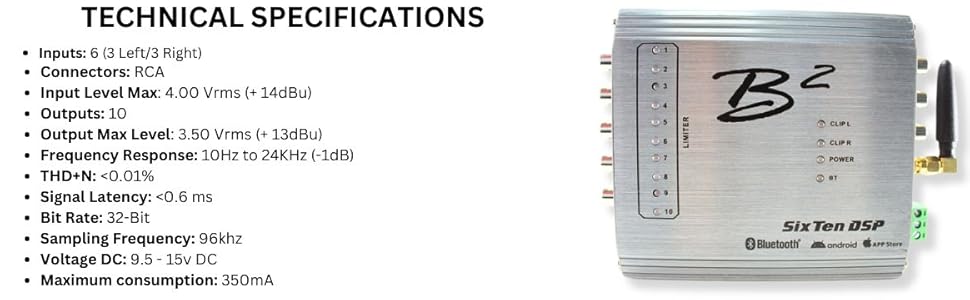
Image: A visual representation of the B2 Audio SixTen DSP's technical specifications, including input/output details and performance metrics.
9. Гаранција и подршка
For warranty information and technical support, please refer to the official B2 Audio webсајт или контактирајте овлашћеног продавца. Сачувајте рачун као доказ о куповини за потребе гаранције.
Произвођач: B2 Audio
Webсајт: ввв.б2аудио.цом