
Увод
This manual provides essential information for setting up, operating, maintaining, and troubleshooting your NIMO 15.6" FHD IPS Student-Laptop-Computer. Please read this guide thoroughly to ensure optimal performance and longevity of your device.

The NIMO 15.6" FHD IPS Student-Laptop-Computer, featuring a vibrant display and sleek design.
Шта је укључено
Проверите да ли су сви предмети присутни у паковању:
- 1 x Nimo N157 Laptop
- 1 x Type-C 65W GaN PD Fast Charger
- 1 к Упутство за употребу
- Windows 11 Home (Pre-installed)
- 2 Years Warranty, 90 Days Return Information
Кључне карактеристике
Your NIMO laptop is equipped with advanced features designed for productivity and convenience:
Vibrant FHD IPS Display
Experience stunning visuals on the 15.6" FHD IPS (1920x1080) Anti-Glare Display. With an 85% screen-to-body ratio and 16:9 aspect ratio, enjoy precise color accuracy and sharp detail for all your tasks.

The 15.6-inch FHD IPS display provides a bright and clear visual experience.
Моћне перформансе
Equipped with a 13th Gen Intel N150 processor (up to 3.6GHz), 16GB DDR4 RAM, and a 512GB PCIe SSD, this laptop delivers lightning-fast performance, rapid startup times, and accelerated data transfer for seamless multitasking and storage.
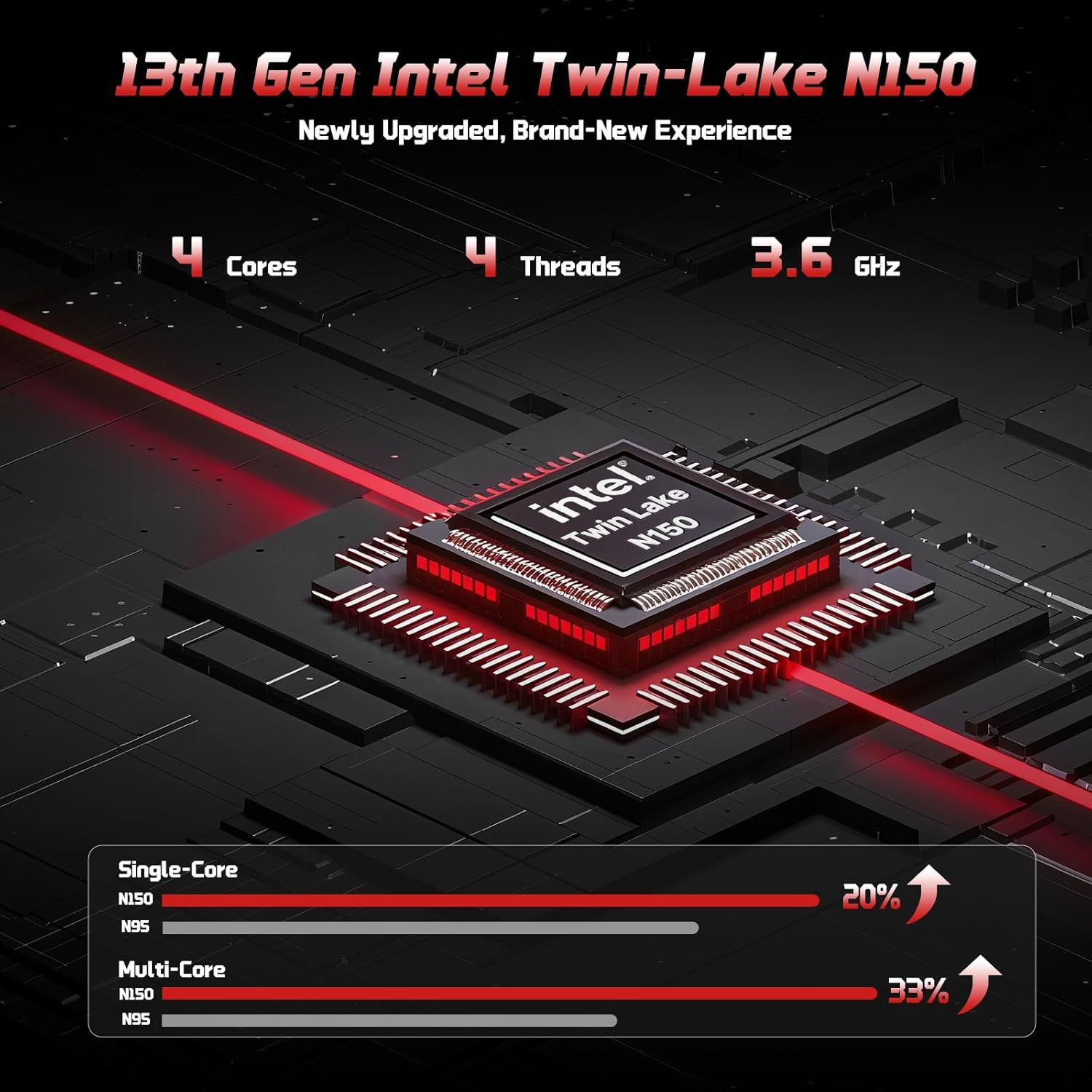
The 13th Gen Intel Twin-Lake N150 processor ensures efficient performance.

The laptop supports user-upgradable RAM and SSD for future expansion.
Fast Charging with GaN PD Charger
The included 65W GaN PD fast charger and 6.56ft USB-C to USB-C cable allow for quick power-ups. Charge for 15 minutes to get 2 hours of standby time. This versatile charger can also power your iPad, phone, and other compatible devices.

The 65W GaN PD charger provides fast and convenient charging for multiple devices.
Humanized Design & Security
Features a built-in fingerprint reader on the touchpad for secure, one-touch login. The backlit keyboard allows for easy typing in dim or dark environments, with adjustable brightness. The touchpad supports scroll and multi-touch gestures.

Secure fingerprint login and a comfortable backlit keyboard enhance usability.
Свеобухватна повезаност
The laptop includes a variety of ports for all your peripheral needs, including USB 3.0, USB 2.0, HDMI, and multiple Type-C ports (one for PD Charge Only, one for Multifunction). It also features Wi-Fi 6 and Bluetooth 5.2 for robust wireless connections.

Детаљно view лаптопа ample ports for various connections.
Приватност Webцам
A 720p HD camera with a physical privacy switch ensures your personal space is always secure. Easily slide the switch to cover the camera when not in use.

The physical privacy switch on the webcam provides enhanced security.
Водич за подешавање
1. Прво укључивање
- Unpack your NIMO laptop and all accessories.
- Connect the Type-C 65W GaN PD Fast Charger to the laptop's Type-C PD Charge Only port and plug it into a power outlet.
- Отворите поклопац лаптопа. Лаптоп се може аутоматски укључити или ћете можда морати да притиснете дугме за напајање (налази се у горњем десном углу тастатуре).
- Пратите упутства на екрану да бисте завршили подешавање система Windows 11 Home, укључујући језик, регион, мрежну везу и креирање корисничког налога.
2. Повезивање периферних уређаја
Користите доступне портове за повезивање екстерних уређаја:
- УСБ уређаји: Connect USB drives, external keyboards, or mice to the USB 3.0 or USB 2.0 ports.
- Спољашњи екран: Use an HDMI cable to connect to an external monitor or projector via the HDMI port.
- Аудио уређаји: Plug in headphones or external speakers into the 3.5mm headphone jack.
- МицроСД картица: Insert a MicroSD card into the dedicated slot for expanded storage.
Упутство за употребу
Коришћење тастатуре и додирне табле
- Тастатура са позадинским осветљењем: Притисните Фн + Ф10 (or the key with the keyboard backlight icon) to cycle through backlight brightness levels or turn it off.
- Нумеричка тастатура: The integrated numeric keypad provides convenient data entry.
- Тоуцхпад: Supports standard Windows gestures, including two-finger scroll, pinch-to-zoom, and multi-finger taps for various functions.
Фингерпринт Логин
To set up fingerprint login for enhanced security:
- Идите на Подешавања система Windows > Налози > Опције пријављивања.
- Select "Fingerprint Recognition (Windows Hello)" and follow the on-screen prompts to register your fingerprint.
- Once registered, you can simply touch the fingerprint sensor on the touchpad to log in.
Дисплаи Сеттингс
Подесите подешавања екрана за оптимално viewинг:
- Резолуција: Right-click on the desktop, select "Display settings", and choose "1920 x 1080" for the best resolution.
- Осветљеност: Adjust screen brightness using the function keys (Фн + Ф5/Ф6) or through Display settings.
Аудио и видео
- Контрола јачине звука: Use the function keys (Fn + F2/F3/F4) or the Windows volume mixer to adjust audio levels.
- WebПриватност камере: Slide the physical switch next to the webкамеру да бисте покрили или открили сочиво камере ради приватности.
Одржавање
Чишћење лаптопа
- Користите меку крпу која не оставља длачицеampводом или средством за чишћење екрана да бисте обрисали екран.
- За тастатуру и кућиште користите меку, суву крпу. Избегавајте јаке хемикалије или абразивне материјале.
- Periodically use compressed air to clear dust from the vents to ensure proper heat dissipation.
Баттери Царе
To maximize your laptop's battery life and health:
- Избегавајте често потпуно пражњење батерије.
- Чувајте лаптоп на хладном и сувом месту када га не користите дуже време.
- Use the provided NIMO 65W GaN PD Fast Charger for optimal charging performance.

The laptop features smart battery optimization for extended lifespan and safe charging.
RAM and SSD Upgrades
Your NIMO laptop supports detachable RAM and SSD, allowing for user upgrades. Consult a qualified technician or refer to detailed upgrade guides on the NIMO support website before attempting any internal component changes.
Решавање уобичајених проблема
If you encounter problems with your laptop, try the following solutions:
- Нема напајања: Ensure the charger is securely connected to both the laptop and a working power outlet. Try a different outlet. If the battery is completely drained, allow it to charge for at least 30 minutes before attempting to power on.
- Проблеми са приказом: Ако је екран празан, покушајте да притиснете Фн + Ф7 (or the display toggle key) to switch display outputs. Check external monitor connections if applicable.
- Споре перформансе: Close unnecessary applications. Check for Windows updates. Ensure sufficient free space on the SSD. Restarting the laptop can often resolve temporary slowdowns.
- Wi-Fi/Bluetooth повезивање: Ensure Wi-Fi and Bluetooth are enabled in Windows settings. Restart your router/modem. Update network drivers if necessary.
- Keyboard/Touchpad Unresponsive: Поново покрените лаптоп. Проверите да ли постоје ажурирања драјвера у Управитељу уређаја.
If problems persist, please contact NIMO customer support for further assistance.
Техничке спецификације
| Феатуре | Спецификација |
|---|---|
| Бранд | NIMO |
| Назив модела | Nimo N157 |
| Величина екрана | 15.6 инча |
| Резолуција екрана | 1920 x 1080 пиксела (FHD IPS) |
| Процесор | 13th Gen Intel N150 (up to 3.6 GHz) |
| РАМ | 16 GB DDR4 (3200 MHz) |
| Хард Дриве | 512 ГБ ПЦИе ССД |
| Грапхицс Цопроцессор | Integrated Graphics (Intel) |
| Оперативни систем | Виндовс 11 Хоме |
| Вирелесс Типе | 802.11a/b/g/n/ac (Wi-Fi 6), Bluetooth 5.2 |
| УСБ портови | 3 x USB 3.0, 1 x USB 2.0, 2 x Type-C (1 PD Charge Only, 1 Multifunction) |
| ХДМИ порт | Да |
| Просечно трајање батерије | 5 сата |
| Тежина артикла | 3.8 фунти |
| Димензије производа | 14.07 к 8.98 к 0.76 инча |
| Посебне карактеристике | Backlit Keyboard, Fingerprint Reader, HD Audio, Numeric Keypad, Privacy Webцам |
Гаранција и подршка
NIMO is committed to providing excellent customer service and support for your product.
Гаранција произвођача
Your NIMO laptop is covered by a comprehensive Двогодишња гаранција произвођача. This warranty ensures that your device is free from defects in materials and workmanship under normal use.

NIMO products are covered by a 2-year support period.
90-Day Hassle-Free Returns
NIMO offers a 90-day hassle-free return and exchange service. If you have any concerns or are not satisfied with your product within 90 days of purchase, you may return it for any reason.

You may return any NIMO product for any reason within 90 days of purchase.
Контактирање подршке
Our dedicated support team is ready to assist you. If any concerns arise or you have product-related questions, you can contact us through our official website, email, or telephone. We strive to swiftly resolve issues or facilitate replacements.

Contact our professional after-sales team via phone and live chat.
NIMO Direct Inc. is a family-owned small business founded in New Castle DE. We are committed to providing affordable, high-quality, and innovative products, while also supporting US manufacturing and local employment.