
1. Увод
This manual provides detailed instructions for the safe and effective use of the CEM ILDM-150 Laser Distance Measure. The ILDM-150 is a precision instrument designed for accurate distance, area, and volume measurements, featuring Bluetooth connectivity for data transfer and management via the Meterbox Pro application. Please read this manual thoroughly before operating the device to ensure proper functionality and safety.

Figure 1.1: CEM ILDM-150 Laser Distance Measure and included accessories.
2. Карактеристике производа
The CEM ILDM-150 Laser Distance Measure offers a range of features designed for efficiency and accuracy:
- Висока тачност: Utilizes a Class II Laser with 1mW output, providing accuracy up to ±1/16 inch (1.5mm) over a measuring range of up to 229 feet (70 meters).
- Вишеструки режими мерења: Supports single distance, continuous measurement, area, volume, and Pythagorean (three-point) calculations.
- Промена јединица: Easily switch between meters (M), inches (In), and feet (Ft).
- Блуетоотх 4.0 повезивање: Seamlessly transfer measured data to a smartphone or tablet using the Meterbox Pro application for analysis and sharing.
- Складиштење података: Stores up to 99 groups of measurement data, with manual deletion capability.
- ЛЦД позадинско осветљење: Large backlit screen for improved visibility in low-light conditions.
- Искључивање звука: Option to turn the measurement beep on or off for use in quiet environments.
- Издржљив дизајн: IP54 rated for water and dust resistance, featuring a hard rubber body for enhanced grip and protection.
- Штедња енергије: Automatic shut-down after 150 seconds of inactivity to conserve battery life.
- Индикација слабе батерије: Обавештава корисника када је потребно заменити батерије.

Слика 2.1: Завршеноview of CEM ILDM-150 key features.
3. Безбедносне информације
The CEM ILDM-150 is a Class II laser product. Adhere to the following safety guidelines:
- Не гледајте директно у ласерски зрак.
- Не усмеравајте ласерски зрак на људе или животиње.
- Avoid using optical instruments (e.g., binoculars, telescopes) to view ласерски зрак.
- Држите уређај ван домашаја деце.
- Не покушавајте да модификујете или растављате уређај.
- Користите само одређене батерије.
4. Почетак рада (Подешавање)
4.1 Садржај пакета
Након отварања пакета, проверите да ли су сви састојци присутни:
- CEM ILDM-150 Laser Distance Measure
- 1.5V AAA Batteries (Note: While typically included, please check the packaging upon receipt as specifications may vary.)
- Преносива торба
- Упутство за употребу
- Ханд Страп
- Пацкаге Бок
4.2 Инсталација батерије
The ILDM-150 requires 1.5V AAA batteries for operation.
- Пронађите поклопац одељка за батерију на задњој страни уређаја.
- Отворите поклопац у смеру стрелице.
- Insert the AAA batteries, ensuring correct polarity (+/-) as marked inside the compartment.
- Добро затворите поклопац одељка за батерије.
4.3 Укључивање/искључивање
- За укључивање: Притисните тастер МЕАС дугме. Екран ће се осветлити.
- За искључивање: Притисните и држите CLR/OFF button for approximately 2 seconds. The device will also automatically shut down after 150 seconds of inactivity.
5. Упутство за употребу
5.1 Основна мерења
Да бисте извршили мерење једне удаљености:
- Усмерите ласер на циљану површину.
- Притисните тастер МЕАС дугме једном. Ласер ће се активирати.
- Притисните тастер МЕАС поново притисните дугме да бисте извршили мерење. Резултат ће бити приказан на екрану.
5.2 Пребацивање јединица
To change the measurement unit (M/In/Ft):
- Притисните тастер Јединица button repeatedly until the desired unit is displayed.
5.3 Backlight and Mute Settings
- The backlight automatically activates when the device is in use.
- To toggle the measurement beep (mute/unmute), refer to the specific button or menu option in your device's interface, typically indicated by a speaker icon.
5.4 Advanced Measurement Modes
The ILDM-150 supports various measurement functions:
- Мерење површине: Press the Area/Volume button once. Follow the on-screen prompts to measure length and width. The device will calculate and display the area.
- Мерење запремине: Press the Area/Volume button twice. Follow the on-screen prompts to measure length, width, and height. The device will calculate and display the volume.
- Pythagorean Measurement (Indirect Measurement): Use this mode to calculate distances indirectly (e.g., height of a building). Press the Pythagorean button. Follow the on-screen prompts to take the required measurements (e.g., hypotenuse and one leg). The device will calculate the unknown side.
- Континуирано мерење (праћење): Притисните тастер МЕАС button and hold it down. The device will continuously measure and display the distance as you move it, showing real-time minimum and maximum values. Release the button to stop.
- Сабирање и одузимање: After taking a measurement, use the '+' or '-' buttons to add or subtract subsequent measurements from the current total.

Figure 5.1: Multiple measurement modes supported by the ILDM-150.
5.5 Tailstock Function
The multi-functional tailstock allows for measurements from corners or edges, ensuring accuracy when the device cannot be placed flush against a surface.

Figure 5.2: Multi-functional use of the tailstock.
6. Bluetooth Connectivity & App
The ILDM-150 features Bluetooth 4.0 for seamless data transfer to your smartphone or tablet via the Meterbox Pro application.
6.1 Installing Meterbox Pro
- Тражи "Meterbox Pro" in your device's app store (iOS App Store or Google Play Store).
- Преузмите и инсталирајте апликацију.
6.2 Упаривање уређаја
- Уверите се да је Блуетоотх омогућен на вашем паметном телефону/таблету.
- Power on the ILDM-150.
- Open the Meterbox Pro application. The app should automatically detect and connect to the ILDM-150.
- A Bluetooth icon on the ILDM-150's display will indicate a successful connection.

Figure 6.1: Bluetooth connectivity with Meterbox Pro app.
6.3 Data Transfer and Management
Once connected, measurements taken with the ILDM-150 can be transferred to the Meterbox Pro app. The app allows you to:
- View and organize measurement data.
- Create reports or charts.
- Share data via email, social media, or other applications.

Figure 6.2: Convenient data analysis and sharing via Meterbox Pro.
6.4 Data Storage on Device
The device can store up to 99 groups of historical data values.
- Призивање података: Use the memory buttons (e.g., up/down arrows) to scroll through stored measurements.
- Брисање података: Притисните тастер ЦЛР button to manually delete the currently displayed data.
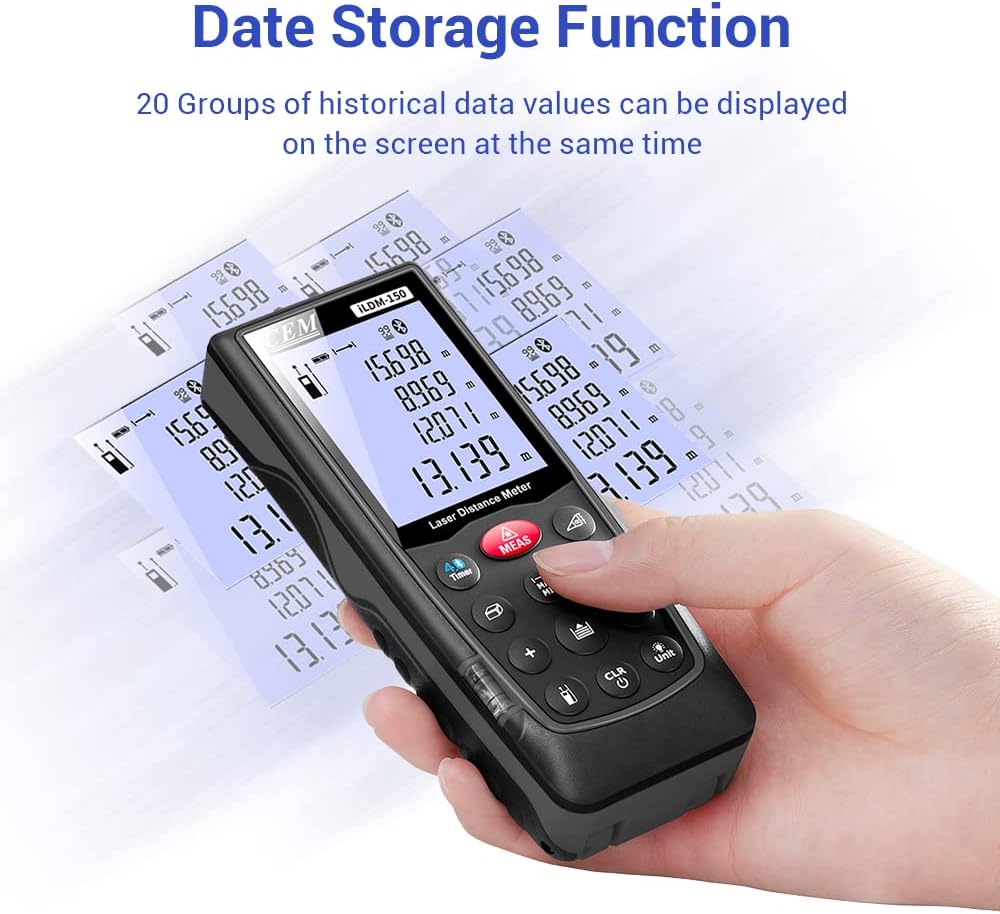
Figure 6.3: On-device data storage and display.
7. Одржавање и њега
Proper maintenance ensures the longevity and accuracy of your ILDM-150.
- Чишћење: Користите меку, дamp cloth to clean the device. Do not use abrasive cleaners or solvents. Pay special attention to the laser lens, cleaning it gently with a lens cloth if necessary.
- Складиштење: Store the device in its portable bag in a cool, dry place when not in use. Avoid extreme temperatures and direct sunlight.
- Одржавање батерије: Извадите батерије ако уређај неће бити коришћен дуже време како бисте спречили цурење.
- Заштита од удара: While durable, avoid dropping the device or subjecting it to strong impacts.

Figure 7.1: The ILDM-150 features IP54 water and dust protection.
КСНУМКС. Решавање проблема
If you encounter issues with your CEM ILDM-150, refer to the following table for common problems and solutions:
| Проблем | Могући узрок | Решење |
|---|---|---|
| Уређај се не укључује. | Слабе или празне батерије; Неправилна инсталација батерија. | Replace batteries; Ensure correct polarity. |
| Нетачна мерења. | Laser lens dirty; Unstable measurement surface; Device not held steady; Measurement taken over reflective or transparent surfaces. | Clean laser lens; Ensure stable placement; Use a target plate for difficult surfaces. |
| Блуетоотх веза не успева. | Bluetooth off on smartphone; Device out of range; App not running. | Enable Bluetooth; Ensure device is within 10m range; Restart Meterbox Pro app. |
| Екран је замагљен или нечитљив. | Low battery; Extreme temperature. | Replace batteries; Operate within specified temperature range. |
| Device shuts off unexpectedly. | Auto-off feature activated; Low battery. | This is normal after 150 seconds of inactivity; Replace batteries if low battery indicator is on. |
9. Техничке спецификације
Detailed specifications for the CEM ILDM-150 Laser Distance Measure:
| Спецификација | Валуе |
|---|---|
| Бранд | ЦЕМ |
| Назив модела | ILDM-150 |
| Парт Нумбер | CEM ILDM-150 |
| Боја | црна 1 |
| Меасуринг Ранге | 229 стопа или 70 метара |
| Прецизност | ±1/16 inch (1.5mm) |
| Ласер Цласс | Класа II, <1mW |
| Оцена међународне заштите | IP54 (Waterproof, Dust-proof) |
| Материјал | Double Injection Molding Machine, Plastic |
| Тежина артикла | 203 грама |
| Тип батерије | Alkaline (AAA) |
| Аутоматско искључивање | 150 секунди (приближно) |
| Меморија података | 99 група |
| Блуетоотх верзија | 4.0 |
| Димензије артикла (Д к Ш к В) | 5.31 к 2.09 к 1.18 инча |
| УПЦ | 887327150034 |
| Произвођач | Shenzhen Everbest Machinery Industry Co.,Ltd. |
| Датум првог доступног | 9. јул 2018 |

Figure 9.1: Dimensions of the ILDM-150.
10. Гаранција и подршка
10.1 Информације о гаранцији
The CEM ILDM-150 Laser Distance Measure comes with a 12-месечна гаранција from the date of purchase. This warranty covers defects in materials and workmanship under normal use. It does not cover damage caused by misuse, accidents, unauthorized modifications, or improper maintenance.
10.2 Корисничка подршка
For technical assistance, warranty claims, or further inquiries, please contact CEM customer support through their official website or the contact information provided with your purchase documentation. Please have your model number (ILDM-150) and purchase date ready when contacting support.


