
1. Увод
Thank you for choosing the Sainlogic WiFi Smart Weather Station SA9. This advanced weather station provides comprehensive weather data, including UV index, sun light intensity, rain gauge measurements, and wind speed/direction, displayed on an 8.5-inch color LCD. With Wi-Fi connectivity, it allows for data storage, export, and integration with popular weather services. This manual will guide you through the setup, operation, and maintenance of your new weather station to ensure optimal performance.
2. Садржај пакета
Пре почетка инсталације, проверите да ли су све компоненте присутне:
- Anemometer (Wind Speed Sensor)
- Раин Гауге
- Монтажни хардвер
- Каблови
- Упутство за употребу (овај документ)
- Main Display Unit (8.5" LCD)
- Outdoor Sensor Array (integrates UV, Sun Light, Thermo-Hygrometer)
3. Подешавање и инсталација
3.1 Outdoor Sensor Array Assembly and Placement
The outdoor sensor array measures various environmental parameters. Proper placement is crucial for accurate readings. Ensure the sensor is mounted in an open area, free from obstructions that could affect wind, rain, or sunlight measurements. The maximum transmission distance is 100.6 meters (330 feet).

слика: Outdoor Sensor Array Components. This image illustrates the various parts of the outdoor sensor array, including the anemometer, rain collector, UV/sun light sensor, bubble level for proper alignment, solar panel for power, and the thermo-hygrometer sensor. It also indicates a maximum transmission distance of 100.6 meters (330 feet) and recommends mounting on a railing or pole in an open space at least 1.5 meters (5 feet) from the ground.
The sensor array includes an anemometer cup, UV/sun light sensor, bubble level, rain collector, solar panel, and a thermo-hygrometer sensor. Use the integrated bubble level to ensure the sensor is perfectly horizontal for accurate rain and wind measurements.
3.2 Опције монтаже
The outdoor sensor array offers flexible mounting options:
- Горњи носач: Secure the sensor array directly to a flat surface.
- Pole Mount (Top): Attach the sensor array to the top of a pole.
- Bočni nosač: Mount the sensor array to the side of a structure.
- Pole Mount (Side): Attach the sensor array to the side of a pole.

слика: Easy Installation Methods. This image displays four common ways to install the outdoor sensor array: mounting it directly on top of a surface, on the top of a pole, on the side of a surface, or on the side of a pole. Each method is depicted with a clear diagram.
3.3 Напајање јединице за приказ
The display unit is powered by a battery. Ensure 3 AA batteries are inserted correctly (batteries not included). The outdoor sensor array is primarily solar-powered with battery backup.
4. Операција
4.1 Display Unit Overview
The 8.5-inch large color LCD provides a clear and comprehensive view of current weather conditions. The backlight is adjustable to suit various lighting environments.

слика: 8.5-inch Large Color LCD Screen. This image highlights the main display unit, showcasing its ability to present various weather data points such as temperature, humidity, pressure, dew point, wind speed/direction, UV index, sun light, moon phase, calendar, precipitation, and alarm status. It also demonstrates the adjustable backlight feature with settings for 100%, 60%, and 20% brightness.
4.2 Wi-Fi Connectivity and App Integration
The SA9 weather station connects to your home Wi-Fi network (2.4G only) to transmit data to the Weathersseed® APP and other compatible services like Weather Underground. Follow the three-step connection process outlined in the app for initial setup.
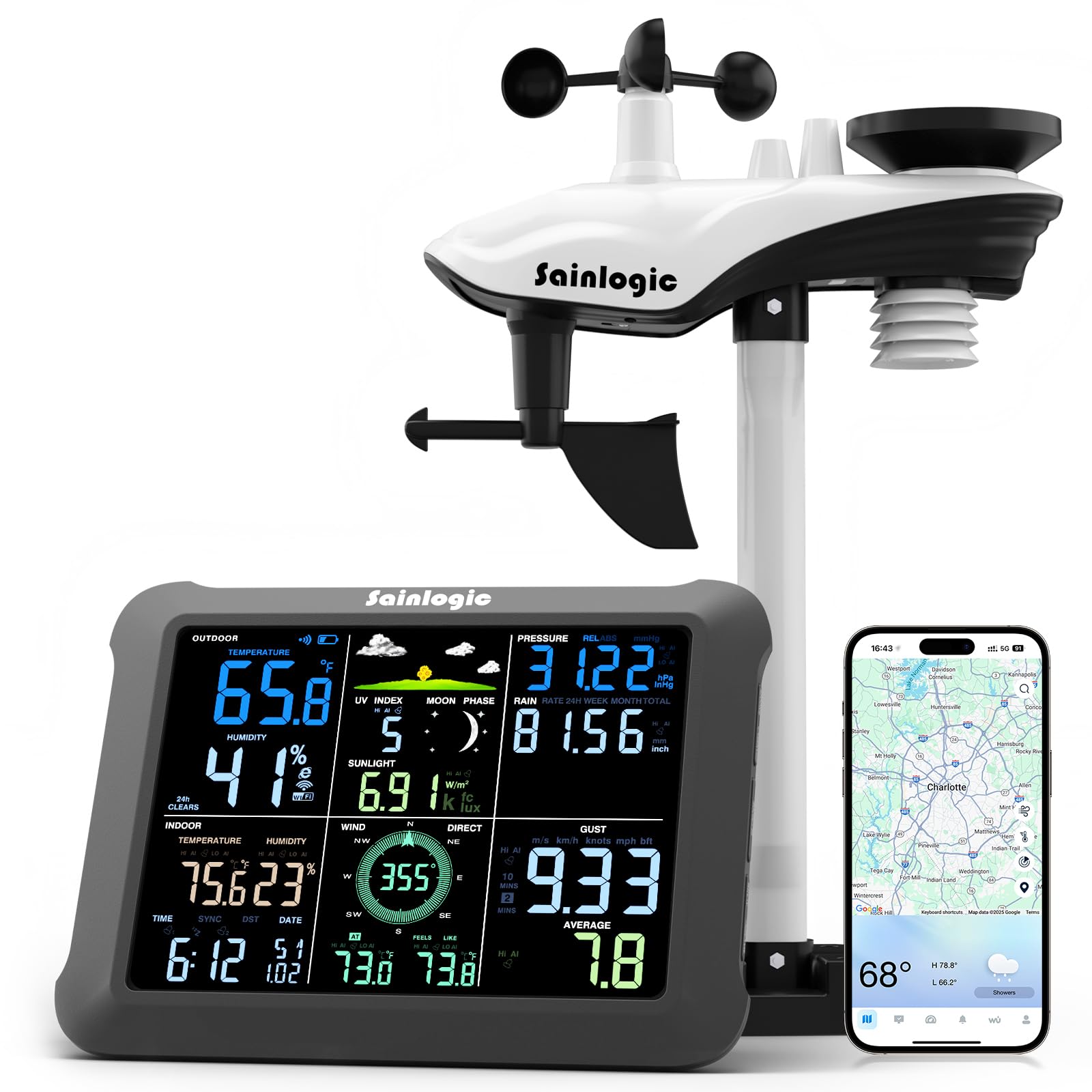
слика: Instant Alert Notification. This image shows the Sainlogic SA9 display unit alongside a smartphone running the companion app. The app displays instant alert notifications for conditions such as 'Outdoor temperature is too high' and 'Relative pressure is too high', indicating the ability to configure alerts via the application and email.
4.3 Weather Data Monitoring
The Weathersseed® APP provides a comprehensive overview of your weather data, including:
- Temperature (Indoor/Outdoor)
- Humidity (Indoor/Outdoor)
- Pressure (Relative/Absolute)
- Тачка росе
- Брзина и правац ветра
- Падавине
- UV Index and Solar Radiation
- Moon Phase, Sunrise/Sunset

слика: Your Perfect Weather Companion - More Accurate Weather Data. This image illustrates the detailed weather data available through the companion app on a smartphone. It shows sections for wind speed, humidity percentage, sun/moon rise and set times, and precipitation graphs, providing a comprehensive overview of current and historical weather conditions.
4.4 Weather Underground Support
The SA9 weather station supports connection to Weather Underground, allowing you to share your local weather data and access a wider network of weather information.

слика: Support for Weather Underground Connection in the APP. This image displays two smartphone screens showing the Weather Underground application. One screen shows current weather data like outdoor temperature, dew point, and humidity, while the other shows historical data for the same parameters, demonstrating the app's integration with Weather Underground.
4.5 Складиштење и извоз података
The weather station stores up to 2 years of historical weather data. This data can be freely exported in Excel format for detailed analysis.

слика: Records 2 Years of Historical Weather Data. This image shows a laptop screen displaying an Excel spreadsheet filled with weather data, alongside a smartphone showing a graphical representation of weather trends. This illustrates the weather station's capability to store 2 years of historical data and export it freely in Excel format.
5. Спецификације
| Феатуре | Детаљ |
|---|---|
| Бранд | sainlogic |
| Број модела | СА9 |
| Дисплаи Типе | ЛЦД |
| Величина екрана | 8.5 инча |
| Технологија повезивања | Wi-Fi (само 2.4G) |
| Извор напајања (екран) | Напајање батеријама (потребне су 3 АА батерије, нису укључене) |
| Извор напајања (спољни сензор) | Соларни погон са резервном батеријом |
| Материјал | Пластика |
| Боја | Црно |
| Прецизност температуре | ±0.5 degrees Celsius |
| Горња номинална температура | 40 степени Целзијуса |
| Сензорна технологија | AI-based |
| Складиштење података | 2 Years (exportable to Excel) |
| УПЦ | 734257141161 |
| ГТИН | 734257141161 |
КСНУМКС. Решавање проблема
If you encounter issues with your Sainlogic SA9 Weather Station, please refer to the following common solutions:
- Без дисплеја/напајања: Ensure batteries are correctly inserted in the display unit and are not depleted. Check the outdoor sensor for sufficient sunlight exposure or replace its backup batteries if necessary.
- Нема података о спољашњем простору: Verify that the outdoor sensor array is within range of the display unit and there are no significant obstructions. Re-establish the connection between the sensor and the display unit as per the initial setup instructions.
- Нетачна очитавања: Ensure the outdoor sensor array is mounted correctly and level. Clear any debris from the rain gauge or anemometer. Avoid placing the sensor near heat sources or reflective surfaces that could skew temperature or light readings.
- Проблеми са Ви-Фи везом: Confirm your Wi-Fi network is 2.4GHz. Ensure the weather station is within range of your Wi-Fi router. Restart both the weather station and your router, then attempt to reconnect using the Weathersseed® APP.
- App Data Not Updating: Check your internet connection. Ensure the weather station is successfully connected to Wi-Fi and the app is synchronized.
For persistent issues, please contact Sainlogic customer support.
7. Одржавање
Regular maintenance helps ensure the longevity and accuracy of your weather station:
- Clean Outdoor Sensors: Periodically inspect and clean the rain gauge funnel, anemometer cups, and wind vane to remove dirt, leaves, or insects that could impede their function. Use a soft, damp тканина.
- Замена батерије: Replace the batteries in the display unit as needed. For the outdoor sensor, while it is solar-powered, consider replacing its backup batteries every 1-2 years to ensure continuous operation during prolonged periods of low light.
- Ажурирања софтвера: Check the Weathersseed® APP regularly for any available firmware updates for your weather station to ensure you have the latest features and performance improvements.
- Сигурна монтажа: Periodically check the mounting hardware of the outdoor sensor array to ensure it remains securely fastened, especially after strong winds or storms.
8. Информације о гаранцији
Sainlogic products are designed for reliability and performance. This product comes with a standard manufacturer's warranty. Please refer to the warranty card included in your package or visit the official Sainlogic webсајт за детаљне услове гаранције. Сачувајте доказ о куповини за потребе подношења захтева за гаранцију.
9. Корисничка подршка
For any questions, technical assistance, or support, please contact Sainlogic customer service through the following channels:

слика: Sainlogic Customer Service. This image provides contact details for Sainlogic customer support, including phone support (Mon-Fri, 10:00-18:00 ET), email support (response within 24 hours on weekdays, 48 hours on weekends), online help via the official website, and direct in-app customer service through the Weathersseed-App.
- Телефоном: Available Monday-Friday, 10:00-18:00 (ET).
- путем е-поште: Responses within 24 hours on weekdays, 48 hours on weekends.
- Помоћ на мрежи: Visit the official Sainlogic website for instructions and additional support resources.
- Via Weathersseed-App: Utilize in-app customer service for immediate assistance.