
1. Увод
Thank you for choosing the FINOTI K19 MAX GPS Drone. This professional-grade drone features a 4K camera, GPS intelligent positioning, 360° laser obstacle avoidance, and a dedicated remote control with a 4.5-inch screen for an immersive flight experience. This manual provides essential information for safe operation, setup, maintenance, and troubleshooting to ensure optimal performance and longevity of your device.
2. Безбедносне смернице
Read all safety warnings and instructions before use to avoid injury or damage.
- Летна средина: Fly in open areas, away from people, buildings, trees, power lines, and water. Do not fly in strong winds (above 10km/h) or adverse weather conditions.
- Линија вида: Увек одржавајте визуелну линију вида са дроном током лета.
- Безбедност батерије: Use only the provided charger and batteries. Do not overcharge or puncture batteries. Discontinue use if batteries are damaged or swollen.
- Безбедност пропелера: Keep hands, face, and loose clothing away from rotating propellers. Ensure propellers are correctly installed before each flight.
- Избегавање препрека: While the drone features 360° laser obstacle avoidance, it is not foolproof. Always exercise caution and manual control.
- Усклађеност са законима: Be aware of and comply with local drone regulations, including registration, no-fly zones, and privacy laws.
- Препорука за узраст: Овај производ није погодан за децу млађу од 14 године.
3. Садржај пакета
Проверите да ли су све ставке присутне у вашем пакету:
- 1 x K19 MAX Drone
- 1 x 4.5-inch Screen Remote Control
- 1 x Infrared Obstacle Avoidance Head
- 3 x Body Battery (Triple Battery variant)
- 1 к торба за складиштење
- 1 к кутија у боји
- 1 к меморијска картица
- 1 к читач картица
- 2 x Упутство за употребу (овај документ)
- 4 x Rezervne lopatice ventilatora
- 2 к УСБ кабл за пуњење
- 1 к одвијач
4. Подешавање
4.1 Склапање дрона
The K19 MAX drone features a foldable design for portability. To prepare for flight:
- Unfold the drone arms carefully until they lock into position.
- Attach the infrared obstacle avoidance head to the designated slot on top of the drone.
- Ensure propellers are securely attached. If replacing, use the provided screwdriver and spare blades, matching the correct blade to each motor.
4.2 Инсталација и пуњење батерије
The drone uses a 3.7V 2200mAh battery. The remote control also requires charging.
- Дроне батерија: Insert the charged battery into the drone's battery compartment until it clicks into place. To charge, remove the battery and connect it to the USB charging cable. Charging time is approximately 60 minutes.
- даљински управљач: The remote control has a built-in rechargeable battery. Connect it to a USB charging cable.
4.3 Даљински управљач прекоview
The remote control features a 4.5-inch HD screen for real-time FPV (First Person View) and various control buttons.

Familiarize yourself with the following controls:
- Леви џојстик: Throttle (up/down), Yaw (rotate left/right).
- Десни џојстик: Pitch (forward/backward), Roll (left/right).
- Дугме за напајање: Укључује/искључује даљински управљач.
- ГПС прекидач: Activates/deactivates GPS positioning.
- One-Click Return: Покреће аутоматски повратак кући.
- Прекидач за избегавање препрека: Toggles the 360° laser obstacle avoidance feature.
- Пребацивање брзине: Adjusts flight speed (three speed adjustments available).
- One-Click Airdrops: Activates the airdrop function.
- Дугме за фотографију: Takes a still image.
- Дугме за видео: Starts/stops video recording.
- Подешавања сочива: Контролише угао камере.
5. Управљање дроном
5.1 Контролна листа пре лета
- Уверите се да су батерије дрона и даљинског управљача потпуно напуњене.
- Проверите да ли су пропелери безбедно причвршћени и да нису оштећени.
- Choose an open, safe flying area.
- Power on the drone, then the remote control. Wait for GPS signal acquisition (indicated by solid GPS light on remote).
- Perform gyroscope and geomagnetic calibration as per remote control instructions.
5.2 Полетање и слетање
- Полетање једним кључем: Press the designated takeoff button on the remote control. The drone will automatically ascend to a safe height and hover.
- Ручно полетање: Push both joysticks to the bottom-outer corners to unlock the motors. Slowly push the left joystick up to ascend.
- Слетање једним кључем: Press the designated landing button. The drone will automatically descend and land.
- Ручно слетање: Slowly pull the left joystick down to descend. Once landed, push both joysticks to the bottom-outer corners to lock the motors.
5.3 Режими лета и карактеристике
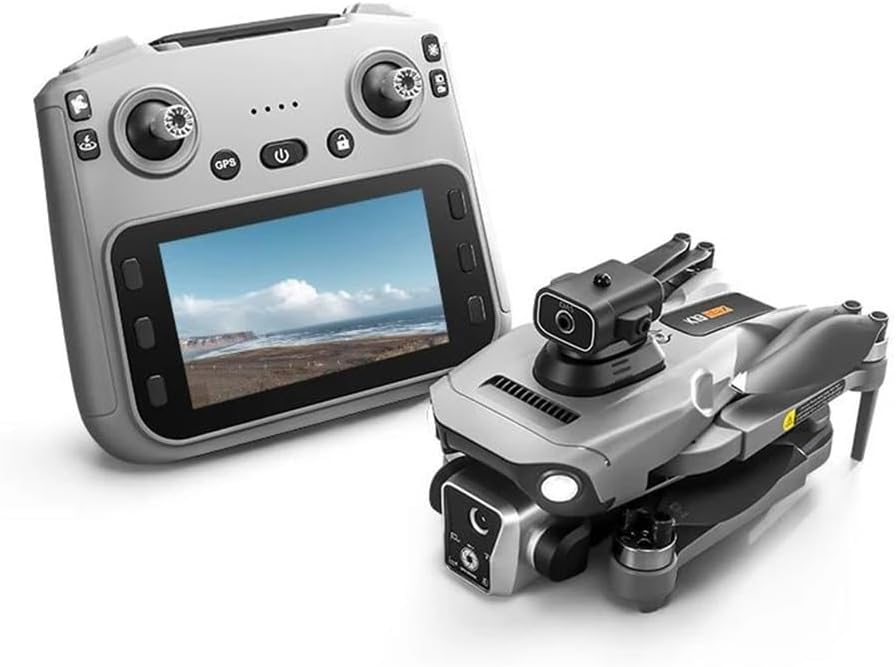
- GPS Intelligent Positioning: Provides stable hover and precise positioning, crucial for aerial photography and safe flight.
- Позиционирање оптичког тока: Assists with stable hovering in environments where GPS signal may be weak or unavailable.
- 360° ласерско избегавање препрека: The drone is equipped with sensors to detect and avoid obstacles in all directions, enhancing flight safety.
- Airdrop Mode: Allows for the remote release of small items. Maximum load capacity is 20 grams. Activate via the one-click airdrop button on the remote.
- Smart Follow Mode: The drone can automatically follow a designated subject, such as a person or vehicle, capturing dynamic footage.
- Surround Mode Flight: The drone can orbit a point of interest, capturing panoramic video or photos.
- One-Click GPS Intelligent Return: When activated, the drone will automatically return to its takeoff point. This feature also engages automatically in case of low battery or loss of signal.
- Three Speed Adjustments: Adjust the drone's flight speed to suit your skill level and flight conditions.
5.4 Рад камере
The K19 MAX features a high-resolution camera system.

- Фотографије: Capture photos with a resolution of up to 7680x4320 (8K). Press the 'Photograph' button on the remote.
- Видео снимак: Record smooth 4K/1080p HD video at 60fps. Press the 'Video' button to start and stop recording.
- Подешавање угла камере: Use the lens adjustment scroll wheel on the remote control to change the camera's vertical angle (90° ESC camera).
- 50x зум: Utilize the digital zoom feature for closer shots.
- Складиштење: Photos and videos are stored on the included memory card. Use the card reader to transfer fileс на рачунар.
5.5 Real-time FPV and Video Transmission

The remote control's 4.5-inch screen provides a live feed from the drone's camera via 5G high-definition image transmission, allowing for real-time FPV up to 3000M. This enables precise control and framing of your shots.
Видео 5.5.2: An official product video demonstrating the FINOTI K19 MAX GPS Drone's features, including its HD remote control with screen, GPS intelligent positioning, airdrop mode, 90° ESC camera, three speed adjustments, omni-directional obstacle avoidance, smart follow mode, and one-click GPS intelligent return.
6. Одржавање
Regular maintenance ensures the longevity and performance of your K19 MAX drone.
- Чишћење: After each flight, gently wipe the drone body and camera lens with a soft, dry cloth. Avoid using harsh chemicals.
- Пропелери: Inspect propellers for cracks, bends, or damage before and after each flight. Replace any damaged propellers immediately using the provided spare parts and screwdriver.
- Мотори: Држите моторе чистим од прашине и остатака. Не покушавајте да подмазујете моторе.
- Одржавање батерије: Store batteries in a cool, dry place. Do not store fully charged or completely depleted for extended periods. Charge to about 50-60% for long-term storage.
- Складиштење: When not in use, fold the drone and store it in its protective storage bag to prevent damage.
КСНУМКС. Решавање проблема
If you encounter issues with your K19 MAX drone, refer to the following common problems and solutions:
| Проблем | Могући узрок | Решење |
|---|---|---|
| Дрон се не укључује. | Low or uncharged battery; incorrectly installed battery. | Charge the drone battery fully. Ensure the battery is inserted correctly and securely. |
| Remote control does not connect to drone. | Remote control not powered on; pairing issue; interference. | Ensure remote is powered on. Re-pair the drone and remote according to the quick start guide. Move to an area with less interference. |
| Дрон лебди током лета. | Improper calibration; strong winds. | Perform gyroscope and geomagnetic calibration. Avoid flying in windy conditions. |
| Лош квалитет слике/видеа или недостатак FPV сигнала. | Weak 5G signal; dirty camera lens; memory card issue. | Ensure drone is within range. Clean the camera lens. Check if the memory card is inserted correctly and has sufficient space. |
| Избегавање препрека не функционише. | Feature is disabled; sensor obstruction. | Ensure the obstacle avoidance switch is ON. Clean the obstacle avoidance sensors. |
| Drone does not return to home. | Weak GPS signal; return point not set. | Ensure strong GPS signal before takeoff. The drone needs a clear GPS lock to record the home point. |
8. Спецификације
| Феатуре | Спецификација |
|---|---|
| Бранд | FINOTI |
| Назив модела | К19 МАКС |
| Фолдинг Сизе | 17 к 10 к 9 ЦМ |
| Величина проширења | 25 к 20 к 9 ЦМ |
| Фреквенција пријема | 5G |
| Пријемни канал | 4 channel 6 axis gyroscopes |
| Капацитет батерије | 3.7В 2200мАх |
| Време употребе | КСНУМКС минута |
| Време пуњења | КСНУМКС минута |
| Удаљеност даљинског управљача | Height 500 meters / Distance 5000 meters (Note: 5G image transmission up to 3000M) |
| Return Distance | 2000 метара |
| Видео Ресолутион | 1920Px1280P (4K/1080p HD at 60fps mentioned in feature bullets) |
| Резолуција слике | 7680x4320 (8K) |
| Ефективна резолуција мировања | 32 MP (from specifications, likely referring to a specific camera mode or sensor) |
| Тип мотора | Мотор без четкица |
| Препрека препрека | 360° ласерско избегавање препрека |
| Airdrop Load Capacity | Макс. 20 грама |
| Екран даљинског управљача | 4.5-инчни ХД екран |