
1. Увод
This manual provides instructions for the Ceybo EN2D36H ZDA1221216 Replacement Remote Control. This remote is designed to be fully compatible with various Hisense VIDAA Smart TV models, offering a direct replacement without the need for complex programming. Simply insert batteries, and the remote is ready for use.
The remote features dedicated shortcut buttons for popular streaming services, allowing quick access to your favorite entertainment platforms.
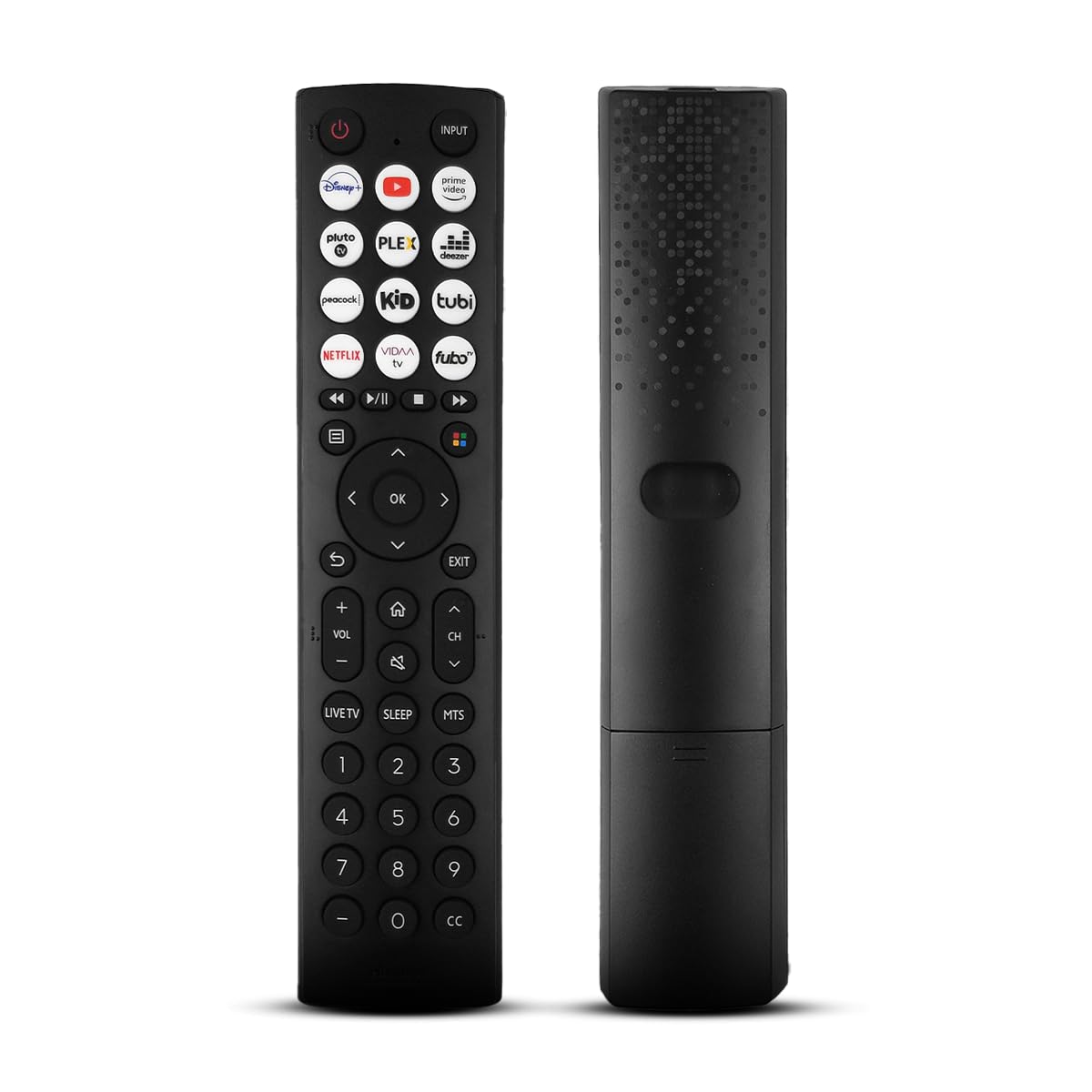
А фронт view of the Ceybo EN2D36H ZDA1221216 replacement remote control, designed for Hisense televisions.
2. Карактеристике
- Широка компатибилност: Works with Hisense A4 Series UHD TVs and A6 Series UHD Smart TVs, including models such as 32A35HUV, 32A45GV, 40A35HUV, 40A45GV, 43A6GV, 43A35HUV, 43A45GV, 50A6GV, 55A6GV, and 65A6GV.
- Instant Streaming Access: Dedicated shortcut buttons for Disney+, YouTube, Prime Video, Pluto TV, Plex, Deezer, Peacock, Kidoodle, Tubi, Netflix, Vida, and Fubo.
- Plug & Play Functionality: No setup or programming required. The remote is ready to use immediately after battery installation.
- Full TV Control: Provides comprehensive control over TV functions including power, volume, input selection, channel navigation, and menu access.
- Ергономски дизајн: Lightweight and designed for comfortable handling.

This image displays the Ceybo EN2D36H ZDA1221216 remote control alongside several Hisense televisions, illustrating its compatibility with Hisense A4 and A6 Series UHD Smart TVs.
3. Подешавање
The Ceybo EN2D36H ZDA1221216 remote control is designed for immediate use without any programming steps.
3.1 Инсталација батерије
- Пронађите одељак за батерије на полеђини даљинског управљача.
- Померите поклопац батерије надоле или притисните резу и подигните да бисте га отворили.
- Уметните две (2) ААА батерије, водећи рачуна да позитивни (+) и негативни (-) терминали буду правилно поравнати са ознакама унутар одељка.
- Вратите поклопац батерије тако што ћете га вратити на место док не кликне чврсто.
Once batteries are installed, the remote is ready to operate your compatible Hisense TV.

This image illustrates the battery compartment of the remote control, indicating that it is powered by two AAA batteries for lasting performance.

This image emphasizes the effortless setup of the remote control, stating that it requires no pairing and is ready to use immediately after battery insertion.
4. Упутство за употребу
Point the remote control directly at your Hisense TV's infrared receiver for optimal performance.
4.1 Основне функције
- Дугме за укључивање (⏻): Притисните за укључивање или искључивање телевизора.
- Дугме за унос: Press to cycle through available input sources (HDMI, AV, etc.).
- Појачавање/утишавање (ВОЛ +/-): Подешава ниво јачине звука телевизора.
- Канал горе/доле (CH +/-): Мења ТВ канал.
- Дугме за искључивање звука (🔇): Искључује или укључује звук ТВ-а.
4.2 Навигација и мени
- Смерни тастер (горе, доле, лево, десно): Navigates through menus and on-screen options.
- Дугме ОК: Потврђује изборе или отвара меније.
- Назад дугме (↩): Враћа се на претходни екран или мени.
- Дугме за излаз: Излази из тренутног менија или апликације.
- Хоме дугме (🏠): Приступа главном паметном центру или почетном екрану телевизора.
4.3 Streaming Shortcut Buttons
Press any of the dedicated shortcut buttons to directly launch the corresponding streaming application:
- Диснеи+
- ИоуТубе
- Приме Видео
- Плутон ТВ
- Плек
- Деезер
- Паун
- Kidoodle
- Туби
- Нетфлик
- Вида
- Fubo

The remote control is shown with a magnified view of its dedicated shortcut buttons for popular streaming services like Disney+, YouTube, Prime Video, Pluto TV, Plex, Deezer, Peacock, Kidoodle, Tubi, Netflix, Vida, and Fubo.

The remote control is presented to highlight its user-friendly design, featuring large and clearly labeled buttons for intuitive navigation and access to all functions.
5. Одржавање
5.1 Чишћење
За чишћење даљинског управљача користите меку, суву крпу. За тврдокорну прљавштину, лагано обришитеampen the cloth with water. Avoid using harsh chemicals, abrasive cleaners, or solvents, as these can damage the remote's surface or internal components.
5.2 Замена батерије
Replace batteries when the remote's response becomes sluggish or it stops functioning. Always replace both AAA batteries at the same time with new ones. Do not mix old and new batteries, or different types of batteries, as this can lead to leakage or improper operation. Dispose of used batteries according to local regulations.
КСНУМКС. Решавање проблема
If you experience issues with your Ceybo EN2D36H ZDA1221216 remote control, refer to the following common solutions:
| Проблем | Могући узрок | Решење |
|---|---|---|
| Даљински управљач не ради. | Празне или неправилно уметнуте батерије. | Замените батерије новим ААА батеријама, водећи рачуна о исправном поларитету (+/-). |
| Даљински управљач не реагује. | Obstruction between remote and TV, or remote is too far. | Ensure a clear line of sight to the TV's IR receiver. Move closer to the TV. |
| Одређена дугмад не раде. | Dirt or debris under the button, or internal malfunction. | Clean the remote. If the issue persists, the remote may require replacement. |
| TV does not respond to remote. | TV's IR receiver is blocked or malfunctioning. | Check the TV's IR receiver for obstructions. Test with another remote if available to confirm TV functionality. |
7. Спецификације
- Бренд: Цеибо
- Назив модела: EN2D36H ZDA1221216
- Технологија повезивања: Инфрацрвени (ИР)
- Тип контролера: Контрола дугмета
- Компатибилни уређаји: Television (Hisense VIDAA Smart TVs)
- Извор напајања: 2 к ААА батерије (нису укључене)
- Максимални домет: 30 стопа (приближно 9 метара)
- Посебне карактеристике: Ergonomic, Lightweight, No Programming Required
- Боја: Црно
8. Гаранција и подршка
For warranty information or technical support, please refer to the product packaging or contact Ceybo customer service through the retailer where the product was purchased. Keep your purchase receipt as proof of purchase.