
Увод
This manual provides essential instructions for the installation, operation, and maintenance of your ASAHOM S1080 Waterproof Control Box. This control box is designed exclusively for use with ASAHOM S1080 Series RGBCW Permanent Outdoor Lights PRO. Please read this manual thoroughly before use to ensure proper functionality and safety.
Садржај пакета
Проверите да ли су све ставке наведене у наставку укључене у ваш пакет:
- 1 x ASAHOM S1080 Waterproof Control Box with Dual Output and WLED
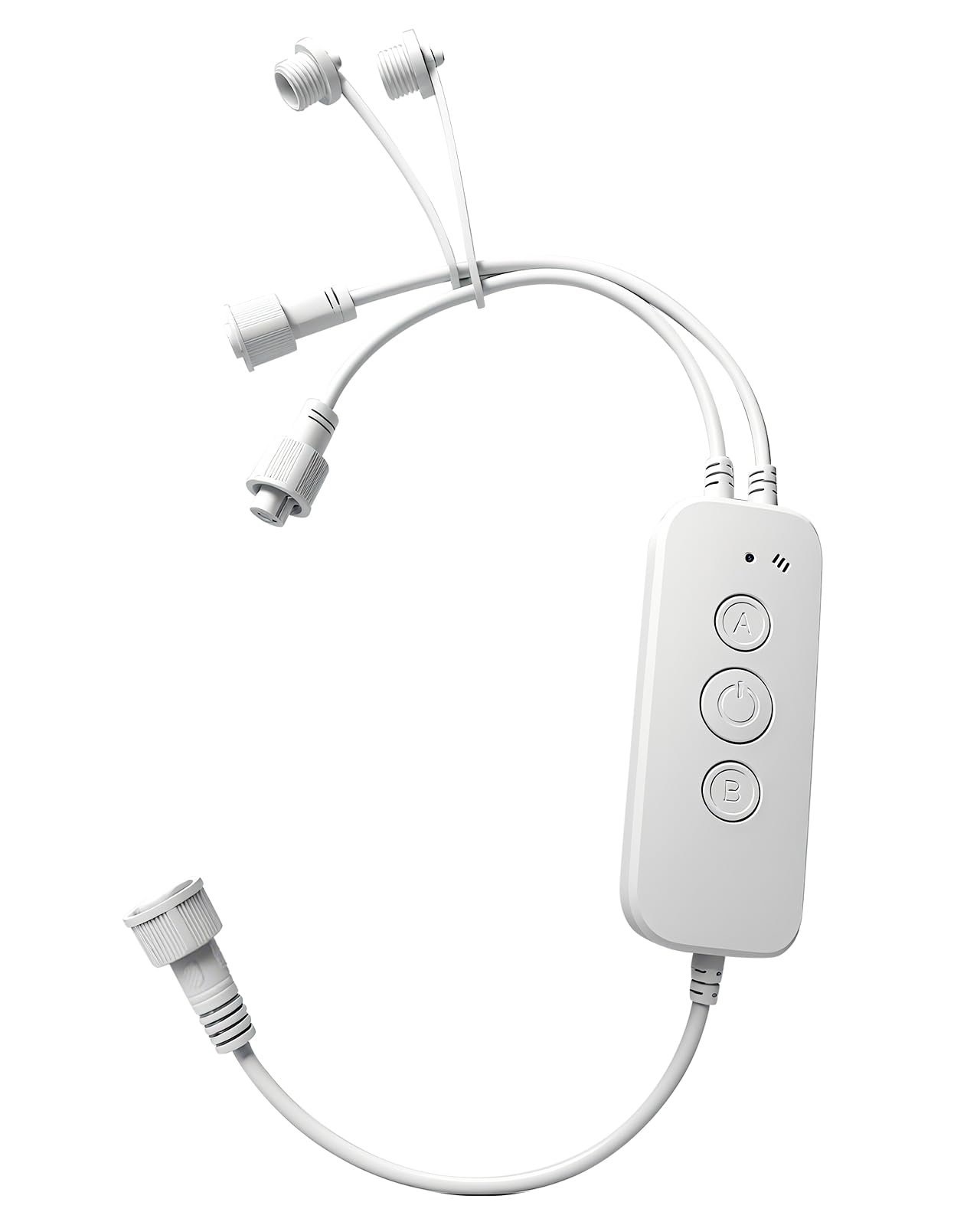
Image: The ASAHOM S1080 Waterproof Control Box, showing its compact design and white casing.
Сетуп
The ASAHOM S1080 Control Box is designed for straightforward integration with your ASAHOM S1080 Series RGBCW Permanent Outdoor Lights PRO. Ensure the power supply is disconnected before making any connections.
- Повежите светлосне жице: The control box features dual output ports. Connect your ASAHOM S1080 light strings to either or both output ports as required by your installation layout.
- Secure Unused Ports: If only one output port is utilized, ensure the waterproof cap on the unused port is securely tightened. This is crucial for maintaining the waterproof integrity of the control box.
- Положај микрофона: During installation, position the control box so that the microphone opening is not obstructed. This ensures optimal sound pickup for the Audio Reactive feature.
- Прикључак за напајање: Once all light strings are securely connected and unused ports are capped, connect the control box to the compatible ASAHOM S1080 power supply.

Image: The ASAHOM S1080 Control Box illustrating its dual output ports for connecting light strings.
Упутство за употребу
Функције дугмета
The control box features three physical buttons for direct control:
- Дугме за укључивање/искључивање:
- Притисните кратко да бисте укључили или искључили светла.
- Притисните и држите дуже од 5 секунди да бисте вратили фабричка подешавања.
- Дугме: Single press to change the color of the lights.
- Б дугме: Single press to switch between different lighting modes.
Двоструки излаз
The control box supports connecting light strings to either or both output ports. This flexibility allows for various installation configurations. Always ensure any unused output port has its waterproof cap securely tightened to prevent water ingress.
Микрофон
The integrated microphone enables the Audio Reactive feature, allowing the lights to respond to sound. For optimal performance, ensure the microphone opening is unobstructed and the sound source is positioned as close as possible to the microphone when this feature is active.
Светло индикатора
The indicator light provides visual feedback on the device's status:
- Трепћуће плаво: The device is in pairing mode, ready to connect to a network.
- Пуна плава: Уређај је успешно повезан са мрежом.
The indicator light can also be turned off via the settings within the associated mobile application.
Одржавање
To ensure the longevity and optimal performance of your ASAHOM S1080 Waterproof Control Box, follow these maintenance guidelines:
- Редовно чишћење: Periodically wipe the exterior of the control box with a soft, damp крпом да бисте уклонили прашину и остатке. Избегавајте употребу јаких хемикалија или абразивних средстава за чишћење.
- Прегледајте везе: Regularly check all cable connections to ensure they are secure and free from damage. Verify that waterproof caps on unused ports are tightly sealed.
- Заштита животне средине: While the control box is waterproof, avoid submerging it in water or exposing it to extreme weather conditions beyond its rated specifications.
- Ажурирања софтвера: Keep the associated mobile application updated to the latest version to benefit from performance improvements and new features.
Решавање проблема
If you encounter issues with your ASAHOM S1080 Waterproof Control Box, refer to the following common troubleshooting steps:
- Светла се не пале:
- Ensure the control box is properly connected to the power supply and the power supply is plugged into a functional outlet.
- Check all connections between the control box and the light strings.
- Briefly press the ON/OFF button on the control box.
- No Network Connection (Indicator Blinking Blue):
- Уверите се да је ваша Wi-Fi мрежа активна и у домету.
- Follow the pairing instructions in the mobile application to reconnect the device.
- Покушајте да поново покренете свој Wi-Fi рутер.
- Incorrect Light Behavior:
- If the lights are not responding as expected, try restoring the control box to factory settings by pressing and holding the ON/OFF button for more than 5 seconds.
- Verify settings within the mobile application.
- Audio Reactive Feature Not Working:
- Ensure the microphone opening is not blocked.
- Position the sound source closer to the control box.
- Check if the Audio Reactive feature is enabled in the mobile application.
If problems persist, contact ASAHOM customer support for further assistance.
Спецификације
| Бранд | АСАХОМ |
| Назив модела | Контролна кутија |
| Број модела | А1029 |
| Боја | Бела |
| Технологија повезивања | Ви-Фи |
| Тип контролера | Button Control, Remote Controlled (via app) |
| Количина дугмета | 3 |
| Компатибилни уређаји | ASAHOM S1080 Series RGBCW Permanent Outdoor Lights PRO, Smartphone |
| Максимални број подржаних уређаја | 1 (Control Box per light system) |
Гаранција
ASAHOM products are manufactured to high-quality standards. For specific warranty details, including coverage period and terms, please refer to the warranty information provided with your original purchase documentation or visit the official ASAHOM webсајт. Сачувајте доказ о куповини за потребе гаранције.
Подршка
For technical assistance, product inquiries, or to report any issues not covered in this manual, please contact ASAHOM customer support. You can typically find contact information on the ASAHOM official webсајту или путем ваше платформе за куповину.
Онлине ресурси: Посетите ASAHOM Store on Amazon за додатне информације о производу и додатној опреми.