
Vetroo M06
Vetroo M06 Micro-ATX/Mini-ITX Gaming PC Case Instruction Manual
Модел: М06
Увод
This manual provides detailed instructions for the installation, operation, and maintenance of your Vetroo M06 Micro-ATX/Mini-ITX Gaming PC Case. Please read this manual thoroughly before beginning assembly to ensure proper setup and optimal performance.

Image: The Vetroo M06 Micro-ATX/Mini-ITX Gaming PC Case in black, showcasing its mesh front panel and side window, viewед из угла.
Кључне карактеристике
- Компактан дизајн: Micro-ATX / Mini-ITX form factor with a high-airflow mesh front panel, designed for space-efficient builds.
- Оптимизовано хлађење: Supports up to five 120mm fans and a 240mm top-mounted liquid radiator for efficient thermal management.
- GPU Compatibility: Погодан за графичке картице дужине до 355 мм.
- Flexible PSU Mounting: Features an adjustable power supply installation area with a maximum length of 160mm.
- Модерно повезивање: Front panel includes USB Type-C and USB 3.0 ports for convenient peripheral access.
Садржај пакета
Молимо вас да проверите да ли су све компоненте присутне пре него што наставите са инсталацијом:
- Vetroo M06 PC Case
- Accessory Box (screws, standoffs, cable ties)
- SFX PSU Bracket (1x)
- Кориснички приручник (овај документ)
Спецификације
| Феатуре | Детаљ |
|---|---|
| Назив модела | М06 |
| Тип случаја | Мини-кула |
| Компатибилност матичне плоче | Мицро АТКС, Мини ИТКС |
| Димензије производа (Д к Ш к В) | 15.55" x 7.87" x 13.07" (395 mm x 200 mm x 332 mm) |
| Тежина артикла | 13.37 фунте (6.06 кг) |
| Материјал | Acrylonitrile Butadiene Styrene (ABS), SPCC (0.8mm metal plate) |
| Максимална дужина ГПУ-а | 355мм |
| Максимална висина ЦПУ хладњака | 165мм |
| Мак ПСУ Ленгтх | 160mm (Adjustable mounting) |
| Подршка обожаватеља | До 5 к 120 мм вентилатора |
| Подршка радијатора | 1 x 240mm (Top) |
| Предњи И / О портови | 1 x USB Type-C, 1 x USB 3.0, HD Audio, Power Button, Reset Button |

Image: Diagram illustrating the compact dimensions of the Vetroo M06 PC case, measuring 15.5 inches in depth, 7.8 inches in width, and 13.0 inches in height.

Image: A detailed diagram outlining the compatibility specifications for the Vetroo M06 PC case, including maximum CPU cooler height (165mm), GPU length (355mm), PSU length (160mm), and supported motherboard form factors (M-ATX/ITX).
Подешавање и инсталација
Before starting, ensure you have a clean, static-free workspace. Refer to your component manuals for specific installation details.
1. Инсталација матичне плоче
- Remove the side panel(s) of the case.
- Install the necessary motherboard standoffs into the case tray according to your motherboard's form factor (Micro-ATX or Mini-ITX).
- Пажљиво поставите матичну плочу на одстојнике, поравнавајући рупе за вијке.
- Причврстите матичну плочу вијцима.
2. Инсталација графичке картице
- Remove the appropriate PCIe slot covers from the rear of the case.
- Insert your graphics card into the primary PCIe slot on your motherboard.
- Причврстите графичку картицу за кућиште помоћу завртњева.
- Connect any required PCIe power cables from your power supply to the GPU.
3. Инсталација ПСУ
- Determine the desired mounting position for your power supply. The Vetroo M06 supports adjustable PSU mounting.
- If using an SFX power supply, attach the included SFX bracket to the PSU.
- Slide the power supply into its designated bay and secure it with screws from the rear of the case.
- Route the necessary power cables to your components.

Слика: Интерна view of the Vetroo M06 PC case highlighting the three adjustable mounting positions for ATX/SFX power supplies, along with an illustration of the included SFX bracket.
4. Storage Installation (HDD/SSD)
- Locate the designated mounting points for 3.5" HDDs and 2.5" SSDs.
- Secure your storage drives using the provided screws.
- Connect SATA data and power cables to each drive.
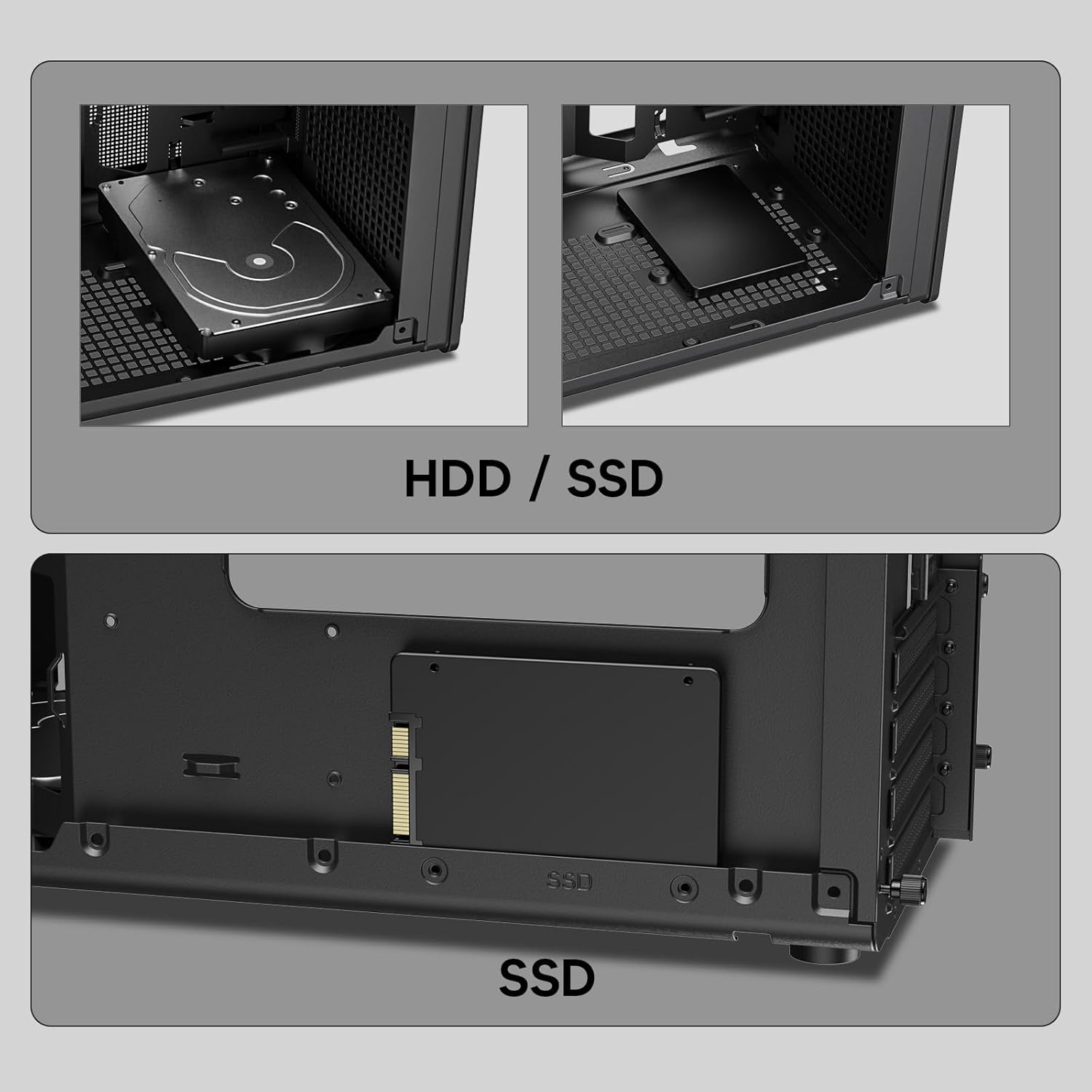
Слика: Крупни план views of the Vetroo M06 PC case interior, demonstrating the mounting options for both 3.5-inch Hard Disk Drives (HDDs) and 2.5-inch Solid State Drives (SSDs).
5. Cooling System Installation (Fans/Radiator)
- Identify the fan mounting locations (up to five 120mm fans).
- Mount fans using appropriate screws, ensuring correct airflow direction.
- For liquid cooling, install a 240mm radiator at the top mounting position, securing it with screws.
- Connect fan and pump cables to your motherboard or fan controller.
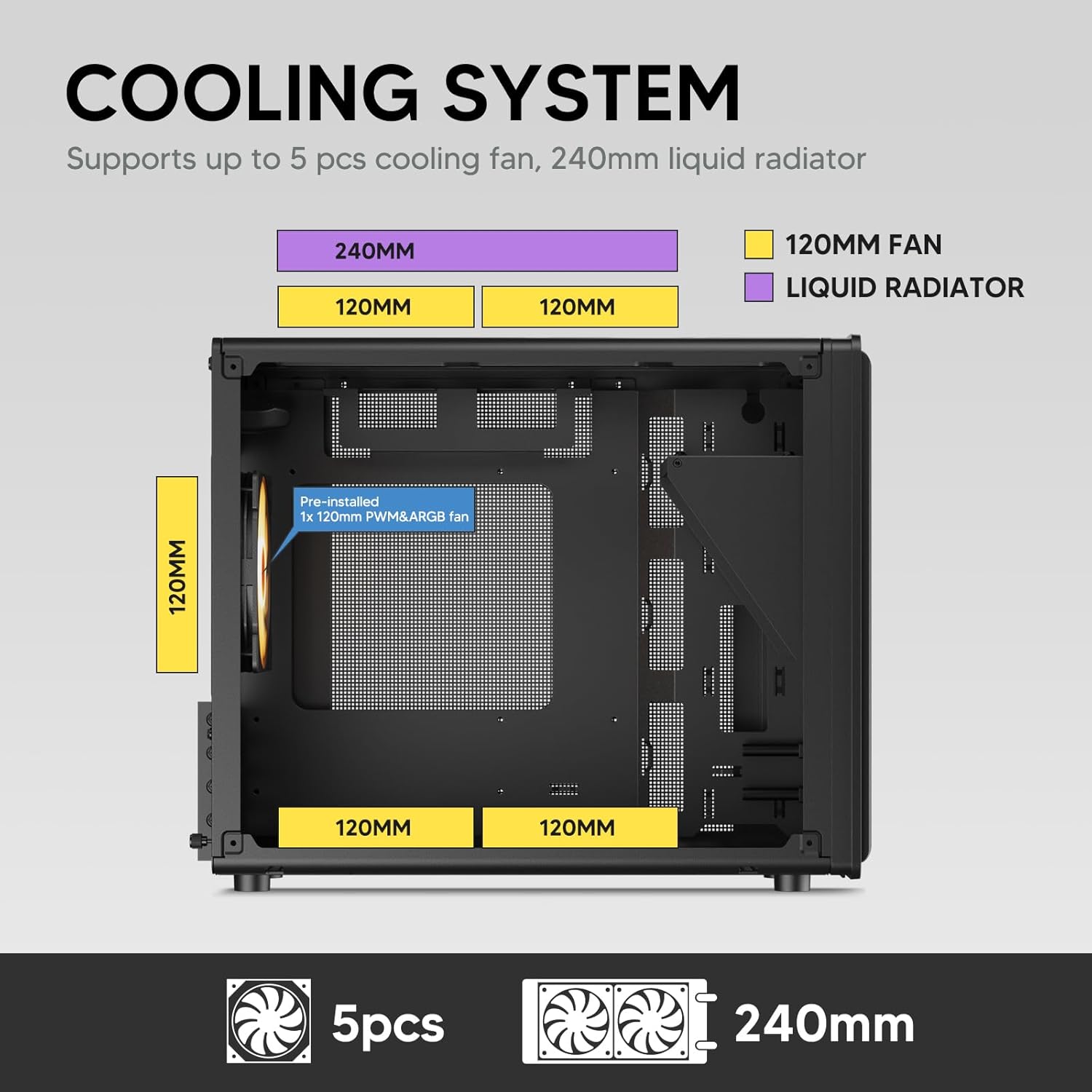
Image: A diagram illustrating the cooling system layout within the Vetroo M06 PC case, detailing the positions for up to five 120mm fans and a 240mm liquid radiator at the top.
6. Прикључци И/О панела
- Connect the front panel cables (Power, Reset, USB 3.0, USB Type-C, HD Audio) to the corresponding headers on your motherboard. Refer to your motherboard manual for header locations.

Image: A close-up of the Vetroo M06 PC case's front I/O panel, clearly labeling the Power button, Reset button, USB 3.0 port, HD Audio jack, and USB Type-C port.
Упутство за употребу
Once all components are installed and cables are connected, replace the side panels. Connect your peripherals (monitor, keyboard, mouse) and power cable to the PSU. Press the power button on the front panel to start your system.
Управљање протоком ваздуха
The Vetroo M06 case features an excellent airflow design with mesh panels to facilitate optimal cooling. Ensure fans are installed to create a balanced airflow, typically with intake fans at the front/bottom and exhaust fans at the rear/top.

Image: An exploded diagram of the Vetroo M06 PC case, illustrating the intended airflow patterns with blue arrows indicating cool air intake and red arrows showing warm air exhaust through its mesh panels.
Одржавање
Regular maintenance helps prolong the life of your PC components and ensures optimal performance.
- Чишћење прашине: Periodically clean dust filters and internal components using compressed air. Ensure the system is powered off and unplugged before cleaning.
- Управљање кабловима: Verify that internal cables are neatly routed and do not obstruct airflow.
- Провере компоненти: Ensure all screws are tight and components are securely seated.

Image: A close-up shot of the Vetroo M06 PC case, featuring a digital caliper measuring the thickness of the metal plate, which is specified as 0.8mm, highlighting the case's robust construction.
Решавање проблема
Ако наиђете на проблеме, погледајте следеће уобичајене кораке за решавање проблема:
- Систем се не укључује:
- Check all power connections, including the PSU to wall outlet, PSU to motherboard (24-pin and CPU 8-pin), and front panel power switch cable to motherboard.
- Уверите се да је прекидач напајања у положају „УКЉУЧЕНО“.
- Нема излаза на екран:
- Verify that your monitor is connected to the graphics card (not the motherboard's integrated graphics ports, unless you are using integrated graphics).
- Поново инсталирајте графичку картицу и РАМ модуле.
- Проблеми са прегревањем:
- Ensure all case fans are spinning and oriented correctly for optimal airflow.
- Check CPU cooler installation and thermal paste application.
- Clean any dust buildup from fans and filters.
- УСБ портови не раде:
- Verify that the front panel USB 3.0 and USB Type-C cables are correctly connected to the motherboard headers.
Гаранција и подршка
Vetroo products are designed for quality and reliability. For warranty information and technical support, please visit the official Vetroo webсајт или контактирајте њихову корисничку службу. Сачувајте доказ о куповини за потребе гаранције.
Vetroo Official Webсајт: Vetroo Store on Amazon
For further assistance, please refer to the contact information provided with your product packaging or on the official Vetroo support channels.
Ask a question about this manual
Ask about setup, troubleshooting, compatibility, parts, safety, or missing instructions. Manuals+ will review the question and use this page’s manual context to help answer it.