
1. Увод
This manual provides essential information for the safe operation, setup, and maintenance of your FINOTI S-X1 MAX Drone. Please read this manual thoroughly before operating the drone to ensure proper function and to avoid damage or injury. The S-X1 MAX is an advanced quadcopter featuring an 8K HD camera, 3-axis anti-shake gimbal, 5G GPS, and a remote control with a 4.5-inch LCD screen for real-time FPV.

Image 1.1: The FINOTI S-X1 MAX Drone and its remote control unit, ready for flight in a grassy field.
2. Садржај пакета
Проверите да ли се све ставке наведене у наставку налазе у вашем пакету. Ако неке ставке недостају или су оштећене, обратите се корисничкој подршци.
- FINOTI S-X1 MAX Drone x 1
- Remote Control with 4.5-inch LCD Screen x 1
- Intelligent Flight Battery x 1 (Triple Battery versions include 3 batteries)
- Резервне лопатице вентилатора x 8
- USB Charging Cables x 5
- Одвијач к 1
- Упутство за употребу к 1
- Читач картица к 1
- Меморијска картица x 1
3. Подешавање
3.1. Пуњење и инсталација батерије
The intelligent flight battery and remote control battery (if applicable) must be fully charged before first use. Use the provided USB charging cables.
- Дроне батерија: Insert the intelligent flight battery into the drone until it clicks securely into place. To charge, connect the battery to a USB power source using the provided USB cable. The indicator lights will show charging status.
- Батерија даљинског управљача: The remote control has an internal rechargeable battery. Connect the remote control to a USB power source using a USB cable.
3.2. Инсталација пропелера
Ensure propellers are installed correctly according to their rotation direction. Each propeller is marked (A or B) and corresponds to specific motor arms.
- Match the propeller type (A or B) with the corresponding motor arm.
- Place the propeller onto the motor shaft and secure it firmly.
3.3. Gimbal Protection Removal
Before flight, carefully remove the gimbal protector. Failure to do so may damage the gimbal during operation.

Слика 3.1: Крупни план view of the drone's 3-axis gimbal, highlighting GPS return and optical flow hover capabilities.
4. Упутство за употребу
4.1. Контролна листа пре лета
- Уверите се да су батерије дрона и даљинског управљача потпуно напуњене.
- Propellers are correctly installed and secure.
- Заштита гимбала је уклоњена.
- Fly in an open area, away from obstacles, people, and restricted airspace.
- Check weather conditions; avoid flying in strong winds or rain.
4.2. Укључивање/искључивање
- Укључено: Press and hold the power button on the drone until indicator lights illuminate. Then, press and hold the power button on the remote control.
- Искључивање: Притисните и држите дугме за напајање и на дрону и на даљинском управљачу док се не искључе.
4.3. Водич за даљински управљач
The remote control features a 4.5-inch LCD screen for real-time FPV and various control buttons and joysticks.
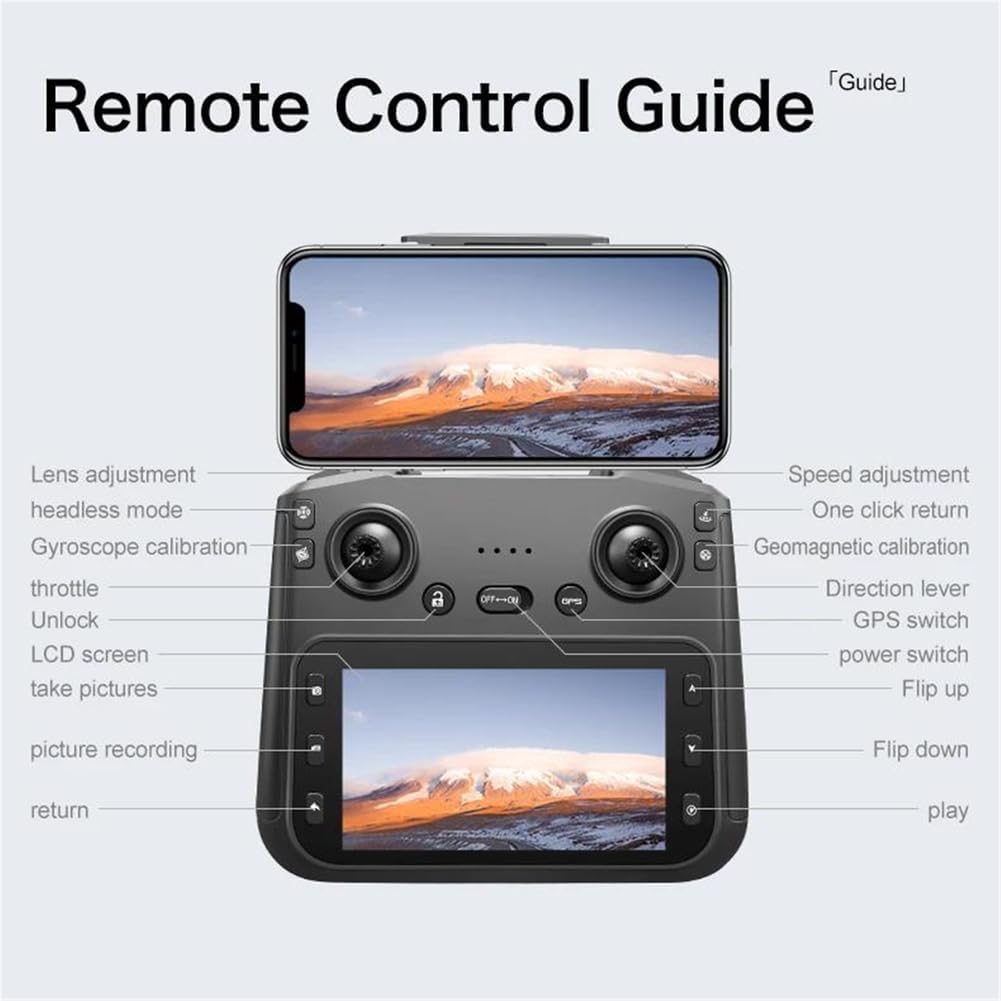
Image 4.1: Detailed diagram of the remote control, indicating the function of each button, joystick, and screen area.
- Леви џојстик (гас/скретање): Контролише висину (горе/доле) и ротацију (лево/десно).
- Right Joystick (Direction): Контролише кретање напред, назад, лево и десно.
- Прекидач: Укључује/искључује даљински управљач.
- ГПС прекидач: Activates/deactivates GPS mode.
- One-Click Return: Покреће аутоматски повратак кући.
- Подешавање брзине: Пребацује се између различитих брзина лета.
- Подешавање сочива: Controls the camera's vertical angle.
- Режим без главе: Поједностављује оријентацију у лету.
- Калибрација жироскопа: Calibrates the drone's gyroscope.
- Geomagnetic Calibration: Calibrates the drone's compass.
- Фотографисати: Captures a still image.
- Picture Recording: Starts/stops video recording.
- Откључај: Unlocks the motors for flight.
4.4. Полетање и слетање
- Аутоматско полетање: After calibration and GPS lock (if in GPS mode), press the one-key takeoff button or push both joysticks to the bottom-outer corners to unlock motors, then push the left joystick up.
- Аутоматско слетање: Притисните дугме за слетање једним тастером. Дрон ће се спустити и аутоматски слетети.
- Ручно слетање: Slowly pull the left joystick down to descend. Once on the ground, hold the left joystick down for a few seconds to stop the motors.
4.5. GPS функције
The S-X1 MAX features advanced GPS capabilities for enhanced flight stability and intelligent functions.
- ГПС позиционирање: Provides precise hovering and stable flight. Ensure a strong GPS signal before takeoff.
- GPS Return (Return-to-Home): The drone will automatically return to its takeoff point under conditions such as low battery, loss of signal, or manual activation.
- ГПС Прати ме: The drone will automatically follow the remote control's GPS signal.
- Image Tracking: Identify a subject on the screen, and the drone will automatically track its movement.

Image 4.2: Visual representation of the drone's GPS capabilities, including low power return, over distance return, out of control return, and one-click return.
4.6. Camera Operation and Gimbal
The drone is equipped with an 8K HD dual-camera system and a 3-axis mechanical gimbal with EIS anti-shake for stable and clear aerial photography.

Слика 4.3: Детаљно view of the drone's HD camera and 3-axis self-stabilizing gimbal, showing adjustable angles for roll, heading, and pitch.
- Предња камера: Wide-angle 1080P HD lens with EIS.
- Доња камера: Optical flow positioning lens.
- Фото/Видео: Use the dedicated buttons on the remote control to capture photos or start/stop video recording.
- Контрола кардана: Adjust the camera's pitch angle using the lens adjustment button on the remote control.
5. Одржавање
5.1. Чишћење
- Use a soft, dry cloth to clean the drone body and remote control.
- Gently clean camera lenses with a microfiber cloth designed for optics.
- Избегавајте употребу растварача или јаких хемикалија.
5.2. Складиштење
- Дрона и даљински управљач чувајте на хладном и сувом месту, даље од директне сунчеве светлости.
- Извадите батерије ако складиштите дуже време.
- Преклопите кракове дрона за компактно складиштење.
5.3. Брига о батерији
- Немојте превише пунити или празнити батерије.
- Charge batteries at least once every three months to maintain health.
- Избегавајте излагање батерија екстремним температурама.
КСНУМКС. Решавање проблема
| Проблем | Могући узрок | Решење |
|---|---|---|
| Дрон се не укључује | Слаба батерија; Неправилна инсталација батерије | Charge battery; Reinstall battery correctly |
| Дрон лебди током лета | Improper calibration; Strong wind interference | Perform gyroscope and geomagnetic calibration; Fly in calm conditions |
| No image on remote screen | Poor connection; Drone too far | Ensure drone and remote are paired; Fly within transmission range |
| GPS функције не раде | Weak GPS signal; Flying indoors | Fly in an open outdoor area with clear sky; Wait for sufficient GPS satellites to connect |
| Motors do not unlock | Drone not calibrated; Safety lock engaged | Perform all necessary calibrations; Ensure one-key unlock or joystick combination is used correctly |
7. Спецификације
- Бренд: FINOTI
- Модел: S-X1 MAX
- камера: 8K HD Dual Camera (Front 1080P Wide-angle with EIS, Bottom Optical Flow)
- Гимбал: 3-Axis Mechanical Stabilization + EIS Anti-Shake
- Тип мотора: Без четкица
- Пренос слике: 5G Digital Image Transmission (up to 5KM range)
- даљински управљач: 4.5-inch LCD Color Screen for Real-time FPV
- ГПС: Yes, with Intelligent Tracking, GPS Follow Me, Return-to-Home functions
- батерија: 7.4V 1600mAh Intelligent Battery
- Склопљене димензије: Приближно 8.2 к 14.8 к 6.4 цм
- Боја: Црно
8. Безбедносне смернице
Adhere to the following safety guidelines to ensure a safe and enjoyable flight experience:
- Always fly in open areas, away from buildings, trees, power lines, and crowds.
- Maintain a safe distance from people and animals.
- Do not fly in adverse weather conditions (strong winds, rain, snow).
- Respect local regulations and airspace restrictions.
- Keep the drone within your line of sight.
- Perform pre-flight checks before every flight.
- Не управљајте дроном под утицајем алкохола или дрога.
- Children should only operate the drone under adult supervision.
9. Гаранција и подршка
FINOTI products are designed for reliability and performance. For warranty information, technical support, or service inquiries, please refer to the warranty card included in your package or contact FINOTI customer service through the retailer where the product was purchased. Please have your model number (S-X1 MAX) and purchase date available when contacting support.