
1. Увод
This manual provides detailed instructions for the Loutoc SRC4526 Universal Remote Control, designed for seamless compatibility with Philips Ambilight Smart TVs. Please read this guide thoroughly to ensure optimal use and longevity of your remote control.
1.1 Производ завршенview
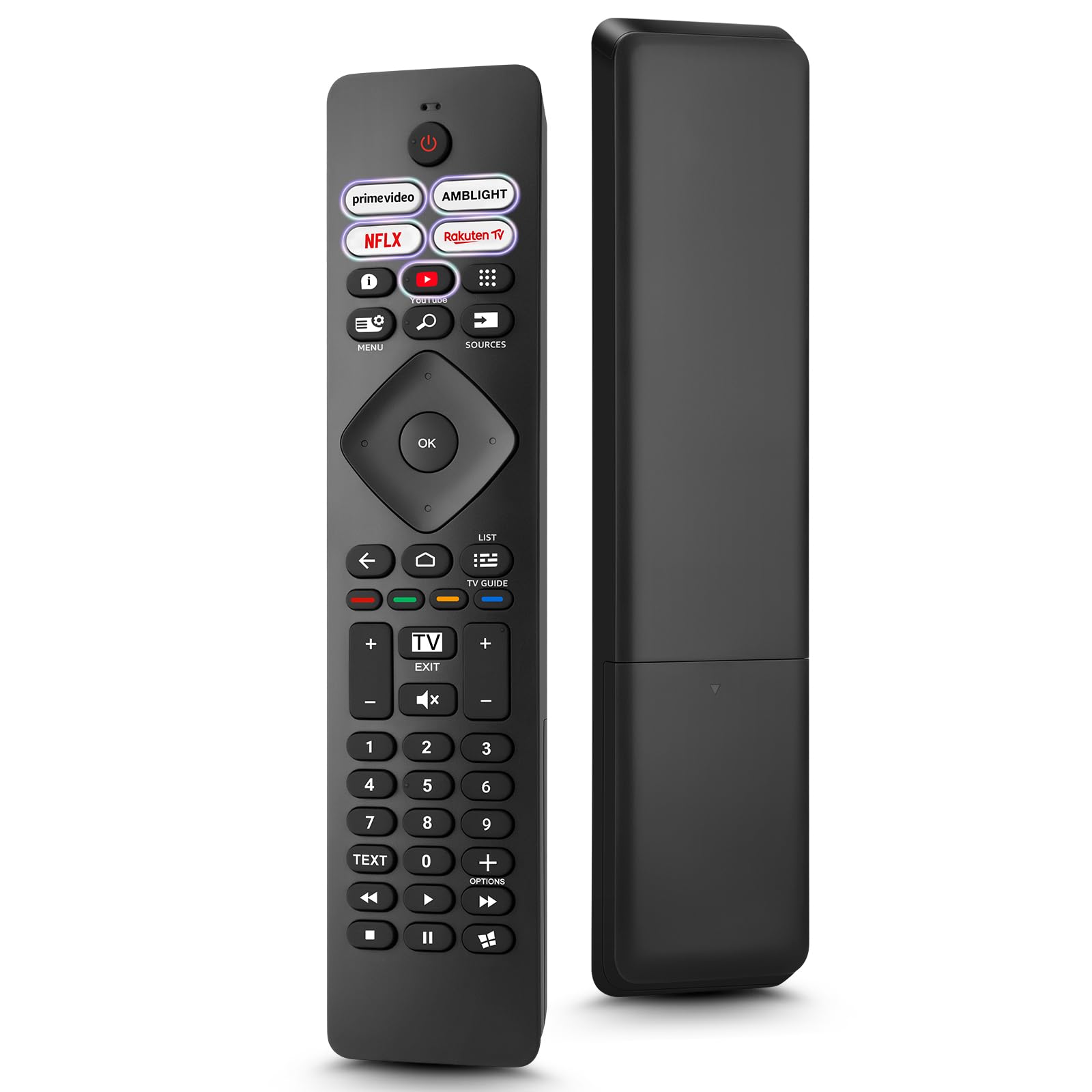
Image: The Loutoc SRC4526 Universal Remote Control, showcasinњегов ергономски дизајн и распоред дугмади.
1.2 Кључне карактеристике
- Convenient Plug-and-Play: No complex setup or programming required. Simply insert batteries and the remote is ready for use.
- Широка компатибилност са телевизорима: Fully compatible with Philips Ambilight TVs, including 4K Ambilight LED, OLED, FHD, and Full Ultra HD models.
- Наменски тастери за пречице: Features 5 direct access buttons for popular streaming platforms: Ambilight, Video, NFLX (Netflix), Rakuten TV, and YouTube.
- Поуздане перформансе: Offers an effective operating range of 8 meters (26 feet) and an ultra-fast response time of 0.2 seconds.
2. Подешавање
2.1 Инсталација батерије
The Loutoc SRC4526 remote control requires two AAA batteries (not included) for operation.
- Пронађите одељак за батерије на полеђини даљинског управљача.
- Отворите поклопац одељка за батерије.
- Уметните две ААА батерије, водећи рачуна да позитивни (+) и негативни (-) терминали буду правилно поравнати са индикаторима унутар одељка.
- Добро затворите поклопац одељка за батерије.
2.2 Прва употреба
This remote control is designed for immediate use with compatible Philips Ambilight TVs. No programming or pairing is required. Once batteries are installed, point the remote at your TV and begin operation.
3. Упутство за употребу
3.1 Функције дугмадиview
Refer to the image below for a visual guide to the remote control's buttons and their corresponding functions.

Image: Detailed diagram of the Loutoc SRC4526 remote control, illustrating each button and its primary function.
| Дугме | Функција |
|---|---|
| Повер | Switches the TV on or off (Standby mode). |
| Prime Video, Ambilight, Netflix, Rakuten TV | Quickly launches the corresponding application. |
| Мени | Opens the Quick Menu with typical TV functions. Hold to show Gaming control bar. |
| Pretraga | Opens the Search tab on the Home screen. |
| Извори | Opens or closes the TV's input sources menu. |
| OK | Confirms a selection or setting. |
| Arrow/Navigation Keys | Navigates up, down, left, or right through menus and options. |
| Назад | Враћа се на претходни екран или канал. |
| Хоме | Opens the TV's Home menu. |
| ТВ водич | Opens or closes the TV Guide. Long press to open the channel list. |
| Color Keys (Red, Green, Yellow, Blue) | Provides direct selection of on-screen options. The blue key typically opens Help. |
| Јачина звука (+/-) | Подешава ниво јачине звука телевизора. |
| Channel (+/-) | Switches to the next or previous channel. |
| Изађи | Exits current menu/application or returns to live TV. From standby, goes to last viewed source. |
| Муте | Искључује или укључује звук телевизора. |
| Тастери са бројевима (0-9) | Директно бира ТВ канале. |
| ТЕКСТ | Opens or closes Text/Teletext. |
| Контроле репродукције | Controls media playback: Play, Pause, Stop, Rewind, Fast Forward. |
| Аппс | Opens the Apps tab on the Home screen. |
3.2 Ambilight Functionality
For Philips TVs equipped with Ambilight functionality, the dedicated Ambilight button on your remote allows you to control the lighting effects.
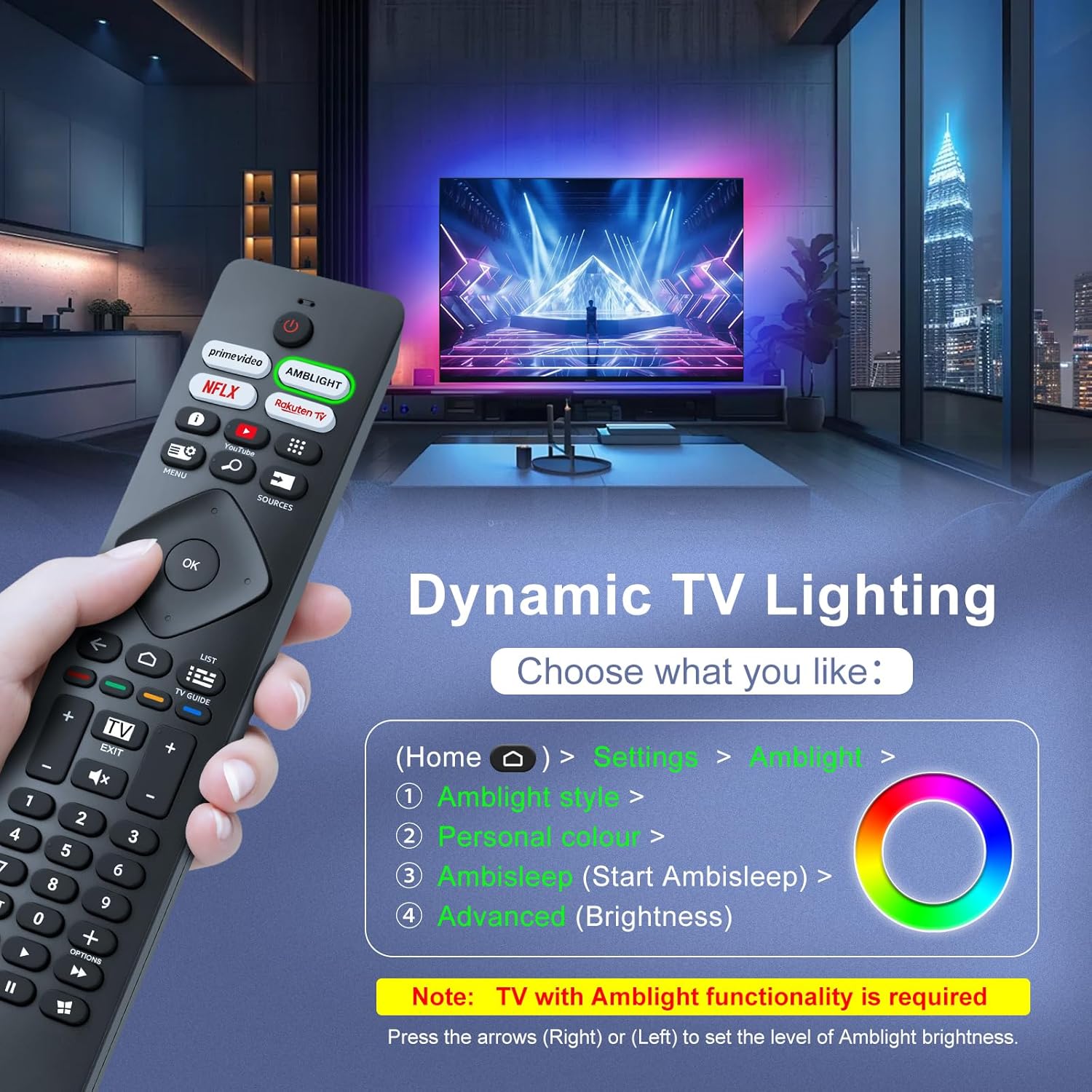
Image: A hand holding the remote control, with an overlay showing Ambilight settings on a TV screen.
After pressing the Ambilight button, you can navigate through the TV's menu to:
- Select different Ambilight display styles.
- Adjust personal color preferences.
- Initiate AmbiSleep mode.
- Adjust Ambilight brightness levels (using the right or left arrow keys).
Note: This feature requires a Philips TV with built-in Ambilight functionality.
4. Одржавање
4.1 Чишћење
To clean your remote control, gently wipe it with a soft, dry cloth. Avoid using liquid cleaners, aerosols, or harsh chemicals, as these can damage the remote's surface or internal components.
4.2 Складиштење
Даљински управљач чувајте на хладном и сувом месту, даље од директне сунчеве светлости и екстремних температура. Ако се даљински управљач неће користити дуже време, препоручује се да извадите батерије како бисте спречили цурење.
4.3 Одржавање батерије
- Замените све батерије у исто време; немојте мешати старе и нове батерије.
- Не мешајте различите врсте батерија (нпр. алкалне и пуњиве).
- Истрошене батерије одлажите одговорно у складу са локалним прописима.
КСНУМКС. Решавање проблема
5.1 Уобичајена питања и решења
- Даљински не реагује:
- Проверите да ли су батерије правилно уметнуте са исправним поларитетом.
- Замените батерије новим ААА батеријама.
- Уверите се да нема препрека између даљинског управљача и инфрацрвеног пријемника телевизора.
- Уверите се да сте унутар ефективног радног домета (до 8 метара).
- Одређена дугмад не раде:
- Clean the remote control, especially around the non-functioning buttons, to remove any dirt or debris.
- If only Ambilight functions are not working, ensure your Philips TV model supports Ambilight.
5.2 Контактирајте подршку
If you encounter persistent issues that cannot be resolved with the troubleshooting steps above, please contact Loutoc customer support directly. We aim to respond to all inquiries within 12 working hours.
6. Спецификације
| Феатуре | Детаљ |
|---|---|
| Бранд | Loutoc |
| Назив модела | SRC4526-FBA |
| Број модела ставке | СРЦ4526 |
| Боја | Црно |
| Технологија повезивања | Инфрацрвени |
| Посебне карактеристике | No programming required, Ergonomic, Lightweight |
| Компатибилни уређаји | Television (Philips Ambilight TVs) |
| Maximum Number of Supported Devices | 1 |
| Тип контролера | Контрола дугмета |
| Максимални домет | 8 метара (26 стопа) |
| Опис батерије | AAA (2 required, not included) |
| Произвођач | Loutoc |
| Земља порекла | Кина |
| Датум прве доступности на Amazon.com.be | 31. августа 2025. године |
7. Гаранција и подршка
7.1 Информације о гаранцији
This Loutoc remote control comes with a manufacturer's warranty of 30 days from the date of purchase. Please retain your proof of purchase for any warranty claims.
7.2 Корисничка подршка
For any questions, technical assistance, or warranty inquiries, please contact Loutoc customer support. We are committed to providing timely assistance and will respond to your queries within 12 working hours.