
1. Производ је готовview
The AOOEPU WiFi Extender Signal Booster is designed to expand your existing wireless network coverage, eliminate Wi-Fi dead zones, and provide stable, high-speed internet access throughout your home or outdoor areas. This dual-band device supports both 2.4GHz and 5GHz frequencies, ensuring broad compatibility with various devices.
Кључне карактеристике:
- Двопојасна повезаност: Operates on both 2.4GHz and 5GHz frequencies for versatile network extension.
- Проширена покривеност: Features four external antennas to penetrate walls and floors, extending Wi-Fi coverage up to 12880 sq. ft.
- Висока компатибилност: Supports up to 105 devices, including phones, tablets, laptops, smart TVs, security cameras, and printers.
- Перформансе велике брзине: Boosts internet speeds up to 1200 Mbps, ideal for streaming, gaming, and video conferencing.
- Стабилна веза: Provides a super stable signal, even through thick walls and appliances, ensuring uninterrupted online activities.
- Етхернет порт: Includes RJ45 Ethernet ports for reliable wired connections to devices like game consoles and smart TVs.
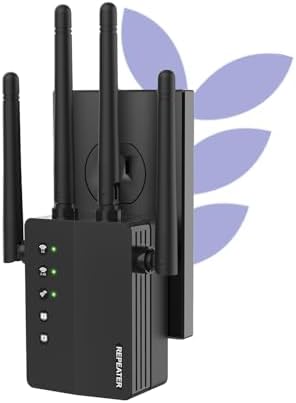
Figure 1: The AOOEPU WiFi Extender Signal Booster, a compact device with four external antennas, designed to plug directly into a standard wall outlet. Green indicator lights are visible, signifying active connections.
2. Подешавање и инсталација
The AOOEPU WiFi Extender offers multiple modes for flexible network setup. Follow these steps for quick and easy installation.
2.1. Quick Setup using WPS Button
- Укључено: Plug the WiFi Extender into a power outlet within the range of your existing main Wi-Fi router.
- Притисните WPS на екстендеру: Locate and press the WPS button on the AOOEPU WiFi Extender. The WPS indicator light should start blinking.
- Притисните WPS на рутеру: Within two minutes, press the WPS button on your main Wi-Fi router.
- Потврда везе: Wait for the indicator lights on the extender to become solid, indicating a successful connection. The extender will automatically pair with your router.

Figure 2: Visual guide for the WPS (Wi-Fi Protected Setup) method, demonstrating how to quickly connect the extender to your existing router by pressing the WPS buttons on both devices.
2.2. Ручно подешавање (Web претраживач)
- Укључено: Plug the WiFi Extender into a power outlet.
- Connect to Extender's Network: On your computer or mobile device, connect to the extender's default Wi-Fi network (e.g., "AOOEPU_Extender" or similar, check the device label for the exact name). No password is required initially.
- Страница за подешавање приступа: Отвори а web browser and enter the default IP address or web address (e.g., 192.168.10.1 or repea.ter, refer to the manual for exact details).
- Пријава: Enter the default username and password (usually "admin" for both, check the device label).
- Изаберите режим: Choose your desired operating mode (Repeater, AP, or Router).
- Конфигуришите мрежу: Follow the on-screen instructions to select your existing Wi-Fi network and enter its password. You can also set a new name and password for the extended network.
- Примени подешавања: Save the settings and wait for the extender to restart.
- Поново повежи: Reconnect your devices to the newly configured extended Wi-Fi network.
3. Радни режими
The AOOEPU WiFi Extender supports three primary operating modes to suit various networking needs:
- Режим понављача: Extends the coverage of an existing wireless network. This is the most common mode for eliminating Wi-Fi dead zones.
- Режим приступне тачке (AP): Transforms a wired network connection into a wireless one. Ideal for adding Wi-Fi capability to a wired-only router.
- Режим рутера: Functions as a standalone router, creating a new private wireless network.

Figure 3: An illustration of the three distinct operating modes: AP Mode, Repeater Mode, and Router Mode, detailing their respective network configurations and applications.
4. Повезивање и компатибилност
This WiFi Extender is designed for broad compatibility and robust connectivity, supporting a wide array of devices and providing stable connections for various activities.
4.1. Компатибилност уређаја
The extender can connect up to 105 devices simultaneously, ensuring all your smart devices, from entertainment systems to smart home gadgets, stay connected.

Figure 4: The extender's wide compatibility, illustrated with icons of common devices such as game consoles, cameras, computers, smartphones, and smart TVs, all capable of connecting to the extended network.
4.2. Ethernet Port Usage
The integrated RJ45 Ethernet ports allow for stable wired connections, which are ideal for devices requiring maximum speed and reliability, such as gaming consoles, desktop computers, and smart televisions.

Слика 5: Детаљан view of the Ethernet ports on the extender, demonstrating how wired devices can be connected for enhanced stability and speed.
КСНУМКС. Решавање проблема
If you encounter issues with your AOOEPU WiFi Extender, please refer to the following common troubleshooting steps:
- Нема приступа интернету након подешавања:
- Ensure the extender is within the effective range of your main router.
- Проверите да ли је лозинка за Ви-Фи унета током подешавања исправна.
- Try restarting both your main router and the extender.
- Slow Speed on Extended Network:
- Relocate the extender closer to your main router to ensure a strong signal for the extender itself.
- Avoid placing the extender near large metal objects, concrete walls, or other electronic devices that may cause interference.
- Уверите се да ваш главни рутер пружа одговарајућу брзину.
- Cannot Access Setup Page:
- Ensure your device is connected to the extender's default Wi-Fi network (not your main router's network).
- Обришите кеш меморију и колачиће прегледача или покушајте са другим web претраживач.
- Verify the IP address or web address is entered correctly.
- Интермитентна веза:
- Check for firmware updates for the extender on the AOOEPU official webсајту.
- Ensure there are no physical obstructions or sources of interference between the extender and your devices.
- Consider resetting the extender to factory defaults and reconfiguring it.
6. Спецификације
| Атрибут | Детаљ |
|---|---|
| Бранд | АООЕПУ |
| Број модела | AOOEPU-0630-1 |
| Димензије производа | 7.48 к 3.74 к 2.4 инча |
| Тежина артикла | 5.6 унци |
| Стандард бежичне комуникације | 2.4 GHz Radio Frequency, 5 GHz Radio Frequency (Dual Band) |
| Брзина преноса података | До 1200 мегабајта у секунди |
| Тип конектора | РЈ45 Етхернет порт |
| Посебне карактеристике | 1-Tap Setup, 360 Degree Coverage, Directional Antenna, Firewall, WiFi Mesh (compatible) |
| Област покривености | До 12880 квадратних метара. фт |
| Максималан број подржаних уређаја | 105 уређаја |
7. Одржавање
To ensure optimal performance and longevity of your AOOEPU WiFi Extender, consider the following maintenance tips:
- Редовно поновно покретање: Periodically restart the extender (unplug and plug back in after 10 seconds) to clear its memory and refresh its connection.
- Ажурирања фирмвера: Check the official AOOEPU website for any available firmware updates. Keeping the firmware updated can improve performance, stability, and security.
- Оптимално постављање: Ensure the extender is placed in an open area, away from obstructions and sources of electromagnetic interference (e.g., microwaves, cordless phones, large metal objects).
- Чишћење: Gently wipe the exterior of the device with a soft, dry cloth to remove dust. Do not use liquid cleaners or aerosols.
- Услови животне средине: Operate the extender within recommended temperature and humidity ranges to prevent damage.
8. Гаранција и подршка
AOOEPU is committed to providing high-quality products and customer satisfaction. For detailed warranty information and technical support, please refer to the following resources:
- Информације о гаранцији: Please refer to the warranty card included in your product packaging for specific terms and conditions. Standard warranty typically covers manufacturing defects for a period specified at purchase.
- техничка подршка: For technical assistance, setup guidance, or troubleshooting beyond this manual, please visit the official AOOEPU support webсајту или контактирајте њихову корисничку службу.
- Онлине ресурси: Additional FAQs, video tutorials, and updated manuals may be available on the AOOEPU brand store or product page.
Note: Protection plans are available for purchase separately through Amazon, offering extended coverage beyond the manufacturer's warranty.