
Увод
The LKTOP 100WH Portable Power Station is designed to provide reliable and efficient power for your DJI drones, charging hubs, controllers, and other electronic devices. With a robust 27000mAh capacity and advanced 21700 steel-shell battery cells, this power station ensures your devices remain charged during outdoor activities, photography sessions, and live streaming events. Its compact design and multiple output ports make it a versatile companion for any adventure.
Шта је у кутији
- LKTOP Drone Power Station for DJI × 1
- УСБ-Ц на УСБ-Ц кабл × 1
- Wrist Lanyard × 1
- Упутства × 1
Производ је завршенview

слика: The LKTOP Drone Power Station displayed alongside various compatible DJI drone models, charging hubs, controllers, and camera accessories, illustrating its wide range of applications.
Ports and Output Power
- УСБ-Ц1: 140W Max (specifically for drones)
- УСБ-Ц2: КСНУМКСВ Макс
- УСБ-А1/А2: КСНУМКСВ Макс
- АЦ утичница: 100W Max (specifically for drones, combined total 160W Max)
ЛЦД екран
The integrated LCD screen provides real-time information on battery status, current charging power, and output power, allowing for easy monitoring of the device's performance.

слика: Детаљно view of the power station's LCD screen, displaying input/output wattage and current battery percentage, along with port indicators.
ЛЕД светла
The power station includes a high-brightness LED light with multiple modes for emergency lighting, enhancing safety during nighttime outdoor activities.
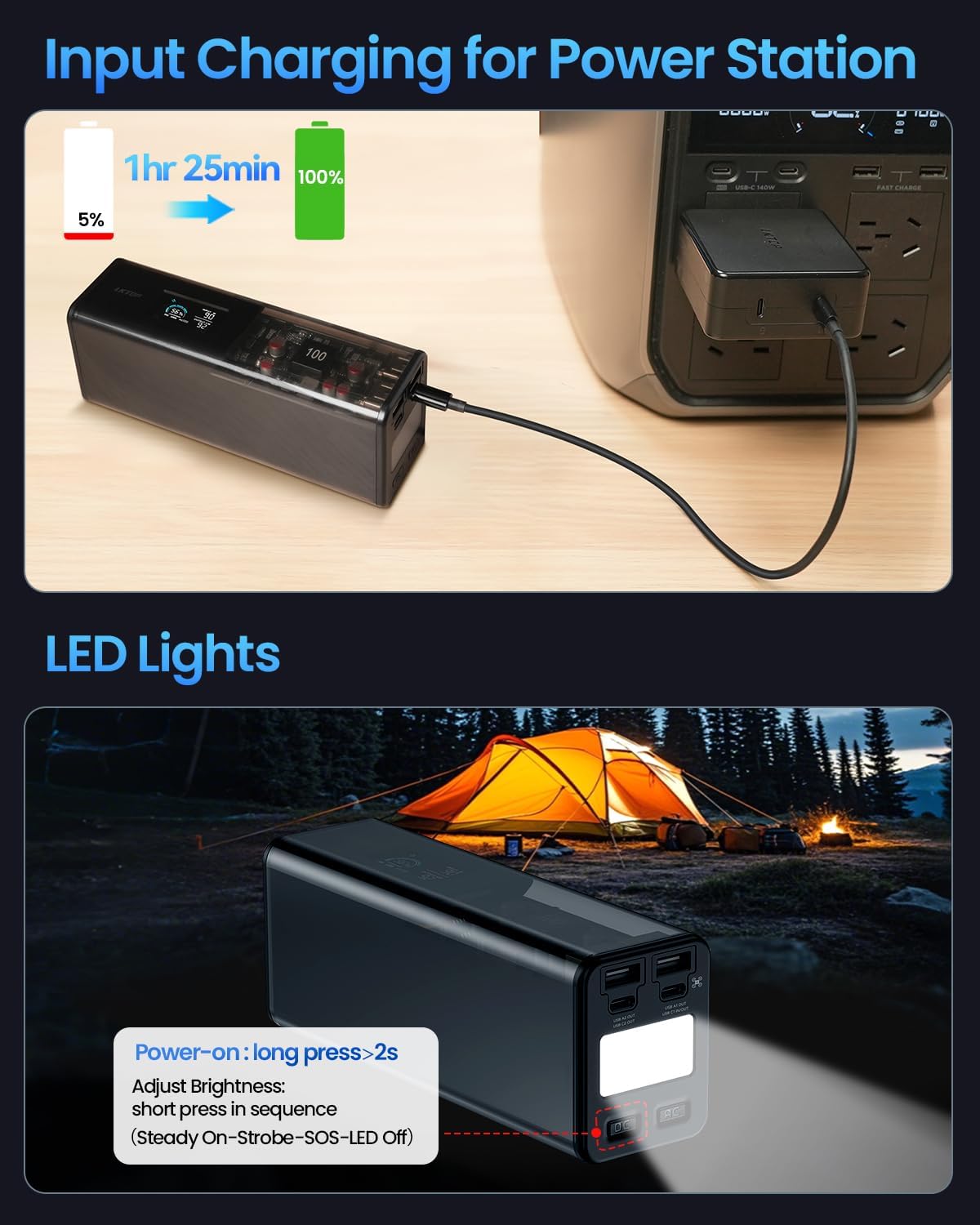
слика: The power station is shown being charged from a wall outlet, with an inset demonstrating the activation and brightness adjustment of its integrated LED lights, useful for campинг.
Компатибилност
The LKTOP Power Station is compatible with a wide range of DJI drones and accessories, as well as other electronic devices. It supports various Power Delivery (PD) protocols.
Компатибилни уређаји:
- DJI Mavic 4 Series Drone (approx. 1hr 55min charge)
- DJI Mavic 3 Series Drone (approx. 1hr 10min charge)
- DJI Air Series Drone (approx. 1hr charge)
- DJI Mini Series Drone (approx. 57min charge)
- DJI Flip Drone (approx. 70min charge)
- DJI Neo Drone (approx. 50min charge)
- LKTOP/DJI Charging Hubs (various models)
- DJI Remote Controllers (approx. 2hr - 2hr 40min charge)
- Other devices: Camping Lights, Cameras, Projectors, Audio devices, Live Sound Cards, Fans, Electric Caldrons, Car Refrigerators.

слика: An infographic detailing the compatibility of the LKTOP Power Station with various devices, including drones, remote controllers, action cameras, and other outdoor electronics, along with estimated charging capacities.
Unsupported Appliances:
Appliances over 100W (watts) or with continuously amplifying power are not supported. This includes, but is not limited to: Electric Kettles, Induction Cookers, Microwave Ovens, Air Blowers, Electric Scooters, Electric Vehicles, Bread Makers, and 220V Audio Systems.
Сетуп
- Raspakujte: Пажљиво извадите све предмете из паковања. Проверите да ли су присутне све компоненте наведене у одељку „Шта се налази у кутији“.
- Почетна наплата: Before first use, fully charge the LKTOP Power Station. Connect the provided USB-C to USB-C cable to the power station's input port and a suitable power adapter (not included) to a wall outlet. The LCD screen will indicate charging progress.
- Упознајте се: Review the layout of the ports, buttons, and the LCD display as described in the Product Overview одељак.
Упутство за употребу
Пуњење електране
- Connect the provided USB-C to USB-C cable to the power station's input port.
- Connect the other end of the USB-C cable to a compatible power adapter (e.g., wall charger, car charger, or solar panel, sold separately).
- The LCD screen will display the input power and charging progress. A full charge takes approximately 85 minutes.
Пуњење спољних уређаја
- Укључено: Short press and then long press (for >2 seconds) the power button to turn on the power station.
- Повежите уређај: Plug your device's charging cable into the appropriate output port (USB-C1, USB-C2, USB-A1/A2, or AC outlet) on the power station.
- Монитор: The LCD screen will show the output power being delivered to your device.
- Прекини везу: Once your device is charged, disconnect it from the power station.
- Искључивање: Short press and then long press the power button to turn off the power station when not in use to conserve battery.
видео: This video demonstrates the LKTOP Drone Power Station's super fast charging capabilities for DJI drones and accessories, highlighting its efficiency and ease of use.
видео: A time-lapse video showcasing the LKTOP Drone Power Station's charging speed for multiple DJI drone batteries, illustrating its rapid charging performance.
Коришћење ЛЕД светла
- Укључено: Long press the LED light button (usually located near the LED) for more than 2 seconds to turn on the light.
- Adjust Brightness/Mode: Short press the LED light button in sequence to cycle through different modes: Steady On, Strobe, SOS, and Off.
Одржавање
- Чишћење: Use a soft, dry cloth to clean the exterior of the power station. Avoid using harsh chemicals or abrasive materials.
- Складиштење: Store the power station in a cool, dry place away from direct sunlight and extreme temperatures. For long-term storage, it is recommended to charge the battery to approximately 60% to prolong its lifespan.
- Одржавање батерије: Avoid fully discharging the battery frequently. Recharge the power station regularly, even if not in active use, to maintain battery health.
Решавање проблема
| Проблем | Могући узрок | Решење |
|---|---|---|
| Електрана се не укључује. | Батерија је потпуно испражњена. | Connect to a power source and charge for at least 15 minutes before attempting to power on. |
| Уређај се не пуни. | Incorrect port used, cable is faulty, or device is incompatible. | Ensure the correct port is used for the device's power requirements. Try a different cable. Verify device compatibility. |
| Power Station gets hot during use. | Нормалан рад под великим оптерећењем. | This is normal. Ensure adequate ventilation around the unit. If overheating persists or is excessive, discontinue use and contact support. |
| LCD screen not displaying information. | Power station is off or screen is in standby mode. | Press the power button briefly to wake the screen or turn on the power station. |
Спецификације
- Димензије производа: 6.89 к 2.68 к 2.05 инча
- Тежина артикла: 3.04 фунти
- Капацитет батерије: 27000мАх / 97.2 Вх
- Тип батерије: 21700 steel-shell battery cells
- Улазни волtage: 110 волти (АЦ)
- Оутпут Волtage: 100 волти (АЦ)
- Време пуњења: Approximately 85 minutes (for full charge)
- Боја: Црно
- Произвођач: Dongguan Junyuda Technology co.,ltd.
Гаранција и подршка
For warranty information, technical support, or service inquiries, please refer to the contact details provided in your product packaging or visit the official LKTOP webсајт. Сачувајте рачун као доказ о куповини за потребе гаранције.