
1. Увод
Thank you for choosing the PEICHENG Android 15.0 10-inch Tablet. This manual provides essential information for setting up, operating, and maintaining your device. Please read it thoroughly to ensure optimal performance and longevity of your tablet.
2. Шта је у кутији
Приликом распакивања, молимо вас да проверите да ли су присутне све доле наведене ставке:
- PEICHENG Android 15.0 10-inch Tablet
- Блуетоотх тастатура
- Бежични миш
- Стилус Пен
- Foldable Protective Case
- УСБ кабл за пуњење
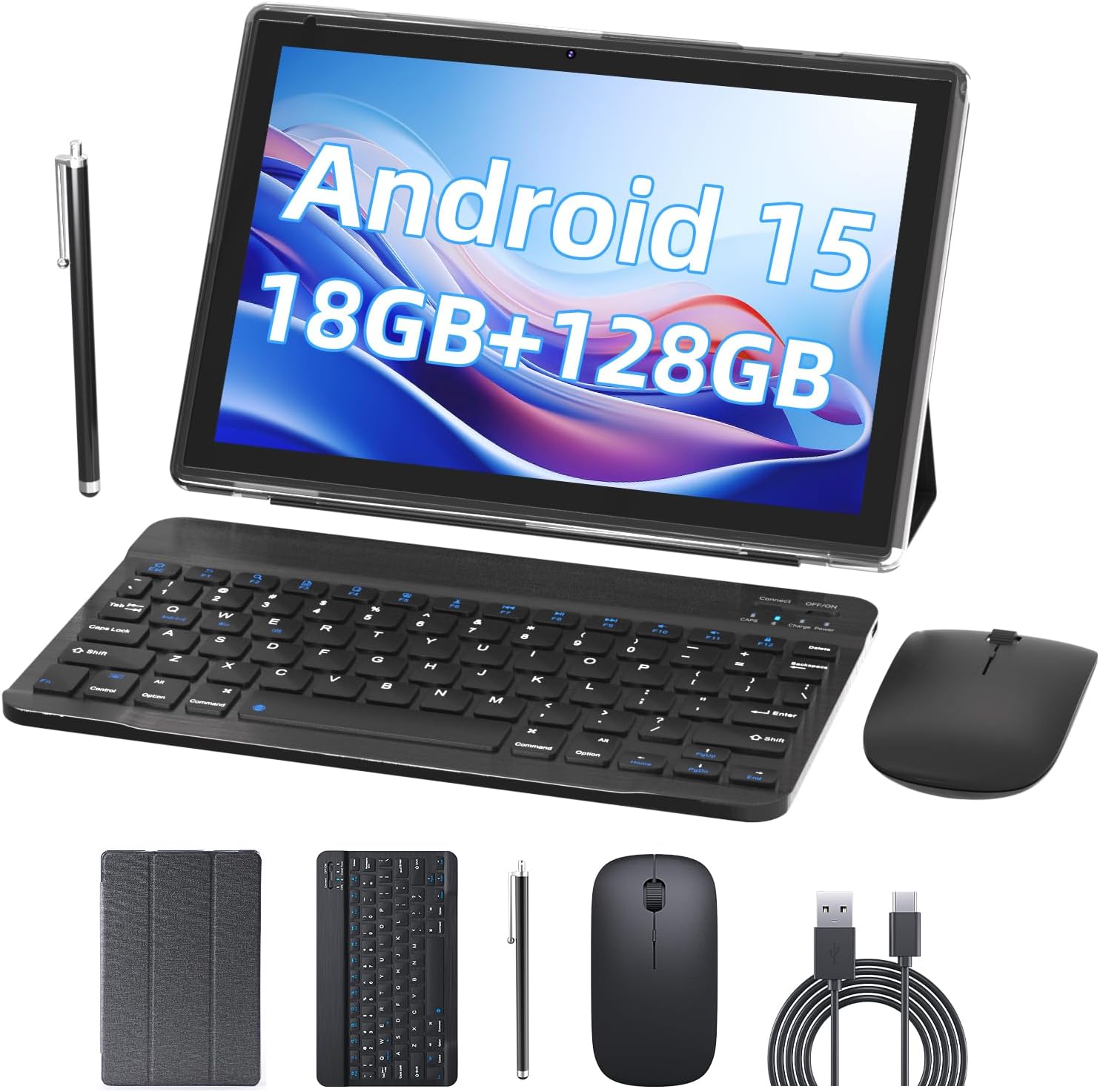
Image 2.1: Contents of the PEICHENG Tablet package, including the tablet, keyboard, mouse, stylus, case, and charging cable.
3. Производ је готовview
The PEICHENG 10-inch Tablet is designed for versatility and performance. It features a 10.1-inch IPS display, front and rear cameras, and various ports for connectivity. Familiarize yourself with the device's layout for ease of use.
3.1 кључне компоненте
- Приказ: 10.1-inch IPS touchscreen (1280x800 resolution).
- камере: Задња камера од 8 МП, предња камера од 2 МП.
- Портови: USB-C port for charging and data transfer, MicroSD card slot.
- Дугмад: Power button, Volume Up/Down.
4. Подешавање
4.1 Почетно пуњење
Before first use, fully charge your tablet using the provided USB charging cable and a compatible power adapter. The charging indicator will typically show progress and turn off when fully charged.
4.2 Укључивање/искључивање
- За укључивање: Притисните и држите дугме за укључивање док се екран не укључи.
- За искључивање: Притисните и држите дугме за напајање, а затим изаберите „Искључи“ из опција на екрану.
4.3 Почетна конфигурација
Upon first startup, follow the on-screen prompts to:
- Изаберите жељени језик.
- Повежите се на Ви-Фи мрежу.
- Пријавите се помоћу свог Google налога или креирајте нови.
- Set up security features (PIN, pattern, or password).

Image 4.1: The PEICHENG Tablet configured for use with its accessories, suitable for various tasks.
5. Упутство за употребу
5.1 Андроид 15.0 оперативни систем
Your tablet runs on the Android 15.0 operating system, offering a user-friendly interface and access to a vast ecosystem of applications via the Google Play Store.
5.2 Основна навигација
- Превуците: Move your finger across the screen to scroll through content or switch between home screens.
- Додирните: Touch an icon or item once to open or select it.
- Дуго притисните: Press and hold an item for additional options or to move it.
- Зумирање штипкањем прстију: Користите два прста да бисте увећали или умањили слике и web странице.
5.3 Управљање апликацијама
Download and install applications from the Google Play Store. To uninstall an app, long-press its icon and drag it to the 'Uninstall' option.
5.4 Карактеристике екрана
The 10.1-inch IPS display provides clear visuals. Utilize the 'Reading Mode' feature in the display settings to reduce harmful blue light, enhancing comfort during extended reading sessions.

Image 5.1: The tablet screen showcasing multiple applications and web content, demonstrating its multitasking capabilities.
6. Прибор
Your PEICHENG Tablet comes with a suite of accessories to enhance its functionality.
6.1 Блуетоотх тастатура
Упаривање: Turn on the keyboard and enable Bluetooth on your tablet. Тражи available devices and select the keyboard to pair. Once connected, you can use it for typing, similar to a laptop.
6.2 бежични миш
Упаривање: Similar to the keyboard, turn on the mouse and enable Bluetooth on your tablet. Pair the mouse through the Bluetooth settings. The mouse provides precise navigation and control.
6.3 Стилус Пен
The stylus allows for more precise input, drawing, and note-taking on the touchscreen. No pairing is required for basic functionality.
6.4 Заштитна торбица
The foldable protective case safeguards your tablet from scratches and minor impacts. It also functions as a stand, allowing for comfortable viewинг и куцање углова.

Image 6.1: The PEICHENG Tablet with its keyboard and mouse, demonstrating its capability as a portable workstation.
7. Управљање батеријом
The tablet is equipped with a 6000mAh battery, providing extended usage time.
7.1 Пуњење
Use the provided USB-C cable to charge the tablet. It is recommended to use a compatible charger to ensure efficient and safe charging.
7.2 Battery Life Tips
- Смањите осветљеност екрана.
- Онемогућите Wi-Fi и Bluetooth када их не користите.
- Затворите неискоришћене апликације које раде у позадини.
- Омогућите режиме уштеде енергије у подешавањима.

Image 7.1: Visual representation of the tablet's 6000mAh battery, highlighting its extended endurance.
8. Повезивање
8.1 Ви-Фи 6.0
The tablet supports 2.4GHz and 5GHz Wi-Fi 6.0, providing faster and more stable wireless connections. To connect, go to Подешавања > Мрежа и интернет > Wi-Fi, select your network, and enter the password.
8.2 Блуетоотх 5.0
Bluetooth 5.0 allows for efficient connection to wireless accessories like headphones, speakers, and the included keyboard and mouse. Enable Bluetooth in Подешавања > Повезани уређаји > Подешавања везе > Блуетоотх and pair your devices.
9. Проширење складишта
The tablet comes with 128GB of internal storage and 18GB RAM (6GB physical + 12GB virtual). For additional storage, you can expand it up to 2TB using a MicroSD card (not included). Insert the MicroSD card into the designated slot on the tablet.

Image 9.1: The tablet's storage capabilities, highlighting its 18GB RAM, 128GB internal storage, and support for up to 2TB MicroSD expansion.
10. Употреба камере
The tablet features an 8MP rear camera and a 2MP front camera. Open the Camera app to capture photos and videos. The front camera is ideal for video calls and selfies.
11. Одржавање
11.1 Чишћење
Use a soft, lint-free cloth to clean the screen and body of the tablet. Avoid using harsh chemicals or abrasive materials. For stubborn smudges, a screen cleaner designed for electronics can be used sparingly.
11.2 Ажурирања софтвера
Редовно проверавајте и инсталирајте ажурирања софтвера како бисте били сигурни да ваш таблет има најновије функције, безбедносне закрпе и побољшања перформанси. Идите на Подешавања > Систем > Ажурирање система.
КСНУМКС. Решавање проблема
Ако наиђете на проблеме са таблетом, погледајте следећа уобичајена решења:
- Уређај се не укључује: Уверите се да је батерија напуњена. Прикључите пуњач и сачекајте неколико минута пре него што поново покушате да је укључите.
- Екран не реагује: Try restarting the tablet by holding the Power button for about 10-15 seconds.
- Проблеми са Ви-Фи везом: Рестартујте Wi-Fi рутер и таблет. Заборавите мрежу у подешавањима таблета и поново се повежите.
- Рушење апликација: Обришите кеш меморију проблематичне апликације (Подешавања > Апликације > [Назив апликације] > Меморија и кеш > Обриши кеш). Ако проблем и даље постоји, покушајте поново да инсталирате апликацију.
- Споре перформансе: Close unused apps, clear cache, and ensure sufficient storage space. Consider a factory reset as a last resort (Подешавања > Систем > Опције ресетовања > Обриши све податке (ресетовање на фабричка подешавања) - Note: This will delete all data on your tablet. Back up important fileс први.).
13. Спецификације
| Феатуре | Спецификација |
|---|---|
| Бранд | ПЕИЦХЕНГ |
| Назив модела | 10.1 inch Tablet |
| Оперативни систем | Андроид 15.0 |
| Величина екрана | 10.1 инча |
| Максимална резолуција екрана | 1280x800 IPS |
| РАМ | 18 ГБ (6 ГБ физичке + 12 ГБ проширења) |
| Интерна меморија | 128ГБ РОМ |
| Екпандабле Стораге | До 2 ТБ преко MicroSD картице |
| Процесор | 2.0GHz Quad-core |
| Ви-Фи повезивање | 2.4G/5G Wi-Fi 6.0 |
| Блуетоотх | Блуетоотх 5.0 |
| Предња камера | 2МП |
| Задња камера | 8МП |
| Капацитет батерије | 6000мАх |
| Димензије (ДкШкВ) | 10.1 к 4.85 к 0.4 инча |
| Тежина артикла | 2.66 фунти |
14. Гаранција и подршка
For warranty information and technical support, please refer to the documentation provided with your purchase or contact PEICHENG customer service. Keep your proof of purchase for warranty claims.