
Увод
The Db Drive APT8MOTO-G3 are 8-inch WDX MOTO mini tower speakers designed for marine and off-road applications. These speakers are engineered to deliver robust audio performance with a maximum power handling of 550 watts and a nominal power of 275 watts. They feature a 1.25-inch high-power aluminum dome tweeter with a rear resonance chamber for clear high frequencies, and an ultralight, weather-resistant fiberglass midrange cone with a high-reaction ribbed cloth surround for durability and sound quality in challenging environments. The APT8MOTO-G3 speakers include RGB lighting (controller sold separately) and are housed in an IP52-rated, UV-inhibited enclosure. Installation is simplified with a weather-resistant quick-disconnect speaker connector and 360° swivel mounting brackets, compatible with roll cages from 1.5 to 3 inches. The frequency response ranges from 75 Hz to 21 kHz.
Безбедносне информације
- електрична безбедност: Always disconnect the vehicle's battery before performing any electrical work. Ensure all wiring connections are secure and properly insulated to prevent short circuits and electrical hazards.
- Захтеви за напајање: These speakers operate on a 12-volt DC power supply. Do not connect to higher voltagе системи.
- Сигурност монтаже: Ensure speakers are securely mounted to prevent detachment during vehicle operation, which could cause injury or damage. Use appropriate hardware for your specific mounting surface.
- Заштита животне средине: While designed for marine use with an IP52 rating, these speakers are not fully waterproof. Avoid submersion or direct high-pressure water spray. Protect from extreme temperatures.
- Заштита слуха: Дуготрајно излагање високим нивоима јачине звука може изазвати трајно оштећење слуха. Будите опрезни при подешавању јачине звука.
Садржај пакета
Проверите да ли су све ставке присутне у пакету:
- Db Drive APT8MOTO-G3 Marine Tower Speakers (Pair)
- Mounting Hardware (360° swivel brackets, bolts, nuts)
- Weather-resistant quick-disconnect speaker connectors
- Гарантни лист
Подешавање и инсталација
Правилна инсталација је кључна за оптималне перформансе и безбедност. Ако нисте сигурни у вези са било којим корацима, консултујте професионалног инсталатера.
1. Монтажа звучника
- Изаберите локацију за монтажу: Choose a secure location on your vehicle's roll cage or other suitable structure. The 360° swivel brackets are compatible with roll cages from 1.5 to 3 inches in diameter.
- Приложите заграде: Securely attach the swivel mounting brackets to the chosen location. Ensure the brackets are tightened sufficiently to prevent movement.
- Позиција говорника: Attach the speakers to the mounting brackets. Adjust the speaker angle using the 360° swivel mechanism for optimal sound projection. Tighten all fasteners once the desired position is achieved.

Слика 1: Под углом view of the Db Drive APT8MOTO-G3 speaker, illustrating the mounting bracket.
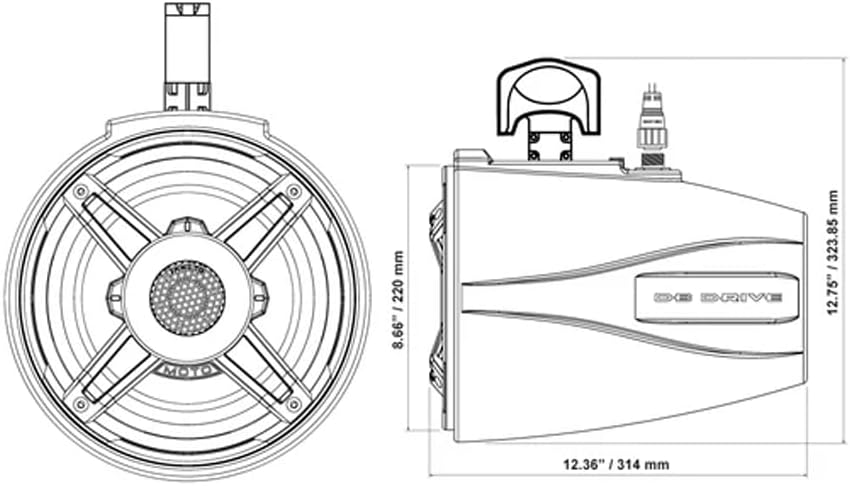
Figure 2: Dimensional drawing providing measurements for installation planning.
2. Ожичење
- Ожичење звучника: Повежите жице звучника са вашег amplifier or head unit to the weather-resistant quick-disconnect speaker connectors on the APT8MOTO-G3 speakers. Ensure correct polarity (+ to + and - to -).
- RGB Lighting Wiring: The speakers feature RGB lighting. Connect the RGB wires to a compatible RGB controller (not included). Follow the instructions provided with your RGB controller for proper connection and operation.
- Извор напајања: Осигурајте amplifier or head unit powering the speakers is connected to a stable 12-volt power source with appropriate fusing.

Слика 3: Предња страна view of the Db Drive APT8MOTO-G3 speaker.
Упутство за употребу
Once installed and wired correctly, operating your Db Drive APT8MOTO-G3 speakers is straightforward.
- Укључено: Turn on your vehicle's ignition and your audio source (head unit/ampлифиер).
- Аудио репродукција: Select your desired audio source and begin playback.
- Подешавање јачине звука: Gradually increase the volume from your audio source to a comfortable listening level. Avoid setting the volume too high to prevent distortion and potential speaker damage.
- РГБ контрола осветљења: If an RGB controller is connected, use its controls to select desired colors, patterns, or brightness for the speaker lighting. The speakers themselves do not have integrated RGB controls; an external controller is required.
Одржавање
Regular maintenance helps ensure the longevity and performance of your speakers.
- Чишћење: Clean the speaker grilles and housing with a soft, damp cloth. Avoid using harsh chemicals or abrasive cleaners, which can damage the finish or materials.
- Провера везе: Periodically inspect all wiring connections for corrosion or looseness. Ensure the quick-disconnect connectors are securely seated.
- Сигурност монтаже: Check mounting bolts and brackets regularly to ensure they remain tight and secure, especially after off-road or marine use.
- Изложеност животне средине: While weather-resistant, prolonged exposure to direct sunlight, salt spray, or extreme weather conditions can degrade materials over time. Consider covering the speakers when not in use for extended periods.
Решавање проблема
Ако наиђете на проблеме са звучницима, погледајте следеће уобичајене проблеме и решења:
- Нема звука:
- Check all audio connections from the amplifier/head unit to the speakers.
- Потврдите ampГлавна јединица/пуњач је укључена и исправно функционише.
- Ensure the volume is turned up on your audio source.
- Check for blown fuses in the amplifier's power circuit.
- Изобличен звук:
- Смањите јачину звука. Изобличење се често јавља када amplifier or speakers are overdriven.
- Check speaker wiring for loose connections or frayed wires that could cause a short.
- Осигурајте ampПодешавања појачања Liferier-а нису подешена превисоко.
- РГБ осветљење не ради:
- Verify the RGB controller is properly connected and powered.
- Check the RGB wiring from the speakers to the controller for secure connections.
- Consult the manual for your specific RGB controller for troubleshooting steps.
- Испрекидан звук:
- Inspect all wiring for loose connections, especially at the quick-disconnect points.
- Check for any signs of corrosion on terminals.
Спецификације
| Модел | APT8MOTO-G3 |
| Спеакер Типе | Marine Tower Speaker |
| Величина звучника | 8 инча |
| Максимално руковање снагом | 550 Ваттс |
| Руковање номиналном снагом | 275 Ваттс |
| Фреквенцијски одзив | 75 Hz - 21 kHz |
| Импеданса | 4 Охмс |
| Осетљивост | 103.5 дБ |
| Пречник високотонца | 1.25 инча (3.7 цм) |
| Midrange Cone Material | Ultralight, weather-resistant fiberglass |
| Материјал кућишта | IP52-rated, UV-inhibited enclosure |
| Улазни волtage | 12 волти ДЦ |
| Компатибилност монтаже | 1.5" to 3" Roll Cages |
| Боја | Црно |
| Ниво отпорности на воду | IP52 (Dust protected, protected against dripping water) |
| Димензије (Д к Ш к В) | 31 цм x 22 цм x 22 цм (приближно 12.2 x 8.7 x 8.7 инча) |
| Тежина | 9.1 Kilograms (per pair) |
| Control Method (RGB) | Push button (via external RGB controller, not included) |
Гаранција и подршка
Овај производ је покривен а 30-дневна ограничена гаранција from the date of purchase. This warranty covers manufacturing defects. It does not cover damage resulting from improper installation, accident, misuse, abuse, neglect, normal wear and tear, or unauthorized modification.
For warranty claims or technical support, please refer to the contact information provided on your warranty card or the retailer where the product was purchased.