
Увод
The Nitecore NU25 MCT UL ultralight rechargeable headlamp is designed for optimal performance in various outdoor activities such as camping, hiking, trail running, and more. Its innovative design and multiple light modes provide versatility and reliability for your adventures. This manual provides essential information on setting up, operating, and maintaining your headlamp.

Figure 1: Nitecore NU25 MCT UL Headlamp with included accessories.
Шта је у кутији
- Nitecore NU25 MCT Headlamp
- Кабл за пуњење од УСБ-Ц до УСБ-Ц
- Заграда
- Трака за главу
- Диффусинг Стуфф Сацк
- Налепница Nitecore
Кључне карактеристике
- Bright Ultralight Design: Emits up to 400 lumens with a max beam distance of 144 yards, weighing only 1.65 oz.
- Multi-Color Temperature: Easily switch between warm (3000K), neutral (4500K), and cool (6500K) white lights for optimal visibility in various conditions.
- Разноврсни излази: Features 4 brightness levels, SOS, beacon, and an auxiliary red light with three modes (Low, High, Slow Flashing).
- УСБ-Ц пуњиви: Built-in USB-C port for convenient charging. Up to 45 hours runtime on lowest setting, fully recharges in just over 1 hour.
- Издржљив и отпоран на временске услове: Crafted from durable PC material, rated IP66 waterproof, and impact resistant up to 1 meter.
Сетуп
Attaching and Adjusting the Headband
The NU25 MCT UL features an ultra-lightweight headband designed for maximum stress-free wearing. The elastic cords are easily adjustable to fit various head sizes securely.
- Unpack the headlamp and the headband.
- Attach the elastic cords of the headband to the designated slots on the headlamp's bracket.
- Ставите главуamp on your head. Use the adjustable buckle on the headband to tighten or loosen the fit until it is snug and comfortable.
- Осигурајте главуamp is positioned correctly on your forehead, with the light facing forward.

Figure 2: All-round Lightweight Design with adjustable headband.
Упутство за употребу
Dual Buttons Interface
The NU25 MCT UL utilizes a dual-button interface for intuitive and seamless operation:
- Дугме за укључивање (⏻): Used for On/Off and adjusting brightness levels.
- Дугме за режим (MODE): Used for switching color temperatures and accessing special modes.
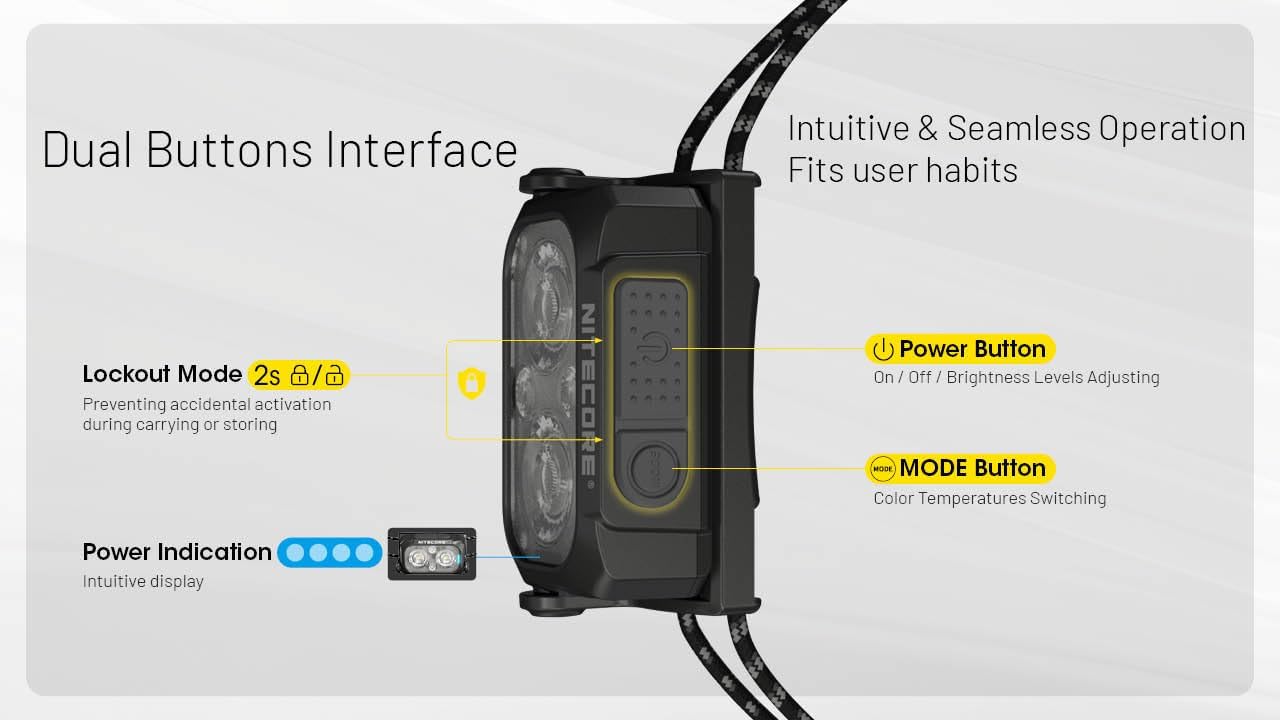
Figure 3: Dual Buttons Interface with Power and Mode buttons, and Power Indication.
Укључивање/искључивање и подешавање осветљености
The Ultra-High Efficiency (UHE) LEDs can emit a bright 400 lumen beam that can reach distances of up to 144 yards.

Figure 4: Night Master with 400 Lumens and 132 Meters beam distance, featuring TrueVision Optical Matrix Lens System.
- Да бисте укључили: Дуго притисните дугме за напајање (⏻) за 1 секунду.
- Да бисте подесили осветљеност: While the light is on, short press the Power Button (⏻) to cycle through brightness levels (Ultralow, Low, Mid, High).
- Да искључите: Дуго притисните дугме за напајање (⏻) за 1 секунду.
Пребацивање температуре боје
Хеадлamp offers three distinct white light color temperatures:
- Топла светлост (3000K): Easier on the eyes, able to cut through fog and rain.
- Неутрално бела (4500К): Clear and natural light for various daily activities.
- Хладна бела (6500К): Enhanced visibility and contrast in outdoor environments.
To switch between color temperatures, short press the Mode Button (MODE) while the light is on.

Figure 5: Dual Primary Lights with 3000K Warm, 4500K Neutral White, and 6500K Cool White options.
Ред Лигхт Моде
The auxiliary red light is ideal for preserving night vision, stargazing, night photography, or as a signal light.
- To Activate Red Light: Long press the Mode Button (MODE) for 1 second.
- To Adjust Red Light Brightness/Mode: While in Red Light mode, short press the Mode Button (MODE) to cycle through Low, High, and Slow Flashing Red modes.
- To Exit Red Light Mode: Long press the Mode Button (MODE) for 1 second.

Figure 6: Ultralow Level (6 Lumens) for extended use and Red Light for night vision preservation.
Special Modes (SOS & Beacon)
The NU25 MCT UL includes SOS and Beacon modes for emergency situations.
- To Activate SOS/Beacon: From any state (on or off), double-press the Power Button (⏻) rapidly to enter SOS mode. Double-press again to cycle to Beacon mode.
- To Exit Special Modes: Short press the Power Button (⏻) or Mode Button (MODE) to return to the previously used mode, or long press the Power Button (⏻) да искључите.
Лоцкоут Моде
Lockout mode prevents accidental activation during carrying or storage.
- Да бисте активирали закључавање: Док је главаamp is off, simultaneously long press both the Power Button (⏻) and Mode Button (MODE) for 2 seconds until the light flashes once. The headlamp is now locked.
- Да бисте деактивирали закључавање: Simultaneously long press both the Power Button (⏻) and Mode Button (MODE) for 2 seconds until the light flashes once and then turns on. The headlamp is now unlocked.
Battery Indication and Charging
Хеадлamp features a power indicator to show remaining battery life.
- Да бисте проверили ниво батерије: Док је главаamp is off, short press the Power Button (⏻). The blue indicator lights will show the battery status.
- Пуњење: Open the USB-C port cover on the side of the headlamp. Connect the included USB-C charging cable to the port and a power source. The indicator lights will show charging progress. A full charge takes approximately 1 hour.
Одржавање
- Чишћење: Обришите главуamp са меким, дamp тканина. Избегавајте употребу јаких хемикалија или абразивних материјала.
- Отпорност на воду: The NU25 MCT UL is IP66 rated, meaning it is protected from dust and powerful water jets. Ensure the USB-C port cover is securely closed to maintain water resistance.
- Складиштење: Чувајте главуamp in a cool, dry place away from direct sunlight and extreme temperatures. Activate lockout mode before storing to prevent accidental activation.
Решавање проблема
- Светло се не укључује:
- Check if the headlamp is in Lockout Mode. Deactivate it as described in the Operating Instructions.
- Уверите се да је батерија напуњена. Напуните је ако је потребно.
- Light Output is Dim:
- Батерија је можда празна. Напуните главу.amp.
- Хеадлamp might be in a lower brightness setting. Adjust using the Power Button.
- The product is equipped with a thermal protection function, which automatically regulates output to maintain optimal performance and prevent overheating.
- Проблеми са наплатом:
- Уверите се да је USB-C кабл правилно повезан са обе главеamp и извор напајања.
- Пробајте други USB-C кабл или адаптер за напајање.
Спецификације
| Бранд | Нитецоре |
| Модел | NU25-400UL |
| Вхите Бригхтнесс | 400 лумена (макс.) |
| Удаљеност светлосног пута | 144 Yards (Max) |
| Тежина артикла | 1.6 унци |
| Извор напајања | Напаја се батеријама (1 литијум-полимерска батерија укључена) |
| Runtime (Highest Setting) | 2 сата |
| Runtime (Lowest Setting) | 45 сата |
| Ниво отпорности на воду | IP66 (отпоран на воду) |
| Материјал | Пластика |
| Димензије производа | 2.36"Д к 1.01"Ш к 1.3"В |

Figure 7: Detailed Technical Data for Nitecore NU25 MCT UL.
Гаранција и подршка
The Nitecore NU25 MCT UL Headlamp comes with a Limited Warranty. For detailed warranty information, product support, or to contact customer service, please visit the official Nitecore webсајт или погледајте гарантни лист који се налази у паковању производа.
Такође можете посетити Nitecore продавница на Амазону за више производа и информација.